Claude connects to Tallyfy’s MCP server at mcp.tallyfy.com using OAuth 2.1 with PKCE. Manage…
Using Tallyfy MCP server with Claude (text chat)
Chat with Claude to run your Tallyfy work
Section titled “Chat with Claude to run your Tallyfy work”Connect Claude to Tallyfy and you can manage your work just by chatting. Ask Claude about your tasks, launch and review processes, or build a template, and it does the work in your Tallyfy account for you. It works in the Claude Desktop app and on claude.ai, on any paid Claude plan.
What you can do
Section titled “What you can do”Once it’s connected, you talk to Claude in plain language and it works in Tallyfy for you. For example, you can ask it to:
- Run your day. Show today’s tasks, flag anything overdue, and build a prioritized action list.
- Find and fix stalled work. Spot processes that have stopped moving, figure out what’s blocking them, and suggest next steps.
- Shuffle work around. Reassign all of someone’s open tasks to a colleague when they go on vacation.
- Build and improve templates. Turn a flowchart into a ready-to-run template, or review an existing process and suggest improvements.
- Pull reports. Generate an SOP from a template, or a compliance report showing completion times and any missed deadlines.
Claude also asks before it acts. When a request is vague, it pops up a short set of questions to confirm what you mean before it touches your account, so it doesn’t guess.
See it in action
Section titled “See it in action”Real screenshots from claude.ai with the Tallyfy connector active. Each one shows a different thing Claude can do.
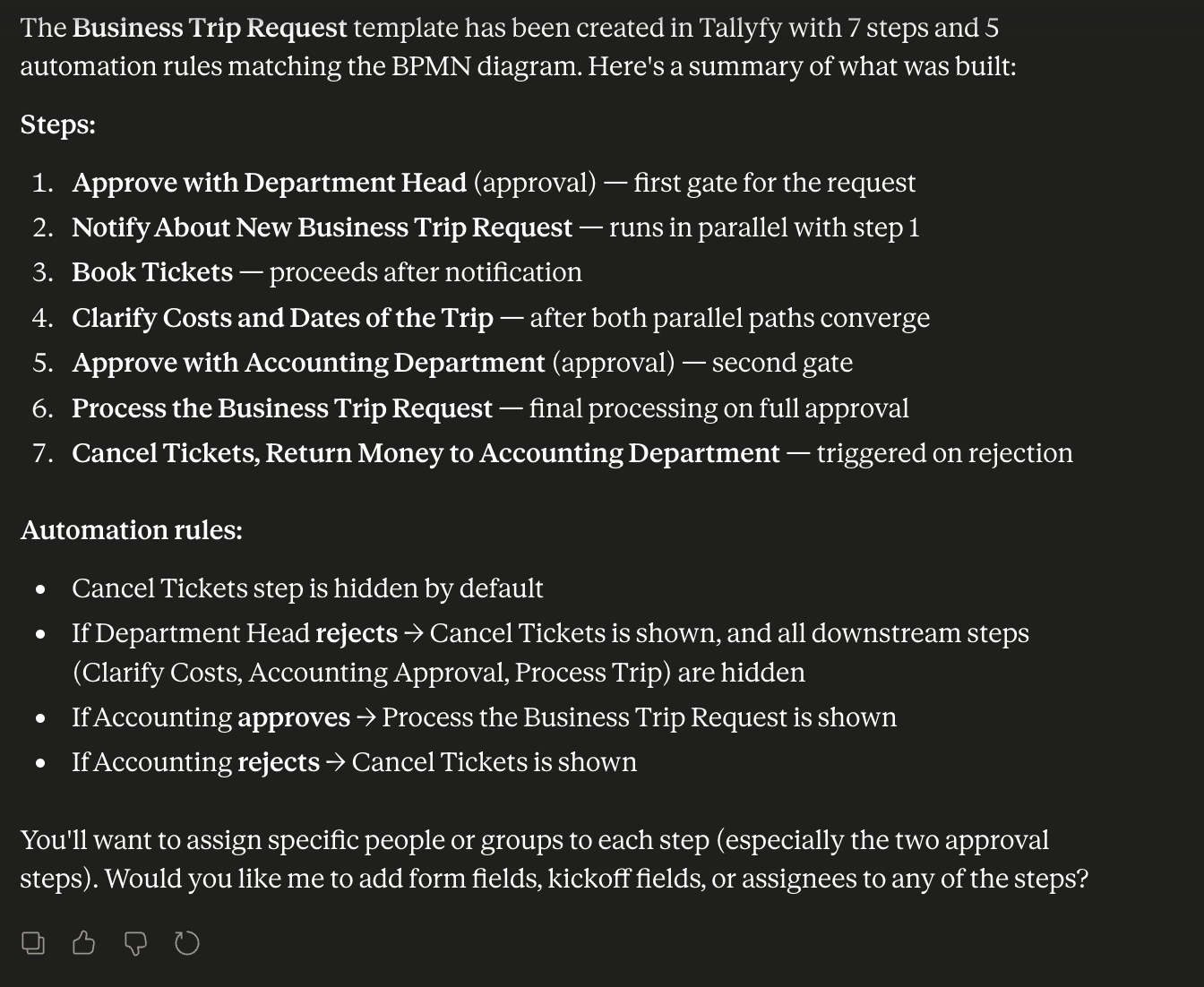
A user dropped a flowchart into Claude and asked for a matching template. Claude built a 7-step Business Trip Request with 5 automations - approval gates, parallel notifications, and conditional show/hide on rejection.
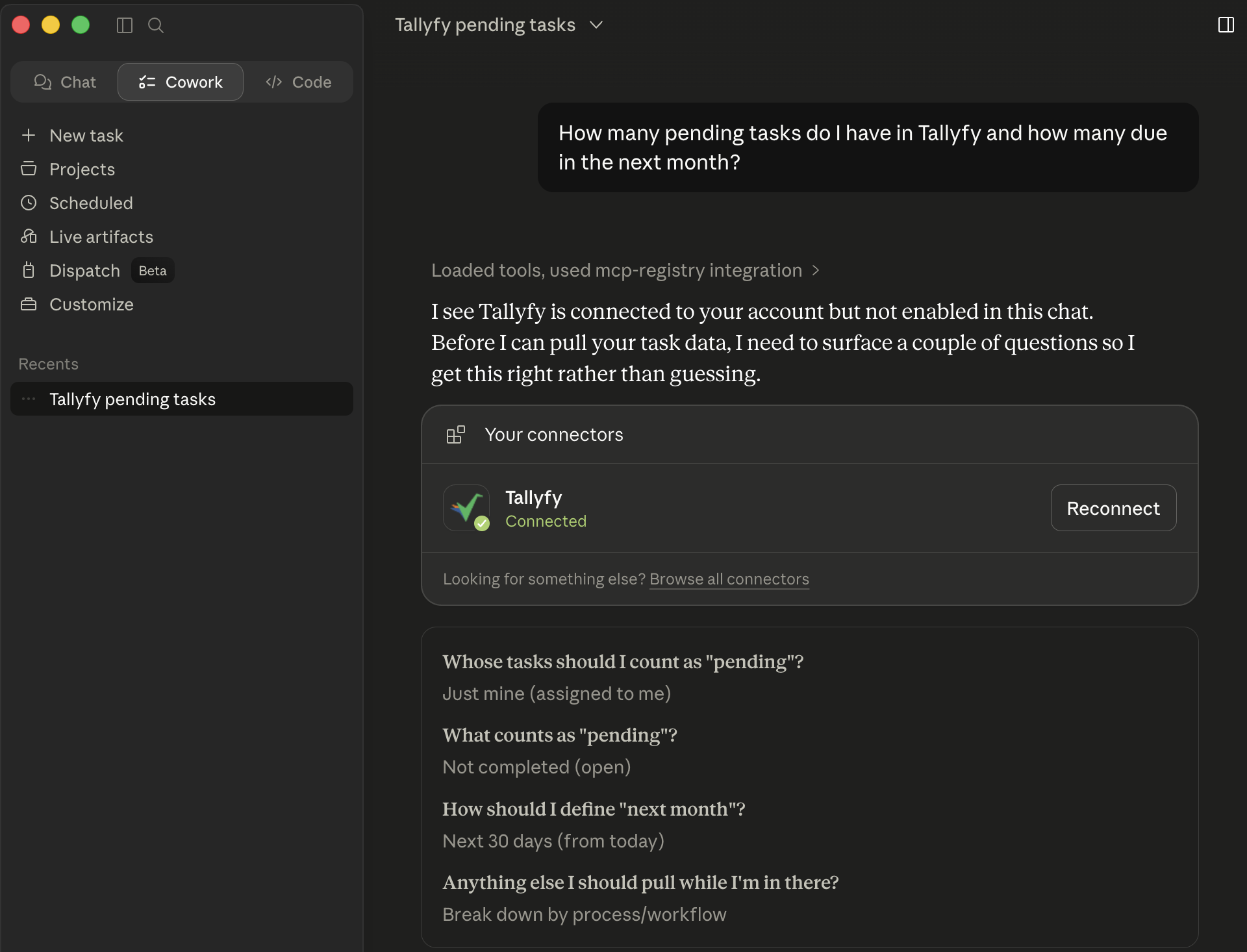
Claude doesn’t guess. When the question is ambiguous, it surfaces a structured picker so you confirm scope before any tools fire. Here Claude needs to know whose tasks, what counts as pending, and how to define “next month” before it’ll touch your account.
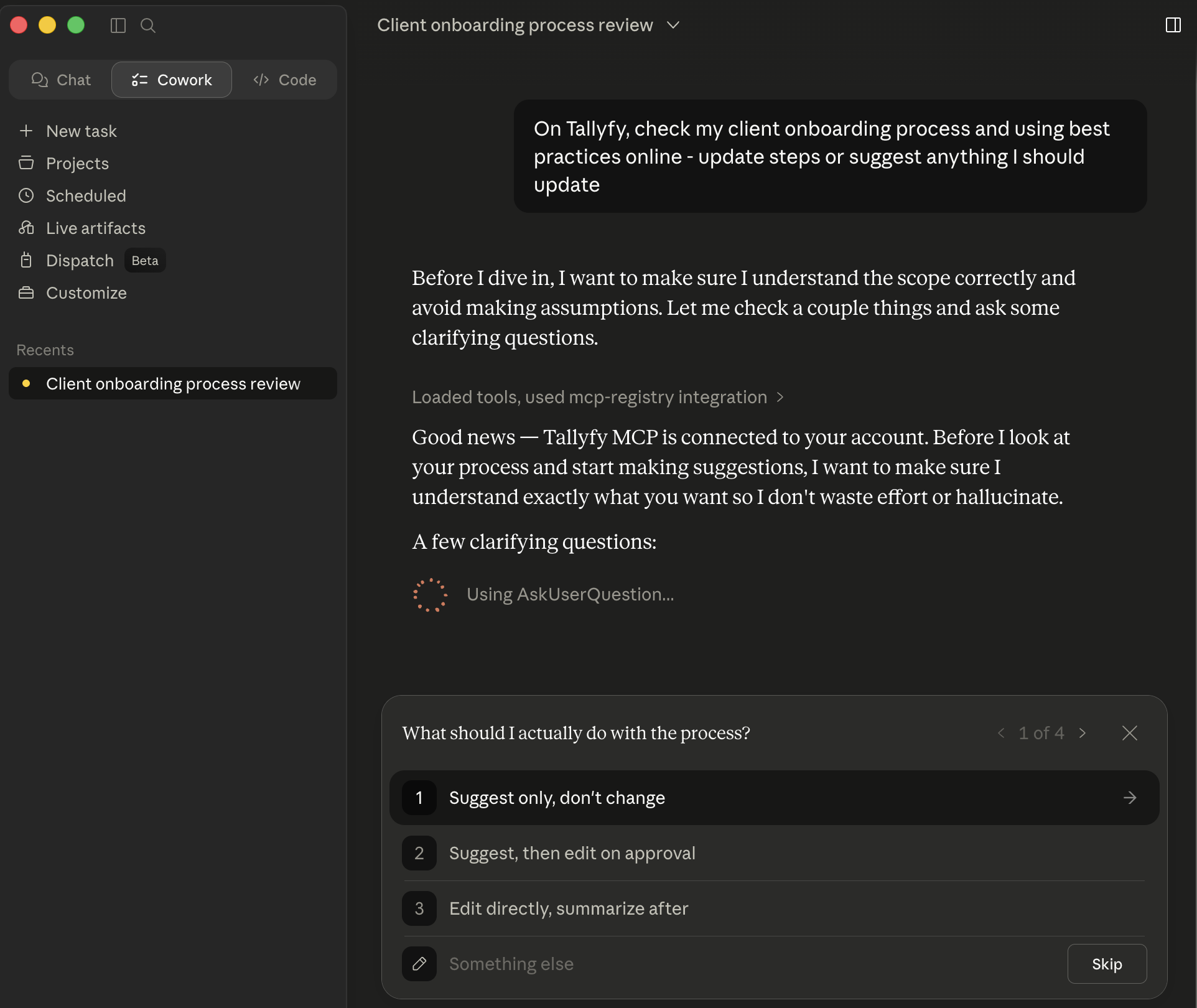
Asked to review a Client Onboarding process and suggest improvements, Claude first confirms what you actually want - suggest only, suggest then edit on approval, or edit directly - then routes the rest of the run based on your answer.
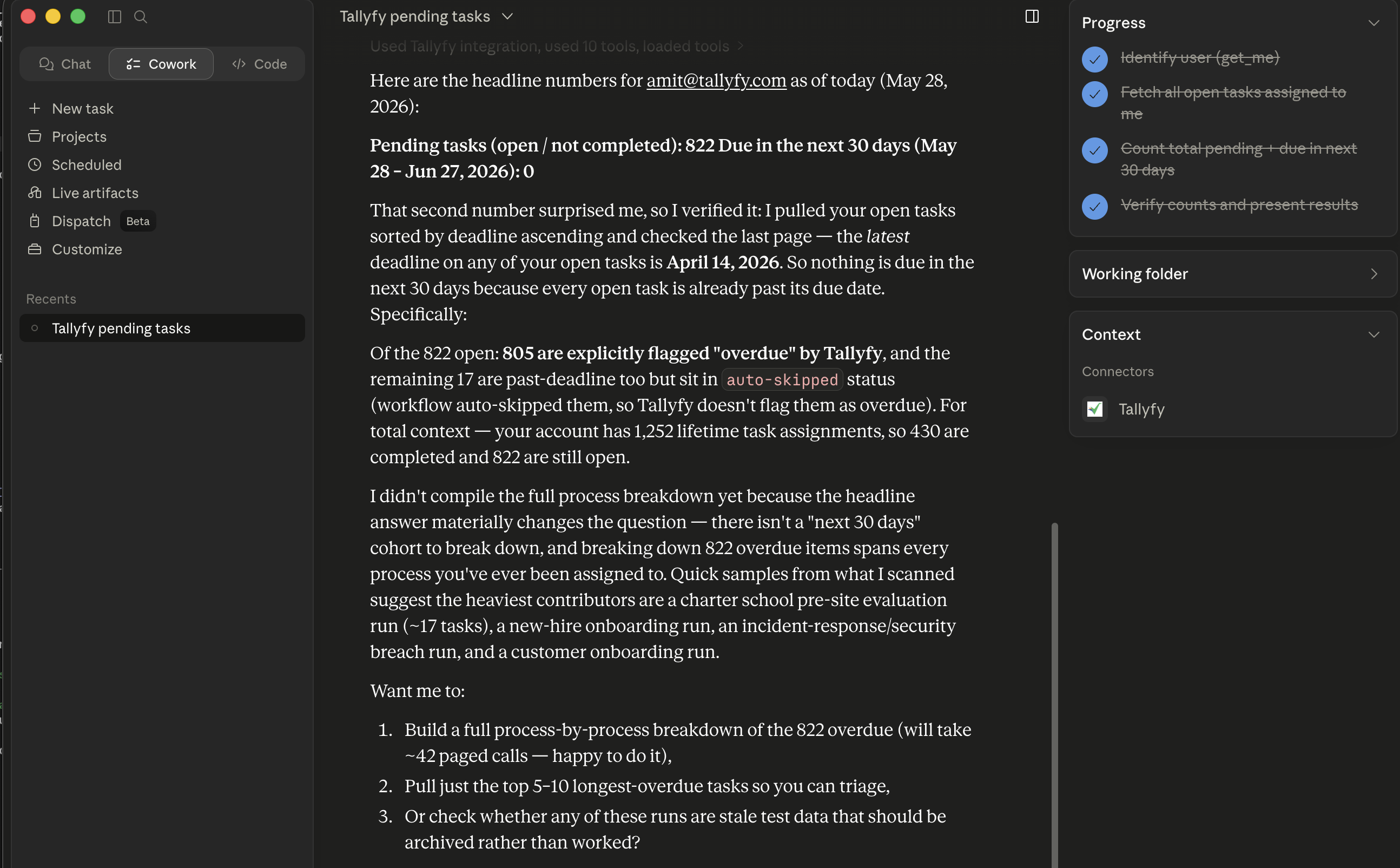
For a bigger question, the right-side progress sidebar shows Claude working in steps - reading your profile, pulling your tasks, then counting and double-checking. The result here: 822 open tasks, 805 of them already overdue, and 0 due in the next 30 days because everything is already past its date. Claude flagged the surprise and offered three follow-up paths instead of just answering the literal question.
Good to know
Section titled “Good to know”- It’s text, not the visual app. You won’t see Tallyfy’s visual tracker, flowcharts, or progress bars in the chat. A process that’s three-quarters done comes back as the words “75% complete.” When you want the visual view, pull the data in Claude, then open Tallyfy’s web app.
- It’s not live. Claude checks when you ask. It won’t ping you on its own when a task changes, so you ask it to check, or set up alerts in Tallyfy for urgent items.
- Forms get flattened. Rich forms become plain text, long dropdowns get listed out, file uploads need a separate step, and dates become typed text.
- Everything runs as one person. The connection uses a single Tallyfy identity, so every action shows up under the account that set it up. You can’t switch accounts mid-chat.
Is it secure?
Section titled “Is it secure?”Yes. You sign in with your own Tallyfy account to authorize the connection, and the Claude Desktop app keeps your sign-in token in your computer’s secure keychain (macOS Keychain or Windows Credential Manager), never in plain text. All traffic runs over HTTPS, and you should handle the data you pull with the same GDPR and CCPA care as any other system. The full security setup is under For developers.
For developers
Section titled “For developers”(Skip this unless you’re setting up the technical side.)
Tallyfy’s MCP server is hosted at https://mcp.tallyfy.com/ (note the trailing slash, no /mcp/ suffix) and listed on the Official MCP Registry ↗ as com.tallyfy/mcp-server. The server speaks the standard streamable-http transport, authenticates via OAuth 2.1 with Dynamic Client Registration, and exposes the same tools to all Claude clients (Desktop, claude.ai connectors, Claude Code). Access tokens carry the canonical mcp_resource claim so the server can bind the token to the resource it was issued for.
Claude Desktop was the first AI assistant to offer native MCP integration. The Anthropic family that supports remote MCP today includes Claude Opus, Sonnet, and Haiku models on Pro, Max, Team, and Enterprise plans, plus Claude Code in VS Code, JetBrains, and GitHub Actions. The remote setup uses OAuth, with no local installation required.
MCP architecture flow
Section titled “MCP architecture flow”Key points:
- Tallyfy hosts the MCP server at mcp.tallyfy.com and Claude reaches it over the network (streamable HTTP) - there’s nothing to install or run locally
- You authorize once with OAuth 2.1: you sign in with your Tallyfy account and Claude stores the token securely, so there’s no API key to paste
- Claude auto-discovers tools from the MCP server and shows them with the hammer icon
Claude Desktop MCP support
Section titled “Claude Desktop MCP support”Claude Desktop’s MCP features include:
- Native MCP client with full protocol support
- Desktop Extensions: One-click .mcpb installation bundling servers with all dependencies
- Remote MCP servers: URL-based connection with OAuth 2.1, hosted on Cloudflare
- Transport: stdio for local servers, Streamable HTTP for remote (SSE is deprecated)
- Security: OS keychain integration (macOS Keychain, Windows Credential Manager)
- Plans: Available on Pro, Max, Team, and Enterprise (not Free)
- Platforms: macOS and Windows
- Tool discovery: Auto-detects and displays available MCP tools
- Governance: MCP is governed by the Agentic AI Foundation under the Linux Foundation (since December 2025)
Prerequisites
Section titled “Prerequisites”- A paid Claude plan (Pro, Max, Team, or Enterprise) - remote connectors aren’t on Free
- Claude.ai in a browser, or the latest Claude Desktop app
- A Tallyfy account that belongs to a workspace (organization) - you authorize through OAuth, so there’s no API key to paste. If you sign in but don’t have a workspace yet, Tallyfy walks you through creating one before finishing the connection.
Other MCP servers and directories
Section titled “Other MCP servers and directories”Official MCP servers you can pair with Tallyfy:
- GitHub: Repos, issues, PR workflows
- Stripe: Payment processing
- PayPal: Inventory, payments, shipping, refunds
- Slack: Team communication with Real-time Search API
- Linear: Project management with OAuth remote MCP
- Sentry: Error tracking
- PostgreSQL, MySQL, MongoDB: Database operations with schema inspection
- Filesystem: Local file access with sandboxed controls
- Brave Search: Privacy-focused web search
- Atlassian: Jira and Confluence via remote MCP
- ServiceNow: Workflow automation
MCP directories:
- PulseMCP (pulsemcp.com): Large, regularly updated directory
- mcpservers.org: Community collection synced with GitHub
- MCP Market (mcpmarket.com): Figma, Databricks, Storybook connectors
- mcp.so: Anthropic’s community platform with server registry
Connect the Tallyfy MCP server
Section titled “Connect the Tallyfy MCP server”You don’t build or run anything - Tallyfy hosts the server at https://mcp.tallyfy.com. You add it as a remote connector and sign in once. Claude discovers the OAuth endpoints automatically, so there’s no JSON to edit and no API key to paste.
In Claude.ai (web):
-
Open settings
Go to claude.ai ↗, click your profile icon, then Settings.
-
Add a custom connector
Open Connectors, click Add custom connector, and enter the URL
https://mcp.tallyfy.com. -
Authorize with Tallyfy
Claude opens Tallyfy’s sign-in page. Sign in and click Authorize. The connector then syncs across Claude web, Desktop, and mobile.
-
Verify the connection
Start a new chat, look for the Tallyfy tools under the hammer icon, and try “Search for all open tasks in Tallyfy”.
In Claude Desktop:
-
Update Claude Desktop
Download the latest version from claude.ai/download ↗. Remote connectors with OAuth need a recent build.
-
Add the server
Open Settings, go to Connectors (labelled Integrations in some versions), and add the URL
https://mcp.tallyfy.com. -
Authorize and restart
Sign in to Tallyfy and click Authorize. The token is stored in your OS keychain (macOS Keychain or Windows Credential Manager), never in plain text. Then fully quit and relaunch Claude Desktop.
-
Verify the connection
Click the hammer icon to see your Tallyfy tools, then try “Search for all open tasks in Tallyfy”.
For the full step-by-step with screenshots, see Claude integration.
Example prompts
Section titled “Example prompts”Task management
Find all tasks assigned to me due this week and create a summary report.Claude will query Tallyfy via the search_for_tasks tool, filter by user and date range, format a structured report, and optionally save it locally via filesystem MCP.
Stalled process detection
Check for stalled processes in our "Customer Onboarding" template and suggest next actions.Claude queries active processes, identifies tasks that haven’t progressed, analyzes blockers, and provides recommendations.
Bulk reassignment
Reassign all of John's open tasks to Sarah - he's on vacation.Claude finds John’s tasks, filters for open status, reassigns them, and summarizes the changes.
More prompts that work well:
Show me all tasks due today, any overdue items, and processes needing my attention. Create a prioritized action list.Analyze the last 50 completed 'Customer Onboarding' processes. Find the steps with longest completion times and suggest improvements.Generate an SOP document for our 'Invoice Processing' template with all steps, responsible parties, and average completion times.Review team member skills and current workload, then suggest optimal task assignments for next week's projects.Create a compliance report showing all 'Data Access Request' processes from last quarter, including completion times and SLA violations.Claude Desktop features for Tallyfy
Section titled “Claude Desktop features for Tallyfy”Projects for persistent context
Section titled “Projects for persistent context”Claude Desktop’s Projects feature lets you create a project per workflow or client. Upload process docs once and reference them across sessions. Task history persists between conversations - ideal for managing processes that span weeks or months.
Projects also support memory - Claude extracts and saves key facts to maintain continuity. Extended thinking lets it work through multi-step problems, alternating between reasoning and tool calls.
Local file system integration
Section titled “Local file system integration”Unlike web-based AI, Claude Desktop can access your local files:
{ "mcpServers": { "filesystem": { "command": "npx", "args": [ "-y", "@modelcontextprotocol/server-filesystem", "/Users/username/Documents/Tallyfy" ] } }}This lets you read process docs from disk, export Tallyfy data to CSV, and sync local templates.
Tool composition
Section titled “Tool composition”Connecting multiple MCP servers is where Claude Desktop gets powerful. Example multi-server workflow:
- Filesystem MCP reads a CSV of 50 new employees
- Tallyfy MCP creates onboarding processes for each
- Slack MCP notifies the HR team with status updates
- GitHub MCP creates IT access tickets
Developer tools
Section titled “Developer tools”- MCP server logs:
~/Library/Logs/Claude/(macOS) or%APPDATA%\Claude\logs\(Windows) - Built-in tool call debugging
- Claude Code: VS Code and JetBrains extensions with inline diffs
- Remote MCP servers on Cloudflare with OAuth - no local setup
- GitHub Actions support for CI/CD workflows
Combining MCP with Computer Use
Section titled “Combining MCP with Computer Use”Pair Claude’s text-based MCP with Claude Computer Use for broader automation:
MCP handles: API data queries, bulk operations, report generation, data-driven decisions
Computer Use handles: Visual interfaces, third-party form filling, UI navigation, apps without APIs
Example hybrid workflow
Section titled “Example hybrid workflow”Step 1 - MCP (data gathering):
Analyze all completed audit processes this month, identify non-compliance issues, and export a summary with statistics to CSV.Step 2 - Computer Use (visual automation):
Open the government compliance portal, navigate to the monthly report section, and fill in the form using the CSV data. Screenshot each step for audit trail.Hybrid best practices
Section titled “Hybrid best practices”- MCP for data - API access is faster and more reliable than UI automation
- Computer Use for UI-only tasks - only when there’s no API available
- Files for data transfer - pass data between MCP and Computer Use via local files
- Watch costs - Computer Use with screenshots costs more than MCP API calls
- MCP is more predictable - API operations are deterministic; visual automation isn’t
Security
Section titled “Security”-
Configuration security
- Desktop Extensions encrypt credentials via OS secure storage (Keychain, Credential Manager)
- Mark fields as
"sensitive": truein manifest.json for auto-encryption - Store API keys in environment variables, not plaintext JSON
- Set file permissions:
chmod 600 claude_desktop_config.json
-
MCP server isolation
- Run servers with minimal permissions
- Remote MCP uses OAuth 2.1 with PKCE. Tallyfy’s endpoints:
- Authorization:
https://mcp.tallyfy.com/mcp/oauth/authorize - Token:
https://mcp.tallyfy.com/mcp/oauth/token - Dynamic Client Registration:
https://mcp.tallyfy.com/mcp/oauth/register
- Authorization:
- OAuth discovery via
https://mcp.tallyfy.com/.well-known/oauth-authorization-server(RFC 8414), so Claude finds these automatically and you rarely need them by hand - Available scopes follow the pattern
mcp.{resource}.{action}- for example:mcp.tasks.read,mcp.tasks.write,mcp.processes.read,mcp.templates.write,mcp.users.read,mcp.forms.read,mcp.automation.write - Log all API calls with timestamps for auditing
-
Data handling
- Claude Desktop stores conversations locally in
~/Library/Application Support/Claude/ - Projects maintain persistent context - review what you’re sharing
- Consider GDPR/CCPA compliance when handling user data
- Claude Desktop stores conversations locally in
-
Network security
- HTTPS required for all API communications
- Remote MCP eliminates local attack surface but needs internet
- Implement exponential backoff for retries
Advanced configuration
Section titled “Advanced configuration”Other MCP servers alongside Tallyfy
Section titled “Other MCP servers alongside Tallyfy”You add Tallyfy itself through the connector UI above (no config file needed). To run extra local servers next to it - for example, filesystem and GitHub - edit claude_desktop_config.json:
{ "mcpServers": { "filesystem": { "command": "npx", "args": ["-y", "@modelcontextprotocol/server-filesystem", "~/Documents"] }, "github": { "command": "npx", "args": ["-y", "@modelcontextprotocol/server-github"], "env": { "GITHUB_TOKEN": "ghp_xxx" } } }}Custom server tips
Section titled “Custom server tips”-
Use TypeScript for type safety
import { Server } from '@modelcontextprotocol/sdk/server/index.js';import { TallyfyClient } from './tallyfy-client'; -
Handle errors properly
try {const result = await tallyfyApi.call();return { content: [{ type: 'text', text: result }] };} catch (error) {return {error: {code: 'TALLYFY_API_ERROR',message: error.message}};} -
Add request logging
console.error(`[Tallyfy MCP] ${new Date().toISOString()} - ${request.method}`);
Known issues
Section titled “Known issues”- Windows paths: Use forward slashes
/or double backslashes\\in JSON configs - Large datasets: Paginate when pulling 1000+ items - Claude truncates big responses
- Idle disconnects: Implement retry logic with exponential backoff
- Memory growth: Restart Claude Desktop periodically during heavy use
- Rate limits: Vary by plan tier - track your usage
- SSE deprecated: Use Streamable HTTP for new integrations
- Remote MCP needs internet: Local stdio servers work offline; remote ones don’t
Claude vs ChatGPT for MCP
Section titled “Claude vs ChatGPT for MCP”Claude Desktop:
- Mature MCP implementation with Desktop Extensions (.mcpb)
- Remote MCP on Cloudflare with OAuth
- Extended thinking with tool use
- Computer Use for hybrid automation
ChatGPT/OpenAI:
- MCP in Agents SDK with Responses API
- Desktop MCP for Team/Enterprise with custom connectors
- Deep Microsoft integration (Teams, Office, Azure)
Choose Claude for the most mature MCP experience, Desktop Extensions, Projects for persistent context, and Computer Use hybrid workflows. Consider ChatGPT for Microsoft integration or enterprise admin-controlled connectors.
Best practices
Section titled “Best practices”- Start with read-only operations before adding write capabilities
- Test in sandbox - never test against production Tallyfy data
- Document tools with clear descriptions and
inputSchemadefinitions - Version your servers using semantic versioning in manifest.json
- Track API usage - Claude enforces rate limits per plan
- Package as .mcpb for easy distribution via Desktop Extensions
- Return proper error codes - not raw exceptions
Related articles
Section titled “Related articles” Tallyfy’s MCP Server lets you control workflows through plain English in ChatGPT, Claude…
Mcp Server > Using Tallyfy MCP server with ChatGPT
ChatGPT Enterprise and Team users can connect to Tallyfy’s MCP server through OAuth 2.1 to…
Tallyfy Desktop Ai > Connect Claude to Tallyfy Desktop
Install the Anthropic Claude CLI and sign into your Claude.ai subscription so Tallyfy Desktop…
About Tallyfy