Mcp Server > Using Tallyfy MCP server with Claude (text chat)
Connect Claude to Tallyfy’s hosted MCP server to manage workflows in plain language. Add it as a…
Chat with your AI assistant to run Tallyfy in plain English. Ask ChatGPT, Claude, Gemini, or Microsoft Copilot to find a task, launch a process, or clean up a template, and it does the work for you. In ChatGPT, Claude and Gemini there’s no code to write and no API key to paste: you sign in once with your Tallyfy account and the assistant handles the rest. Microsoft Copilot works the same way with one extra step: someone adds Tallyfy to an agent in Copilot Studio once, then shares that agent with the team.
Tallyfy’s MCP server is the bridge that makes this possible. MCP (Model Context Protocol) is the shared standard that lets AI assistants connect to outside tools, and every major AI provider supports it. You stay in charge the whole time: the AI only sees what you allow, and it follows your existing Tallyfy permissions on every action.
Want the simplest possible setup, using an AI subscription you already pay for? See our BYO AI (Bring Your Own AI) integration.
Think of MCP as a universal translator between AI assistants and your business tools. It’s an open standard, run by the Agentic AI Foundation under the Linux Foundation, so no single vendor owns it. It opens a safe connection between an AI model and a system like Tallyfy, and you decide what that AI is allowed to touch. OpenAI, Anthropic, Google, and Microsoft all support it.
Tallyfy’s MCP server gives your AI assistant more than 100 tools that connect straight to your Tallyfy organization. Sign in securely from your AI tool, or use a Tallyfy API token, and you can:
For example:
The server’s tools cover these areas, all callable from any MCP-compatible AI:
Search and discovery
Find tasks, processes, templates, snippets, or do a unified search across all entity types in plain English.
User and access management
List and manage members, guests, groups, and roles. Invite new users, change roles, enable or disable accounts.
Task management
View your own tasks, list tasks assigned to teammates, see all tasks within a process, create standalone tasks from natural language, complete or reopen tasks, update titles and deadlines, manage comments, and report or resolve task issues.
Process management
List running processes, launch new ones from a template, view or update process state, archive completed processes, and reactivate archived ones.
Template design and optimization
Get any template’s detail or a full inventory, view steps, run a health assessment, see step dependencies and visibility conditions, get deadline recommendations, modify template properties, clone templates, and add or reorder steps.
Form field management
Add form fields to steps, update properties, move fields between steps, reorder fields, delete fields, get AI suggestions for useful fields, and manage dropdown options.
Kickoff fields
View, add, update, reorder, and delete kickoff (prerun) fields on templates. Get dropdown, radio, and multiselect options for kickoff fields. Get AI recommendations for process launch form fields, and complete or reopen the kickoff form on a process.
Automation and workflow logic
Create, update, and delete automations. Review them all with duplicate detection, get consolidation recommendations that flag orphaned automations and merge candidates, and inspect step visibility conditions.
Organization tools
Manage tags, folders, and tags on templates and processes.
Building templates from a description
Describe the process you want and your AI assistant builds it for you, step by step. It creates the template, adds each step, and sets up the kick-off form fields. You review and adjust as it goes, so nothing lands in your account that you haven’t seen.
There’s no single “generate a template” button here. Your assistant does it the same way you would, one action at a time, which means you can stop or change direction at any point.
Yes. Only people you’ve authorized can reach your data, and every action follows the Tallyfy permissions that person already has. You sign in through a secure, token-based flow, so the AI never handles a password, and you choose exactly what it can read or change. Every action is logged. And because the server is open source, anyone can check exactly how it works. The technical setup lives in the For developers section near the bottom.
Here’s the surface at a glance: what the assistant can do today, and where it stops.
What to notice:
Pick your AI platform:
.mcp.json or workspace settingsMCP is powerful, but text-based AI chat has real limits when you’re working with Tallyfy’s visual workflow features:
Text-based MCP shines in specific scenarios:
Ask specific questions, get targeted answers:
Got a messy document? AI turns it into structured templates:
The MCP server can also test a template directly, walking every path through it and reporting what is broken without launching anything: Test a template before anyone runs it.
Compliance docs changed? AI spots differences and updates everything:
Real screenshots from claude.ai with the Tallyfy connector active. The full set with longer captions lives in the Claude integration guide - here are four highlights.
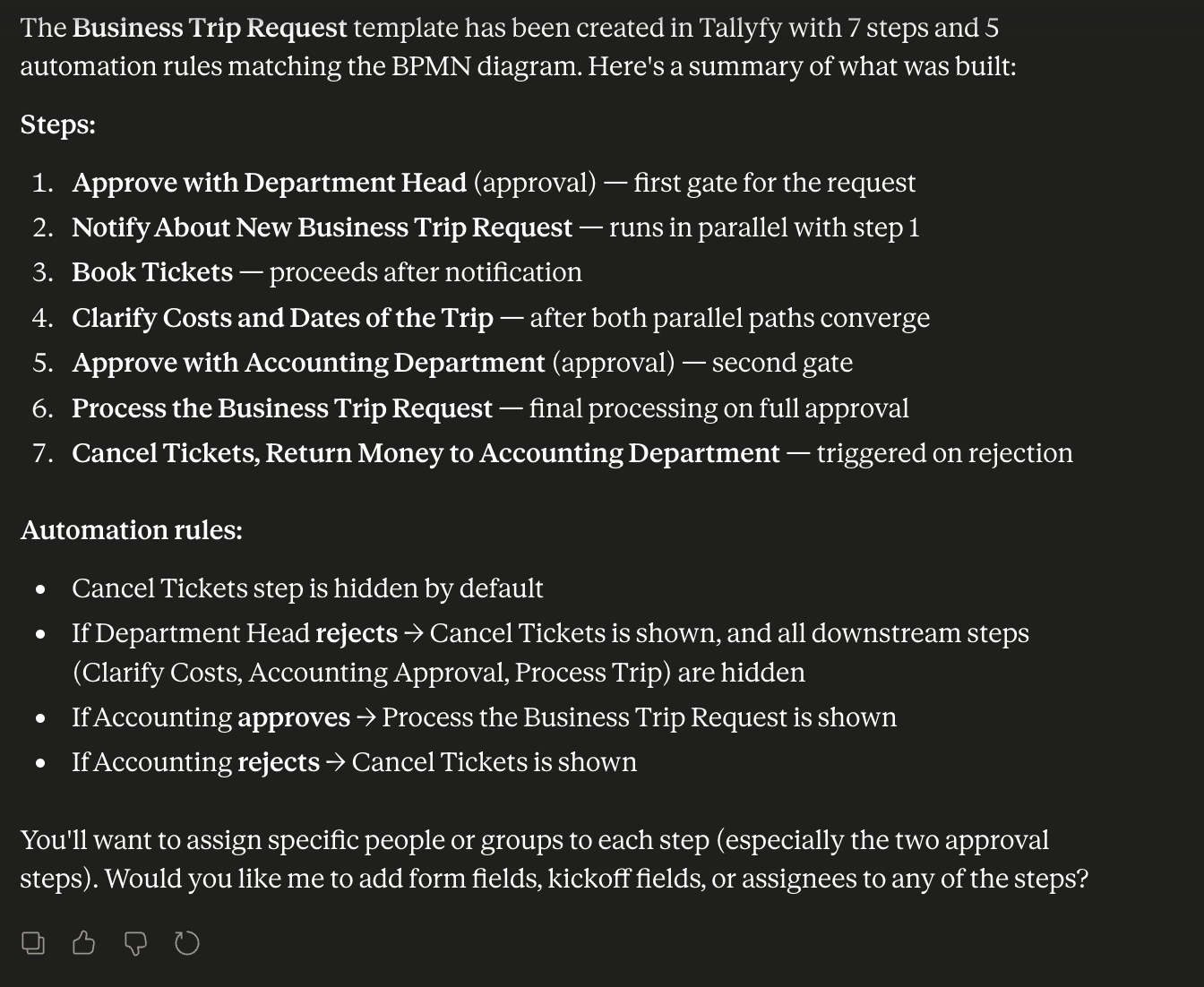
Building a workflow from a flowchart. Drop in a flowchart, get a working Tallyfy template with steps and conditional automations.
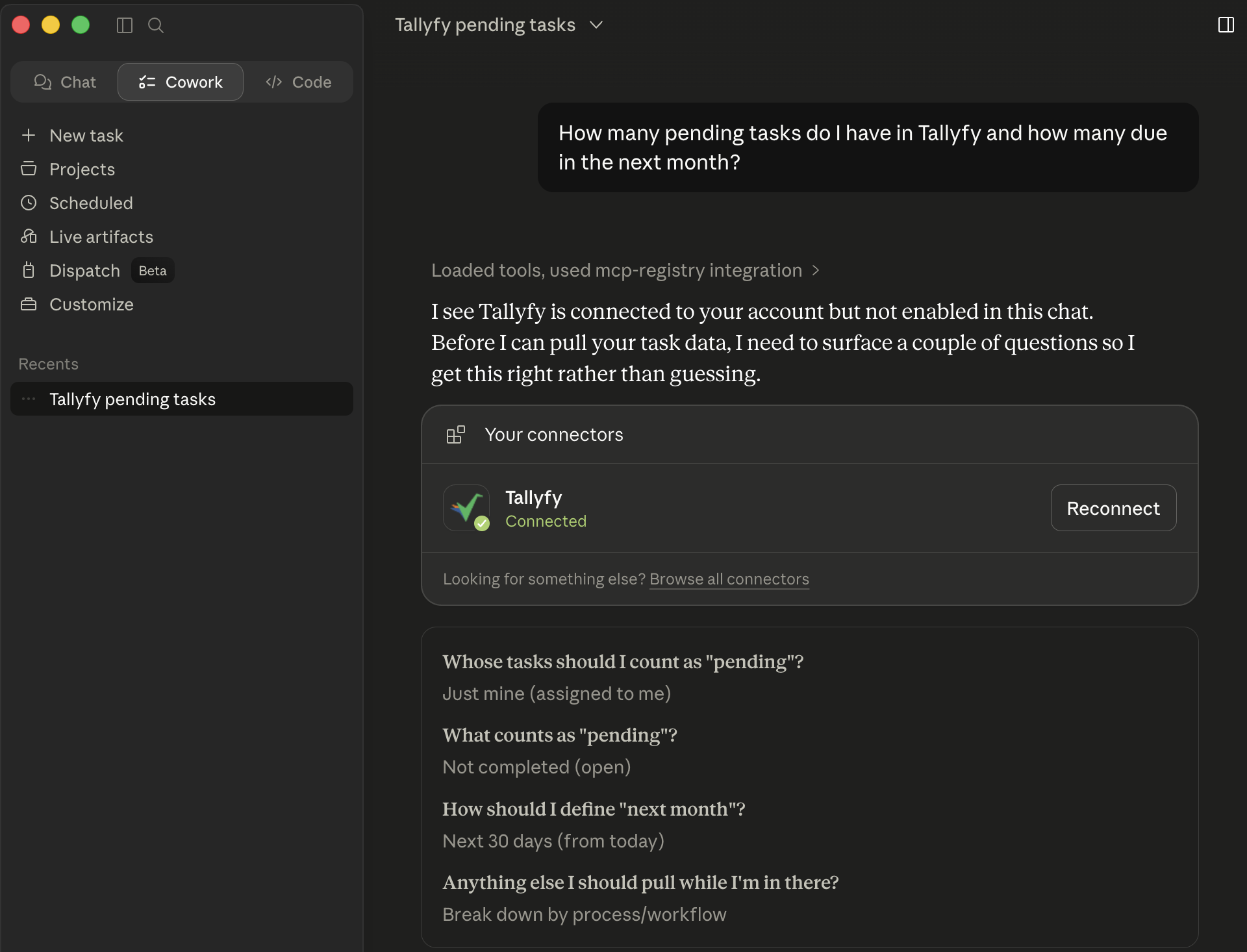
Confirming scope before pulling data. Claude uses the ask_user_question MCP tool to clarify ambiguous requests before any tools fire.
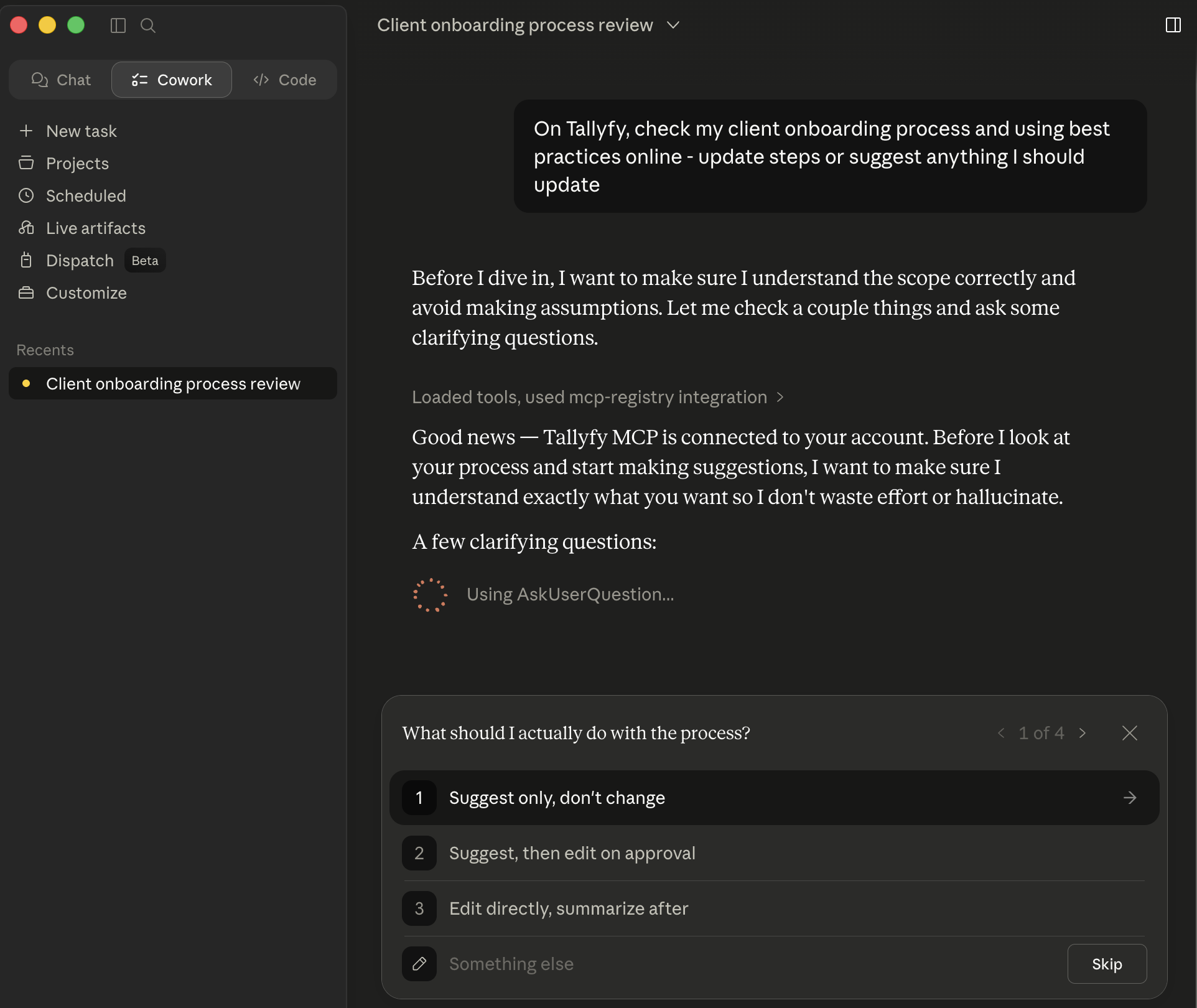
Reviewing an existing process. Asked to review a Client Onboarding workflow, Claude confirms whether you want suggestions only, edit-on-approval, or direct edits.
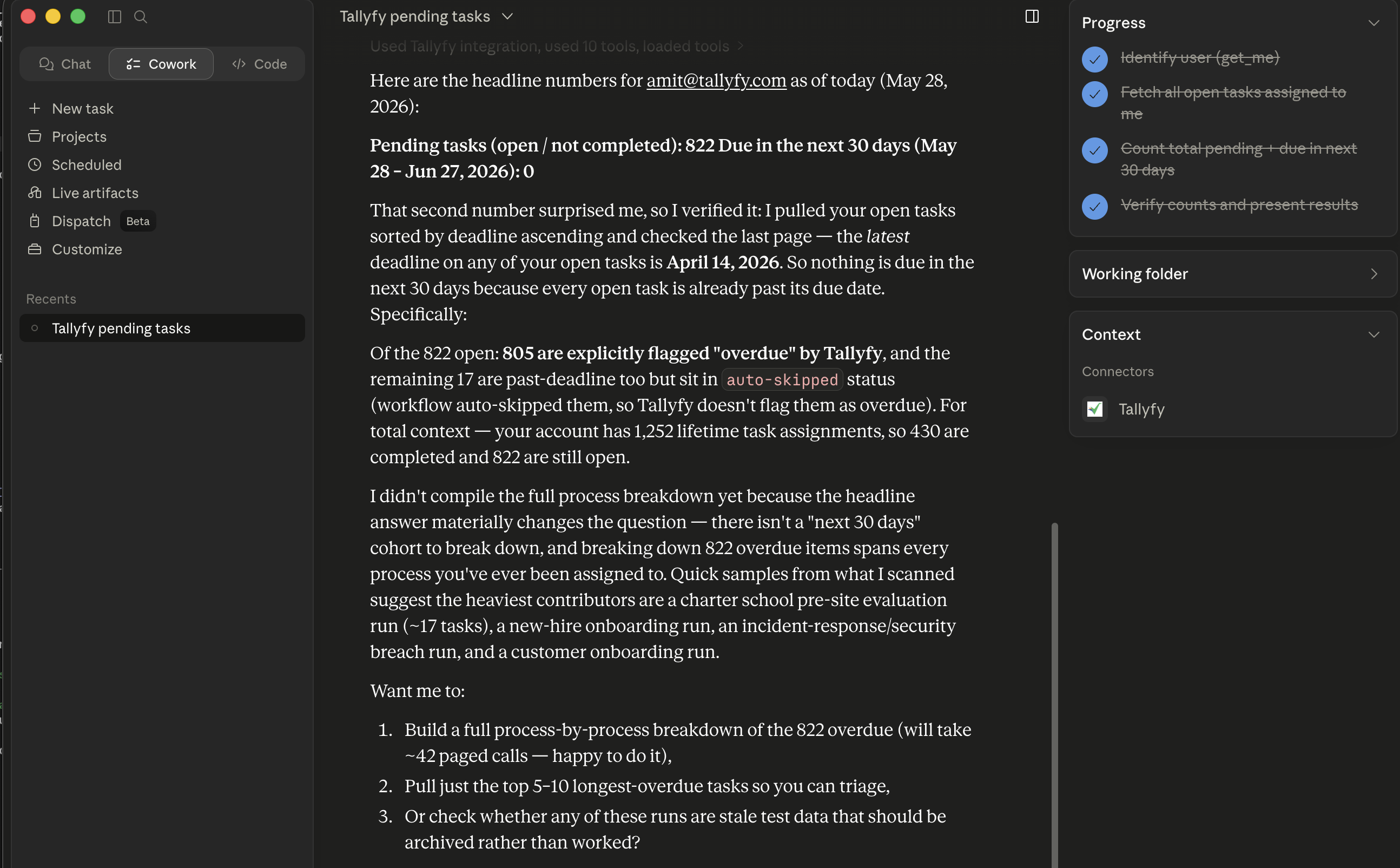
Multi-tool analysis with progress tracking. Claude chains get_me, get_my_tasks, and counting/verification logic. The result: 822 open tasks, 805 explicitly overdue, zero due in the next 30 days because everything is already past its date.
| What Tallyfy does | Why it matters in the age of AI |
|---|---|
| Define process steps | You can’t automate anything without a recipe. |
| Hand small tasks to AI | Massive reduction in mistakes, omissions, and hallucination. |
| People approve work | Accountability. You can’t blame AI for mistakes. |
| Hybrid people + AI tasks | AI can’t do every task in a process. |
| Track real-time status | Tracking AI sessions at scale is a nightmare. |
| Gradually shift tasks to AI | A total re-do will break a process that works today. |
(Skip this unless you’re setting up the technical side.)
com.tallyfy/mcp-server (DNS-verified) and on Smithery ↗.The MCP server uses OAuth 2.1 with PKCE for secure authentication. The well-known endpoint at /.well-known/oauth-authorization-server (per RFC 8414) lets AI clients discover authorization endpoints automatically. OAuth scopes use dot notation - for example, mcp.tasks.read, mcp.processes.write, mcp.templates.read.
Key security features:
https://mcp-gcp.tallyfy.com/ brought up as the Tier-1 origin for Gemini Enterprise customers; the Google Cloud build pipeline is now unblocked and deploys on every pushThe MCP server is built from:
ToolAnnotations (read-only or destructive hints) on every toolPublic endpoints:
https://mcp.tallyfy.com/ - the primary streamable-http MCP endpoint (DigitalOcean)https://mcp-gcp.tallyfy.com/ - the Google Cloud Run mirror (Tier-1 path for Gemini Enterprise)https://mcp.tallyfy.com/.well-known/oauth-protected-resource - OAuth resource metadatahttps://mcp.tallyfy.com/.well-known/oauth-authorization-server - OAuth authorization server metadatahttps://mcp.tallyfy.com/.well-known/jwks.json - public RS256 signing keyhttps://mcp.tallyfy.com/.well-known/openai-apps-challenge - OpenAI Apps directory verification challengehttps://mcp.tallyfy.com/health - health checkhttps://mcp.tallyfy.com/privacy - MCP-specific privacy summaryBoth endpoints share the same OAuth backend, the same tools, and the same Tallyfy organization data. Pick mcp.tallyfy.com by default; use mcp-gcp.tallyfy.com when your AI platform (Gemini Enterprise in particular) prefers a Google Cloud-hosted origin.
The server is open source under Apache 2.0, so you’re free to review exactly what every tool does, audit the OAuth flow, or run your own instance. The code lives at github.com/tallyfy/mcp-public ↗[1].
You never have to name a tool. If you need to check exactly what a connected AI can and cannot do in your account, for a policy or an audit, the complete list is at Every tool the MCP server gives your AI. It marks which tools only read.
Mcp Server > Using Tallyfy MCP server with Claude (text chat)
Mcp Server > Using Tallyfy MCP server with ChatGPT
Mcp Server > Using Tallyfy MCP server with Microsoft Copilot Studio