
How to build a workflow model that works
A workflow model is a visual map of every step in a repeatable process. Running parallel tasks instead of sequential ones can cut cycle times by 30 to 40 percent, as Tallyfy data from hundreds of implementations shows.
Workflow models turn messy processes into something your team can see, follow, and improve. Here’s how Tallyfy approaches workflow management.
Workflow Made Easy
Summary
- A workflow model is a visual map of a repeatable process - It shows who does what, in what order, and where handoffs happen between people, so there’s no guessing or “who was supposed to do that?” moments
- Most workflow models fail because they’re static - A diagram on a whiteboard or in a PDF doesn’t track progress, send reminders, or adapt when things change. The model has to live where work happens
- Parallel tasks are the biggest quick win - Running steps simultaneously instead of forcing everything into a single queue (like IT setup and facilities access during onboarding) can cut cycle times by 30-40 percent
- AI agents need workflows too - We pour billions into smarter technology and leave the underlying processes untouched. Right now, nobody’s building the workflows they need to follow. A defined process is the prerequisite for any automation, human or machine. See how Tallyfy handles this
I’ve spent over a decade watching teams draw beautiful process diagrams that nobody ever looks at again. Flowcharts pinned to corkboards. Swim lanes buried in Confluence. Elaborate BPMN models that took weeks to design and zero seconds to ignore. The problem isn’t the diagram - it’s that a static picture can’t do anything. It can’t remind someone their task is overdue. It can’t route an approval to the right person. It can’t tell you where a process is stuck right now, at this very moment. The pattern we keep running into is teams that invest heavily in documentation but never connect it to execution. That’s why workflow models matter more than ever - but only if you build them the right way.
What a workflow model is and why most are broken
A workflow is a repeatable sequence of tasks that moves work from start to finish. Think employee onboarding - collect documents, set up systems, run orientation, assign a buddy. It happens every time someone new joins.
A workflow model is the visual representation of that sequence. It maps every step, every decision point, every handoff between people or departments.

Simple enough in theory.
Something I’ve noticed across industries with operations teams, we’ve heard the same frustration over and over: someone spent weeks mapping a process, the diagram looked great in the meeting, and then it sat untouched for months. A healthcare organization told us they mapped their member onboarding and discovered 26 distinct steps with a 45-day lead time that nobody had formally documented. The clarity was valuable. But the model itself? It just became another document.
Here’s where I think most people go wrong. They treat workflow modeling as a documentation exercise. Draw it, share it, done. But a model that nobody runs isn’t a model - it’s a picture. And pictures don’t manage work.
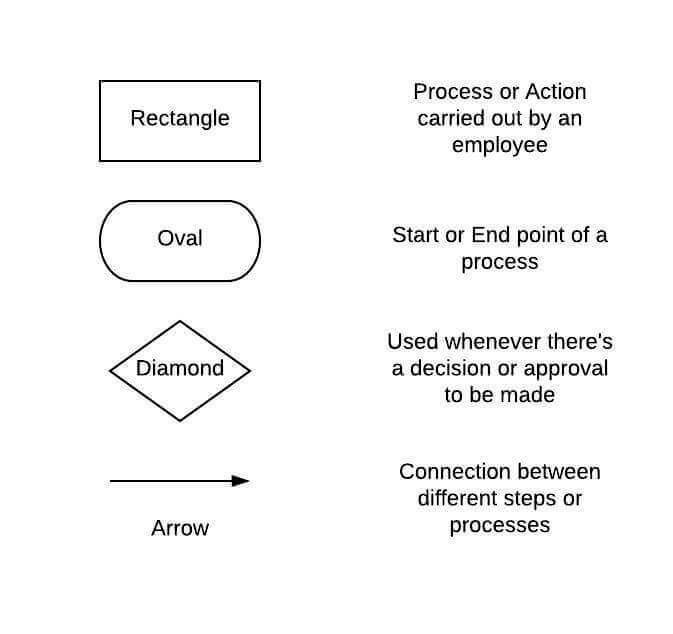
The standard symbols are straightforward - rectangles for process steps, diamonds for decisions, ovals for start and end points, arrows for flow. You probably already know this stuff. The real question isn’t what symbols to use. It’s whether your model will be a living thing or a dead artifact.
Why workflow models matter more in the age of AI
Here’s something that’s been on my mind lately. Agents without workflows are glorified autocomplete with no process to follow.
Think about it. An AI agent is only as good as the process it follows. If you tell an AI to “handle onboarding,” what does that even mean without a defined sequence of steps, decision points, and handoff rules? The AI needs a workflow model just as much as a human team does - probably more, because it can’t improvise the way people can.
A broken onboarding workflow done manually might lose one new hire’s paperwork per month. Automate that same broken workflow with an AI agent, and you’ll lose paperwork at machine speed. The process definition - the workflow model - is the prerequisite for any automation, whether it’s a simple rule-based trigger or a sophisticated AI agent running multiple steps in parallel.
That’s why we built Tallyfy the way we did. Not as a diagramming tool, but as a place where workflow models become running processes. The model isn’t separate from the work. It IS the work.
How to build a workflow model people will use
I’m not going to pretend this is some mystical five-step framework. It’s more practical than that. But there’s a sequence that works, and I’ve seen it play out across hundreds of implementations.
Figure out what you’re modeling
Sounds obvious, right? It isn’t. The first mistake is trying to model everything at once. Pick one process. Just one. Start with something that happens frequently and causes visible pain - maybe onboarding, maybe purchase approvals, maybe how your team handles incoming requests.
Your model will look different depending on what you’re mapping. An approval workflow needs decision diamonds and branching paths. An onboarding workflow needs role assignments and parallel tracks. A compliance process needs audit checkpoints and escalation rules.
Be specific about scope. “Our sales process” is too broad. “What happens between signed contract and first delivery” is workable.
And watch out for confidentiality. If this model is going to be shared with new team members or external partners, think about what information should and shouldn’t be visible.
Talk to the people who do the work
This might be the most important step, and it’s the one people skip most often. Managers think they know the process. They usually know the idealized version. The people doing the work every day know the real version - including all the workarounds, shortcuts, and “we’ve always done it this way” habits that never made it into any formal documentation.
Ask specific questions:
- Who’s responsible for each step?
- How long does each step take in reality, not in theory?
- Where do things get stuck?
- What steps could happen at the same time instead of waiting in line?
One thing that surprised us working with professional services firms is that this information-gathering phase is where the real value hides. One IP services firm discovered that their docketing setup was forcing sequential steps that could easily run in parallel. Credential collection and system configuration were happening one after another, when there was no dependency between them at all. Fixing just that cut their setup time from 4 weeks to 2-3 weeks.
Pick the right tool
You’ve got three basic options:
-
Pen and paper - Seriously, this works for a first draft. Sketch it out, get the sequence right, argue about it with your team. Don’t underestimate the whiteboard. But know that paper models are terrible for anything ongoing.
-
Flowchart software - Tools like LucidChart are great for creating clean, shareable diagrams. They’re a step up from paper.
- 3 editable documents
- 60 objects per document
- Unlimited documents
- 1 GB storage
- 3 user minimum
- Unlimited documents
- Advanced security
- Dedicated support
- Workflow management software - This is where the model stops being a picture and becomes a running system. Tools like Tallyfy don’t just visualize your process - they track it, assign tasks, send reminders, flag bottlenecks, and let you update the template so every future run uses the improved version.
The choice matters because it shapes what your model can do. A Lucidchart diagram is a reference document. A Tallyfy template is an executable process. Both have their place, but don’t confuse one for the other.
Design, test, and redesign
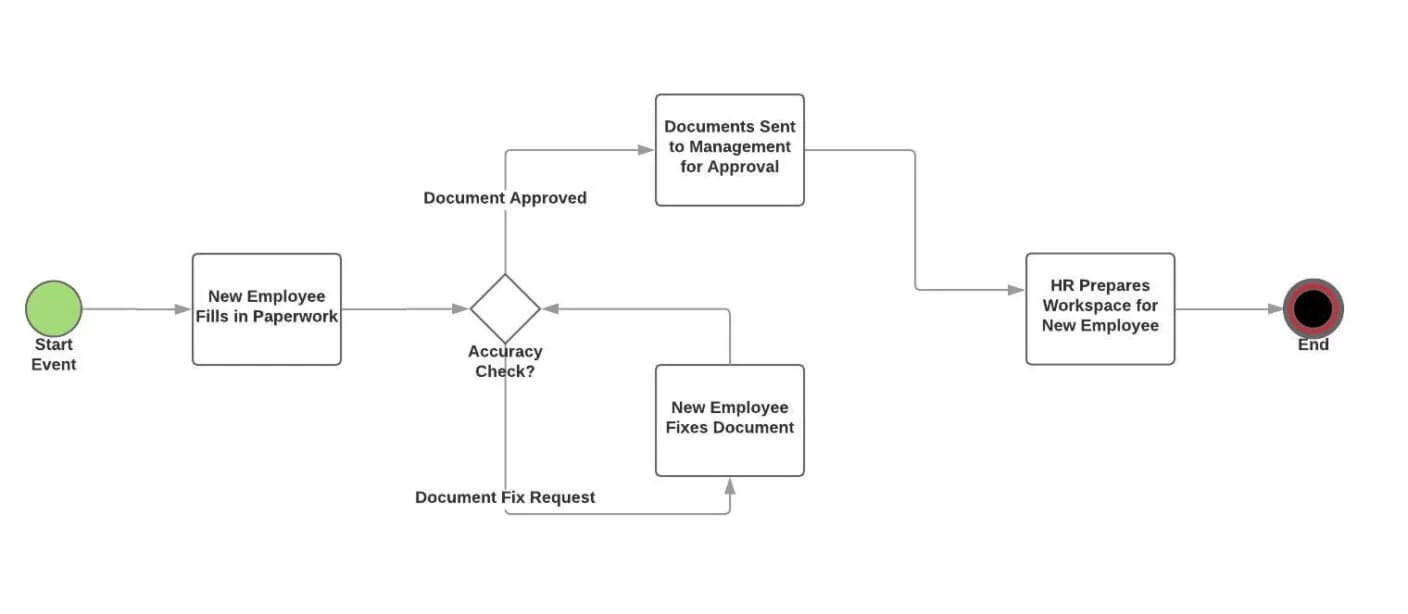
Map the process using whatever tool you’ve picked. For employee onboarding, it might look something like this:
Try these workflow model templates
Once you’ve got the model in front of you, challenge it. Ask yourself:
- Are any steps taking longer than they should?
- Which steps could run at the same time? (This is usually the biggest win.)
- Are there steps that exist only because “we’ve always done it that way”?
- What happens when something goes wrong? Is there an escalation path?
That parallel execution point keeps coming up because it’s that important. In the onboarding example, there’s no reason IT needs to finish setting up an email address before facilities issues an access card. Both tasks use the same information. Run them at the same time.
Then update your model. If you’re using workflow software, update the template so every future process run reflects what you’ve learned. If you’re using a flowchart tool, update the diagram and make sure people know about the changes. Either way, this isn’t a one-time activity. Good workflow models evolve.
Is your model working?
Are you hearing this at work? That's busywork
Enter between 1 and 150,000
Enter between 0.5 and 40
Enter between $10 and $1,000
Based on $30/hr x 4 hrs/wk
Your loss and waste is:
every week
What you are losing
Cash burned on busywork
per week in wasted wages
What you could have gained
160 extra hours could create:
per week in real and compounding value
Total cumulative impact over time (real cost + missed opportunities)
You are bleeding cash, annoying every employee and killing dreams.
It's a no brainer - improve your workflows
Turning models into running processes with Tallyfy
Here’s where I’m going to get specific about what Tallyfy does, because I think it matters for understanding the difference between a model and a living workflow.
Tallyfy is workflow management software built around one core idea: the model should be the process, not a description of the process. You create a template once, and every time someone launches that workflow, they get a tracked, assigned, deadline-driven instance of it.
Your team gets a dashboard of tasks. Managers get visibility across all running workflows. Automations handle notifications, routing, and escalation. When you improve the template, every future run uses the updated version automatically.
No more “did you see the updated flowchart in SharePoint?” conversations.
You can browse real workflow templates to see this in practice. Explore different workflow automation options to understand what’s possible.
Common workflow model types
Not every process fits the same mold. Here’s a quick rundown of the major types:
- Sequential - Step A, then Step B, then Step C. Straight line. Good for simple approvals or checklists.
- Parallel - Multiple steps running at the same time, merging when all are done. Great for onboarding, project kickoffs, anything where independence exists between tasks.
- Conditional - Branching paths based on decisions. “If the amount is over $10K, route to VP for approval.” If-this-then-that logic.
- State machine - Tasks move through defined states (draft, review, approved, published). Common in content workflows and compliance.
- Rules-driven - Automation triggers based on conditions. When a form is submitted, assign tasks to specific people based on the answers.
Most real-world processes combine two or three of these. An onboarding workflow might be sequential overall but with parallel tracks for IT and facilities, plus conditional branching for different employee types. Choose a model that reflects how work flows in practice, not how you wish it would flow on a whiteboard.
Related questions
What are the 5 steps of workflow?
Planning, execution, monitoring, control, and completion. We’ve seen teams get lost during execution when visibility is lacking. Good monitoring shouldn’t mean constant “where are we at?” messages - it should be automatic. Control means fixing issues before they become disasters. Completion means learning what to improve for next time.
Why is a workflow model important?
Because without one, you’re flying blind. People don’t know their role, handoffs get dropped, and bottlenecks hide until they’ve caused real damage.
A good model with proper workflow management software transforms teams from fighting fires to predictable, repeatable execution. It’s not about efficiency as a buzzword. It’s about people knowing what to do next without having to ask.
How do you create an effective workflow model?
Map what really happens today - not the idealized version. Talk to the people doing the work. They know where things break.
Don’t try to build the perfect model in isolation. Start small, test with a real process, and iterate. Build in flexibility because real workflows need room to adapt. Perfect processes exist only in textbooks.
How often should you update a workflow model?
Review at least twice a year, but keep your eyes open for warning signs between reviews - increasing errors, missed deadlines, growing team frustration. When your technology changes or your business shifts direction, workflows have to adapt too. “Set it and forget it” is a fantasy. Good workflows evolve alongside your business.
What does Tallyfy think about workflow models?
We think most workflow models fail because they’re disconnected from the actual work. Those carefully designed flowcharts? Nobody opens them after the initial meeting. Those process documents? Gathering dust.
Workflows should be systems people use every day - not theoretical exercises filed away somewhere. That’s why we built workflow software that turns static models into trackable, running processes.
How do workflow models relate to AI agents?
This is where things get interesting. AI agents need structured workflow patterns - sequential, parallel, and evaluation loops - to operate reliably. Without a defined process, an AI agent is just a chatbot guessing at what to do next.
The organizations getting real value from AI are the ones who defined their workflows first and then let AI follow them. Process definition is table stakes for meaningful AI results. Always has been, always will be.
About the Author
Amit is the CEO of Tallyfy. He is a workflow expert and specializes in process automation and the next generation of business process management in the post-flowchart age. He has decades of consulting experience in task and workflow automation, continuous improvement (all the flavors) and AI-driven workflows for small and large companies. Amit did a Computer Science degree at the University of Bath and moved from the UK to St. Louis, MO in 2014. He loves watching American robins and their nesting behaviors!
Follow Amit on his website, LinkedIn, Facebook, Reddit, X (Twitter) or YouTube.

Automate your workflows with Tallyfy
Stop chasing status updates. Track and automate your processes in one place.