
Summary
- As-is is your unfiltered reality check - Document exactly how a process runs today, warts and all, before touching anything. Skipping this step is why most improvement projects collapse within months
- To-be is your blueprint, not a wish list - The future state must be grounded in what you learned from the as-is analysis. Dreaming up an ideal process without understanding the current one is just fiction writing
- Front-line workers hold the real answers - HBR research shows that people doing the work every day spot inefficiencies that managers and consultants miss
- AI does not fix bad processes, it scales them - Bill Gates said it decades ago and it is more true now than ever. Fix the process first, then automate. Ready to improve your processes?
The as-is and to-be process states are the bread and butter of process improvement. Sounds simple. Mind you, it’s not.
Before you change anything about how work gets done, you need two things: a brutally direct picture of how things work right now, and a clear map of how they should work after you’re done. Most teams skip the first part. They jump straight to the shiny future state and wonder why nothing sticks.
Why both states matter
The as-is state of a process is the “now” picture. It’s messy. It’s full of cobbled-together workarounds that nobody documented. It’s the thing that makes you wince when you finally write it down.
The to-be process is the future. The improved version. Or at least, that’s the idea. The one that fixes the bottlenecks you found in the as-is.
Here’s what trips people up: you can’t design a good to-be without understanding the as-is first. I’ve seen teams spend months building beautiful future-state diagrams only to discover they did not understand why the current process had certain steps. Those “unnecessary” steps? They existed because of a compliance requirement nobody told the improvement team about.
Bill Gates nailed this problem years ago: “The first rule of any technology used in a business is that automation applied to an efficient operation will magnify the efficiency. The second is that automation applied to an inefficient operation will magnify the inefficiency.”
That quote is more relevant now than when he said it. With AI entering every workflow, the stakes are even higher. Fast.

If you’re looking for software that helps you bridge the gap between as-is and to-be states, here’s how Tallyfy approaches it:
Tallyfy is Process Improvement Made Easy
How to document the as-is process
Before you can document anything, you need to actually understand the process. Unless you’ve basically done the work yourself - and I mean really done it, not just watched a demo - you’ll need to do some digging.
There are a few ways to get there:
- Watch it happen - Sit with the team. Observe. Don’t just read the SOP nobody follows. See what people actually do, because the gap between documented process and real process is almost always enormous.
- Talk to the people doing the work - Personal interviews with the folks running the process. This is the single most useful research method. In our conversations with operations teams at Tallyfy, we consistently find that front-line workers have the most practical improvement suggestions. They’ve been working around the broken parts for years.
- Send out questionnaires - Surveys can cover more ground than interviews but you’ll get thinner answers. Use them as a complement, not a replacement.
- Assemble a project team - Mix process workers with improvement experts. The workers know the reality. The experts know what questions to ask.
HBR wrote about this dynamic - companies like Taiichi Ohno’s Toyota, Starbucks, and Chevron have all found different but effective ways to engage front-line workers in process improvement. The pattern is clear. The people closest to the work see problems that dashboards and reports never capture.
One global healthcare organization discovered this when mapping their policy management workflow. They had 250 policy managers across 29 locations using spreadsheets to oversee revision processes. Only by interviewing front-line staff did they uncover that employees could only access policies on the corporate network. Remote workers had no access at all. That’s a compliance gap you won’t find in any process diagram.
Talk to people who play different roles in the process. If you’re working on a client onboarding process, you’d want perspectives from sales, onboarding, and support. Each sees a different piece of the puzzle.
Process templates to get you started
Once you’ve gathered the information, map it out. A process flowchart works fine for this. Draw the steps. Connect them. Don’t overthink the notation.
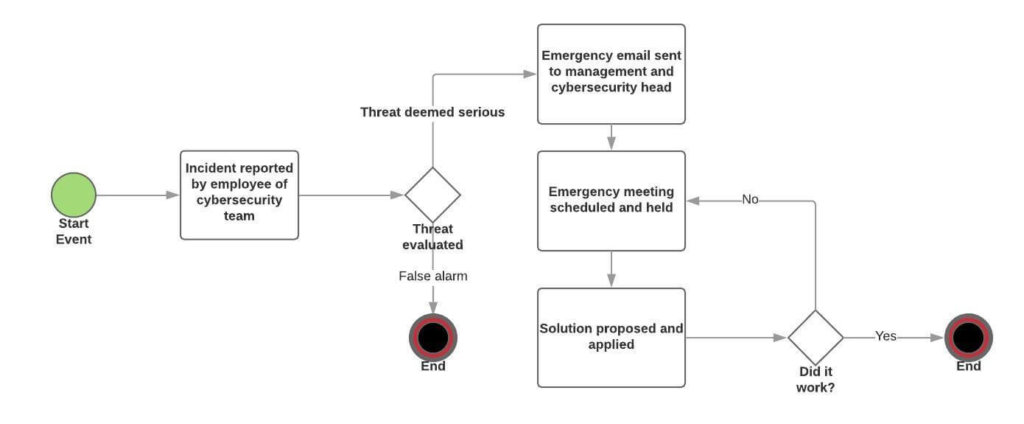
There are three main ways to do process mapping:
- Pen and paper - Quick and dirty. Good for initial brainstorming. Bad for sharing with anyone who wasn’t in the room.
- Flowchart software - Better for sharing and collaboration. You can update it without starting over.
- Workflow software - This is where it gets interesting. Instead of just drawing the process, you’re digitizing it. Tallyfy takes this approach - the process becomes a living, trackable thing rather than a static diagram that sits in a shared drive collecting dust.
Analyzing what’s broken
This is the hard part. You’ve got your as-is map. Now you need to figure out what’s wrong with it.
Since every business runs differently, there’s no universal checklist. But these questions will get you moving:
- Are deadlines frequently missed? Where in the process do things stall?
- Are some steps taking way longer than they should? Why?
- Are there steps that are pure time or money sinks with no clear value?
- What step has the highest impact on output? Can you automate it?
- Are people doing manual work that software could handle?
That last question matters more than ever. We’ve observed at Tallyfy that teams often cling to manual handoffs and email chains because “that’s how we’ve always done it.” The as-is analysis is where you challenge those assumptions.
If you’re not a process improvement specialist, this step can feel overwhelming. That’s normal. Read our guide on process analysis for a deeper dive. And sometimes bringing in fresh eyes - someone who doesn’t have years of context baked into their assumptions - is the smartest move you can make.
Building and rolling out the to-be process
You’ve mapped the current state. You’ve identified the problems. Now you’ve probably got a handful of ideas for how to make things better.
Start building the to-be process map. It works similarly to the as-is map - same format, same tools - but with your improvements baked in. Think of it as an edited version of reality.
The map itself is the easy part. Implementation? That’s where things get painful.
Sometimes your improvements will not work as well as you expected. Other times, your team will resist the changes because humans are creatures of habit. Process standardization sounds great in theory, but people aren’t keen on being told to do things differently. Is there a way to force adoption? Not really.
A few things that help:
-
Start small - Don’t roll out changes company-wide on day one. Pick one team, one location, one instance of the process. Test it. Measure it. If the new process is actually better, the data will prove it. Then scale.
-
Get buy-in, don’t just mandate - You can’t drop a new process on people without explaining why. What problem does it solve? How does it make their work easier? At Tallyfy, we’ve seen that there are really only two reliable ways to enforce a new process: constant manual follow-up (exhausting), or using workflow software that makes the new process the default path. The software approach wins because it removes the temptation to revert.
-
Measure everything - Pick specific metrics before you launch. Cycle time, error rate, throughput - whatever matters for your process. A pharmaceutical supply chain team we worked with tracked roughly 1,117 forms per year across their change management workflow. By measuring cycle time at each phase - initiation, assessment, planning, implementation, closure - they could pinpoint exactly where delays occurred and prove the to-be process delivered real improvements.
After implementation
Deploying the to-be process isn’t the finish line. It’s a checkpoint. Most teams don’t get that memo.
You need to verify that the changes you made are actually working. Compare the new metrics against the old ones. Not just once - over weeks and months. Some improvements show up immediately. Others take time to materialize. And some changes that looked great on paper turn out to create new problems downstream. What surprised us when we dug into the data is that most teams abandon measurement within six weeks of deploying a to-be process. They celebrate the launch, check the metrics once or twice, and then drift back to their regular routines. The to-be process quietly degrades. People introduce small shortcuts. Workarounds creep back in. Within three months, the “improved” process often looks nearly identical to the as-is version it was supposed to replace.
This is where workflow management software earns its keep. Instead of manually collecting data and chasing people for updates, Tallyfy tracks process output automatically. You can see whether cycle times are dropping, whether steps are getting stuck, whether the new process is actually sticking.
The broader point here connects to something I think about constantly: in the age of AI, defining your processes matters more than ever. Every AI tool, every automation, every agent - they all need a structured process to follow. If you haven’t done the as-is to to-be work, you’re handing AI a broken playbook and asking it to run faster.
Common questions
What’s the real difference between as-is and to-be?
Think of as-is as an unvarnished photograph. No filters, no flattering angles. It’s the process as it exists today - including the ugly parts nobody wants to admit.
To-be is the architect’s blueprint. It’s what you’re building toward. But unlike a fantasy, it’s grounded in what you learned from studying the photograph.
The gap between the two is your improvement roadmap. Without both, you’re guessing.
How do you actually develop both?
Start as a detective. Watch how things work right now. Interview the people who live in the process daily. Write it all down without judgment. That’s your as-is.
Then put on your designer hat. Look at what’s slow, what’s redundant, what’s error-prone. Sketch out a better version. That’s your to-be.
The key - and I think this is where most process improvement initiatives go sideways - is involving everyone. Not just managers in a conference room. The people doing the actual work have insights that no amount of top-down analysis will uncover. Keep refining as you learn. The to-be process isn’t a one-time deliverable. It evolves.
