
IT service management that works in practice
IT service management turns ad-hoc IT support into a repeatable system of ticketing, approvals, and change control. ITIL 4 organizes this into 34 management practices that scale with your organization, and modern teams layer AI agents on top of these structured workflows.
IT service management requires structured processes for ticketing, approvals, and change control. Here is how Tallyfy supports ITSM workflows.
Tallyfy is Service Management Software For Any Size Of Business
Summary
- ITSM treats IT as a service, not a help desk - Every IT resource, from laptop provisioning to app access, becomes a managed service with ticketing, prioritization, and approval workflows instead of chaotic email threads
- ITIL 4 shifted from rigid processes to flexible practices - The framework now includes 34 management practices covering service requests, knowledge management, asset tracking, incident response, and change control, designed to adapt to how your organization works
- AI agents are reshaping service desks fast - IEEE Spectrum reports 40% of enterprise apps will feature task-specific AI agents by end of 2026, up from under 5% today, but agents without defined workflows just create faster chaos
- DevOps and ITSM aren’t enemies - High-performing teams combine DevOps speed with ITSM process control, and the organizations that get both right see fewer incidents and shorter resolution times. See how Tallyfy supports ITSM workflows
I’ve spent years watching IT teams drown in ad-hoc requests. Someone pings Slack for a new monitor. Another person sends an email about a software license. A third walks up to a desk and asks for VPN access. No ticket, no trail, no accountability.
That’s the problem ITSM solves. And honestly, it’s less complicated than most people make it sound.
What ITSM means and why it matters
IT service management is how IT departments manage the delivery of IT services to everyone in the organization. It covers everything involved in designing, creating, delivering, supporting, and managing those services.
Here’s where people get confused. They think ITSM is just the help desk. Ticket goes in, fix comes out. But ITSM stretches way beyond that.
Every single thing your IT team provides is an IT service. The apps on your phone. The printer on the third floor. The cloud storage your marketing team uses. All of it. The core idea is that IT should be delivered as a service, not as a favor someone does when they have time. When you frame it that way, the expectations shift. Users expect consistency, responsiveness, and transparency, and the IT team gets the structure to deliver on those expectations instead of drowning in ad-hoc requests. Without that framing, IT becomes a catch-all for anything vaguely technical, and the team burns out handling requests that have no priority, no tracking, and no accountability.
This matters.
Say an employee needs a new monitor. With ITSM, here’s what happens:
- They submit a ticket through a portal.
- The ticket lands in the IT team’s queue, prioritized by urgency.
- IT addresses the ticket, approves the request, and tracks it to completion.
Simple. Repeatable. Traceable.
Without this structure? You get a nightmare of Slack messages nobody can find two weeks later.
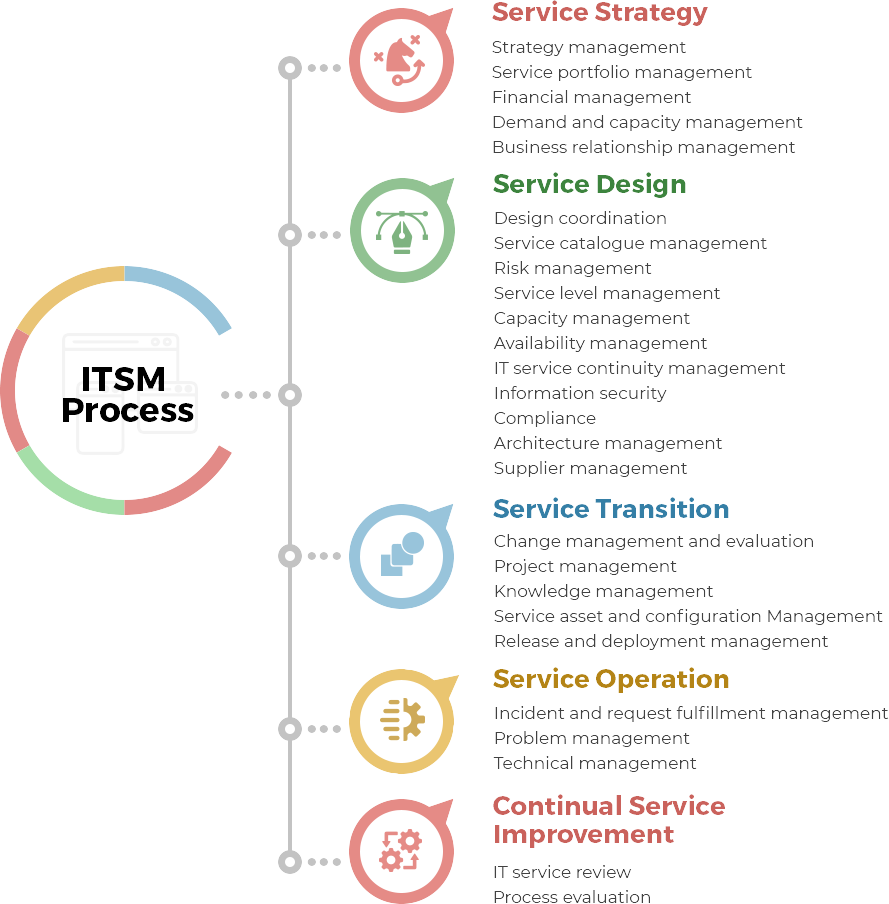 A breakdown of the ITSM Process. Credit: manageengine.com
ITSM, ITIL, and DevOps untangled
These three terms get thrown around like they’re interchangeable. They aren’t.
ITSM is the broad concept. It’s how IT teams manage service delivery. Basically, think of it as the “what.”
ITIL is the most widely accepted approach to doing ITSM. The latest version, ITIL 4, shifted from rigid processes to flexible practices. It now promotes agile thinking, collaboration, and continuous feedback. People sometimes treat ITIL like a rulebook carved in stone. It isn’t. It’s a guide you adapt to fit your organization.
ITIL is sometimes treated as a set of laws you must follow. That’s wrong. The practices are designed to bend to how your team works, not the other way around.
DevOps, coined by Patrick Debois, strengthens the relationship between software development and IT operations, helping teams build, test, and deploy faster. Better trust between teams, quicker releases, fewer surprises.
People love to argue that ITSM and DevOps are mutually exclusive. That’s rubbish. The best teams use both. DevOps, as Gene Kim documents, gives you speed. ITSM gives you control. You need both, and pretending otherwise is how you end up shipping fast into a wall.
The gap isn’t in the model. It’s in the operating procedures. That’s where ITSM becomes the unexpected hero in this AI-agent era. Your agents need structured processes just like your people do. After watching hundreds of teams try this, the pattern repeats across dozens of implementations: the teams that define their ITSM workflows first get far more value from automation than the ones chasing shiny tools.
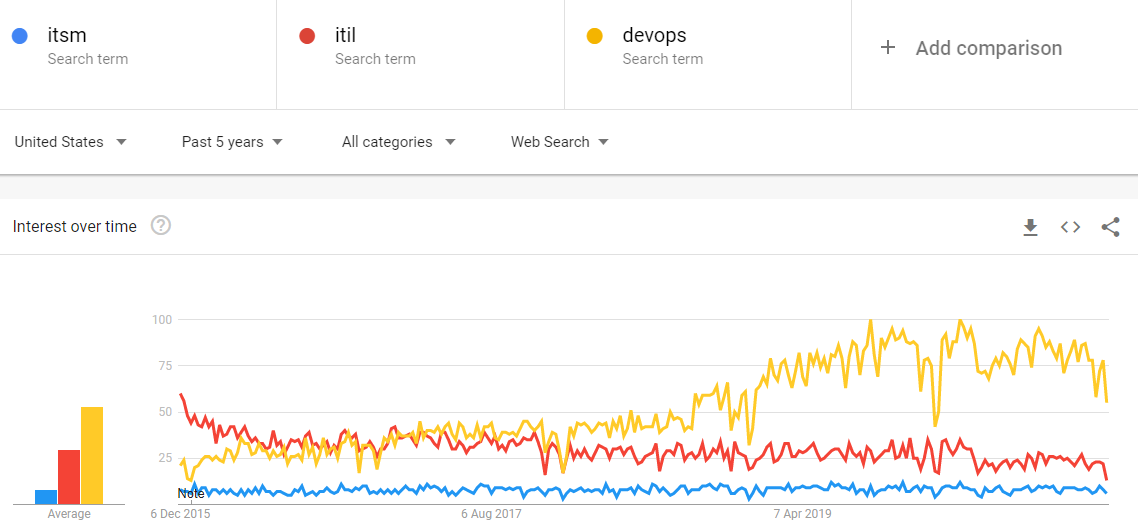 Search interest for DevOps has grown steadily. ITSM has held level. ITIL has declined. The lesson? People care about speed AND structure.
What ITSM gets right and where it struggles
There are real benefits to putting ITSM in place. There are also genuine downsides if you go in without a plan.
Where ITSM shines
- Aligns IT with business goals. IT stops being the department that “fixes things” and starts being a strategic partner.
- Creates trackable metrics. You can measure incident response time, first-touch resolution, ticket volume. Numbers don’t lie.
- Encourages cross-department collaboration. When development, operations, and business teams share workflows, handoffs get cleaner.
- Enables continuous improvement. Knowledge management means you don’t solve the same problem from scratch every time.
- Resolves major incidents faster. Structured incident management with clear escalation paths keeps the organization running.
- Helps you plan ahead. Problem management means you’re preventing fires, not just putting them out.
Where it can go wrong
- Scalability headaches. Fast-growing firms sometimes find their ITSM structure can’t keep up with expansion.
- Compatibility issues. Not every ITSM approach plays nice with existing software or IT operation structures.
- Implementation without purpose. This is the big one. Adopting ITSM because “everyone else is doing it” guarantees failure.
To be fair, that oversimplifies it. The organizations that succeed start with one process and expand gradually. The question we get asked most often, that slow-and-steady approach works ten times better than a big-bang rollout. Feedback we’ve received from IT teams managing distributed technicians tells the same story: standardized workflows for security deployments and incident response create the strongest foundation.
34 ITIL 4 practices that shape modern ITSM
Previous ITIL versions listed recommended processes. ITIL 4 shifted the language to introduce 34 practices instead. The goal was to account for culture, technology, and data management alongside the process steps. This isn’t just a naming change. Calling them “practices” lets you consider the full picture of how work gets done, not just the sequence of steps.
Here are the ones that matter most:
Service request management handles repeatable requests: app access, software updates, hardware orders. The key is automating the repetitive stuff so your team spends time on problems that need human judgment. This is exactly the kind of workflow Tallyfy handles well, turning a messy email chain into a tracked, repeatable process.
Knowledge management is about creating, sharing, and using organizational knowledge so you don’t reinvent the wheel every Tuesday. Nobody reads documentation. But if you turn knowledge into a live workflow people follow, they don’t need to.
IT asset management tracks everything the organization owns, tangible and intangible. Where are your laptops? Who has which licenses? Are you paying for software nobody uses?
Incident management guarantees that unexpected issues get responded to and resolved fast. With so many moving parts in modern IT stacks, the number of potential failure points keeps growing.
Problem management goes deeper. While incident management fixes what’s broken, problem management digs into why it broke. Deming-style root cause analysis. Pattern detection. Prevention.
Change management sets standard procedures for handling changes to the IT environment. New services, updates, code fixes. The best change management gives you speed without recklessness: context and transparency that reduces friction while keeping risk low.
ITSM workflow templates to get you started
Pre-built templates for common IT service management processes
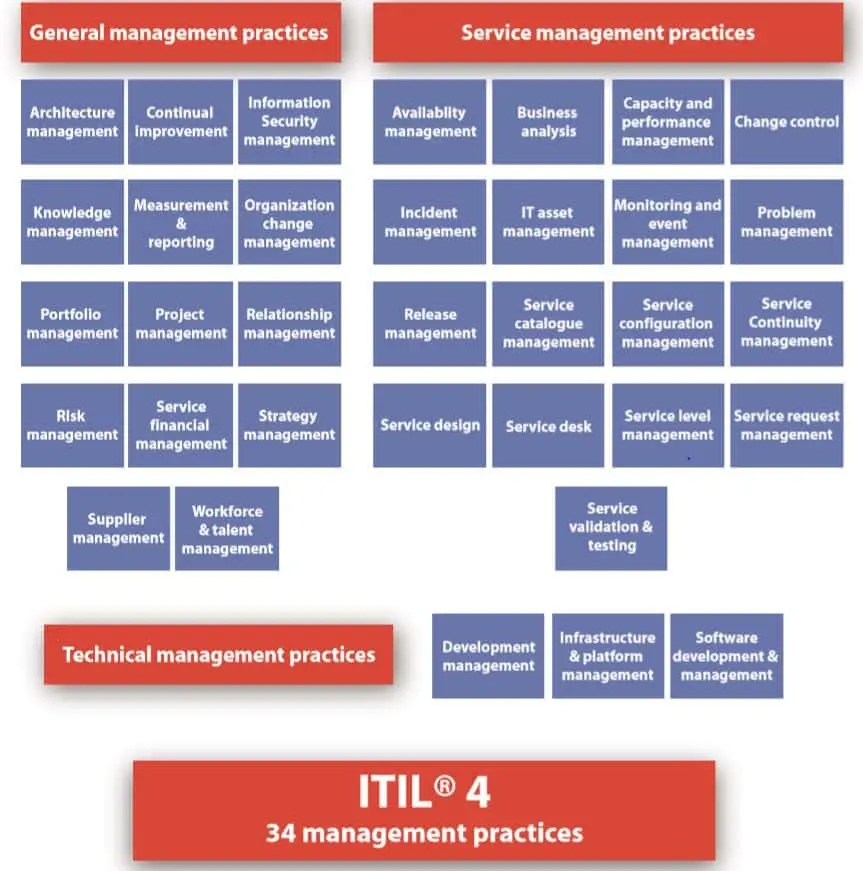 The 34 management practices of ITIL 4. Credit: knowledgeapple.com
Three ways ITSM pays for itself
I’m skeptical of vague ROI claims. So let me be specific about where ITSM actually moves the needle.
IT teams get more done with less scrambling
- Process workflows replace manual chaos. Instead of emails and Slack messages, you get tracked, repeatable processes across departments. Tallyfy makes this transition painless because you can set up a workflow in about 60 seconds, not 6 months.
- Scarce IT staff stop wasting time on admin. When you automate ticket routing and basic approvals, your people focus on strategic work instead of shuffling requests.
- Incident prioritization gets smarter. Service-based incident management means you prioritize by business impact, not by who yells loudest.
- Recurring problems shrink. Good problem management and knowledge management cut down on repeat issues, saving resolution time and reducing headaches for end users.
The business runs smoother
- Less downtime. Proper incident, problem, and availability management keeps things running. That’s not a buzzword. It’s money.
- Fewer surprises. Problem management and capacity planning help you predict issues before they become outages.
- Faster recovery. When something does break, IT service continuity plans mean you’re back up in hours, not days.
Waste drops
- No more duplicate spending. Asset management finds the software licenses nobody uses, the hardware collecting dust, and the hosting bills you forgot about.
- Better budgeting. Configuration and capacity management ensure new IT spending is justified, not just someone’s pet project.
- Less rework. Inconsistency-related waste often costs double or triple the original effort. Standardized change management stops that cycle.
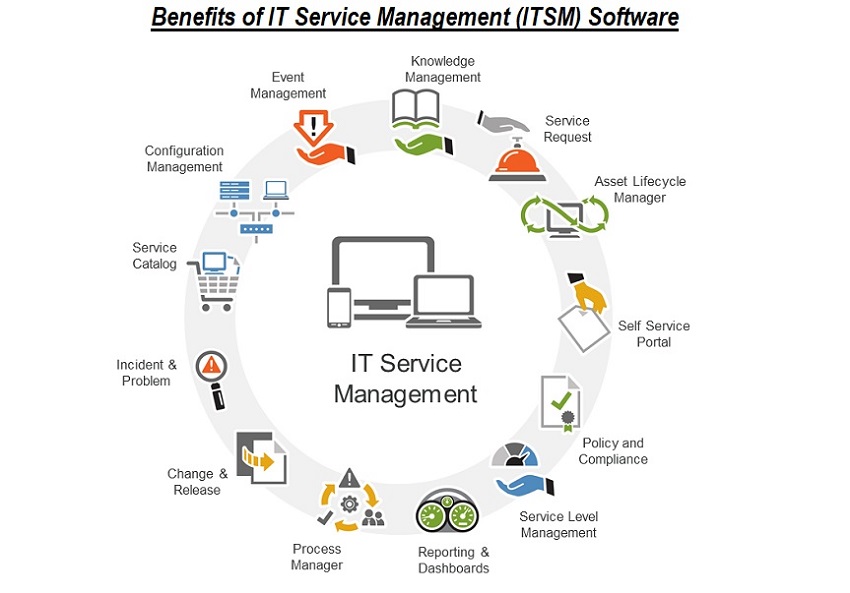 Benefits of ITSM software. Credit: techglobex.net
How to pick an ITSM approach that fits
Not every business needs the same ITSM setup. I’ve watched organizations waste months implementing the wrong one. Here’s a more practical approach.
Start with what’s broken. Break down your daily IT operations. List the recurring issues. Identify the processes that feel slow, broken, or manual. Focus on the processes vital to operations first.
Talk to your people. Not just IT staff, though they’re essential. Pull in a focus group from different departments. Ask what features they’d find most useful. The best ITSM is one people will use, not one that looks impressive in a vendor demo.
Separate needs from wants. Review the list and align it with actual requirements, not aspirations. What’s essential for the base level of functioning? What’s nice to have? Be honest here.
Plan your integrations. ITSM has to work with your existing tools. If you’re heavy on cloud services, your ITSM needs to be cloud-native. Compatibility issues can be researched and resolved before implementation, but only if you look for them early. Any potential compatibility issues are better discovered in planning than in production.
Set a realistic budget. Calculate the total cost over five years. Include upgrades, maintenance, and scaling. The cheapest option upfront rarely stays cheapest over time.
Metrics that tell you if it’s working
You can’t measure everything, so pick the metrics that matter. Here are the ones I’d focus on:
- Incident response time - from report to resolution
- First-touch resolution rate - percentage fixed on first contact
- SLA compliance ratio - resolutions meeting service level agreements
- Cost per ticket - what each resolution actually costs
- Reopen rate - tickets that come back after being “resolved”
- Ticket volume trends - total tickets over time, by department and type
If your reopen rate keeps climbing, something’s broken in your resolution process. If your first-touch rate is falling, your knowledge base probably needs attention. The metrics tell the story. You just have to read them.
ITSM in the age of AI agents
Here’s what’s changing fast. IEEE Spectrum reports that 40% of enterprise apps will feature task-specific AI agents by end of 2026. That’s up from under 5% today. Which is a bit wild. The service desk is one of the first places this will hit hard.
AI agents can handle password resets, access requests, and basic troubleshooting without a human touching the ticket. That’s real. It’s happening now. Does that mean you can skip ITSM entirely? No.
But here’s what most people miss. An AI agent following a broken workflow will just break things faster and at greater volume. The teams that win are the ones defining their ITSM processes first, then layering AI on top.
This is something we think about constantly at Tallyfy. The workflow is the foundation. AI is the accelerant. Get the order wrong and you’ve got a very expensive mess.
In discussions we’ve had with IT leaders adopting AI-powered service desks, the pattern is clear: the ones who mapped their workflows before deploying agents saw resolution times improve within the first quarter. The ones who jumped straight to AI? They’re still untangling the chaos.
Turns out, technology represents maybe 9% of the conversation when we talk about service management. The rest is process design, people, and measurement. Get those right and the technology part almost takes care of itself.
For most organizations, adopting an ITSM structure will help future-proof the firm. With business and IT changes accelerating faster than ever, standing still isn’t neutral. It’s falling behind.
About the Author
Amit is the CEO of Tallyfy. He is a workflow expert and specializes in process automation and the next generation of business process management in the post-flowchart age. He has decades of consulting experience in task and workflow automation, continuous improvement (all the flavors) and AI-driven workflows for small and large companies. Amit did a Computer Science degree at the University of Bath and moved from the UK to St. Louis, MO in 2014. He loves watching American robins and their nesting behaviors!
Follow Amit on his website, LinkedIn, Facebook, Reddit, X (Twitter) or YouTube.

Automate your workflows with Tallyfy
Stop chasing status updates. Track and automate your processes in one place.