
BPMN patterns mapped to modern workflow tools
Keith Swenson argued BPMN 2.0 became a programming language, not a business tool. Here is how all 12 common BPMN patterns, from sequences and parallel splits to tiered approvals, map to modern workflow tools that normal people can use on any device.
Summary
- BPMN was designed for a different era - It worked when processes were rigid assembly lines. Modern teams need flexibility, mobile access, and the ability to handle exceptions that flowcharts can’t anticipate
- Documentation isn’t the same as improvement - BPMN solves process documentation but makes change painful, requiring specialists to redraw diagrams while the actual work stays broken
- Every BPMN pattern has a simpler modern equivalent - Sequences, parallel splits, exclusive choices, tiered approvals - all of them work in Tallyfy without needing a BPMN specialist
- AI agents need structured workflows, not flowcharts - The deficit sits in the process layer, not in the neural network. See how Tallyfy modernizes workflow management
Let’s get some context first.
BPMN is used by legacy BPM software tools. In discussions we’ve had with operations teams - which account for about 17% of our conversations with financial services and 10% with professional services firms - moving beyond BPMN has become one of the most frequent topics. Honestly, here’s why.
Why BPMN doesn’t fit modern work
BPMN wasn’t built for how people work today. It came from an era when everyone was in a factory or sitting in front of a desktop workstation. These days, most work happens across distributed teams using phones, tablets, and a dozen different apps. People want structure, but not rigidity. If you’re paying someone a six-digit salary, do you expect them to follow flowcharts? I think not.
BPMN can’t handle every possible scenario. Real processes have exceptions. Messy edge cases. Things nobody anticipated when someone drew that beautiful diagram six months ago. With Tallyfy, you can use comments and issue reporting to handle scenarios that no one planned for. BPMN just… breaks.
BPMN became obsolete when smartphones showed up. If you’re using BPMN to publish process maps, nobody is going to squint at a diagram that barely fits on A2-size paper, let alone a 6-inch phone screen. Keith Swenson made this exact argument years ago - that BPMN 2.0 turned into a graphical programming language for developers, not a tool for business people. He was spot on. Is BPMN going to catch up? No.
It’s just awful to have to work with inside a prison of BPM abstractions and tools.
BPMN solves documentation, not improvement. That’s the gap nobody talks about. You want to go from as-is to to-be? You need to think practically. How do you make change easy? How do you involve the people who actually do the process? BPMN requires redoing an entire process model just to make a small change - and usually only someone who knows BPMN can do it. At Tallyfy, we’ve seen teams stuck in this loop for months, redrawing diagrams while the actual work stays broken.
BPMN can’t be shared with external people. Nobody outside your organization wants to see a complex BPMN diagram. What they care about is a better experience. Tallyfy focuses on making processes so simple that you can share them with anyone - even people outside your company. BPMN is mostly focused on automating internal, repeatable processes that only insiders ever see.
BPMN isn’t really a standard. It’s supposed to be, but many vendors create their own “flavor” of BPMN, making migration between tools anything but trivial. We regularly hear from teams wanting to escape legacy BPMN tools like Gero Decker’s Signavio - the migration assistance they need proves just how locked-in these “standard” tools make you.
As a developer I hated it… the skills were not marketable… Not a single interviewer knew what I was talking about with my BPM experience.
AI agent problem nobody is solving
Here’s a mega trend that connects directly to this BPMN discussion. Turns out, the missing input for AI agents is not better models. It is better processes.
Paul Daugherty’s research at Accenture makes this clear. True value comes from redesigning operations, not layering AI agents onto old workflows. AI follows whatever process you give it, including the broken one. An AI agent following a broken BPMN diagram just automates the chaos faster.
This is why process definition matters more than ever. You need structured workflow patterns - sequential, parallel, evaluation loops - that both humans and AI agents can follow. BPMN was never built for this. It was built for documentation, not execution. Tallyfy provides the kind of structured, executable workflows that work for both human teams and AI agents.
There are also things BPMN simply can’t do at all that modern tools handle naturally.
If you’re looking to move beyond legacy BPMN tools, here’s how Tallyfy approaches business process management differently:
Business Process Management Made Easy
Basic sequential and parallel patterns
Sequence
BPMN pattern description
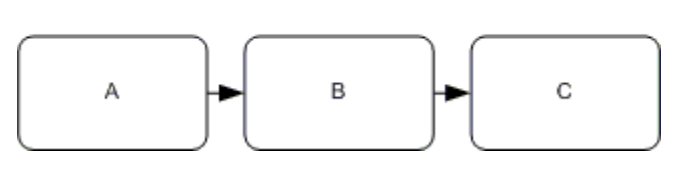
Task A, B, and C are completed in order.
Equivalent of pattern in Tallyfy
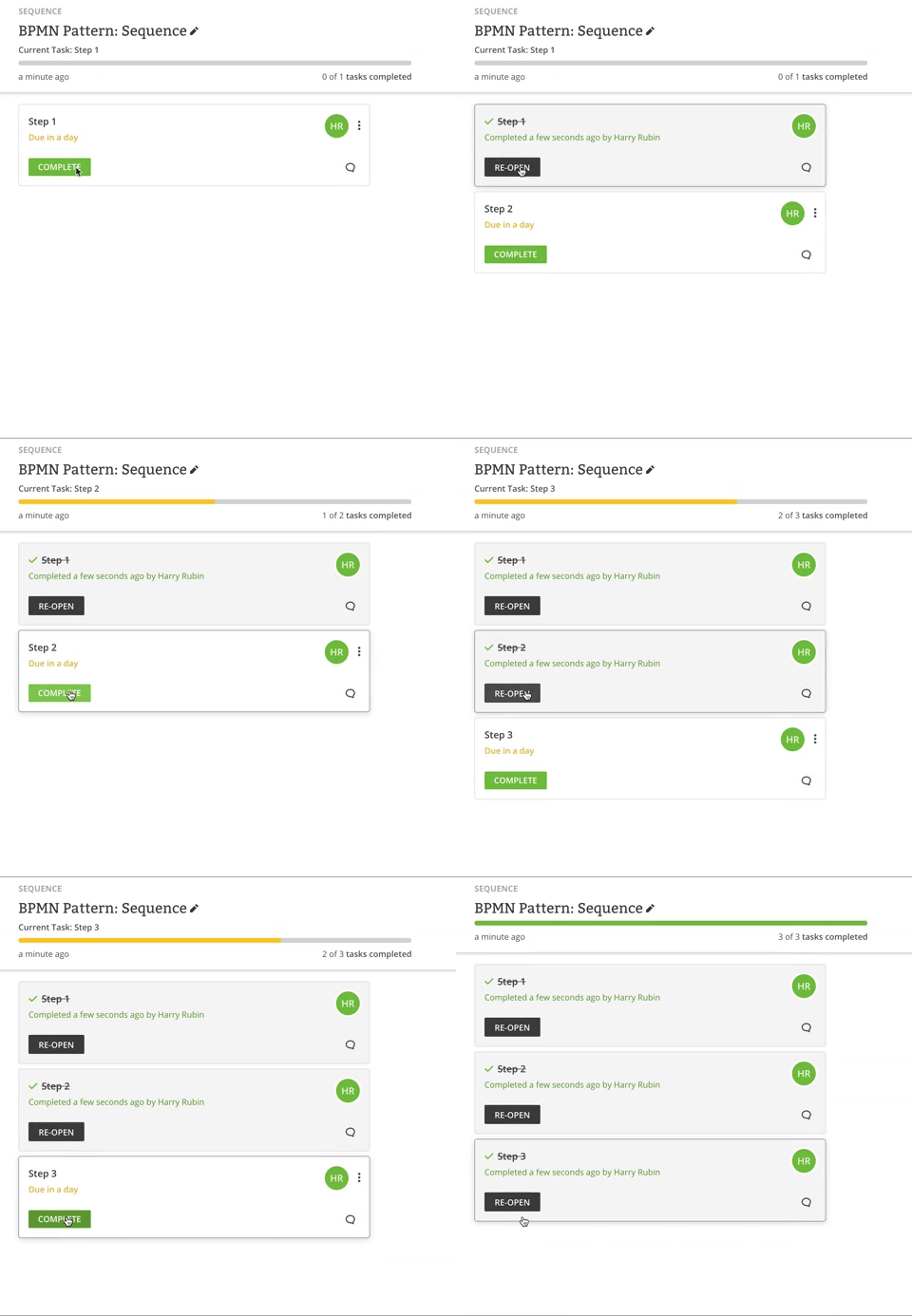
Once task A is completed, show task B.
Once task B is completed, show/assign task C.
Parallel split
BPMN pattern description
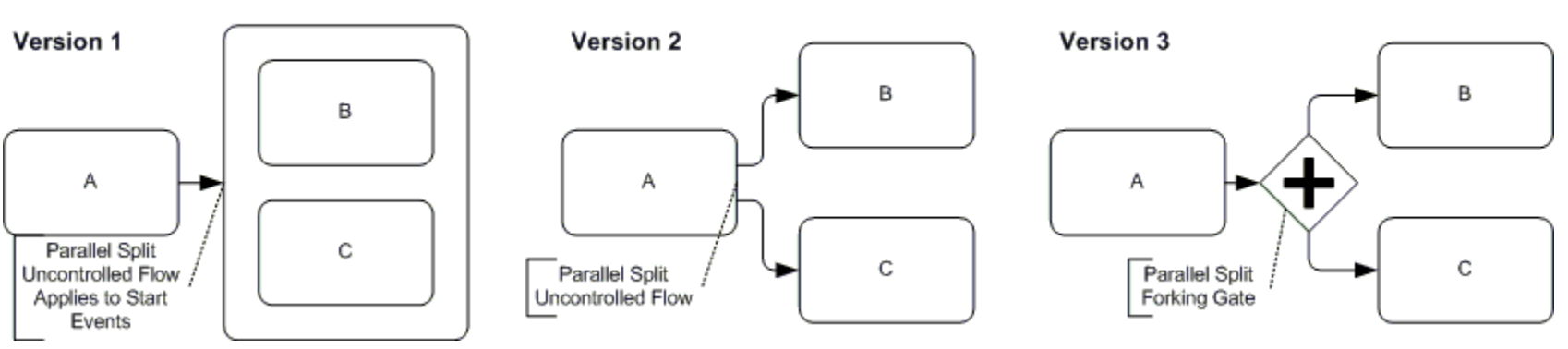
After task A is completed, tasks B and C are to be completed concurrently.
(V1) B and C are to be completed together. (V2) B and C are to be completed.
Equivalent of pattern in Tallyfy
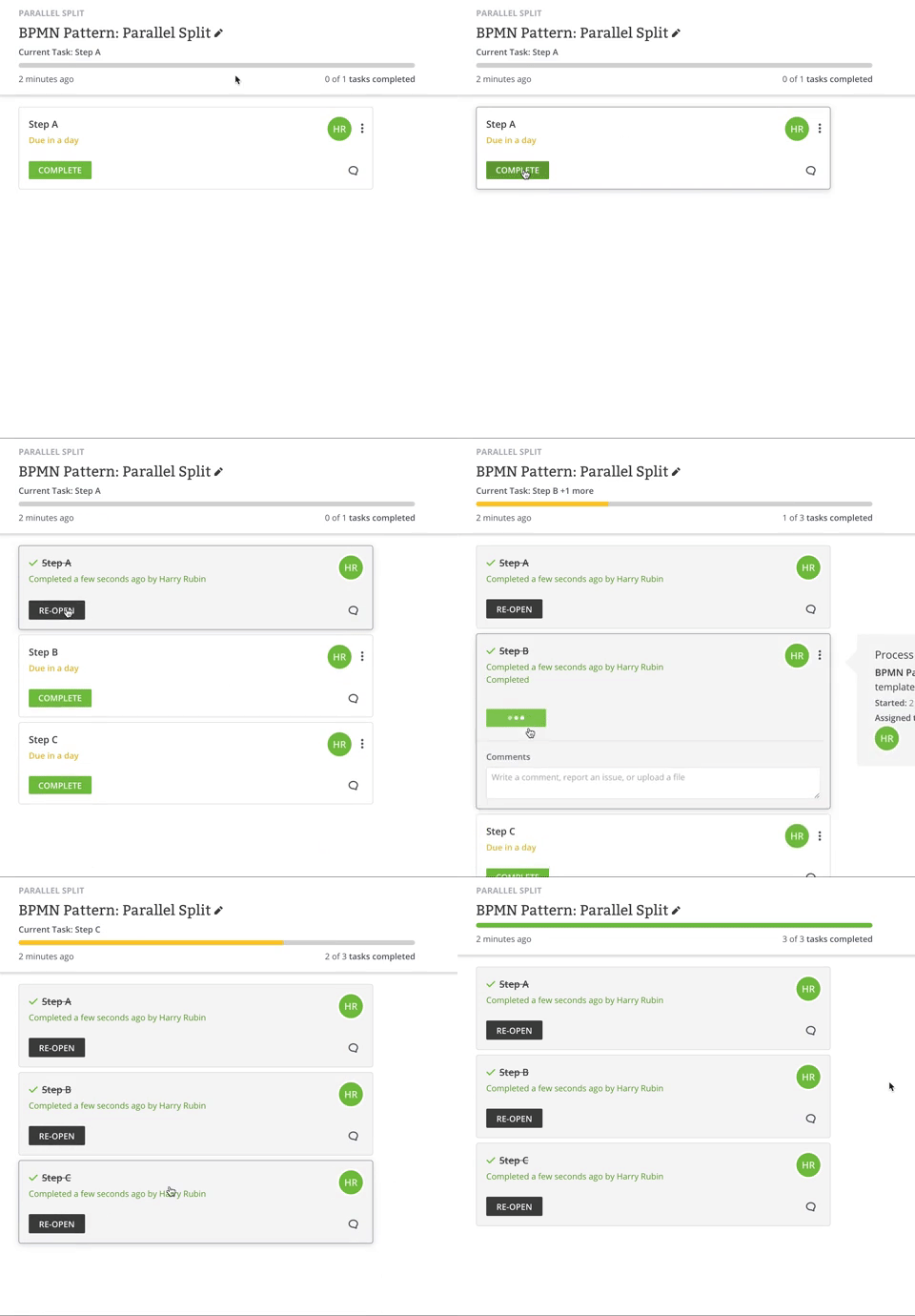
Once task A is completed, show/assign task B and C.
Synchronization
BPMN pattern description
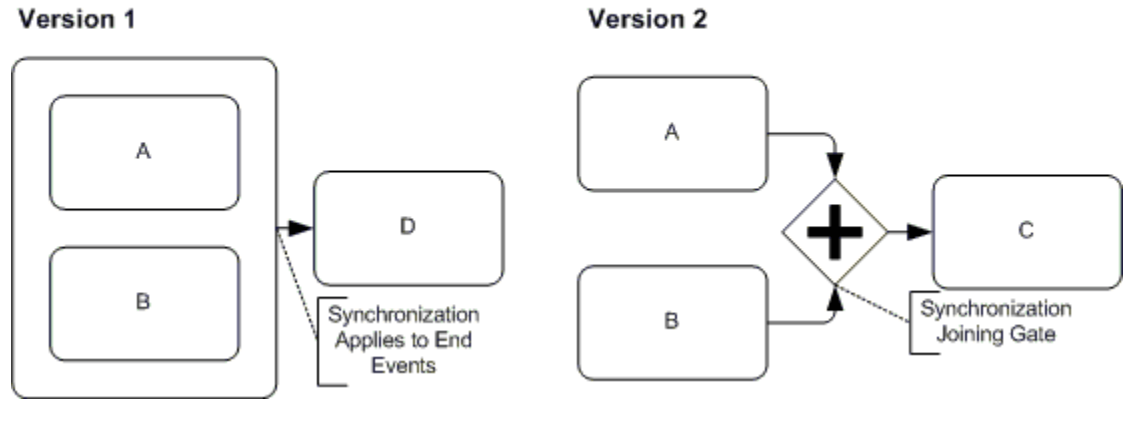
After task A and B are completed, task C/D is to be completed.
(V1) once both A and B are completed together; (V2) once A and B are both independently completed.
Equivalent of pattern in Tallyfy
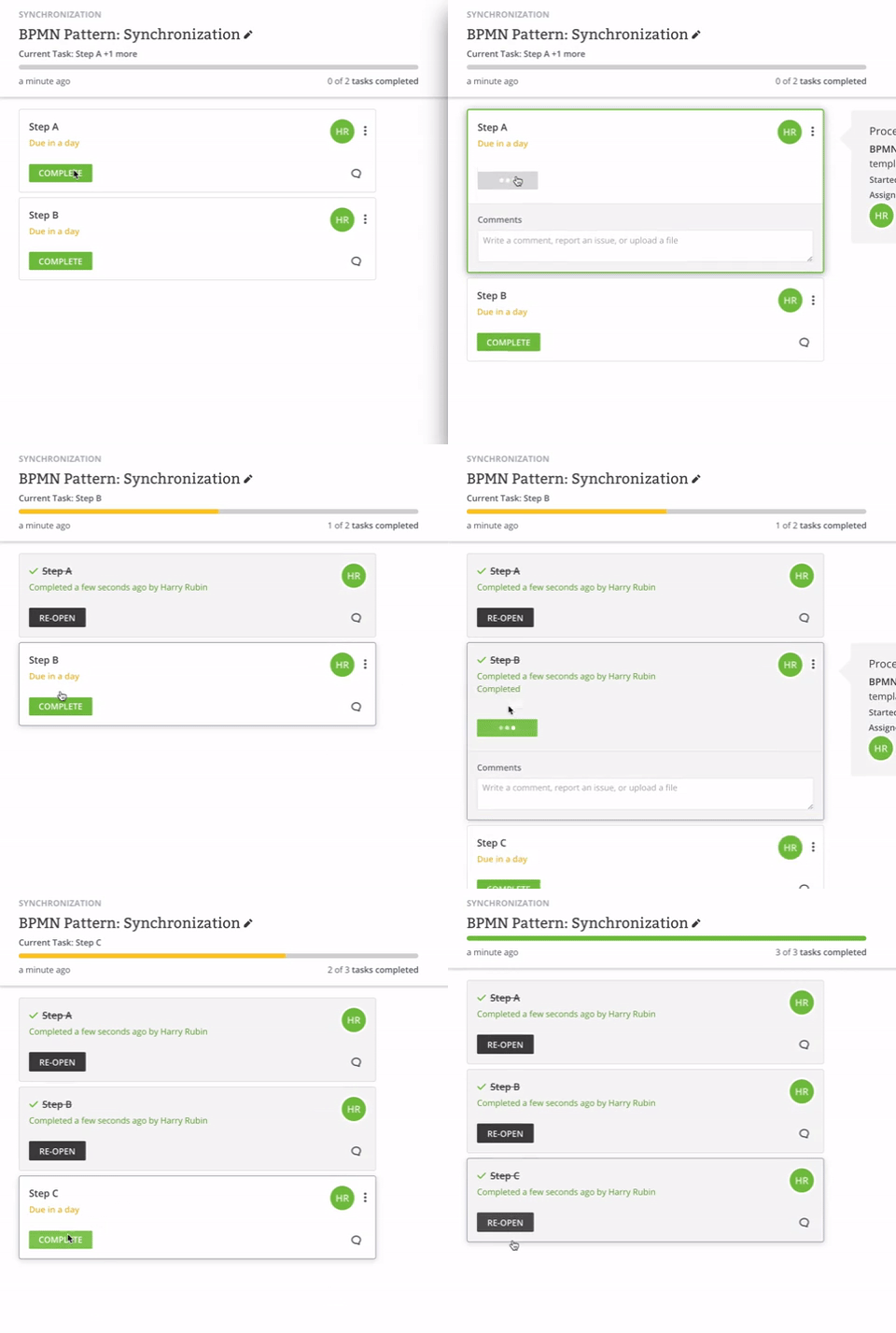
Once task A and B are completed, show/assign task C/D.
Decision and choice patterns

Exclusive choice
BPMN pattern description
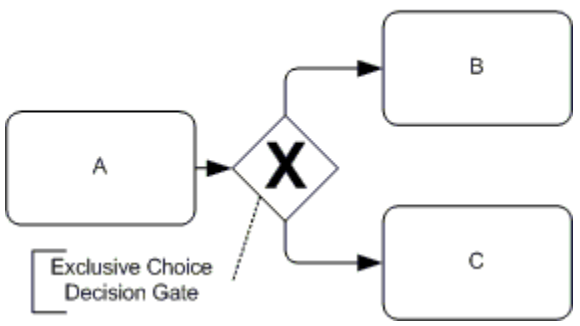
Depending on information gathered in task A, either task B or C is to be completed.
Equivalent of pattern in Tallyfy
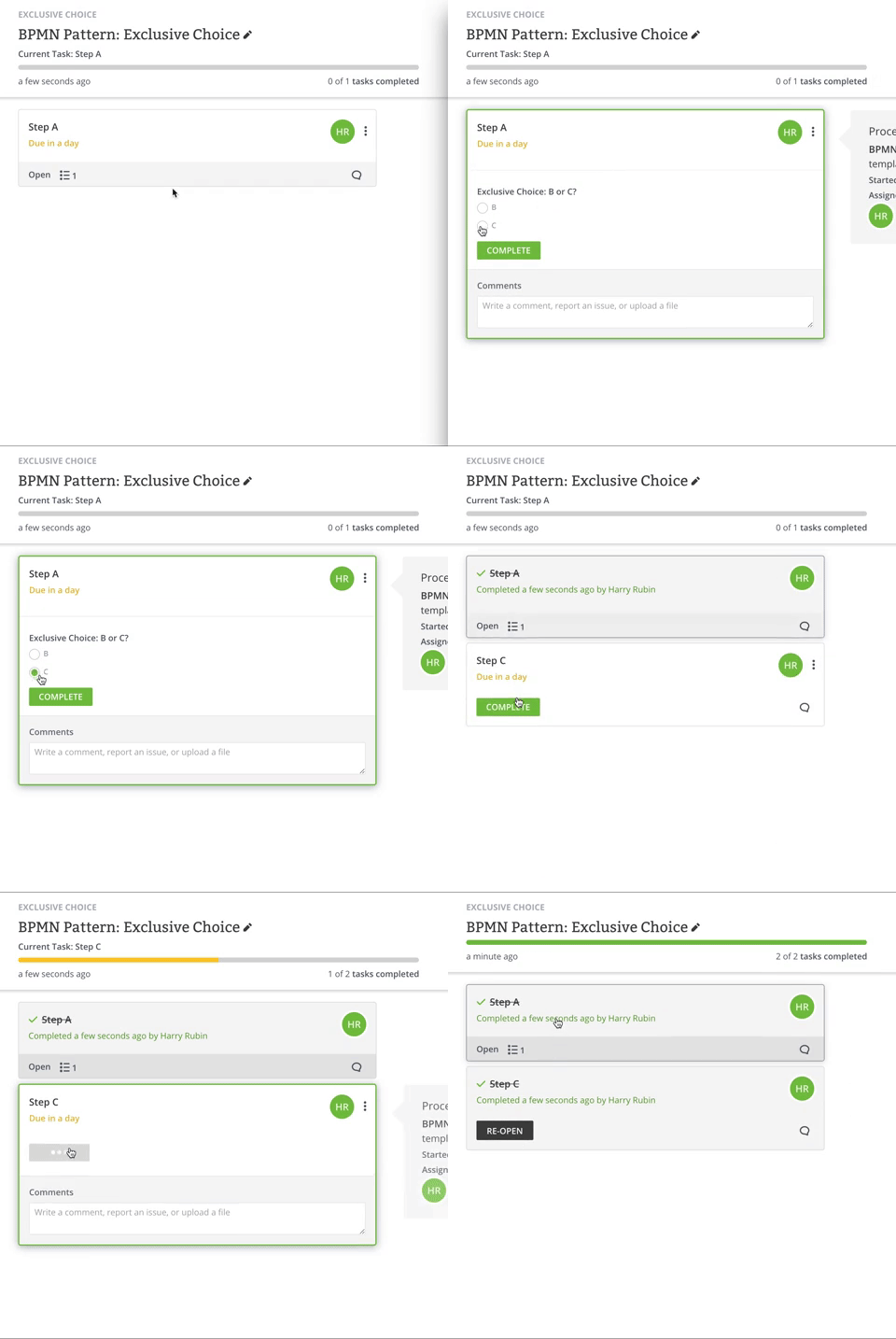
If task A contains information X, task B is to be completed.
If task A doesn’t contain X, task C is to be completed.
Simple merge
BPMN pattern description
After task A and B are completed, task C is to be completed.
(V2) Task C can only be started once both A and B are completed.
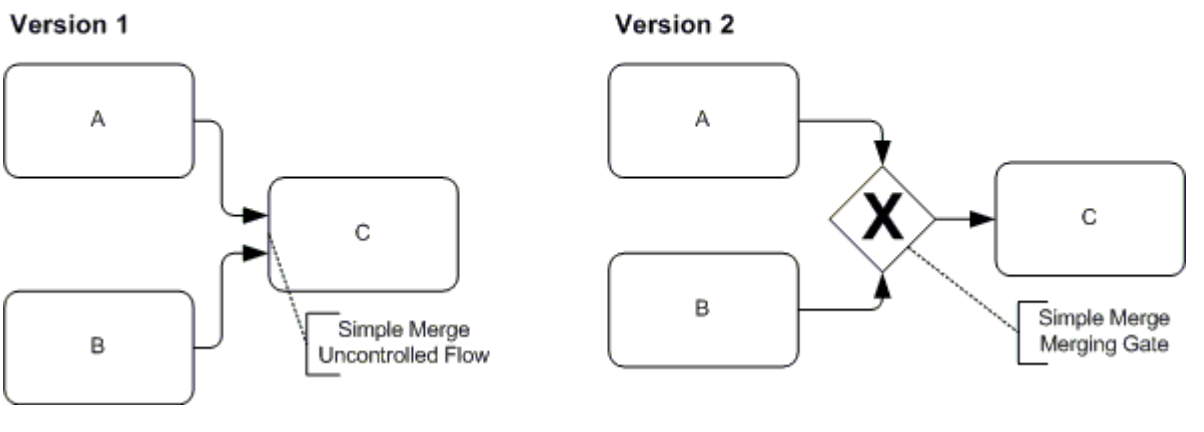
Equivalent of pattern in Tallyfy
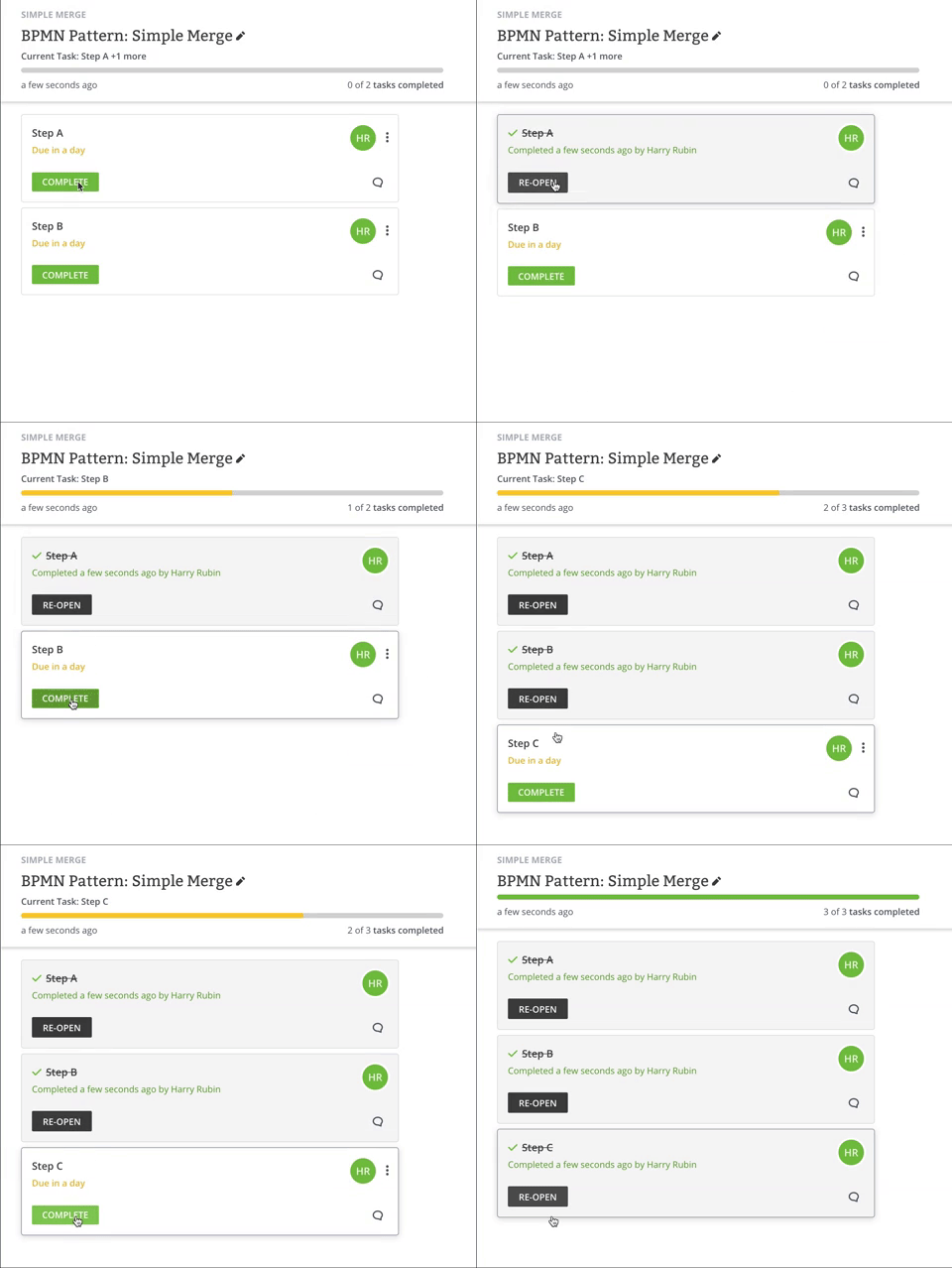
(V1) Once task A and B are completed, show task C.
(V2) Once A or B is completed show C.
Multi-choice
BPMN pattern description
A decision made in task A leads to either task B or C.
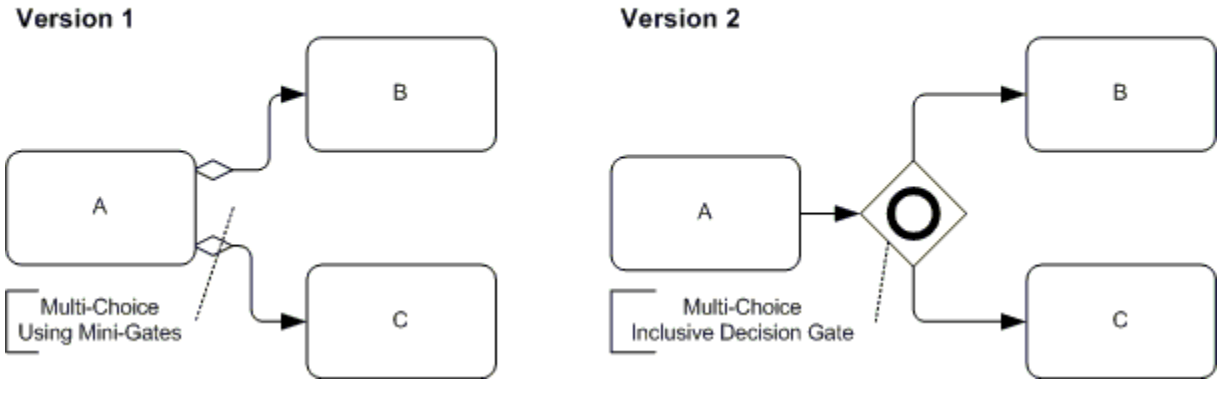
Equivalent of pattern in Tallyfy
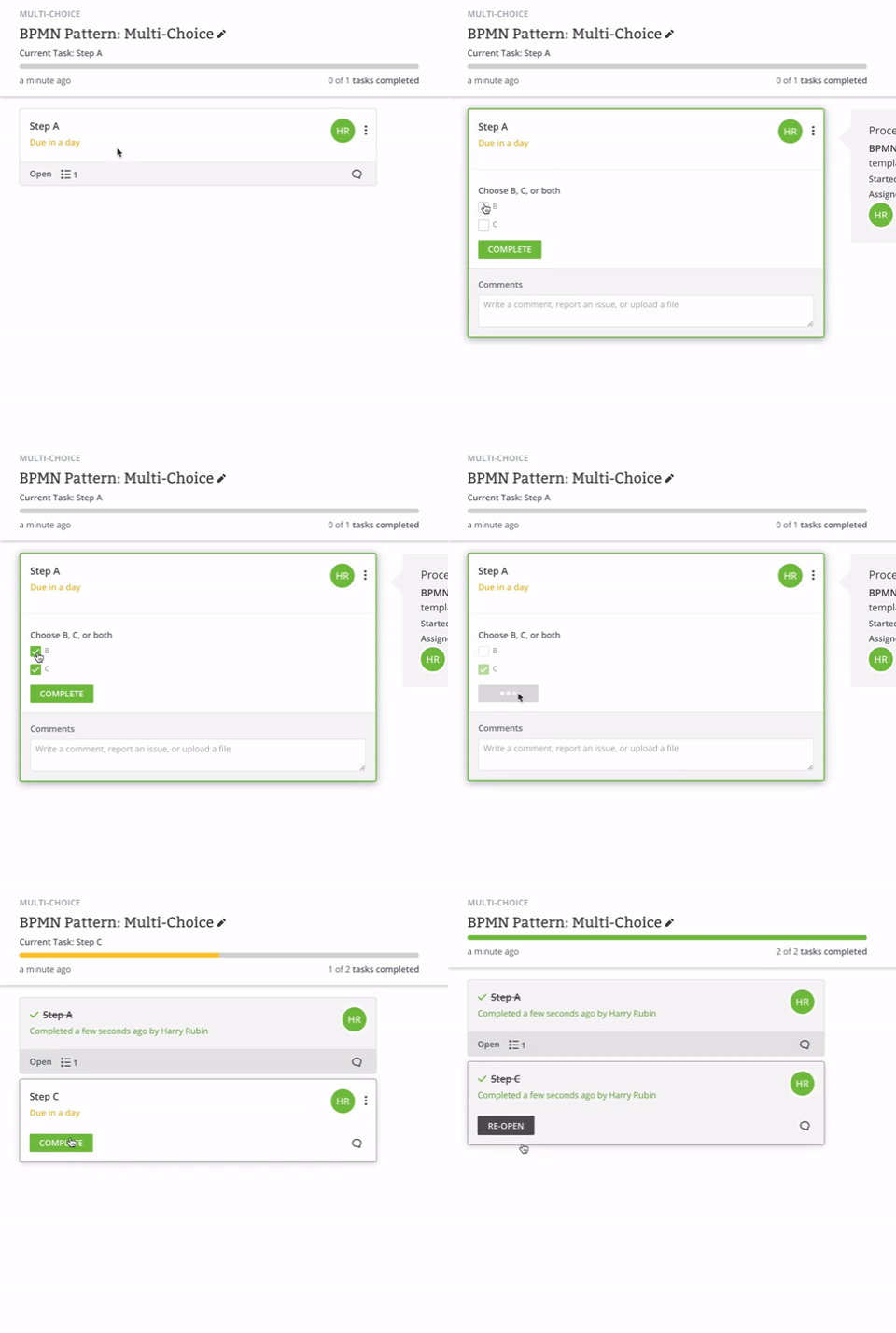
(V1) If task A contains B, show task B. If task A contains C, show task C.
(V2) A choice of either B or C is given in A. If B is selected show task B; if C is selected, show task C.
Deferred choice
BPMN pattern description
After A is completed, depending on outcome of event, B or C will be completed.
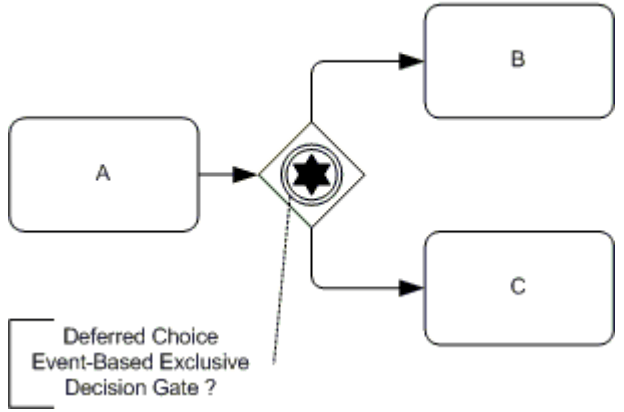
Equivalent of pattern in Tallyfy
After task A is completed, assign task X.
If task X response contains answer B, open task B. If task X response contains answer C, open task C.
Merge and join patterns
Discriminator
BPMN pattern description
After task A is completed, tasks B and C are to be completed, after which task D is to be completed.
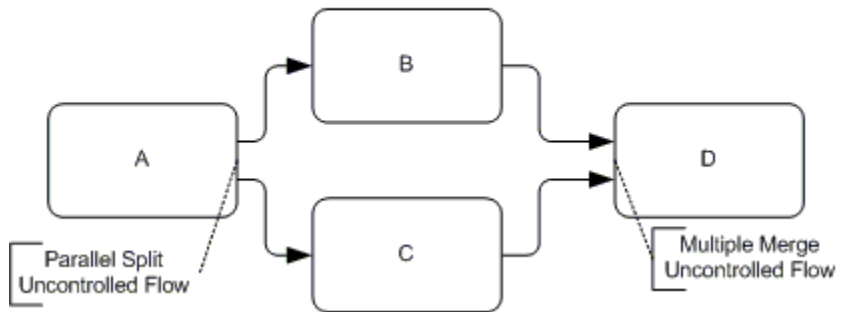
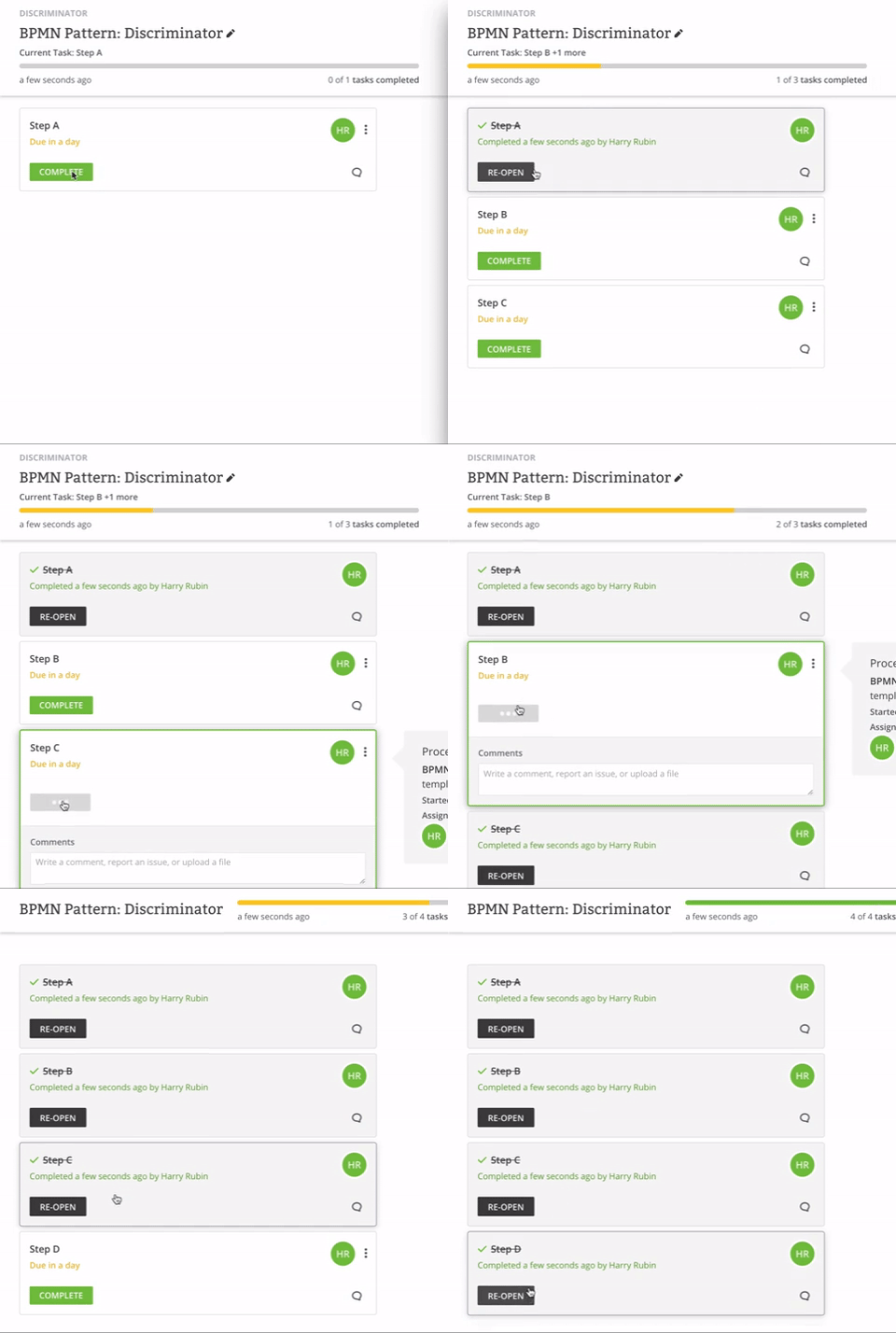
Equivalent of pattern in Tallyfy
After task A is completed, show tasks B and C.
After task B or C is completed, show task D.
N out of M join
BPMN pattern description
After task A is completed, tasks B1, B2, and B3 are to be completed.
When either of the B tasks are completed, task C is to be completed.
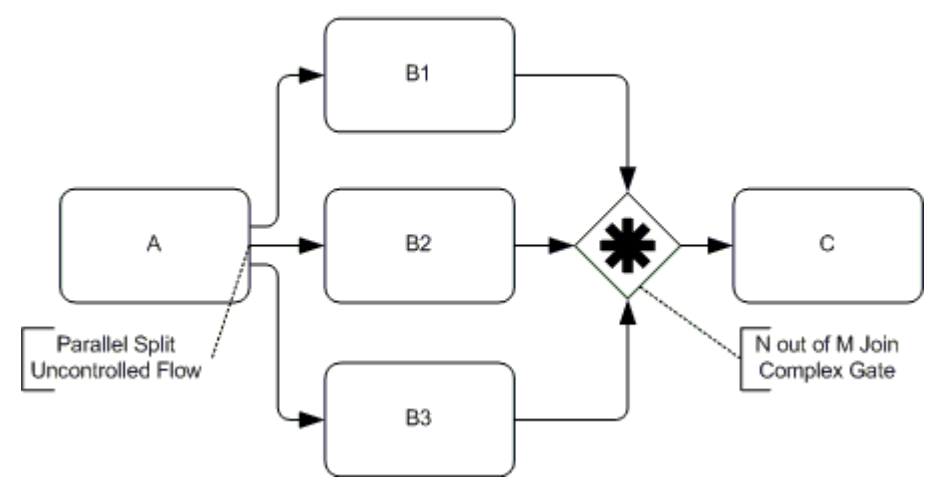
Equivalent of pattern in Tallyfy
After task A is completed, show tasks B1, B2, and B3.
After task B1, B2, or B3 is completed, show task C.
Note on issue - This would more easily work in Tallyfy if there was the ability to create two rules for one task: (when A is completed, show task B1. If task B2 or B3 is completed, hide task B1). We’re working on it.
Synchronizing merge
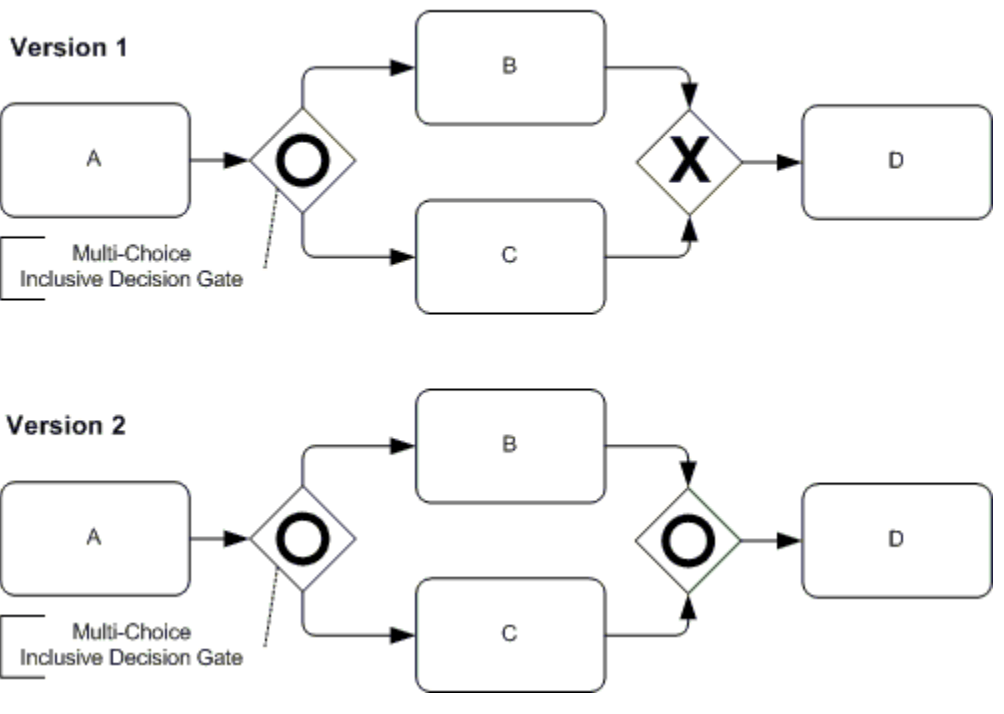
BPMN pattern description
After task A is completed, tasks B and C are to be completed.
When B or C is completed, task D is to be completed. (V2) B and/or C.
Equivalent of pattern in Tallyfy
After task A is completed, show tasks B and C.
After task B or C is completed, show task D and (V1) hide the other of B or C.
Complex routing and approval patterns
Interleaved routing
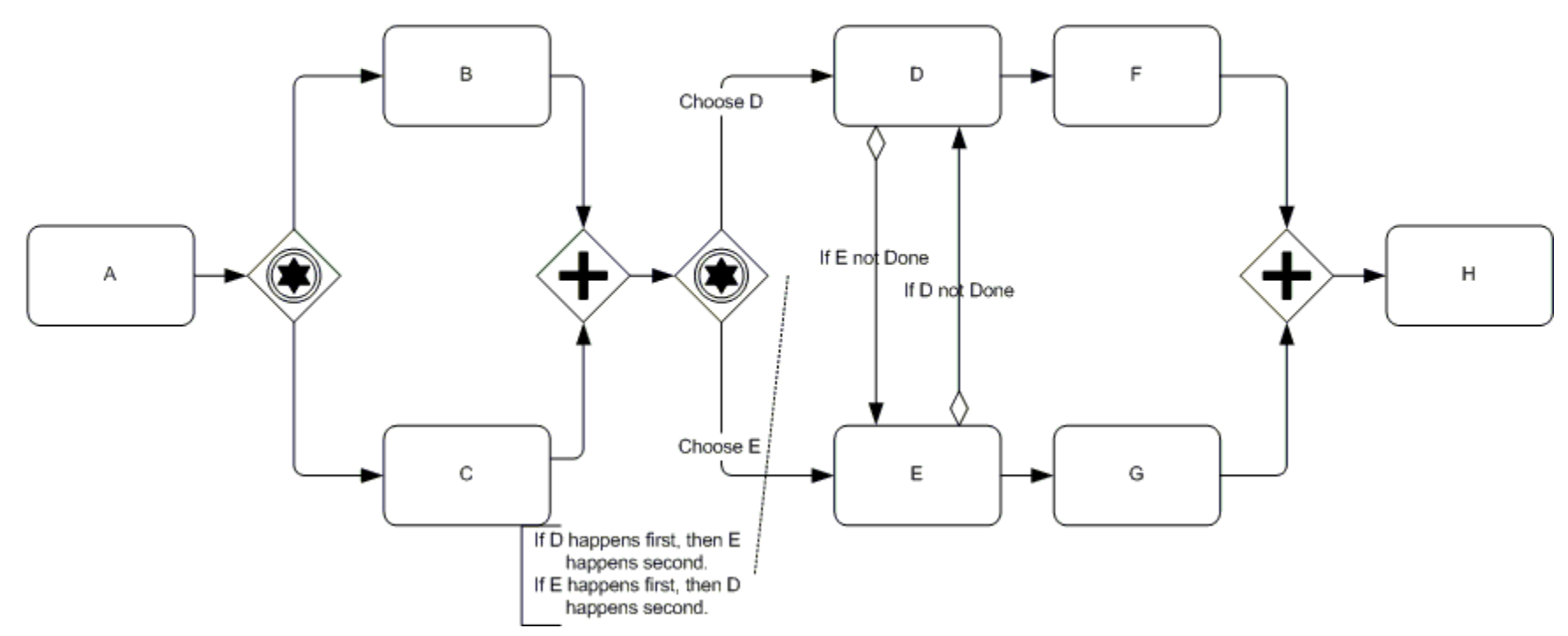
BPMN pattern description
After A is completed, depending on outcome of event, B or C will be completed.
After both B and C are completed, a choice is made between E and D.
If E is selected, E is completed, then D. If D is selected, D is completed, then E.
After D (after E) is completed, F is completed. After E (after D) is completed, G is completed.
After both F and G are completed, H is completed.
Equivalent of pattern in Tallyfy
After task A is completed, assign task X.
If task X response contains answer B, open task B. If task X response contains answer C, open task C.
After Tasks B and C are complete, open tasks D and E.
When tasks D and E are complete, open tasks F and G.
When tasks F and G are complete, open task H.
Note on issue. This doesn’t completely replicate the diagram. To do that, you’d need to split a process into two processes, yet have rules that make what happens in process one dependent on process two. We’re working on it.
Tiered approval
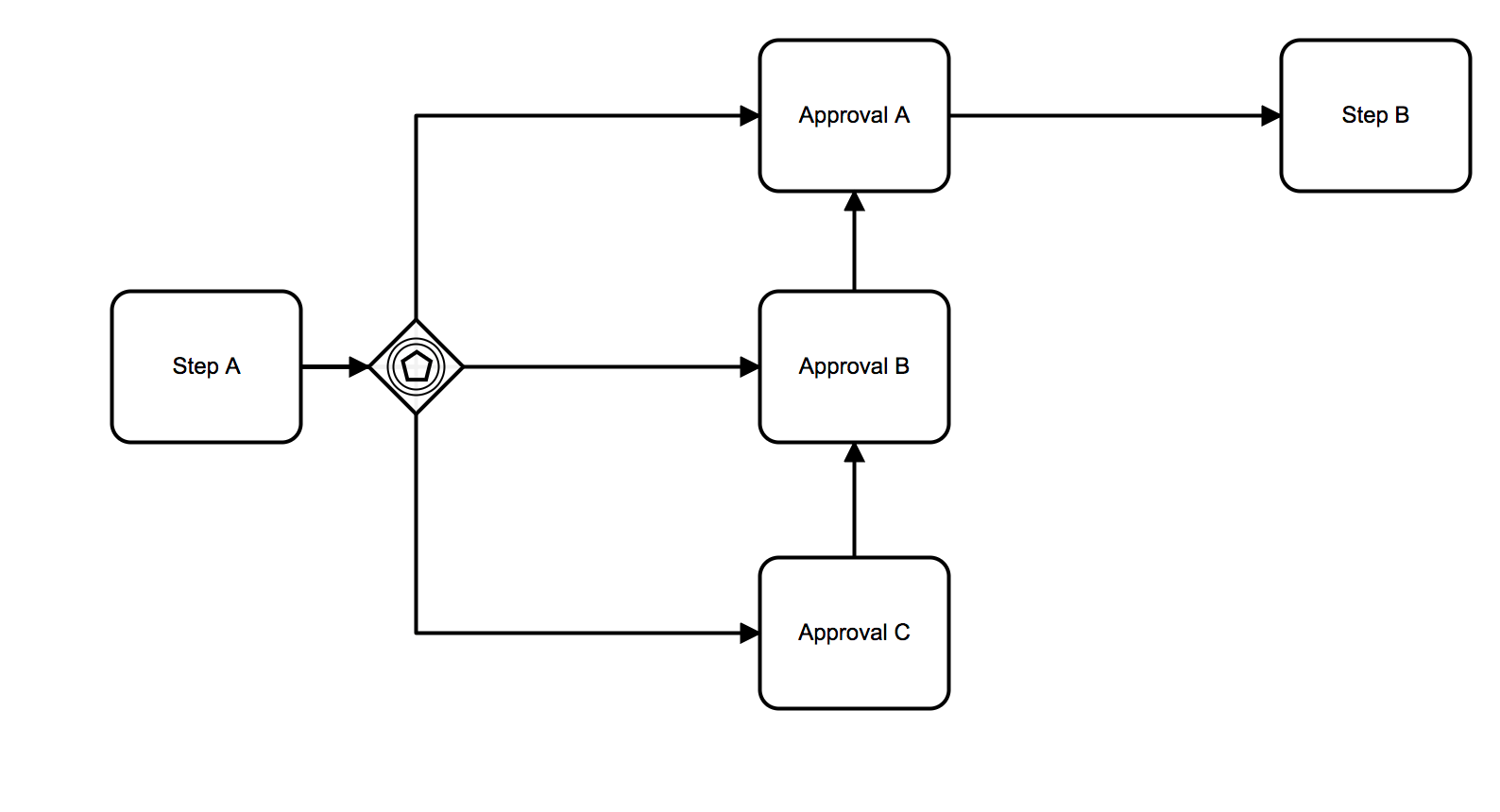
BPMN pattern description
Event in Step A has results 1, 2, and 3.
If event results in 1, Approval A is needed before proceeding to Step B.
If event results in 2, both Approvals A and B are needed before proceeding to Step B.
If event results in 3, Approval C is needed in addition to A and B before proceeding to Step B.
Equivalent of pattern in Tallyfy
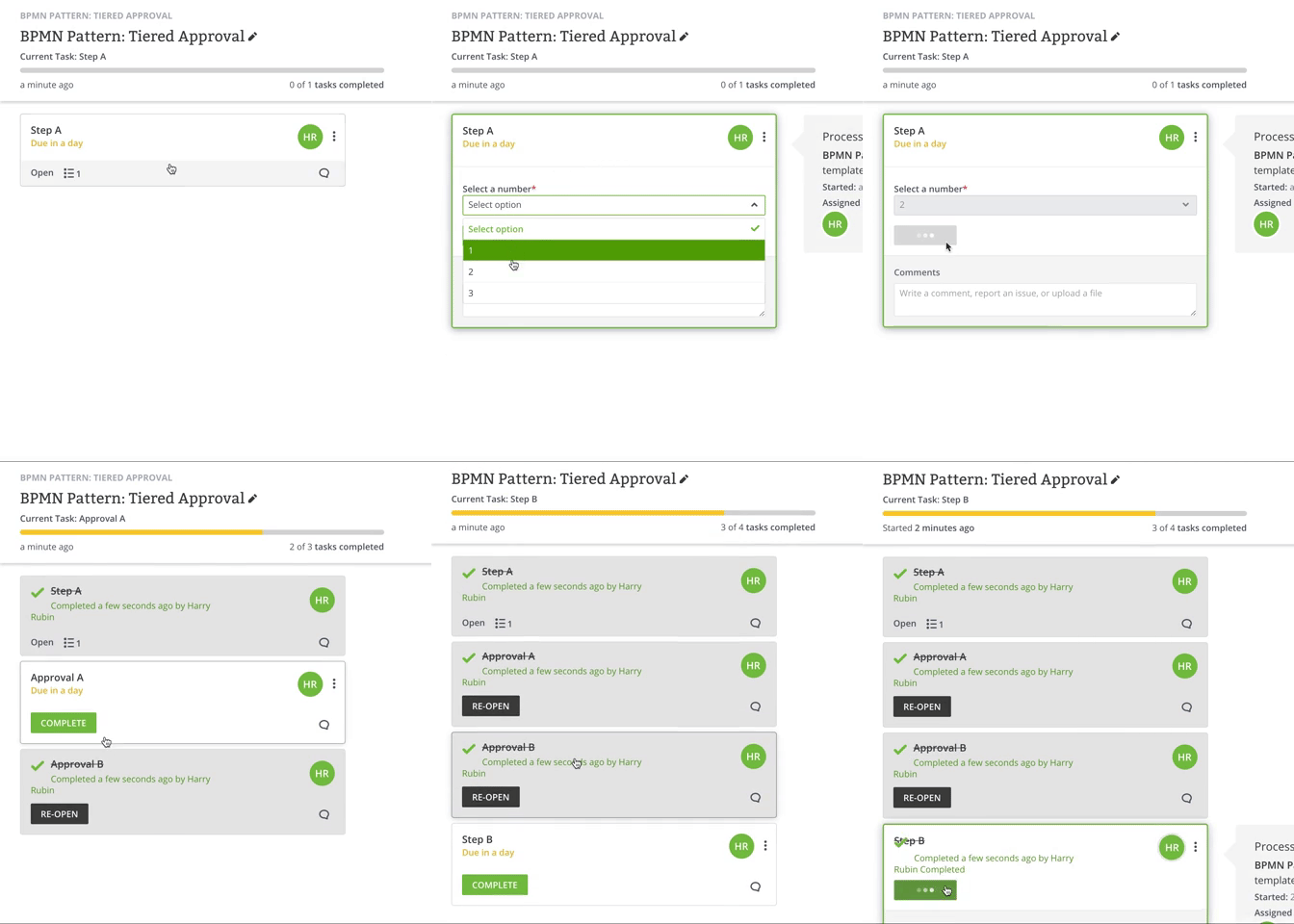
When Step A is completed, open task Approval A.
If step A contains 2 or step A contains 3, open task Approval B.
If step A contains 3, open Approval C.
Why tiered approvals prove the point
These approval patterns are where the gap between BPMN and modern tools becomes painfully obvious. Instead of drawing complex flowcharts that require a BPMN specialist to modify, you can use ready-made templates in Tallyfy that handle tiered approvals, conditional routing, and multi-level authorization right out of the box. A major Asian bank migrating 2,500 cash management users per batch discovered this firsthand. Their 6-stage migration process required coordination across seven teams - from sales and account management to implementation and e-payment registration. BPMN diagrams could document this complexity, but they couldn’t flex to handle the reality of “Top Tier” versus “Standard” treatment paths, rejected deals needing parking and follow-up, or token assignment steps that varied by legacy system origin. Bit of a mess, that. Actually, that’s not entirely BPMN’s fault. Based on hundreds of implementations, I’ve found that the teams who get stuck longest are the ones trying to model everything in BPMN before doing anything. They spend months perfecting diagrams while the process itself stays broken. The pattern we keep running into is that the better approach starts with running the process, gathering feedback from the people doing the work, and improving as you go.
That’s the philosophy behind these templates:
About the Author
Amit is the CEO of Tallyfy. He is a workflow expert and specializes in process automation and the next generation of business process management in the post-flowchart age. He has decades of consulting experience in task and workflow automation, continuous improvement (all the flavors) and AI-driven workflows for small and large companies. Amit did a Computer Science degree at the University of Bath and moved from the UK to St. Louis, MO in 2014. He loves watching American robins and their nesting behaviors!
Follow Amit on his website, LinkedIn, Facebook, Reddit, X (Twitter) or YouTube.

Automate your workflows with Tallyfy
Stop chasing status updates. Track and automate your processes in one place.