
Best BPM software that works in 2026
Most BPM projects fail because companies buy Fortune 500 tools when they need something running next week. Here are 18 BPM tools and which ones to avoid.
Summary
- BPM is a trap word - It covers everything from simple approval routing to multi-million dollar enterprise transformation programs. Most companies searching for “BPM software” need basic workflow automation. Wrong tool category = wasted months.
- Gartner reported that BPM fails from complexity, not technology - Vendors sell sophistication. Companies buy complexity they can’t use. Simple tools that people open every day deliver more value than powerful platforms nobody touches.
- The real divide is implementation timeline - Enterprise BPM takes 6-18 months. Modern BPM works in days. Choose based on your reality, not aspirations. Understand BPM categories
The best BPM software for most growing companies is one that’s running within a week, not sitting in an implementation queue for six months. That’s the honest answer. If you’ve got 50-500 employees and need repeating processes to run without manual coordination, you don’t need enterprise BPM. You need something your operations team can set up on Tuesday afternoon.
How we evaluated these tools: I’ve spent 10+ years building Tallyfy and working with hundreds of mid-market companies on process automation. This guide reflects hands-on experience implementing BPM across industries, combined with analysis of G2 reviews, vendor documentation, and direct conversations with operations leaders. I’m transparent about my bias - I built Tallyfy - but I’ll tell you exactly where it falls short.
Here’s a pattern I’ve watched repeat for years. It never changes.
A mid-market company with 200 employees goes shopping for “BPM software.” They get demos from Appian, Pega, and ServiceNow. Impressive stuff. Complex flowcharts. AI capabilities. Integration with everything. The vendor talks about digital transformation and process excellence.
Six months later, the software sits unused. The implementation isn’t finished. The budget tripled. Nobody in operations can build a workflow without IT involvement. The company is back to spreadsheets and email.
Then they find out the tool they needed cost a tenth of what they paid and would’ve been running in a week.
This happens constantly. Let me help you avoid it.
Business Process Management Made Easy
Quick comparison
Here’s the reality on 18 BPM tools. I’m not being diplomatic. You need to know what you’re getting.
| Tool | Best for | G2 rating | Price | Implementation | My take |
|---|---|---|---|---|---|
| Tallyfy | Growing companies | 4.6/5 | $$$ | Hours | Built it. It works. |
| Kissflow | Platform consolidators | 4.3/5 | $$$ | Days | Too broad to excel |
| ProcessMaker | Open source fans | 4.3/5 | $/$$$ | Days-weeks | Gap between free and paid |
| Bizagi | BPMN documenters | 4.1/5 | $/$$$$ | Days-months | Free modeler, costly automation |
| Flokzu | LATAM markets | 4.7/5 | $$ | Days | Solid, limited reach |
| Pipefy | Kanban lovers | 4.6/5 | $$ | Hours-days | Templates rarely fit |
| Appian | Real enterprises | 4.5/5 | $$$$$ | 6-12 months | Complex but capable |
| Pega | Fortune 500 | 4.2/5 | $$$$$ | Years | Not for mid-market |
| Nintex | Microsoft shops | 4.2/5 | $$$$$ | Months | SharePoint heritage |
| Camunda | Developer teams | 4.5/5 | $/$$$ | Weeks-months | Devs only |
| ServiceNow | IT departments | 4.3/5 | $$$$$ | Months | ITSM roots show |
| Oracle BPM | Oracle ecosystem | 3.9/5 | $$$$$ | 6-18 months | Legacy complexity |
| IBM BPM | IBM shops | 4.0/5 | $$$$$ | 6-18 months | Requires consultants |
| Monday.com | Project managers | 4.7/5 | $$$ | Hours | Not BPM at all |
| Asana | Task trackers | 4.4/5 | $$ | Hours | Not BPM at all |
| Creatio | CRM-adjacent BPM | 4.7/5 | $$$$ | Weeks | Better at CRM |
| Newgen | Document-centric | 4.3/5 | $$$$$ | Months | Banking focus |
| Bonita | Open source BPM | 4.3/5 | Free/$$$ | Weeks | Developer required |
G2 ratings change - verify current scores at G2.com.
Now let me explain what matters.
What BPM software means in practice
BPM stands for Business Process Management. That definition is useless because it covers too much ground.
When a mid-market operations leader says “BPM software,” they mean: I’ve got repeating processes that should run without me babysitting them. Employee onboarding. Purchase orders. Approval workflows. Things that happen the same way over and over. They want software that handles the task routing, the reminders, the tracking, the escalations - without manual coordination.
When an enterprise process architect says “BPM software,” they mean something entirely different: BPMN modeling notation. Process mining. Complex event processing. Multi-system orchestration. Integration with ERP. Six-month implementation timelines with consultant teams.
These are not the same thing. Not even close.
Here’s a hard truth that most vendors won’t tell you: Building an agent without a workflow is like hiring someone with no job description. Right now, nobody’s building the workflows those agents need to follow. An AI agent without a defined process is just a chatbot with more confidence. Before you buy any BPM tool, ask yourself whether it’ll give you the structured workflow patterns - sequential, parallel, evaluation loops - that AI agents actually need to operate.
The tragedy is that mid-market companies keep buying enterprise tools because the marketing makes them feel sophisticated. Then the implementation fails because they don’t have the organizational capability to use what they bought. The pattern we keep running into at Tallyfy is companies coming to us after burning through six figures on a platform they never fully deployed.
Tools worth considering for mid-market companies
Let me be direct about my bias: I built Tallyfy. I think it’s the best choice for most growing companies. But I’ll explain exactly why - and where it falls short - so you can decide for yourself.
Tallyfy - what I spent a decade building
I got frustrated watching BPM implementations fail. Over and over, I saw companies buy complex platforms they couldn’t use. Consultants made money. Software sat idle. Employees went back to email.
So I built something different. No BPMN notation. No flowcharts. No certification required. You describe your process as steps. Plain language. The system handles the rest.
What works well:
External collaboration is the feature that keeps surprising people. When your processes involve outside parties - vendors, contractors, partners - they get one permanent link. No accounts. No passwords. No “I never got the invitation” excuses. This single feature saves hours weekly for companies doing onboarding, vendor management, or any process touching people outside your organization.
The AI template creation genuinely works. Upload an existing document or describe what you need. The system creates a usable starting point. Whether converting a full procedures library takes hours or days depends on complexity, but the technology does what it claims.
Real-time tracking answers the “where does this stand?” question before anyone asks. You see exactly what’s waiting on whom. Bottlenecks become obvious immediately. No more status meetings just to discover what happened last week.
Conditional logic means different situations get different steps. Not everyone needs every task. Smart forms collect the information that determines routing.
Fair pricing adjusts based on your country’s economy. I got tired of watching American software companies price out entire markets. We serve people globally, so pricing should reflect economic reality.
Where Tallyfy falls short:
I’m not pretending it’s perfect.
If you genuinely need BPMN diagrams, process mining, or complex multi-system orchestration, we’re not built for that. We deliberately chose simplicity over sophistication. That tradeoff probably is not right for enterprises with dedicated process teams.
No desktop application. Mobile works but was not our primary focus. If your team works primarily from phones in the field, test carefully.
Implementation is fast - hours, not months - but that means we do not have the extensive professional services some enterprises expect. If your organization needs consultants to hold hands through a two-year implementation, we’re not structured for that.
Reality check:
Best for companies with 50-500 employees who need to standardize operations without hiring consultants. Employee onboarding. Approval workflows. Compliance processes. These work well.
See real BPM templates in action
If you’re orchestrating complex technical systems or need to model processes extensively before executing them, look elsewhere.
Kissflow - the platform that does everything
Kissflow wants to be workflows, projects, cases, collaboration, and probably your calendar too. All in one platform.
The appeal:
Broad feature set. One platform for multiple purposes. No-code form builder that works reasonably well. Established presence in certain industries, particularly in India.
The reality:
When software tries to do everything, it does nothing exceptionally well. Users report that unexpected pricing increases can arrive after initial commitment. The platform changes frequently, breaking established workflows. The “low-code” label sometimes requires more technical knowledge than expected.
Teams frequently find that what should take days ends up taking months. The breadth creates learning curves across multiple areas.
Reality check:
If you genuinely need one platform for workflows AND projects AND cases AND collaboration, and you accept mediocrity in each area, Kissflow might work. If you need excellent BPM specifically, look elsewhere.
- 10-30 users
- Internal users only
- External users
- Private clusters
ProcessMaker - the open source option
ProcessMaker offers both open source and commercial versions, giving flexibility to technically capable organizations.
The appeal:
Open source option for budget-conscious organizations. BPMN 2.0 support for traditional process modeling. Self-hosted deployment for data control.
The gap:
Open source requires real technical capability to implement and maintain. You need developers. You need server administrators. You need people who understand process engines. That’s the reality.
The commercial version competes at enterprise pricing levels. The distance between free functionality and enterprise features is significant. Many organizations start with open source, realize they need capabilities from the paid version, and face a substantial price jump.
Reality check:
Suitable for organizations with technical resources who want control over their BPM platform. If you’ve got developers comfortable with open source software and can maintain server infrastructure, this works. If you’re looking for simplicity, this isn’t it.
Expect sales calls and unpredictable costs. Hard to budget or compare.
See Tallyfy's transparent pricing insteadBizagi - the free modeler trap
Bizagi offers a free BPMN modeler that serves as an entry point to their commercial automation platform.
The strategy:
Free modeler for process documentation. BPMN 2.0 compliant. Reasonable stepping stone from documenting to automating.
The trap:
The free modeler creates documentation, not automation. Pretty diagrams that don’t run anything.
Moving to the automation platform is a significant step up in cost and complexity. The approach assumes you want to diagram extensively before automating anything - which modern workflow thinking increasingly questions.
If you spend weeks perfecting BPMN diagrams before running any automation, you’ve delayed value by weeks. Sometimes months.
Reality check:
Good for organizations that genuinely need to document processes extensively before automating. If you’re in a regulated industry requiring process documentation, the modeler helps. If you just want things to work, skip the diagramming phase.
- Process documentation only
- Unlimited users/apps
Flokzu - the regional player
Flokzu is solid BPM software with strong presence in Spanish-speaking markets.
What works:
Clean interface. Reasonable pricing. Works as advertised. Good for companies operating primarily in Latin America who want support in their timezone and language.
The limitation:
Smaller ecosystem. Fewer integrations. Less community support. English documentation isn’t as strong. If you need extensive third-party resources, the alternatives have larger communities.
Reality check:
If you’re a Latin American company or primarily Spanish-speaking team, Flokzu deserves evaluation. Otherwise, larger platforms offer more ecosystem.
- Simple process automation
- Advanced modeling
- On-premise option
Pipefy - Kanban for processes
Pipefy uses a card-based system similar to Trello but oriented toward processes.
The appeal:
Visual card-based approach feels intuitive. Good template library. Simple approval flows work fine. Familiar interface for anyone who’s used Kanban boards.
The frustration:
Templates look helpful but rarely match your actual processes exactly. You’ll spend more time customizing than expected. Customization beyond templates requires developer-level knowledge.
The card-based system makes complex multi-step workflows hard to visualize and track. Mobile experience? Limited. Pricing scales steeply as you add users. At Tallyfy, we’ve heard from operations teams that this frustrates growing teams consistently.
Reddit discussions suggest the gap between advertised simplicity and real-world complexity frustrates users.
Reality check:
Teams already comfortable with Kanban who want to add basic process automation. Don’t expect it to replace proper BPM software for anything beyond simple workflows.
- Up to 10 users
- 5 processes
- Advanced automation
- Unlimited processes
Enterprise BPM - where serious money goes
These tools exist for a reason. Fortune 500 companies with dedicated process teams, multi-year transformation initiatives, and budgets to match need serious platforms.
If you’re a mid-market company, you should probably stop reading here. These tools aren’t for you. The marketing will convince you otherwise. Don’t believe it.
Here’s what enterprise complexity looks like in practice:
 Appian’s process modeler - powerful but requires trained specialists to operate effectively
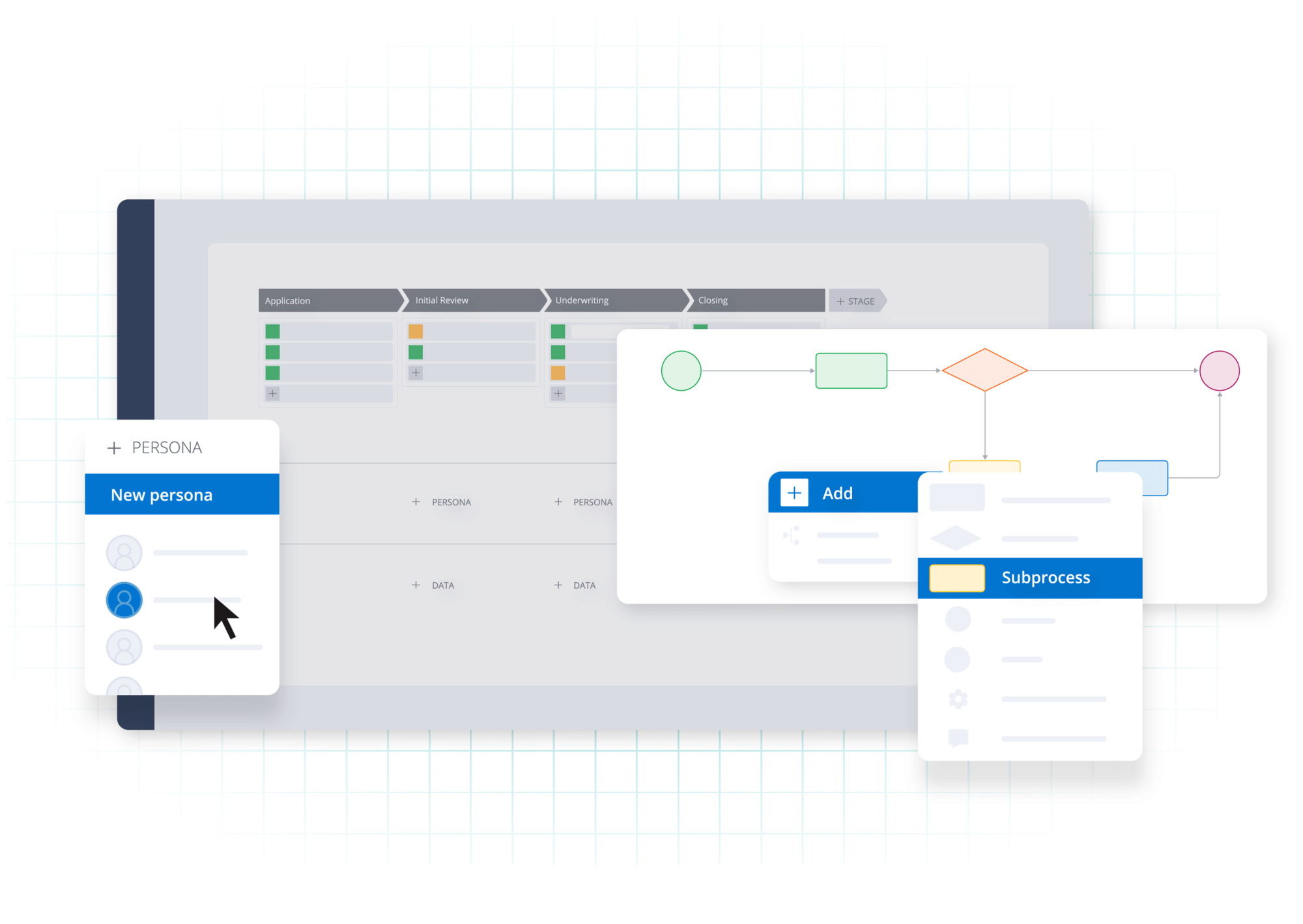 Pega’s App Studio - enterprise-grade capability that assumes dedicated process architecture teams
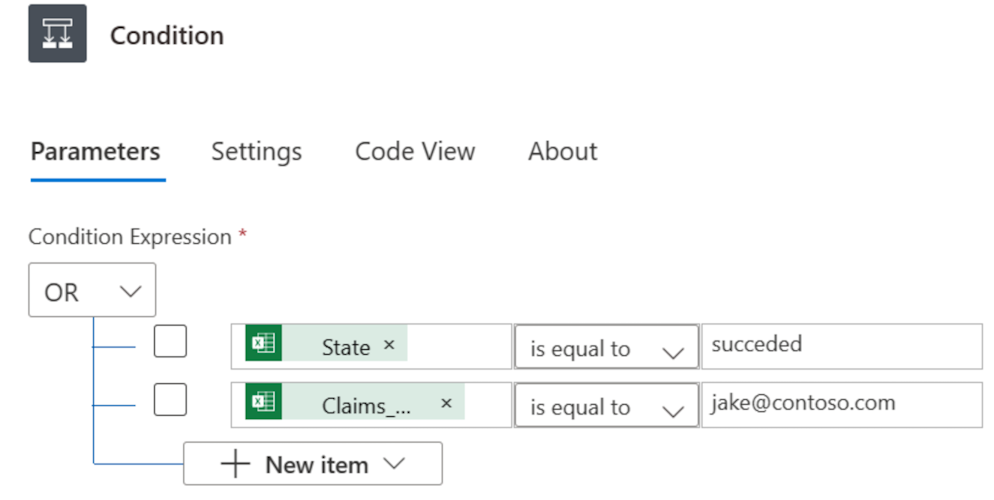 Power Automate’s condition builder - even Microsoft’s “simple” automation requires technical thinking
Appian - the AI-focused enterprise platform
Appian positions itself as a leader in enterprise low-code and process automation. The AI investment is genuine, not marketing.
Where it excels:
Large enterprises needing sophisticated process orchestration across multiple systems. Has AI capabilities. Handles complex scenarios that simpler tools can’t touch. The platform has significant capability - along with significant complexity.
The reality check:
Pricing is enterprise-scale - think six figures annually as a starting point. Implementation requires their professional services or certified partners. The “low-code” label still assumes technical users who understand process modeling.
Mid-market companies rarely have the resources to implement successfully. Companies with 300 employees often buy Appian, spend a year implementing, and end up with a fraction of what they expected.
Who should consider:
Enterprises with 2000+ employees. Dedicated process architecture teams. Multi-year budget for implementation. Complex multi-system integration requirements.
- Up to 15 users
- Testing only
- Limited access
- Full automation
- Advanced capabilities
Pega - enterprise complexity leader
Pega represents the upper tier of enterprise BPM. This is serious software for serious enterprises.
Where it excels:
Fortune 500 companies with dedicated process teams. Multi-year transformation initiatives. Complex case management. AI-driven next-best-action capabilities. The platform attempts scenarios most tools avoid.
The reality check:
This isn’t mid-market software. Implementation timelines are measured in years. Expertise is expensive and genuinely hard to find. Success requires significant organizational commitment beyond just buying software.
If you’re evaluating Pega and you’ve got fewer than 5,000 employees, you’re probably in the wrong category.
Expect sales calls and unpredictable costs. Hard to budget or compare.
See Tallyfy's transparent pricing insteadNintex - SharePoint’s complicated friend
Nintex emerged from SharePoint and maintains deep Microsoft ecosystem integration.
Where it excels:
Organizations deeply invested in Microsoft infrastructure who want process automation integrated with their existing stack. SharePoint workflows. Power Platform integration. Microsoft-centric environments.
The reality check:
The Microsoft focus can be limiting. Pricing is at the higher end. Implementation complexity increases with automation sophistication. The SharePoint legacy creates technical debt for some deployments.
G2 reviews mention steep learning curves, complex licensing, and implementations that take much longer than expected. One reviewer described 18 months to see meaningful results.
Expect sales calls and unpredictable costs. Hard to budget or compare.
See Tallyfy's transparent pricing insteadCamunda - for developers only
Camunda takes a developer-first approach to process orchestration. Open source core with commercial options.
Where it excels:
Organizations with strong development teams who want fine-grained control over process execution. Microservices orchestration. Complex integration scenarios. Developers who want to code their process automation.
The reality check:
This is software for developers, not business users. If your operations team can’t write code, they can’t build workflows in Camunda. The platform assumes technical capability that most mid-market companies lack.
Good for engineering-led process automation. Wrong choice if business users need to build and modify processes themselves.
- Non-production use
- Community support
- Cloud hosted
- Full features
- You host
- 24x7 support
ServiceNow - the ITSM giant
ServiceNow expanded from IT service management into broader workflow automation.
Where it excels:
Organizations already using ServiceNow for IT operations who want to extend workflow automation to other departments. IT-centric process automation. Incident-driven workflows.
The reality check:
The IT service management roots show everywhere. The platform thinks in tickets and incidents, which doesn’t always translate to business process thinking. Pricing assumes enterprise scale.
For non-IT departments, the ITSM mental model creates friction. Business users expect to build processes, not submit tickets.
Expect sales calls and unpredictable costs. Hard to budget or compare.
See Tallyfy's transparent pricing insteadOracle BPM - legacy enterprise
Oracle BPM serves organizations in the Oracle ecosystem needing process automation integrated with Oracle applications.
Where it makes sense:
Companies running Oracle ERP, HCM, or other Oracle applications who want tight integration with their existing stack. Oracle-centric IT environments.
The reality check:
Legacy pricing. Legacy complexity. Legacy implementation timelines. If you’re not already deep in Oracle, this makes no sense. If you are deep in Oracle, you’re probably already using it or considering it.
Expect sales calls and unpredictable costs. Hard to budget or compare.
See Tallyfy's transparent pricing insteadIBM BPM - Blue Giant’s offering
IBM’s business automation tools serve large enterprises with complex process requirements and existing IBM investments.
Where it excels:
Organizations already in IBM’s ecosystem. Complex enterprise workflows. Legacy system integration.
The reality check:
Requires consultants. Long implementation timelines. Enterprise pricing. If you’re not already an IBM shop, there’s no reason to start with BPM.
Expect sales calls and unpredictable costs. Hard to budget or compare.
See Tallyfy's transparent pricing insteadTools that claim to be BPM but aren’t
Project management software and task trackers keep appearing in BPM searches. Let me be clear: they’re not BPM.
Monday.com - great for projects, wrong for processes
Monday.com has colorful boards. Timeline views. Collaboration features that work for projects.
The problem:
Projects end. Processes repeat. Monday.com was designed for unique initiatives, not repeating workflows.
Try using it for employee onboarding happening 50 times a month and you hit walls fast. Duplicating boards. Tracking across hundreds of instances. The tool fights you because it wasn’t designed for this.
- Up to 2 users
- 3 boards
- Minimum 3 seats
- Timeline view
- Automations
- 25,000 automations/month
- Advanced security
- SSO
Asana - task management, not process management
Asana has a clean interface. It helps teams track tasks. But it’s not BPM software.
Asana tracks tasks. It doesn’t automate process sequences. When someone finishes their task, you still manually assign the next one. You send the reminders. You check status.
BPM software handles routing automatically. Asana requires you to do that work.
- Up to 10 teammates
- Timeline view
- Workflow builder
- Goals
- 25K automations/month
- SAML SSO
- Priority support
Why BPM projects fail and what to watch for
BPM vendors have perfected the art of making mid-market companies feel inadequate.
BPMN is a horrific solution to a problem that does not exist.
The demo starts with impressive flowcharts. Complex process diagrams appear on screen. The presenter talks about digital transformation, process excellence, operational efficiency. AI gets mentioned. Integration capabilities appear endless. The pricing? “Let’s schedule a call to discuss your specific needs.”
What they don’t mention:
The demo process is not real
That beautiful workflow on screen? It was built by specialists over months. It does not represent what your team can build on Tuesday afternoon. We kept hearing the same frustration from operations leads — the gap between demo complexity and what you’ll actually achieve is jarring.
We’ve talked to teams who managed to cut their onboarding time by 64% - from 14 days down to 5 days - once they stopped chasing the complex enterprise demo and picked something simple enough to use. Another operations team saved $150,000 annually just by avoiding the consultants required for enterprise tools.
Professional services are assumed
Enterprise BPM vendors expect you to buy implementation help. It’s baked into their business model. “The software is just the platform” - and the platform is useless without expensive consultants.
The consultant dependency trap runs deeper than initial implementation. When the project ends and consultants leave, nobody internal truly understands what was built. Every future change requires bringing consultants back. I’ve seen companies locked into this cycle for years, unable to modify their own processes without expensive outside help.
Your processes don’t need BPMN
BPMN (Business Process Model and Notation) is a formal specification for process diagrams. It’s powerful. It’s also complete overkill for 90% of business processes. You don’t need certified notation to automate expense approvals.
Complexity sells, simplicity works
The counterintuitive part is that sophisticated demos win budgets while simple tools win usage. These rarely align. The impressive platform that wowed the executive team often frustrates the operations team who has to use it daily.
The switching cost trap
Multi-year contracts lock you in. By the time you realize the implementation is struggling, you’re committed. The vendor knows this. Their incentive is to close the deal, not ensure successful adoption.
No proper documentation available… life has become miserable… I cannot even switch to another BPM product.
This pattern destroys budgets repeatedly. A mid-market company with 300 employees buys enterprise BPM. Eighteen months later, they’ve spent hundreds of thousands on software and services. They’ve got three automated workflows. The operations team went back to email months ago.
Common failure patterns
These failure patterns destroy projects regularly:
The governance paralysis
Someone decides that all processes need formal approval before automation. A committee forms. Meetings multiply. Months pass while the committee debates process modeling standards. Meanwhile, the problems remain unsolved.
The solution: start with one process. Automate it. Improve it. Then move to the next. Just ship it. Governance should follow success, not precede it.
The integration obsession
The IT team wants the BPM platform to integrate with everything. CRM. ERP. Accounting. HR systems. Email. Calendar. Before automating any process, they need “a complete integration architecture.”
Six months of integration work later, nobody’s automated anything. The integrations exist, but no workflows use them.
The solution: start with manual handoffs. Integrate where it saves significant time. Most processes work fine with people moving data between systems.
The training gap
Business users can’t build processes in the platform. IT builds everything. Every change request becomes a ticket. Backlog grows. Business users find workarounds. The platform becomes a bottleneck instead of an enabler.
The solution: pick tools business users can configure themselves. Test this during evaluation - can your operations manager build a workflow in 30 minutes without IT help?
The scope explosion
The project started with employee onboarding. Then someone adds procurement. Then contract approval. Then compliance workflows. Then success processes. The scope triples. The timeline extends. Complexity multiplies.
The solution: finish one process before starting another. Prove value. Build capability. Expand deliberately.
The change resistance
Employees know the new system is coming. They also know email still works. They wait it out. Usage stays low. Management pushes adoption mandates. Resistance goes underground. People find ways around the system.
The solution: make the new way the only way. Kill the alternatives. When email stops being an option for approvals, people use the approval system. No exceptions.
Warning signs during evaluation
Certain patterns predict BPM failure:
You’ll need our professional services - If vendors assume you need expensive consultants before starting, the software is too complicated for your team. Every change becomes a budget request.
Custom pricing only - Opacity hides unpleasant surprises. Transparent pricing correlates with transparent software.
Multi-year contracts required - Why would confident vendors need to lock you in? Good software retains people through value, not contracts.
BPMN certification mentioned - Unless you’re a Fortune 500 with a dedicated process architecture team, you don’t need flowchart certification to automate approvals.
Total cost and how to decide
BPM pricing is confusing by design. Here’s what matters:
Is your BPM tool working?
Are you hearing this at work? That's busywork
Enter between 1 and 150,000
Enter between 0.5 and 40
Enter between $10 and $1,000
Based on $30/hr x 4 hrs/wk
Your loss and waste is:
every week
What you are losing
Cash burned on busywork
per week in wasted wages
What you could have gained
160 extra hours could create:
per week in real and compounding value
Total cumulative impact over time (real cost + missed opportunities)
You are bleeding cash, annoying every employee and killing dreams.
It's a no-brainer
Licensing costs are just the beginning
Enterprise platforms quote per-user-per-month pricing that looks reasonable. But implementation doubles or triples the first-year cost. Training programs add more. Ongoing administration requires staff. Premium support costs extra.
A $30/user/month platform can easily become $100/user/month when you factor in everything required to use it.
Implementation consultants multiply costs
Enterprise BPM vendors assume you’re buying professional services. Budget $200,000-500,000 for initial implementation of major platforms. That’s standard, not excessive.
Modern cloud tools implement without consultants. The total cost difference is dramatic.
Training has a real price
BPMN certification programs take weeks. Multiply that by everyone who needs to build or modify processes. Include the opportunity cost of people not doing their regular jobs.
Simple tools train in hours. The difference compounds over time.
Administration is ongoing
Enterprise platforms need dedicated administrators. At least a half-FTE for smaller deployments. Full-time or more for larger ones. That’s salary, benefits, and management overhead - forever.
Modern tools require minimal ongoing administration. Occasional configuration. No dedicated role needed.
Change requests cost money
In complex systems, every process modification requires skilled resources. Internal if you’ve got them. External if you don’t. Either way, change has a cost that accumulates over time.
Simple tools let business users make changes themselves. No cost per modification. That matters.
Calculate five-year TCO, not annual licensing
A platform that costs $20/user/month but requires $300,000 in implementation and $50,000/year in administration is more expensive than a $50/user/month platform that requires nothing beyond licensing.
Do the math. Include everything. The “expensive” simple tool is often cheaper than the “affordable” enterprise platform.
One financial services team we spoke with was managing 500+ investment deals and spending $7,500 per quarter just on workflow coordination overhead - piles of emails, duplication, rework. The total cost of their “free” internal process was far higher than any software would’ve been.
How to make your decision
Forget feature checklists. Answer these questions honestly:
What’s your timeline?
Need results this quarter? You’re in modern BPM territory. Cloud tools. Simple interfaces. Implementation in days or weeks.
Can you wait 12-18 months? Enterprise platforms become feasible. But be honest about whether you’ve really got that patience.
Who’s building the processes?
IT builds everything, business users just execute? Enterprise tools can work.
Business users need to create and modify processes themselves? Complexity kills you. Test this during trials. Can your operations manager build a real workflow in 30 minutes without IT help?
What’s the budget reality?
Under $50/user/month with minimal implementation costs? Modern BPM.
Six figures for software plus another six figures for implementation? Enterprise BPM.
Don’t buy enterprise tools with mid-market budgets. The implementation will fail.
Who’s involved in your processes?
Only employees? Most tools handle this.
Outside parties - vendors, partners, external teams? Many tools fail here. Account requirements. Password friction. Invitations that expire. Tallyfy’s guest approach solves this specifically.
What success looks like
When BPM software works, you notice the absence of problems.
The status meeting dies
Nobody asks “where does this stand?” because everyone can see real-time status. No more Monday check-ins to discover what happened last week. No more chasing people for updates. The system shows what’s waiting on whom.
Exceptions surface automatically
That approval stuck for two weeks? The system flags it. Bottlenecks become visible before they become crises. You manage by exception instead of managing everything.
Onboarding accelerates
New employees follow documented processes instead of learning through tribal knowledge. The process exists in the system, not in someone’s head. Knowledge doesn’t walk out when people leave.
Outside parties notice the difference
External teams and partners experience consistency. Every engagement gets the same professional process. Deliverables arrive predictably. They don’t know it’s automated. They just know your company has its act together.
Spreadsheets disappear
The monthly tracker that someone manually updates? Gone. The workaround someone invented because the old system was too complicated? Unnecessary. The system becomes the system.
Nobody thinks about the software
Good BPM fades into the background. People do their work. The system handles routing and tracking. Nobody thinks about the platform. They think about the work. That’s the goal.
That’s what you’re buying. Not impressive demos. Not sophisticated BPMN diagrams. Quiet productivity where processes just work.
Frequently asked questions
What’s the difference between BPM and workflow automation?
BPM (Business Process Management) is the discipline of analyzing, designing, executing, and improving business processes. Workflow automation is the tactical tool that executes task sequences automatically.
Traditional BPM emphasized modeling and analysis before automation. Modern approaches often skip extensive modeling and go straight to execution, improving iteratively.
For most mid-market companies, the distinction matters less than the outcome: do your repeating processes run smoothly without manual coordination?
How much does BPM software cost?
Modern cloud BPM: $10-50 per user per month with minimal implementation costs.
Enterprise BPM: $50-200+ per user per month, plus implementation costs of $100,000-500,000+ for professional services.
Total cost of ownership for enterprise platforms is typically 3-5x licensing when you factor in implementation, training, and administration.
Do we need BPMN expertise for BPM software?
With modern tools, no. You describe processes in plain language. The system handles execution.
With enterprise platforms, often yes. BPMN notation, process modeling skills, and sometimes certification become prerequisites.
If someone insists you need flowchart training before automating approvals, they’re selling complexity you probably don’t need.
Why do BPM projects fail?
The primary cause is complexity mismatch - organizations buy tools more sophisticated than they can implement.
Secondary causes: lack of executive sponsorship, insufficient change management, technology-first thinking that ignores adoption, trying to automate too much at once.
Successful BPM projects start small with one high-impact process, prove value, then expand. Failed projects attempt enterprise-wide transformation from day one.
How long does BPM implementation take?
Modern cloud tools: first workflow running in hours. Meaningful automation in 2-4 weeks.
Enterprise platforms: initial deployment 3-6 months. First significant value 6-12 months. Full implementation 1-2+ years.
Choose your timeline first. Then select tools that realistically fit.
Can small businesses use BPM software?
Yes, often more effectively than large enterprises. Small businesses with 10-50 employees lose proportionally more productivity to inefficient processes.
The key is choosing appropriately-sized tools. Enterprise BPM is overkill and will fail. Simple workflow tools that your team adopts immediately deliver value quickly.
How do we get employees to use BPM software?
Pick simpler tools. The number one adoption killer is complexity.
Start with one painful process. Automate it. Show the win. Build from there.
Involve future users in selection. If they help choose the tool, they’re more likely to use it.
Kill alternatives. If email still works for approvals, people will use email. Make the new system the only path.
What security features should BPM software have?
Basics: SOC 2 compliance. Data encryption. Role-based access controls. Audit trails.
For regulated industries: data residency options. SSO integration. Detailed permissions granularity.
Don’t accept vague claims. Ask for compliance certifications. Review security documentation. Tallyfy’s security shows what transparency looks like.
How do we handle processes involving external people?
Most BPM software assumes all participants have accounts. That assumption fails for processes that cross organizational boundaries.
Requiring outside parties to create accounts creates friction. Passwords get forgotten. Invitations expire. “I never got the email” becomes daily conversation.
Look for tools that handle external participants without account requirements. Tallyfy’s guest links solve this - one permanent URL, no password needed. For processes regularly involving vendors, partners, or contractors, this capability becomes essential.
Should we document processes before automating?
The traditional BPM approach says yes - model extensively, then automate. This delays value by months.
The modern approach: automate first, document as you go. Get something running. Improve it. The act of automating creates documentation naturally.
Exception: heavily regulated industries sometimes require process documentation before execution. If compliance mandates formal documentation, do it. Otherwise, skip to automation.
What happens when processes need to change?
This matters more than people realize during evaluation.
Good BPM software: modify the template, running instances continue unaffected, new instances use the updated version. Version history maintained.
Bad BPM software: changes require IT. Modifications break running instances. Versioning creates confusion. Every change needs testing.
Test this during trials. Create a process. Run some instances. Modify the template. See what happens to running work.
Can BPM software integrate with our existing tools?
Good ones do, through middleware like Zapier or Make.
The question is whether integration requires IT involvement. Ask vendors: “Can a business user configure an integration with our CRM?” If the answer involves developers, tickets, or professional services, the integration isn’t really self-service.
Native integrations are nice but rarely cover everything you need. Middleware flexibility matters more than extensive native integrations.
How do we measure BPM success?
Start with simple metrics that matter:
Process completion time - How long from start to finish? Track this before BPM, track after. The improvement should be measurable.
Exception rates - How often do processes stall or fail? Good BPM reduces exceptions through automation and visibility.
Adoption - Are people using it? Track active users. Track process runs. If usage is low, something’s wrong.
Time to first workflow - How long from purchase to first real process running? Days is good. Months is bad.
Avoid vanity metrics. “Number of workflows created” means nothing if nobody runs them.
What’s the difference between BPM and RPA?
BPM (Business Process Management) designs and executes business processes - the sequence of tasks, approvals, and handoffs that accomplish work.
RPA (Robotic Process Automation) mimics human actions in software - clicking buttons, copying data, navigating interfaces.
BPM is about the process itself. RPA is about automating manual actions within processes.
They can work together. BPM handles the workflow. RPA handles the tedious data entry. But they solve different problems.
Most companies need BPM more than RPA. Process automation delivers more value than task automation.
When should we consider enterprise BPM?
Enterprise BPM makes sense when:
- You’ve got 2000+ employees
- You’ve got dedicated process architects
- Implementation timelines of 12-18 months are acceptable
- Budget allows for six-figure implementations
- Complex multi-system integration is genuinely required
- Process mining is a strategic priority
If you checked fewer than four of those boxes, modern BPM is probably better.
Don’t buy enterprise capability for mid-market reality. The implementation will fail.
How do we transition from spreadsheets to BPM?
Most companies run processes in spreadsheets and email. Transitioning requires care:
Pick one process - Not the most complex one. Pick something that happens frequently, causes friction, and involves clear steps.
Build the new workflow - Get it running in the BPM tool while the old method continues.
Run both briefly - Parallel operation catches gaps. People see the new way working.
Kill the old method - Stop accepting spreadsheet submissions. Make BPM the only path.
Expand - Once one process works, add another. Build capability gradually.
Don’t try to migrate everything at once. Sequential wins beat parallel failures.
What mistakes should first-time BPM buyers avoid?
The big ones:
Buying for features you might need - You’ll never use most enterprise features. Pay for what you need now.
Choosing based on demos - Demos show ideal scenarios. Test with your actual processes during trials.
Underestimating adoption challenges - The software is easy. Getting people to use it is hard. Budget time for change management.
Ignoring total cost - Implementation, training, and administration often exceed licensing cost.
Starting too big - One process first. Prove value. Then expand.
Accepting custom pricing - Opacity hides bad deals. Insist on transparent pricing.
About the Author
Amit is the CEO of Tallyfy. He is a workflow expert and specializes in process automation and the next generation of business process management in the post-flowchart age. He has decades of consulting experience in task and workflow automation, continuous improvement (all the flavors) and AI-driven workflows for small and large companies. Amit did a Computer Science degree at the University of Bath and moved from the UK to St. Louis, MO in 2014. He loves watching American robins and their nesting behaviors!
Follow Amit on his website, LinkedIn, Facebook, Reddit, X (Twitter) or YouTube.

Automate your workflows with Tallyfy
Stop chasing status updates. Track and automate your processes in one place.