
Why kanban sounds great but does not scale for workflows
Kanban boards look beautiful in demos. Three columns, cards moving left to right, visual satisfaction. But when you have 10+ task states, multiple processes running simultaneously, and people need to edit data inline, the card metaphor falls apart. At Tallyfy, we learned this the hard way.
Summary
- Kanban columns break at scale - A typical workflow has 10+ states. Kanban boards become horizontal scrolling nightmares when you add columns for “Waiting for Review,” “Pending Approval,” “Needs Rework,” and every other real-world status
- Tables handle presentation AND editing - The spreadsheet metaphor does both in one shot. Click a cell, change a value. No modal popups, no card expansions, no context switching. People already know how spreadsheets work
- Multiple processes need unified views - Kanban assumes one board per workflow. Real operations teams track 15 different process types simultaneously. Table views handle single AND multiple process tracking in the same interface
- Users graduate FROM kanban TO BPM - Teams start with simple task boards for simple task lists, then discover they need actual workflow management. The transition is always kanban to structured processes, never the reverse. See how Tallyfy tracking works
Workflow tracking at scale requires dense data views. Here’s how we approach work management.
Work Management Made Easy
This is our candid experience with view design at Tallyfy. This reflects our experience at a specific point in time. Some details may have evolved since, and we have omitted certain private aspects that made the story equally interesting.
The request comes up constantly. In 2018, a customer from a hospitality software company asked us directly:
A Kanban Board… If each step of the blueprint could be assigned to a tag.
We’ve heard this request dozens of times since. The visual appeal is obvious - cards moving across columns feels satisfying. Card-based tools built entire businesses on that satisfaction.
In our conversations with operations leaders evaluating workflow tools, we noticed a consistent pattern. A web development agency owner told us directly: “These project management tools either lacked the client facing piece, data collection in forms or the ability to truly string tasks together in an automated process.” They had evaluated Asana and Trello before realizing kanban boards couldn’t handle their actual requirements.
But here’s what I wrote to the team in May 2019, after years of watching this pattern:
I suggest closing this view for now, as it is not as scalable or dense as the table view.
That was a hard decision. Kanban views are sexy in demos. They photograph well for marketing. Prospects instantly understand them. Closing that feature request felt like leaving money on the table.
It was the right call.
The density problem
In April 2018, I laid out the core argument in a Basecamp discussion:
The thing about spreadsheet/table/grid view is that it does both presentation and editability in one shot.
This is the fundamental difference. I expanded on this in another thread:
Tables are info-dense and people are familiar with spreadsheets (hence the success of smartsheets.com) - so this should play much better for serious customers than card-like views e.g. Trello.
The Smartsheet reference wasn’t casual. They built a business on the insight that serious operations people think in rows and columns, not cards and columns - though their execution left much to be desired. A kanban card shows you a summary. Want to edit something? Click the card. Wait for the modal. Find the field. Make your change. Close the modal. Now multiply that by 50 tasks.
A table cell? Click it. Type. Done.
Our CTO articulated this even more clearly:
I think that a kanban board format is interesting, but I am more interested in: 1. Further refining the Tasks page. 2. Creating a run view with high data density.
High data density. That phrase captures everything.
When you’re managing real workflows - not a personal to-do list, but actual business processes with deadlines, assignees, form data, and status indicators - you need to see a lot of information at once. Kanban sacrifices density for visual appeal. Which looks great in demos, not so much on a Tuesday.
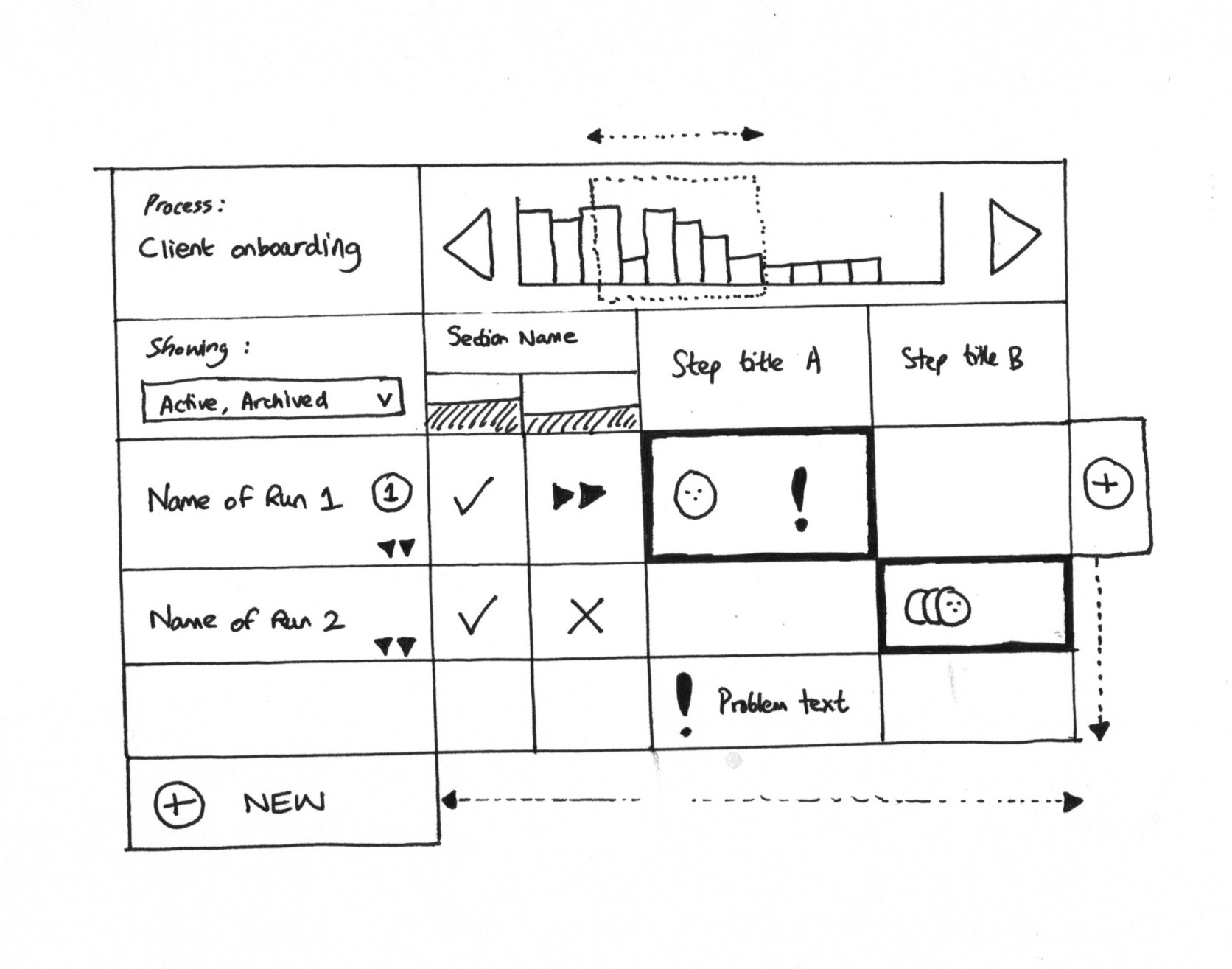
Early grid view sketch: rows are process instances, columns are steps. Each cell shows status at a glance without clicking anything.
The column explosion
Here’s a practical problem nobody talks about in kanban demos.
A simple kanban board has three columns: To Do, In Progress, Done. Beautiful.
A real workflow might have: Not Started, In Progress, Waiting for Input, Under Review, Pending Approval, Approved, Needs Revision, Blocked, On Hold, Completed, Cancelled, Archived.
That’s twelve columns. On a laptop screen. Good luck dragging cards across that without horizontal scrolling.
And that’s just one process type. What happens when your operations team tracks employee onboarding, vendor approvals, customer complaints, and equipment requests? Four separate kanban boards? Constant tab switching?
Real workflows that break kanban
These multi-step processes need table density, not card columns
The column problem gets worse, mind you, when you consider what information lives on each card. In one discussion about what a grid view should show, the requirements kept growing:
Showing: Active, Archived. Section Name. Step title A. Step title B.
Simple enough. But then add status indicators, assignee avatars, deadline warnings, problem flags. Each cell becomes a mini-dashboard. Kanban cards can’t handle this density without becoming clunky, cluttered messes.
The Trello graduation pattern
Pravina, who handled many of our early conversations, noticed something interesting:
Most of our users have been using these [Trello, monday.com] for a long time and look to transition to a BPM (Tallyfy) as they scale.
Read that carefully. Users transition FROM kanban tools TO workflow management. Not the other way around.
Turns out, this observation matched feedback from a software company managing multiple web-based applications. Their CEO had evaluated Kissflow, Pipefy, Process Street, and project management apps like Trello and Basecamp. His conclusion: “We realized we needed the power and flexibility of an enterprise system that also had the simplicity of an agile cloud app.” Kanban boards failed because they tracked individual tasks rather than groups of related tasks moving through a coherent process.
This is the natural progression. A team starts small. Five people, simple tasks, basic kanban works fine. The business grows. Suddenly they need:
- Conditional logic (if this approval fails, go back to step 3)
- Form fields attached to tasks
- Deadline calculations based on previous step completion
- Audit trails for compliance
- Multiple people working the same process type simultaneously
Kanban was never designed for this. Actually, that overstates it a bit. It’s a visualization technique borrowed from Taiichi Ohno’s manufacturing at Toyota, designed for physical cards on physical boards with physical WIP limits. The digital translation loses most of what made it work.
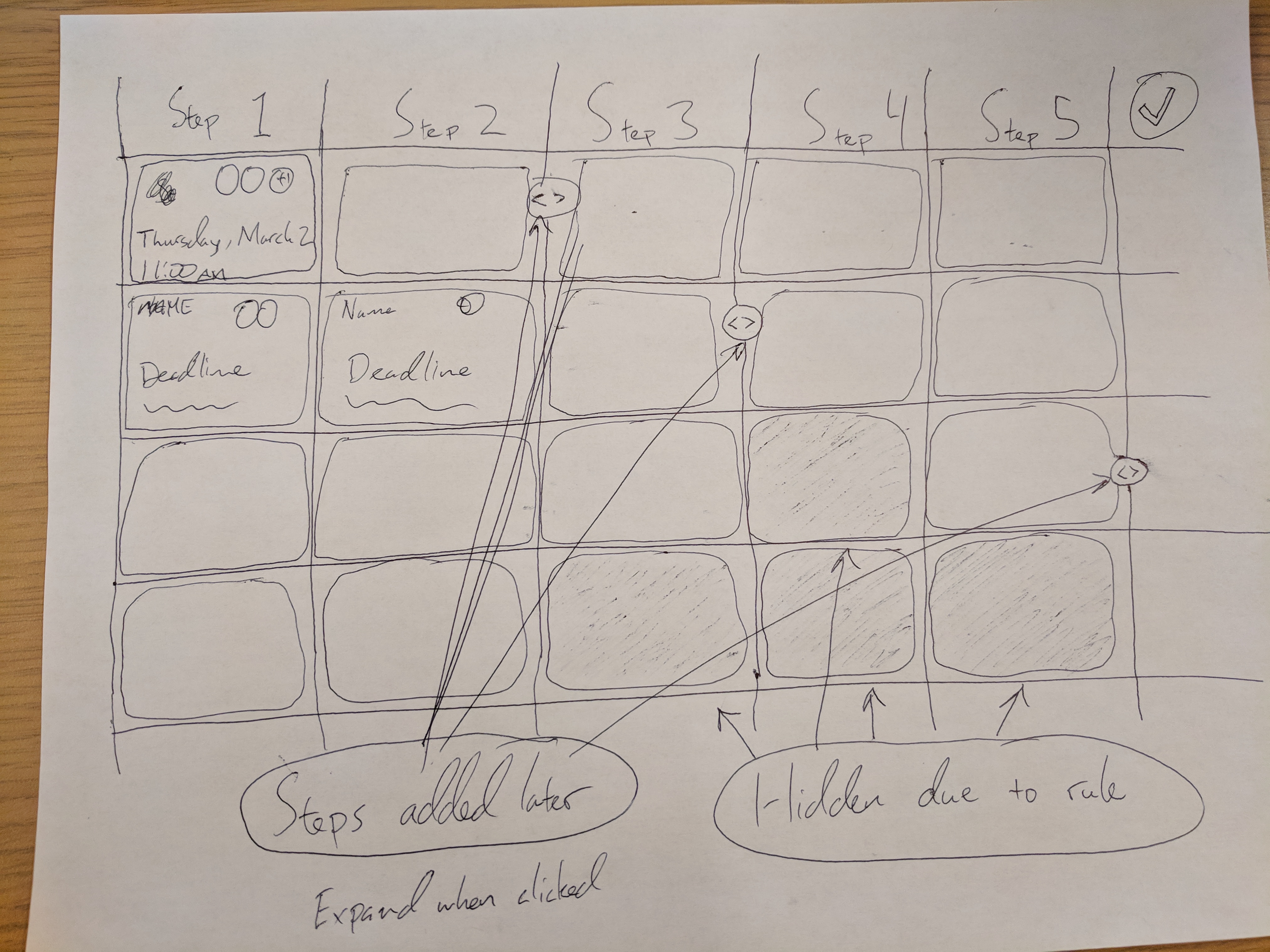
Our Product Manager’s whiteboard sketch: the table approach handles dynamic step additions and conditional visibility naturally. Try doing that with kanban columns.
The lost prospect
I’ll be honest about this. We lost deals because we didn’t have kanban.
Our tracking for Kanban board view for task management documented one case:
Lost a prospect to rocketlane.com who specifically wanted Kanban functionality.
That stings. Losing business because you deliberately chose not to build a feature that prospects ask for.
But here’s the thing: that prospect was basically looking for a task board, not workflow management. They would have churned anyway once they realized kanban doesn’t solve the problems they actually had.
The companies that stick around are the ones who tried kanban, hit its limitations, and specifically searched for something more structured. Those are the conversations where we win.
Why monday.com missed it
We studied competitors extensively. One assessment I wrote about Roy Mann’s monday.com (formerly DaPulse) captured the core issue:
Really for tasks, not groups of tasks (runs).
This distinction matters more than it sounds. A kanban board manages individual tasks. A workflow system manages groups of related tasks that form a coherent process.
In another competitor analysis, I noted the fundamental confusion:
monday.com is really for tasks, not groups of tasks (runs). The kanban metaphor breaks when you need to track 50 instances of the same process moving through 12 steps each.
A kanban board asks: “What stage is this card in?” A workflow tracker asks: “How far along is this entire process, and which step is blocking progress?”
When you onboard a new employee, you don’t have random floating tasks. You have a sequence: paperwork, then equipment setup, then training, then manager introduction. The tasks are connected. Completing one triggers the next. The whole bundle moves through the organization together.
Kanban flattens this structure. Every task becomes an independent card. The relationship between tasks disappears. The process becomes invisible.
Table views handle both cases
Here’s what Walker was getting at with “high data density.” A table view works for:
Single process tracking: One row per instance of a process (like one row per employee being onboarded). Columns show each step. Cells show status. You see 30 onboardings at once without scrolling.
Multiple process tracking: Rows can be different process types. Filter by type when you need to. Or view everything your department is responsible for in one screen.
Cross-functional visibility: Managers see their team’s work. Executives see department summaries. Same interface, different filters.
Try building that flexibility into a kanban board. You can’t. The column metaphor assumes everything moves through the same stages. Real organizations don’t work that way.
The editing problem
I keep coming back to this point because it matters so much in daily use. At Tallyfy, we have observed this countless times - the original insight came from watching how people actually work:
The thing about spreadsheet/table/grid view is that it does both presentation and editability in one shot.
There’s a reason Excel conquered the business world. Not because spreadsheets are pretty - they’re not. Because the mental model of “click cell, type value” is burned into everyone’s muscle memory.
Watch someone use a kanban tool for an hour. Count how many times they:
- Click a card
- Wait for it to load
- Find the field they need
- Make a small change
- Close the card
- Repeat
Now watch someone use a spreadsheet. They click a cell. They type. They press Tab. They type in the next cell. The flow never breaks.
When you’re processing 50 tasks in a batch - approving expenses, reviewing applications, updating statuses - that friction compounds. Two extra clicks per task times 50 tasks times three times per day adds up to hours lost weekly.
When kanban actually works
I’m not saying kanban is useless. It works well for:
- Personal task management (limited number of items)
- Software development sprints (well-defined stages, one team, one board)
- Physical manufacturing (where it was invented)
- Simple project tracking (less than 20 active items)
The common thread? Limited scale, simple states, single-process focus.
The moment you add complexity - multiple simultaneous processes, conditional logic, form data, compliance requirements - kanban becomes a liability instead of an asset.
What we built instead
The tracker view in Tallyfy ended up looking nothing like kanban. Walker summarized the priority clearly:
I am more interested in: 1. Further refining the Tasks page. 2. Creating a run view with high data density.
High data density won. The tracker is closer to a spreadsheet with workflow superpowers.
Rows are process instances. Columns can be steps, or they can be data fields, or both. Cells show status indicators that update in real-time. Click a cell to see details or make edits. Filter, sort, group - all the spreadsheet operations people already know.
One key design decision: steps that get added dynamically (through automation or manual additions mid-process) show up as new columns. Steps hidden by conditional rules show as grayed-out cells. The whiteboard sketch captured this:
Steps added later. Hidden due to rule. Expand when clicked.
Try representing that in a kanban column. Where does a dynamically-added step go? How do you show that a step was skipped because a rule fired?
The interface is not as photogenic as a kanban board. It doesn’t demo as cleanly in a 30-second video. But the teams who use it daily - the ones managing 500 active processes across 12 different workflow types - they would never go back to cards.
The request still comes
People still ask for kanban. The visual appeal is undeniable. The familiarity is powerful.
We say no. Not because we can’t build it - the engineering is straightforward. We say no because it would make the product worse for the people who need it most. Will we ever build it? Probably not.
Some decisions in product development are about what you won’t build. This is one of them. The teams who need kanban have plenty of options. The teams who have outgrown kanban - those are the ones we’re building for.
To that customer from the hospitality software company, if you’re reading this years later, I hope you found what you were looking for. And I hope, eventually, you discovered why your workflows needed something more.
See how table-based tracking handles real workflow complexity.
About the Author
Amit is the CEO of Tallyfy. He is a workflow expert and specializes in process automation and the next generation of business process management in the post-flowchart age. He has decades of consulting experience in task and workflow automation, continuous improvement (all the flavors) and AI-driven workflows for small and large companies. Amit did a Computer Science degree at the University of Bath and moved from the UK to St. Louis, MO in 2014. He loves watching American robins and their nesting behaviors!
Follow Amit on his website, LinkedIn, Facebook, Reddit, X (Twitter) or YouTube.

Automate your workflows with Tallyfy
Stop chasing status updates. Track and automate your processes in one place.