
Why consensus over a step matters more than any feature
The biggest problem in workflow software was never technical. It was getting team agreement on who does what. This 2017 insight at Tallyfy shaped eight years of product decisions.
Team consensus is the foundation of workflow adoption. Here’s how we approach workflow management.
Workflow Made Easy
Summary
- This was our number one problem - Not features, not performance, not UI. Getting team agreement on who does what was the biggest barrier to workflow adoption.
- The insight came from watching users struggle - A single user building a process that touches eight people can’t succeed alone. They need those people to confirm their roles.
- Invitation without purpose fails - Generic app invites get ignored. Contextual requests to confirm specific steps get responses.
- The feature name debate - We went back and forth between “step approval” and “step consensus.” Thomas chose consensus. That word choice mattered.
- Real adoption barriers emerged from production - GitHub issues revealed patterns: users abandoning templates when one-off tasks became maintenance nightmares, admin bottlenecks blocking standard users from contributing.
This is our candid experience building consensus features at Tallyfy. This reflects our experience at a specific point in time. Some details may have evolved since, and we’ve omitted certain private aspects that made the story equally interesting.
The insight I want to share in this post is simple: features like rules engines, assignment logic, and guest access don’t matter if teams can’t agree on who does what. Consensus is the foundation everything else builds on.
September 1, 2017: The post that changed our direction
I posted this to our internal product design board under the title “Our most important problem + opportunity”:
“As a single user who just joined, I need to be able to get consensus over a step in a process from others who are involved in that process.”
That sentence took me hours to write. It sounds simple but it was the distillation of months watching users struggle.
The problem wasn’t technical. The problem was human.
“Not only would others get on board and confirm their role in a process, but they would also join Tallyfy with the right first experience. An example - if employee onboarding touches 8 people, how do I get others to confirm or update the step I said they do? How do you make my job of getting everyone using Tallyfy easier by making each of the 8 people feel a sense of ownership over their piece of the process?”
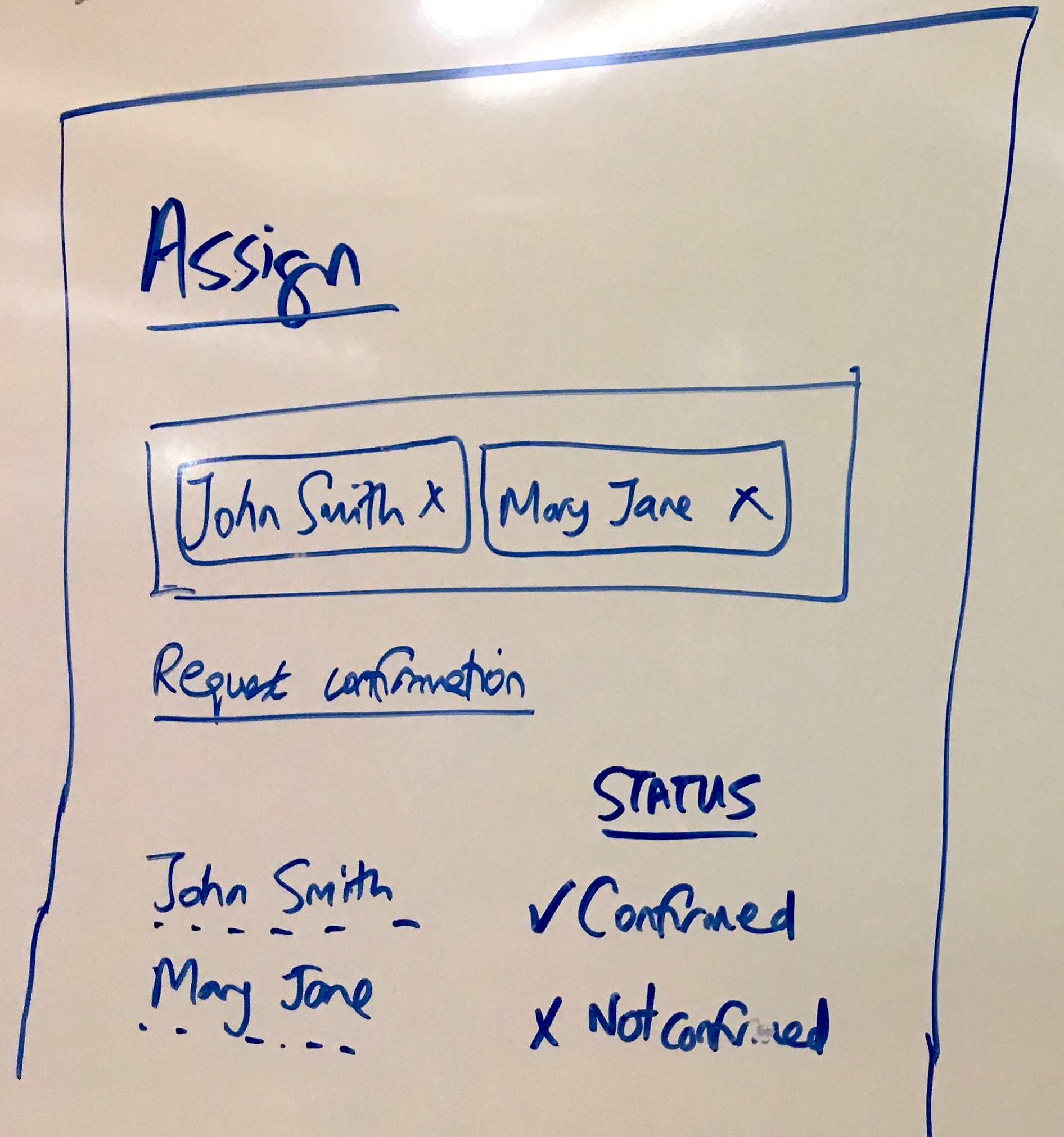 The original sketch from August 2017. Each step shows whether the assigned person has confirmed their ownership - one user confirmed, another not confirmed.
The assignment tab was the problem
I’d identified what I believed was our biggest architectural flaw:
“At present, we have the Assign tab - where a lone user assigns someone to do something. IMO - this is the biggest flaw and inversely - our greatest opportunity to get process consensus and grow Tallyfy within a company far more quickly through buy-in, solving both the adoption and invitation problem.”
Assignment was a clunky one-way operation. Someone decides, someone else gets told. No confirmation. No dialogue. No buy-in. That’s broken.
I pushed hard on this point:
“If we solve this - it takes us straight down to self-service and productization with hopefully, the pivot point to ridiculous growth.”
Bold claim. But honestly, I believed it.
The purposeful first experience
Generic invitations fail. People get hundreds of “someone invited you to an app” emails. Most get ignored. They don’t even open them.
I designed around context:
“If someone has never seen or heard of Tallyfy before, and gets an email like this - it makes the perfect contextual introduction into the app:
Janet has asked you to confirm that you do this step within PROCESS NAME:
STEP TITLE and other details
Button - Yes - I do this! Button - Suggest changes”
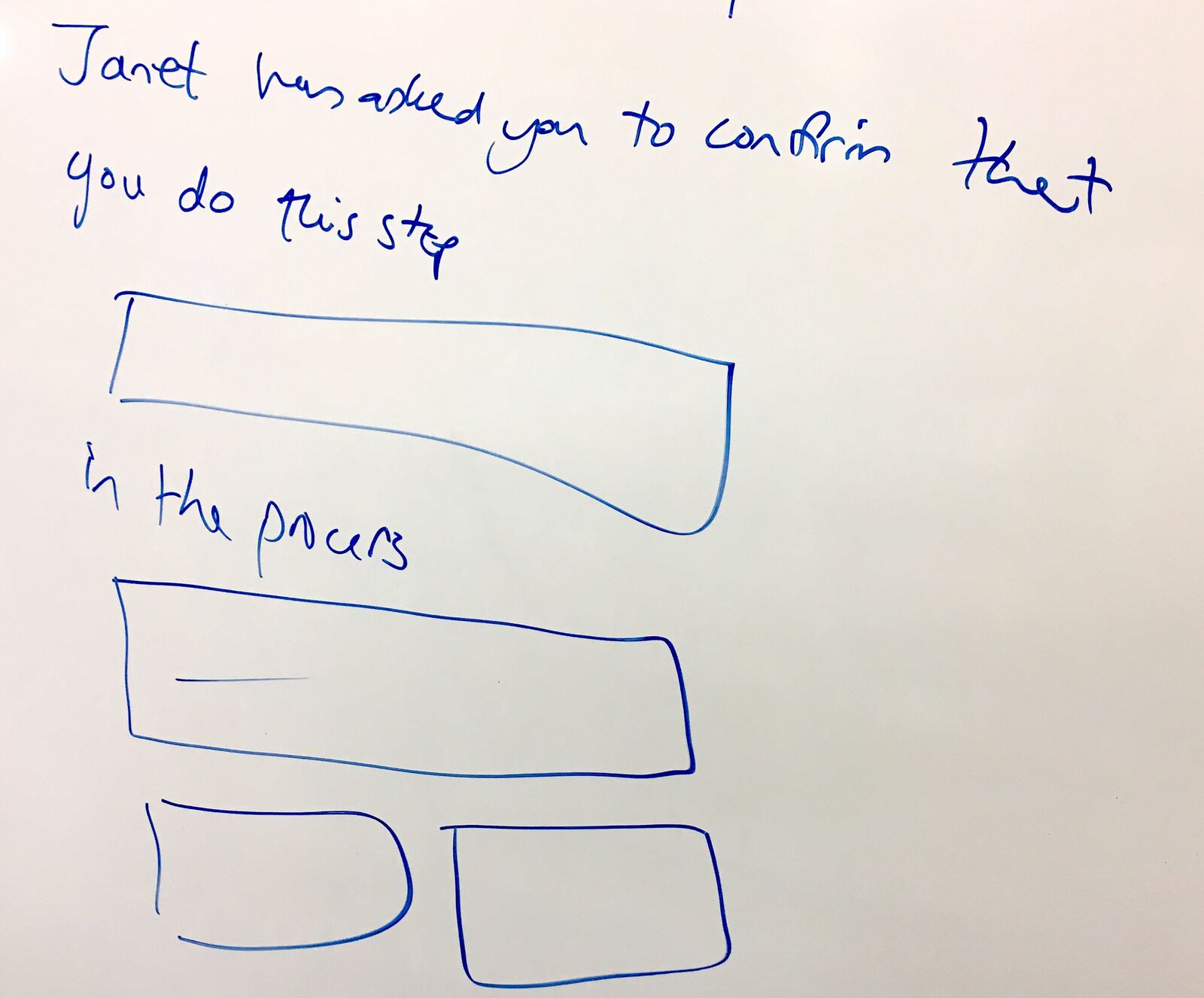 The invitee experience: not “join this app” but “Janet has asked you to confirm that you do this step.” Context drives action.
The micro-action model came from Mark Zuckerberg’s Facebook:
“If you think about a ‘micro-action’ on Facebook - ‘Are you my friend?’ - that is the road this is leading down.”
Small commitment. Clear context. Specific response.
The satisfaction of confirmation
I wanted the person who requested confirmation to feel rewarded when it worked:
“By designing a step to be confirmed by someone else - the inviter who requested that confirmation should feel proud that the micro-task of confirmation (something they initiated) worked - enhancing their feeling of ‘this app works’ and ‘I like it’.”
This wasn’t about features. It was psychology:
“It is as if step confirmation was a ‘clap’ for the inviter on its own email, along with more info e.g. the invitee changed step details - to draw even more conversation into the builder.”
Every successful confirmation reinforced the behavior. Every response pulled the team deeper into the tool.
The guilt of incomplete steps
Positive reinforcement was only half the equation. I also designed for negative feedback:
“We need to design the notion of a step being incomplete. I suggest we do it via progress bars for every step in the builder. This would encourage people to fill it out. I would go so far as to say that a process is not publishable unless we believe it is complete in terms of each step having a title and an owner as a minimum.”
Incomplete steps should feel incomplete. Visual indicators of missing information. Blocked publishing until basics are covered.
The goal wasn’t punishment but prompting.
Why this helped sales close faster
Our VP of Sales, Matt, was copied on all of this. The business case was clear:
“Our biggest sales problem is that a single user needs to get others on board in order to actually start using Tallyfy.”
During demos, we could accelerate this:
“While doing a demo, we could pour fuel over the consensus process by getting the person to say who does which step, as an email address.”
Then the retention hook:
“When someone has asked say, 5 people to confirm steps in a process, it is very hard for them to lose face and back out of Tallyfy - since they have to explain to their coworkers why he or she killed all the work the others did. We could supercharge retention and eventually, sales.”
Commitment creates stickiness. Not through lock-in but through social investment. There’s a difference.
The shared mental model connection
I shared a research paper with the team about shared cognition:
“This is a bit longer - but we are developing a ‘shared mental model’ so that a group can solve a problem.”
The link went to research from UC Santa Barbara on process mapping and team cognition. The academic framing helped explain why this mattered beyond product features. Teams that share a mental model of their work perform better. Workflow tools that force explicit agreement help build that shared model.
The internal debate about MVP
When Pravina pushed for implementation, the scope debate began:
“Will commenting on a step in a template be added to v2 as an MVP for ‘Consensus’? I think we could use the current task comment design for this.”
I had a different view:
“I think the MVP here is just to embed one-off tasking into the template builder, since it already exists.”
The user story was simple:
“I am building a template, and I want to task someone else to confirm information in a given step i.e. is it fully defined and accurate?”
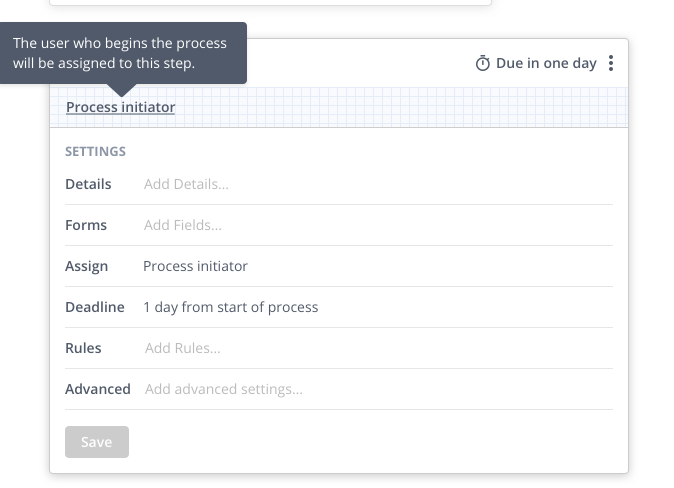 The step settings concept: Details, Forms, and Clarification tabs. The Clarification section would house consensus-related features.
Commenting versus tasking: The deeper debate
This debate went several rounds. Pravina advocated for comments as the simpler approach:
“I think a simpler MVP would be adding simple commenting to template step cards. Why is commenting better than one-off tasks as an MVP?
- It has context (it is on that step). Task cards have zero context and it is a long way away.
- An audit trail is kept (not possible with many tasks)
- The UI already exists for task cards, just plonk it under here.”
Valid points. Especially the audit trail argument, which was spot on. But I pushed back hard:
“Yea, I can see the commenting is simpler point. But commenting only results in a notification - you cannot achieve the point of this topic - growth through inviting someone else into Tallyfy. Whereas a task results in a new user acquired and proper accountability.”
The disagreement was productive. We needed both perspectives. That’s how good product decisions get made.
Pravina countered with practical concerns:
“If we use one-off tasks, the audit trail is lost. Comments keep everything visible in context. And we already have the UI for step comments on task cards.”
I saw her point about context, but the growth mechanism mattered more to me at that moment:
“A task creates a new user. A comment creates a notification. We need users, not notifications.”
Later, a GitHub issue would prove Pravina partially right. I’ll get to that shortly.
The user story that clarified everything
Pravina wrote out the full scenario:
“1. The marketing department manager creates a template 2. The manager creates a step where the front desk assistant is assigned to it. The step name is ‘Log visiting client in the system’ 3. The manager wants to make sure that the step is accurate and wants the assistant to approve that it is. 4. The manager creates a task for the assistant to review the step ‘Log visiting client in the system’ and links it to the template 5. The assistant receives the email notification for this 6. The assistant clicks through (creates password and activates their account) 7. The assistant enters the app and sees a task in their task view and also in the template”
Step 7 raised a question she highlighted in red: “how precisely will this work?”
The answer shaped our implementation.
Thomas brought the Google Sheets comparison
Our product designer Thomas raised possibilities:
“I think the template creator has a ways to go, there are opportunities for:
- Google docs style editing with multiple people
- Versioning users can take advantage of (Audit trail)
- A template chat (users could reference steps in the chat, hold conversations there)”
 Google Sheets as reference: commenting on a cell with option to assign to someone. Pravina referenced this exact pattern.
Pravina connected this to accountability:
“I agree with Amit’s point about accountability for Sam to have to approve it with a check mark on a task. Commenting is too loose, but could be a good MVP. Google sheets have commenting and tasking on a cell, we could do something like that - add commenting to a step card and add a tasking mechanism in it.”
The combination was the answer. Comments for discussion. Tasks for confirmation.
What GitHub issues revealed years later
Our 2017 debates were theoretical. Production use told us what actually mattered.
At Tallyfy, we’ve seen this pattern confirmed repeatedly through feedback from operations teams. A digital strategy consulting firm in New York with about 20 employees told us they chose Tallyfy because it offered “the best combination of functionality and ease-of-use.” But the real insight came from what they said about their old process: “All our internal processes were done manually and on an ad-hoc basis.” Getting consensus meant starting from scratch every time. Nobody could confirm their role in a process because there wasn’t a documented process to confirm.
The one-off task maintenance nightmare
A mid-market facilities management company cancelled after 18 months. Their feedback when we were enabling promotion of one-off tasks to blueprint steps:
“We kept adding one-off tasks and it was a chore to then update the blueprint.”
This validated what Pravina had warned about. One-off tasks scattered everywhere became impossible to maintain. They lacked the context she’d advocated for. The audit trail she wanted. The connection to the step they referenced.
We’d built the MVP I wanted. The customer experience proved her point.
The adoption barrier nobody anticipated
Work on adding snippet visibility scoping (global or specific members) exposed a different consensus problem:
“Standard users cannot create snippets independently, requiring admin intervention which hampers adoption.”
We’d designed permissions around security. But permissions also blocked consensus-building. Which nobody saw coming. If Sam can’t create a reusable snippet while confirming his step, Sam can’t contribute to the process knowledge. Admin bottlenecks killed organic growth.
The missing top-level comment
Work on adding multi-level commenting for processes and blueprints asked for something we’d never considered:
“No way to comment on the overall process or blueprint.”
Our entire consensus model focused on steps. Individual pieces. But sometimes teams need to discuss the whole process. The architecture. The flow. The why behind the what.
We’d built bottom-up consensus but missed top-down conversation.
The all-assignees-must-complete pattern
Work on enabling editing of task assignee completion properties documented what became an important consensus mechanism:
“All assignees must complete” - technical mechanism for consensus.
When a step requires multiple people to sign off, you get structural consensus. Not just one person confirming. Everyone involved must agree the step’s done.
Turns out, this was accidental consensus. We built it for compliance use cases. It turned out to be the technical implementation of what I’d been describing philosophically.
The real-time presence idea
I’d also proposed showing who was online:
“A small but helpful sense of ‘consensus’ and community might be that we indicate the presence of someone else building a process in real-time with you. If such presence was not purely about ‘who is online’ but also real-time update on steps as others are updating them - it would amplify the feeling that ‘we are all on board here’ and create social pressure to adopt and finish building a process as a group.”
This one took longer to implement. But the principle held: visibility creates accountability creates consensus. Does that always work? Not perfectly, but close enough.
The naming debate
When we moved to implementation, Pravina asked:
“What would you like this feature to be called? Template / step approval Template / step consensus”
Thomas responded:
“I like step consensus.”
That word choice mattered. Approval’s hierarchical. Someone above grants permission. Consensus is collaborative: equals reach agreement.
We were building a tool for teams, not command structures.
What we left out
This post focuses on the strategic insight, but several ideas from that 2017 discussion never shipped:
Pride and vanity language - I suggested changing “assign owner” to “I know who does this” and celebrating confirmations as achievements. The emotional design was deprioritized.
Publishing blocks - I wanted processes to be unpublishable until every step had a confirmed owner. We softened this to warnings rather than blocks. It wasn’t worth the friction.
MixPanel instrumentation - We planned to measure “Did satisfaction of confirmation creep in?” and track invitee engagement patterns. Some of this happened but not to the depth I envisioned.
Real-time collaborative editing - Google Docs style simultaneous editing of templates. It’s still on the roadmap but complex to implement.
Template-level commenting - The ability to discuss the overall process, not just individual steps. Work on adding multi-level commenting for processes and blueprints reminded us this gap exists.
The lessons from production
Eight years of production use taught us things the 2017 debates couldn’t:
One-off tasks need context - Pravina was right. The pattern we keep running into is that scattered tasks become maintenance nightmares. The facilities company cancellation proved it.
Permissions block consensus - Security requirements conflict with organic adoption. Standard users need the ability to contribute without admin intervention.
All-must-complete creates structural consensus - Sometimes the best consensus mechanism is architectural, not conversational.
Comments and tasks serve different purposes - Comments create discussion. Tasks create accountability. You need both, linked to the same context.
Templates that build team consensus
We built Tallyfy because we kept seeing, the companies that succeed with workflow adoption share one trait: they get buy-in before they launch. A software company running loyalty programs and food ordering systems told us their rollout processes contained up to 50 steps. Before Tallyfy, they used seven different apps - printed checklists, digital forms, kanban boards, support tickets. The consensus problem wasn’t technical. It was that nobody knew who was supposed to do what because the process was scattered across too many systems.
For more on how we structure templates in Tallyfy, see our documentation. And for understanding how tasks and tracking work together, that documentation covers the implementation details.
The insight that drove eight years of development
When I wrote in September 2017 that getting consensus over a step was “our most important problem,” I was making a claim about what workflow software actually is.
It’s not about automation. It’s not about tracking. It’s not about compliance.
Actually, those all matter too. But at its core, it’s about getting a group of people to agree on who does what, and then making sure they actually do it.
Everything else is implementation detail.
That insight has guided every product decision since. When we debate new features, the question is always: does this help teams reach and maintain consensus, or does it just add complexity?
More often than not, the features that help consensus are the ones worth building.
About the Author
Amit is the CEO of Tallyfy. He is a workflow expert and specializes in process automation and the next generation of business process management in the post-flowchart age. He has decades of consulting experience in task and workflow automation, continuous improvement (all the flavors) and AI-driven workflows for small and large companies. Amit did a Computer Science degree at the University of Bath and moved from the UK to St. Louis, MO in 2014. He loves watching American robins and their nesting behaviors!
Follow Amit on his website, LinkedIn, Facebook, Reddit, X (Twitter) or YouTube.

Automate your workflows with Tallyfy
Stop chasing status updates. Track and automate your processes in one place.