
Guests who never need to create an account
The design philosophy behind letting external people participate in your workflows without accounts or passwords. Pravina and the engineering team at Tallyfy share real debates, sketches, and security lessons from building guest access since October 2016.
Frictionless guest access is essential for client-facing workflows. Here is how we approach client onboarding.
Client Onboarding Made Easy
Summary
- Guest access in workflow software - this is our personal, candid experience building it at Tallyfy. Not theory. Not best practices from a blog. What actually happened: the mistakes, debates, and hard-won insights from years of iteration.
- External participants should never need accounts - When a client, vendor, or partner needs to do one task in your workflow, making them create an account is hostile UX
- Progress bars are proven to increase conversions - Instead of a sign up call-to-action, showing people their journey with a clear goal gets better engagement
- The same rules engine applies to everyone - Guests follow the same conditional logic, deadlines, and automation as internal members. There’s way more behind this than meets the eye.
- Learn more about how guests work - See our complete guide to guests and what is a guest in the documentation
This reflects our experience at a specific point in time. Some details may have evolved since, and we’ve omitted certain private aspects that made the story equally interesting.
The core principle
Most workflow tools force everyone into the same bucket. You want your client to approve something? They need to create an account first. Your vendor needs to submit documents? Account creation required.
This creates friction at exactly the wrong moment, when external people are trying to help you get work done. The pattern we keep running into is that organizations invest heavily in internal workflow tools, then force external participants through the clunkiest possible experience.
In our conversations with operations managers at mid-size digital agencies, we’ve heard this frustration constantly. One CEO of a 50+ person marketing agency described client onboarding before guest access as “I shot myself in the face every single time we acquired a new customer.” Their clients were losing usernames and passwords, unable to grant access to colleagues who needed to help complete forms, and watching onboarding stretch from days to weeks.
The principle we landed on: guests who participate in workflows should never need to create an account.
But getting there took years. And the journey involved messy debates, sketches, customer feedback, security incidents, and hard choices about what to leave out.
Phase 1: October 2016 - first sketches
When we first started designing guest-facing functionality, the question was: what does an external person actually need to see?
Pravina, who led much of our early product design, set the bar clearly:
“Whatever we come up with will need to be something a guest user can understand and action without any training.”
Here is the first sketch of a guest-facing widget, dated October 12, 2016:
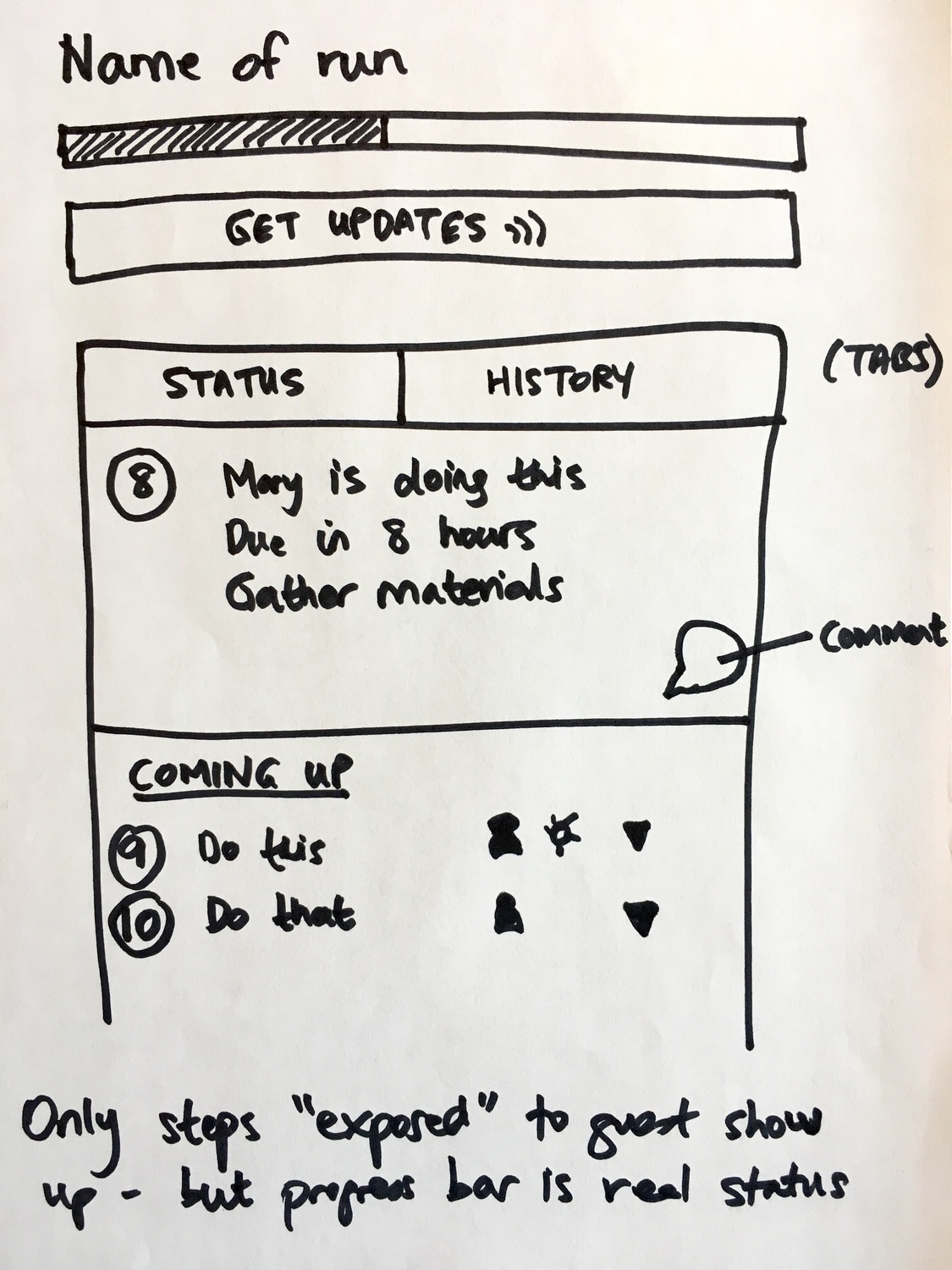
The key design note on this sketch: “Only steps exposed to guest show up - but progress bar is real status”
This captures the tension we were solving. A guest sees a simplified view of the process, but the progress indicator reflects the actual state of the entire workflow. They aren’t seeing a fake progress bar - they’re seeing real progress through steps that happen to be hidden from them.
The second sketch zoomed into the activity portion:
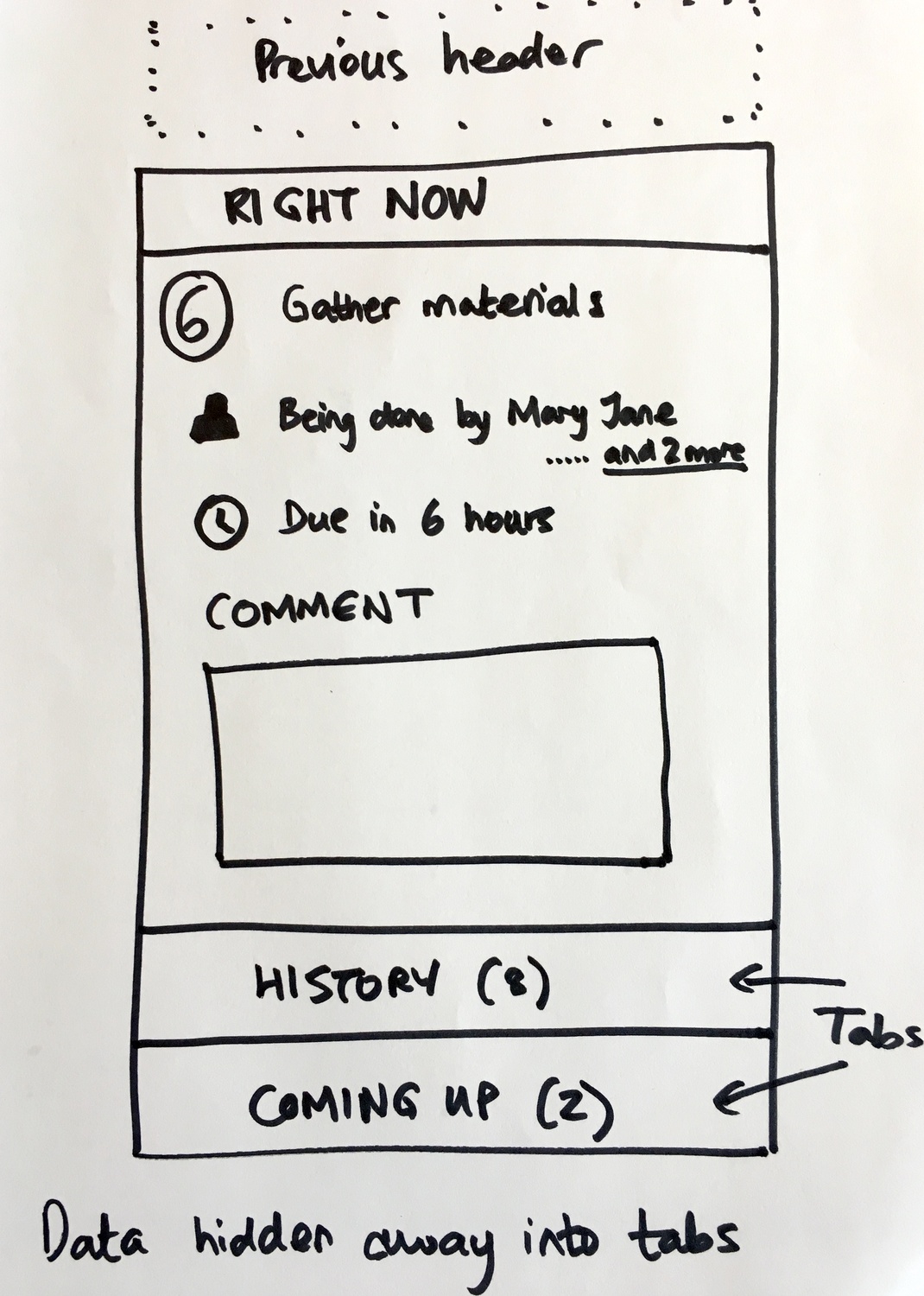
The annotation says “Data hidden away into tabs” - this was about what Jakob Nielsen calls progressive disclosure. A guest doesn’t need to see everything at once. Show them what matters right now, collapse the rest.
Pravina pushed for radical simplicity in the UI:
“Change the big icons in steps in a run to links rather than icons. A guest user will need zero training if it is this simple.”
The technical reality check
Our CTO brought the engineering perspective to these discussions. When we debated how to handle task state for guests, he pointed out:
“This is, essentially, changing the state of a task from boolean to enumerated.”
What sounds like a simple feature request - let guests mark tasks as done - actually required rethinking how we stored task state across the entire system. Boolean (done/not done) is simple. Enumerated (not started, in progress, waiting, blocked, done, rejected) is a whole different architecture. Good luck explaining that in a standup.
This is the hidden complexity behind guest access that users never see.
Phase 2: August 2017 - priority clarification
By August 2017, the scope of what we called “external embeds” had grown unwieldy. We had conflated several different products into one conversation.
Pravina brought clarity by prioritizing three distinct capabilities:
“A. Tracker (see progress of a run) - high priority B. Webform (initiates a run) - mid priority C. Customer Journey (marketing funnel product) - low priority”
Turns out, this was a crucial moment. We’d been designing as if all three were the same feature. They weren’t.
I had argued that technically the implementation could be unified:
“This entire project should probably be called external embeds. It embodies external embeds like forms and progress bars.”
But our CTO pushed back on scope creep:
“An external, embeddable, drop-in progress bar widget for sites is beyond the scope of the main Tallyfy management application and API.”
He was right. Trying to build a general-purpose embeddable widget system would have delayed the core guest functionality by months. We focused on the high-priority tracker first.
The internal debate: public website vs SaaS onboarding
In the same period, we had a substantive disagreement about scope. The discussion started with the concept of embeddable customer journeys.
The original proposal stated:
“A customer journey is a type of Tallyfy process that is designed to run on a public website. Runs of a customer journey are done by an anonymous visitor, until that visitor is identified. Upon identification of an anonymous visitor, a customer journey turns into a run.”
Pravina pushed back on this approach:
“The solution you have described seems to be for a public website - Public website journey. However the Box lead is the post sign up process on a SaaS - SaaS onboarding journey. IMO these two are very different - especially in terms of the problem statement and competitors.”
She raised specific concerns:
“This is more challenging as the visitor may have started their journey on Quora, external blog-post, conference, word-of-mouth etc. 1. How will you tailor their journey for so many channels? 2. Will you force them to browse everything? 3. Will you force the Tallyfy user to make hundreds of flow combinations?”
My response was that technically, the distinction didn’t matter as much as it seemed:
“IMO it is the same widget on a public website or a post-signup web app. The only difference is the identity of the person is known for post-signup and so the run has a lot more context/info.”
This debate shaped how we thought about guest access. The underlying widget and permission model should work regardless of whether the guest is anonymous, identified, or somewhere in between.
Whiteboard sessions: goodbye forms, hello live forms
Around the same time, we held whiteboard sessions about how external data collection should work.
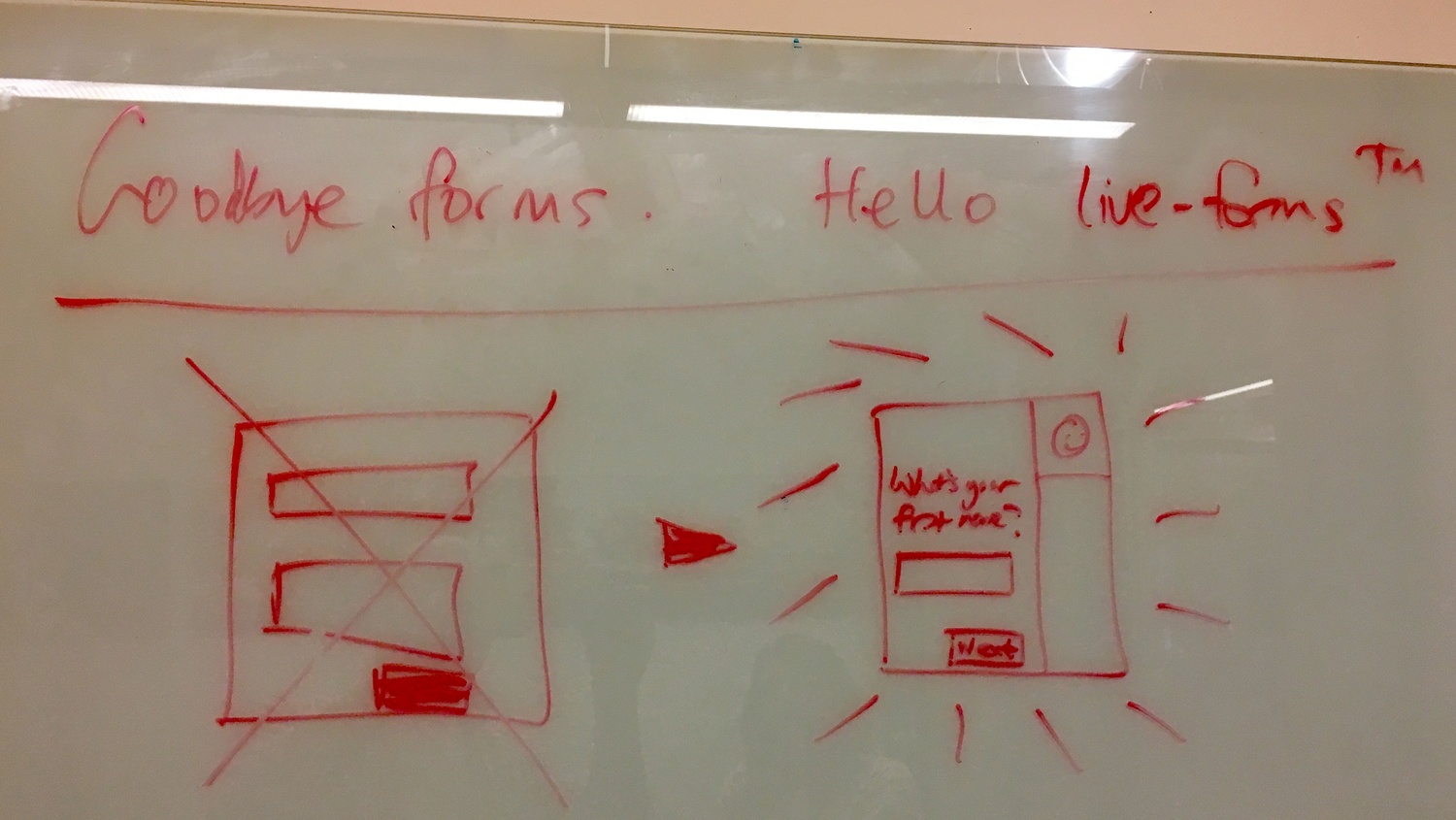
The next sketch captured the emotional difference:
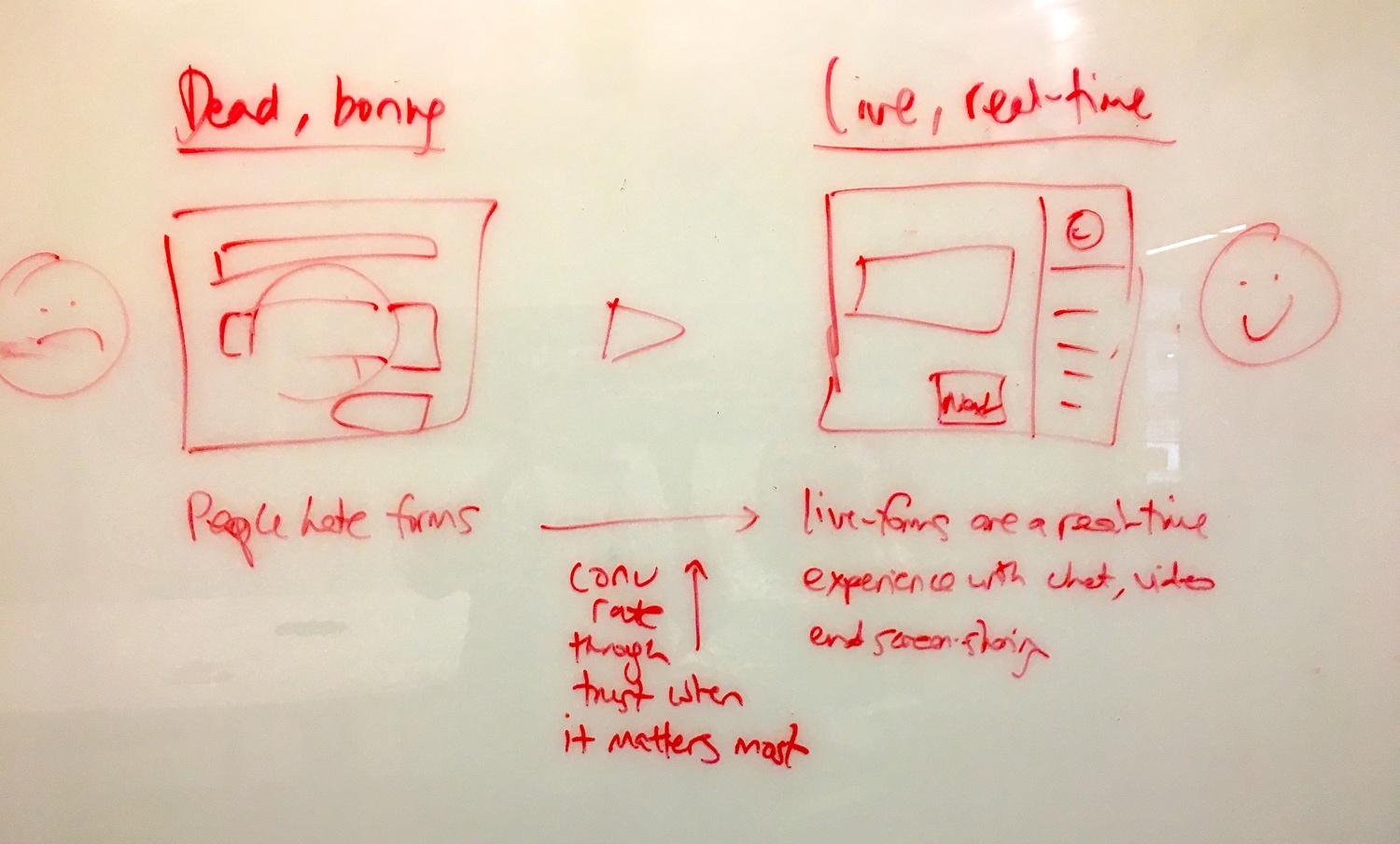
The key insight written on the whiteboard: “People hate forms” transforms to “Live-forms are a real-time experience with chat, video and screen-sharing”
And the conversion angle: “Conv rate through trust when it matters most”
The form abandonment problem
Another whiteboard captured the business case for why this mattered:
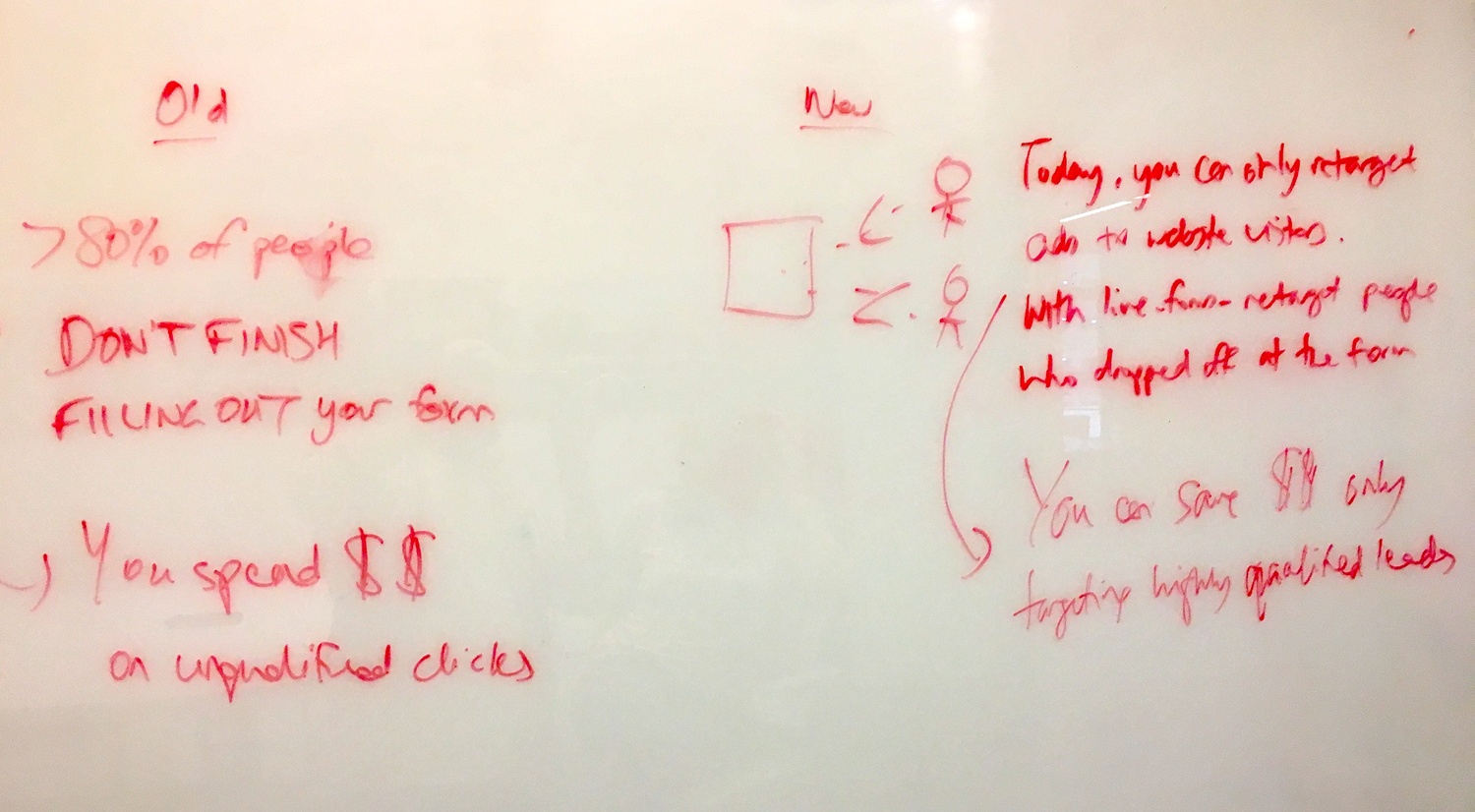
The numbers on the whiteboard: “80% of people DO NOT FINISH filling out your form” and “You spend $$ on unqualified clicks”
The new approach showed how with live forms, you could:
- See where people dropped off
- Retarget people who didn’t finish
- Save money by targeting only highly qualified leads
The integration angle
We also explored how guest-facing workflows should integrate with existing tools:
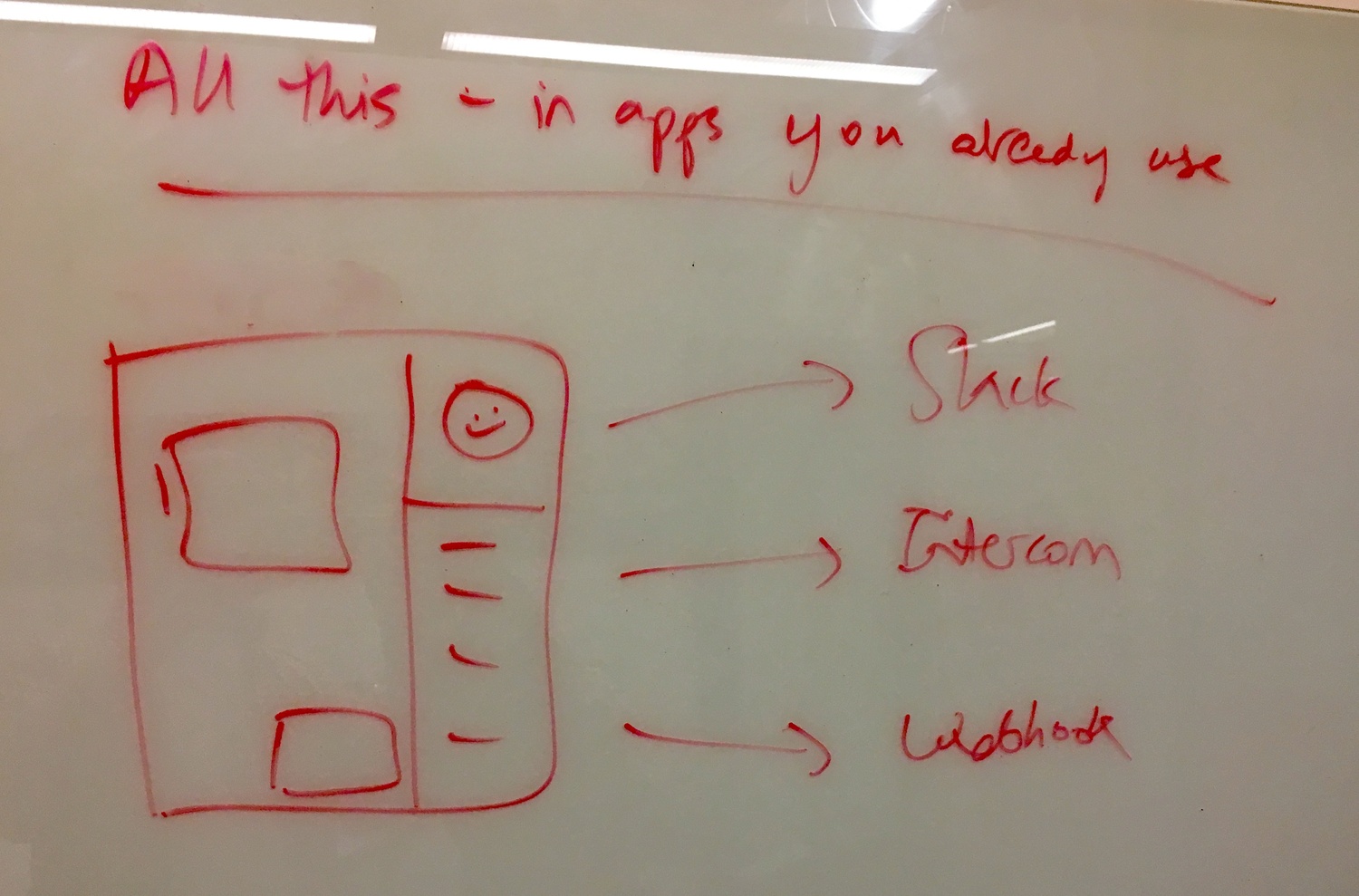
The header said “All this - in apps you already use” with arrows pointing to Slack, Intercom, and Webhooks.
This was about meeting guests where they are. If a guest prefers to interact via Slack, the workflow should accommodate that. The underlying rule engine stays the same.
Phase 3: February 2018 - user confidence features
A specific piece of feedback from February 2018 shaped how we thought about guest confidence. A user from a broadcast media company mentioned:
“A really small enhancement, like say a click to see a visual in a modal to show what my guests see would make him much more confident in using the guest invite feature.”
This feedback matched a pattern we kept hearing. In discussions with professional services firms handling client onboarding, the common refrain was “No more: What’s my password? I don’t know how to log in!” Teams reported saving 2+ hours per client internally and 30+ minutes of client time once external participants could just click a link and complete tasks without authentication barriers.
The response from the team captured our design philosophy:
Thomas: “This seems pretty straightforward from a design point of view, just re-using existing designs.”
The resolution: “Quick win, so move to top of PL for next week.”
Sometimes the smallest features, like showing staff what their guests will see, have outsized impact on adoption. The user wasn’t asking for new functionality. They just wanted proper reassurance that what they set up would look right to their external contacts.
The email architecture for guests
One of the earliest technical decisions was that guest emails should never require login. From our internal discussion about fixing a user preference issue:
“Guest emails NEVER require login”
And the URL structure:
“All URLs: ?guest_code=[code]”
This seems obvious in retrospect, but it required discipline. Every email template, every notification, every link in the system needed to respect this principle. A guest clicking a link in an email should land on a page where they can immediately take action - never on a login screen.
By late 2025, the guest email system included 12 specific templates:
- Guest registration (2-step process)
- Guest task assignment and completion
- Guest password reset
- Guest OTP authentication
- Guest magic link login
- Guest access grants and revocations
- Guest digest emails
Each template went through the same design system as member emails, with multi-language support and dark mode compatibility.
Phase 4: security incident and rate limiting
In 2023, we learned the hard way why guest access needs serious security guardrails. From an internal discussion about fixing blueprint positions incorrectly updating when navigating to the last page:
“Attacker exploited comment API to bypass ALL guest creation limits and send 10,000+ phishing emails”
Someone figured out they could use our comment functionality to bypass the limits we had placed on guest creation. They used Tallyfy to send massive numbers of phishing emails.
This led to thorough rate limiting across all guest-related endpoints. The attack surface for guest access is larger than for member access because, by definition, guests are less trusted. Every endpoint that guests can access needs its own rate limits, abuse detection, and monitoring.
The security incident was painful but valuable. It forced us to think about guest access not just as a UX problem but as a security surface.
Rules apply to guests too
At Tallyfy, we believe one architectural decision that, honestly, seems obvious in retrospect but required deliberate design: the same rules engine applies to guests. When you create conditional logic in a workflow, if this field equals X then show step Y, those conditions apply regardless of whether the person triggering them is a member or a guest. Deadlines work the same way for guests. Automated notifications fire based on guest actions. Conditional branching responds to guest form submissions. The audit trail captures guest activity identically. The alternative would have been to create a separate, simplified rules system for guest interactions, but we explicitly rejected this because it would have created two systems to maintain and would limit what organizations could accomplish with external participants. Maintaining a single engine was harder upfront, but it meant every improvement to the rules system automatically benefited guest workflows too.
What we left out
Several ideas from the early design discussions didn’t make it into the final implementation:
Complex IFTTT-style conditional rules for guests - The original vision included letting guests see and interact with complex conditional logic. We decided the rules engine should power the experience invisibly rather than exposing its complexity to external users. Would guests have used it? Almost certainly not.
Full customer journey product - As Pravina identified early on, this was really a separate product. We eventually agreed it was out of scope for the core guest functionality. A marketing funnel tool that tracks anonymous visitors across sessions is fundamentally different from a workflow tool that lets identified guests complete tasks.
GA/Mixpanel-level tracking in widgets - We explored adding detailed analytics tracking to the guest-facing widgets. Scale concerns and privacy considerations led us to keep tracking minimal. The audit trail captures what matters for workflow purposes without becoming a surveillance tool.
Anonymous visitor support initially - The original vision included tracking anonymous website visitors through a journey before they identified themselves. We descoped this because it introduced privacy complexity and GDPR considerations that would have delayed the core guest functionality.
Referrer-based journey customization - The idea of automatically adjusting the workflow based on whether someone arrived from Quora vs Google vs email. The conditional logic system can achieve similar results, but the automatic referrer-based routing was cut for simplicity.
Embedded forms on third-party websites - While guests can access workflows via links, the full embeddable widget for running inside other websites was deprioritized. The link-based approach solved 90% of use cases with 10% of the complexity.
Cloudflare and WordPress plugins - One-click installation for common platforms was discussed but never built. The manual embed code approach required more setup but fewer maintenance obligations.
The conversion tracking question
A more recent discussion explored tracking when guests convert to members. The question was framed as:
“When guests sample Tallyfy, do they feel sufficiently interested to actually sign up as members?”
This led to designing a webhook for guest-to-member transitions that would fire when:
- An existing guest creates a new organization
- An existing guest gets invited as a member to an existing organization
The business intent: “This webhook enables tracking of our viral spread and network effects” and “measuring guest-to-member conversion rates, viral coefficient of guest experiences, network effects between organizations.”
Why this matters for workflow design
If you’re designing workflows that involve external participants, the key insight is: don’t make guests second-class citizens in your rule system.
Templates that work with guest access
Actually, that oversimplifies it. The temptation is to simplify guest interactions so much that you strip away the power of your workflow engine. Resist this.
A guest completing a task should trigger the same downstream logic as a member completing a task. A guest submitting a form field should evaluate the same conditions. A guest missing a deadline should fire the same escalation rules.
The only differences should be:
- What they see (scoped to relevant steps)
- How they authenticate (no account required)
- What they can access (their assigned tasks only)
Everything else - the rules, the automation, the tracking - should be identical.
This is how you build workflows that actually work with external participants instead of just tolerating them.
For more details on how this works in practice, see our documentation on guests and the guide to what is a guest.
About the Author
Amit is the CEO of Tallyfy. He is a workflow expert and specializes in process automation and the next generation of business process management in the post-flowchart age. He has decades of consulting experience in task and workflow automation, continuous improvement (all the flavors) and AI-driven workflows for small and large companies. Amit did a Computer Science degree at the University of Bath and moved from the UK to St. Louis, MO in 2014. He loves watching American robins and their nesting behaviors!
Follow Amit on his website, LinkedIn, Facebook, Reddit, X (Twitter) or YouTube.

Automate your workflows with Tallyfy
Stop chasing status updates. Track and automate your processes in one place.