
Summary
- Ford cut accounts payable staff by 75% with one database - Their 500-person department manually matched three separate documents per shipment, but a centralized cross-referencing system eliminated most of that labor overnight
- Process management software went from six figures to free - Legacy BPMS used to cost six-figure installations taking months, but modern cloud tools like Tallyfy let teams start for free and see results through automation, enforcement, and visibility
- Three tools drive real transformation - Project management software provides accountability, BPMS takes workflows online with automation, and accounting software kills calculation errors. Start transforming your processes with Tallyfy
Business process transformation means replacing how work gets done - not tweaking it. You swap manual, broken workflows for technology that changes the game. That’s it. No grand philosophy required.
Business Process Management Made Easy
Here’s the distinction that trips people up. Business process improvement is about small adjustments - removing a step here, restructuring there. Full-scale rebuild is different. You’re ripping out the old way and dropping in something brand new.
Layer AI on a broken workflow and you get faster dysfunction. So before you throw technology at a workflow, you’d better understand what you’re rebuilding and why.

Why most transformation efforts stall
I’ve noticed something in our conversations about process change. Teams get excited about new tools. They buy software. They announce the initiative in an all-hands meeting. Then basically nothing happens.
Try the free SOP generator
By Tallyfy. Get a Word doc in ~15-20 seconds. No sign-up.
Tap a section to preview the steps, or download the full Word document below.
Why? Because they skip the diagnosis.
You can’t rebuild what you don’t understand. And most organizations don’t actually understand their own processes. They think they do. They’ve got documentation somewhere - maybe a flowchart from 2019 that nobody’s looked at since. But the real process? The one people actually follow? That lives in someone’s head.
This is where it gets frustrating. We’re building smarter AI but not smarter processes for it to run on. The tools exist. The technology is ready. But without defined processes to rebuild, you’re just adding noise.
Three tools that drive real transformation
There are countless ways to approach this. It depends on your industry, your processes, your team’s technical comfort. But after years of building workflow software, I keep coming back to three categories that matter most.
Project management software
Without the right tool, running projects is a nightmare of emails, sticky notes, and awkward check-in meetings.
Physical Kanban boards look nice. They don’t create accountability. Same with Gantt charts pinned to a wall - they set timelines but don’t make sure anyone follows them.
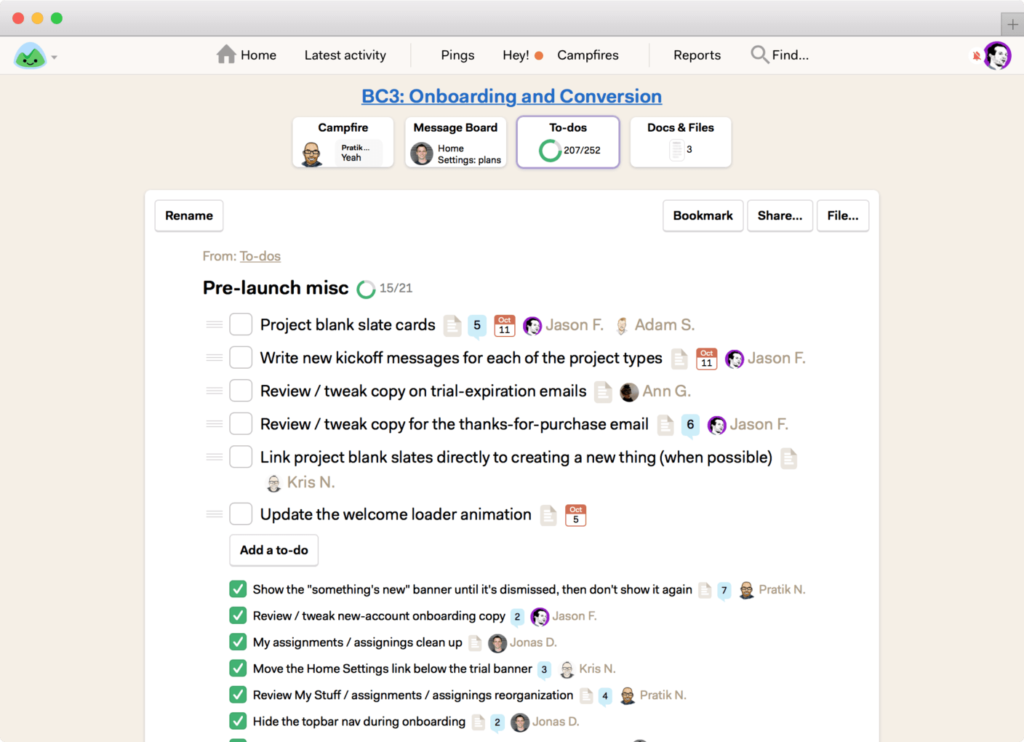
Project management software like Jason Fried’s Basecamp changes this. Instead of the project manager constantly tapping people on the shoulder, everyone sees what’s due, who owns it, and what’s falling behind. That top-down visibility? It didn’t exist before these tools.
Process management software
Every company runs on processes. Some are written down. Most aren’t. Either way, they’re there - and they’re probably messier than anyone admits.
Business Process Management Software takes those messy, cobbled-together workflows and makes them visible, trackable, and automated. Here’s what that means in practice:
-
Visibility - You can actually see your processes mapped out. Sounds basic, but most teams have no idea where their bottlenecks are until they see the whole workflow laid out. We built Tallyfy because we kept seeing teams struggle without this visibility - knowing exactly where things get stuck reshapes how teams collaborate.
-
Automation - When someone finishes a task, the next person gets notified automatically. No more “hey, did you see my email?” No more tasks falling through cracks.
-
Enforcement - New processes are hard to stick. People default to old habits. The software keeps everyone on the defined path. No deviations, no shortcuts that break things downstream.
And here’s what changed in the last decade. Traditional BPM used to cost six figures and take months to install. Now you can start for free and see the benefits in days, not months. That price drop changed everything about who can afford to rebuild their processes. Is BPM still only for enterprises? Not anymore.
Want to learn how to pick the right BPM software? See what makes certain BPM solutions stand out.
Accounting software
For any organization with an in-house accounting team, this one’s straightforward. Manual calculations are slow and error-prone. In finance, a small mistake can cascade into something expensive. Nobody wants to explain that one in a board meeting.
Accounting software handles three things well:
- Accuracy - The software does the math. No more spreadsheet errors that nobody catches until audit season.
- Speed - Calculating sales tax across thousands of transactions? An accountant might spend days. The software does it in seconds.
- Reporting - Generating financial reports used to be a proper multi-day project. Now anyone on the team can pull the report they need instantly.
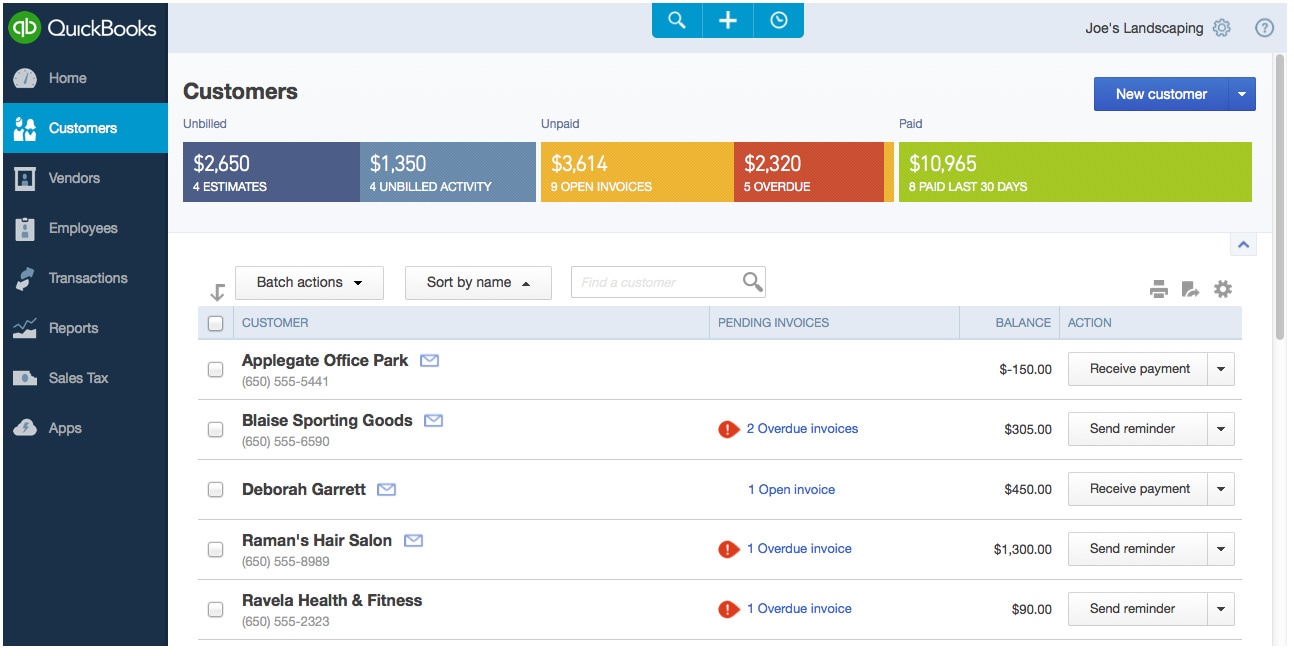
At Tallyfy, we use QuickBooks - it’s reliable, widely supported, and does the job without drama.
How Ford cut accounts payable by 75%
This is my favorite transformation story, first told by Michael Hammer, because it’s so simple.
In the 1980s, the American auto industry was in rough shape. Ford needed to cut costs everywhere. When they examined their accounts payable department, they found 500 people doing the work. For comparison - Mazda, Ford’s partner company, probably had 5 doing the same job.
The problem wasn’t lazy employees. It was a terrible process.
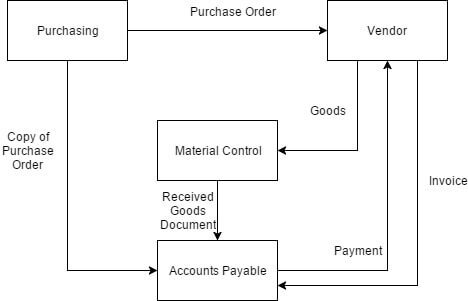
Here’s how it worked before:
- Purchasing sends an order receipt to accounts payable
- Material control receives the shipment and sends a receipt to accounts payable
- The vendor sends an invoice to accounts payable
- Employees manually match all three documents before approving payment
Three separate documents. Manual matching. Five hundred people.
The fix? They built one internal database. That’s it. No AI. No machine learning. Just a database.
The new process:
- Purchasing submits the order to the database
- Material control receives the shipment and cross-references it against the database
- If things match, order is marked complete. Done.
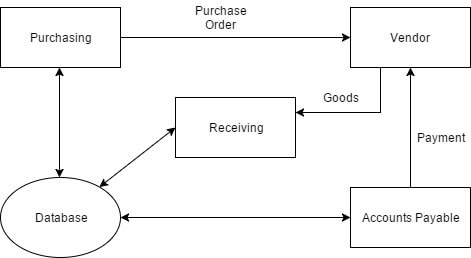
No more matching three documents by hand. No more 500-person department. Ford reduced headcount by over 75% and survived the downturn.
The lesson? Turns out, transformation isn’t about fancy technology. It’s about seeing the obvious waste that everyone’s gotten used to.
Modern accounts payable and purchasing templates
Use this form to submit a vendor invoice for payment. Provide complete vendor and invoice details to
What transformation looks like in the AI era
Ford’s story happened in the 1980s with a simple database. Imagine what’s possible now.
But here’s the thing I keep telling people - you can’t automate chaos. If your process is broken, AI will just break it faster. And at scale. That’s worse than doing nothing.
The pattern we’ve seen at Tallyfy across hundreds of implementations is clear. The teams that succeed at transformation follow a specific order:
- Map the process as it actually works today. Not how it’s supposed to work. How it really works.
- Fix the obvious waste - the manual handoffs, the redundant approvals, the steps that exist because “we’ve always done it that way.”
- Then automate - with process management software, with AI, with whatever technology fits.
Skip step one and two? You’ll spend six months and a lot of money automating a bad process. I’ve seen it happen too many times.
One thing that keeps coming up with operations teams is this. The overhaul that sticks isn’t the one with the fanciest technology. It’s the one where someone finally asked “why do we do it this way?” and didn’t accept “because we always have” as an answer. They challenged every approval step that existed purely because a previous manager insisted on it. They questioned every report that got generated but never read. They pushed back on every handoff that required re-entering data someone else had already entered. They asked whether the three-day turnaround was actually necessary or just an artifact of a process designed around postal mail. They didn’t assume the process was sacred - they assumed it was wrong until proven otherwise.
Here’s an example that keeps coming up in our conversations. A team has a process documentation problem - their onboarding workflow touches five departments, involves twelve handoffs, and nobody can explain why step four exists. They want to “use AI” to fix it. But the fix isn’t AI. The fix is removing step four, combining two handoffs, and then putting the cleaned-up process into software that enforces it. AI can help after that - suggesting improvements, flagging delays, routing exceptions. But only after the foundation is solid.
Think about it this way. Would you hand an AI agent a set of contradictory instructions and expect good results? Of course not. So why would you point AI at a contradictory process and expect real change?
Getting started without overthinking it
Pick one process. Just one. The one that drives your team crazy. The one where things fall through cracks every week.
Map it out. Find the waste. Fix the process. Then put it into software like Tallyfy so it stays fixed.
That’s business process transformation. Not a consulting project that takes eighteen months. Not a six-figure software purchase. OK, that slightly oversells how easy it is. Just seeing what’s broken, fixing it, and making sure it doesn’t break again.
Ford did it with a database in the 1980s. You can do it with modern tools in an afternoon.
