
Why favorites became watchers and why the star icon stayed
Favorites in a business context does not really mean anything. At Tallyfy, we redesigned the entire notification system around what Jakob Nielsen called the 1% rule - 90% of users observe rather than create. The familiar star icon stayed but everything underneath changed to support three notification frequencies and process-level watching.
Workflow watching keeps teams informed without overwhelming them. Here’s how we approach workflow management.
Workflow Made Easy
Summary
- This is our candid experience building workflow watching at Tallyfy - not theory. What started as renaming “Favorites” became a multi-year engineering effort spanning permissions, notifications, and guest access
- Favorites don’t mean anything in business - You favorite something because you want quick access AND updates when things change. The word “watching” captures both needs
- The 1% rule drives the design - 90% of users lurk rather than create content. Making watching one-click catches the whole funnel of passive users who engage through observation
- Three notification frequencies solve the noise problem - Electric (instant), Mindful (every 3 hours), and Chilled (daily digest) let users control their own notification load
- Guests can watch too - External collaborators need process visibility but with careful scoping. A guest watching a process only gets updates on tasks visible to them. Learn more about tracking
This reflects our experience at a specific point in time. Some details may have evolved since, and we’ve omitted certain private aspects that made the story equally interesting.
We had a feature called “Favorites” for years. You could star a process, a template, a task, even another person. The star appeared in your sidebar for quick access.
But here’s what bothered me: what does “favorite” actually mean in a business context?
The problem with favorites
Favorites in a business context does not really mean anything. It is a favorite because of a reason - you care about it in a specific way. You want access to it quickly, and you want to know if updates happen related to it.
The word “favorite” sort of implies a static preference. Like bookmarking a restaurant you want to try. But business objects aren’t static. A process you starred yesterday might have five new updates today. A team member you favorited might have completed three tasks you need to know about.
Favoriting something already implies “watching it” as well, since the underlying object - a process, blueprint, person, etc. - is not static.
We were building half a feature. Quick access without updates. A rubbish bookmark without notifications.
The lurker insight
Feedback we’ve received from operations teams confirmed what social app research shows. One loyalty rewards company wanted to put up a TV screen showing pending tasks and completed tasks from everyone in real-time. They weren’t asking for more features to create tasks. They wanted visibility into what was already happening. That crystallized the insight.
Here’s what really pushed us to rethink this completely:
It is well-known from social apps that watching or lurking instead of creating content is what 90% of people do - so create more adoption and engagement by feeding updates to watchers.
Turns out, Jakob Nielsen’s 1% rule from internet culture applies to business software too. Most users don’t create content. They consume it. They observe. They follow along.
If more lurkers become engaged through one-click watching then more adoption should be the result. It is much easier to watch and then begin to enjoy Tallyfy instead of being asked to comment or create tasks. It catches the whole funnel of lazy users.
This isn’t about lazy users - it’s about recognizing that passive engagement is still engagement. Someone watching a process cares about that process. They just don’t want to edit it or comment on it right now.
Where this all started
The inspiration came from a simple question in September 2017:
As a user or manager, it would be great to see a stream of who did what on any given view.
That question opened a can of worms. Our CTO pushed back:
Notifications should be a subset of “activity”. It should be a few items pulled out of activity, which is more akin to an audit trail.
This sparked an internal debate that ran for months. By October 2017, Pravina had mapped out where we were heading:
- Tallyfy My Notifications = Basecamp’s Hey. 2. Tallyfy All Activity = Basecamp’s Latest Activity. 3. Tallyfy’s Audit Trail is for each update within a template and process.
Three distinct concepts had emerged from what started as “can we rename Favorites?”
We also had customer feedback pushing us. One loyalty rewards company wanted to put up a TV screen showing pending tasks and completed tasks from everyone in real-time. The watching system was the foundation for that kind of visibility.
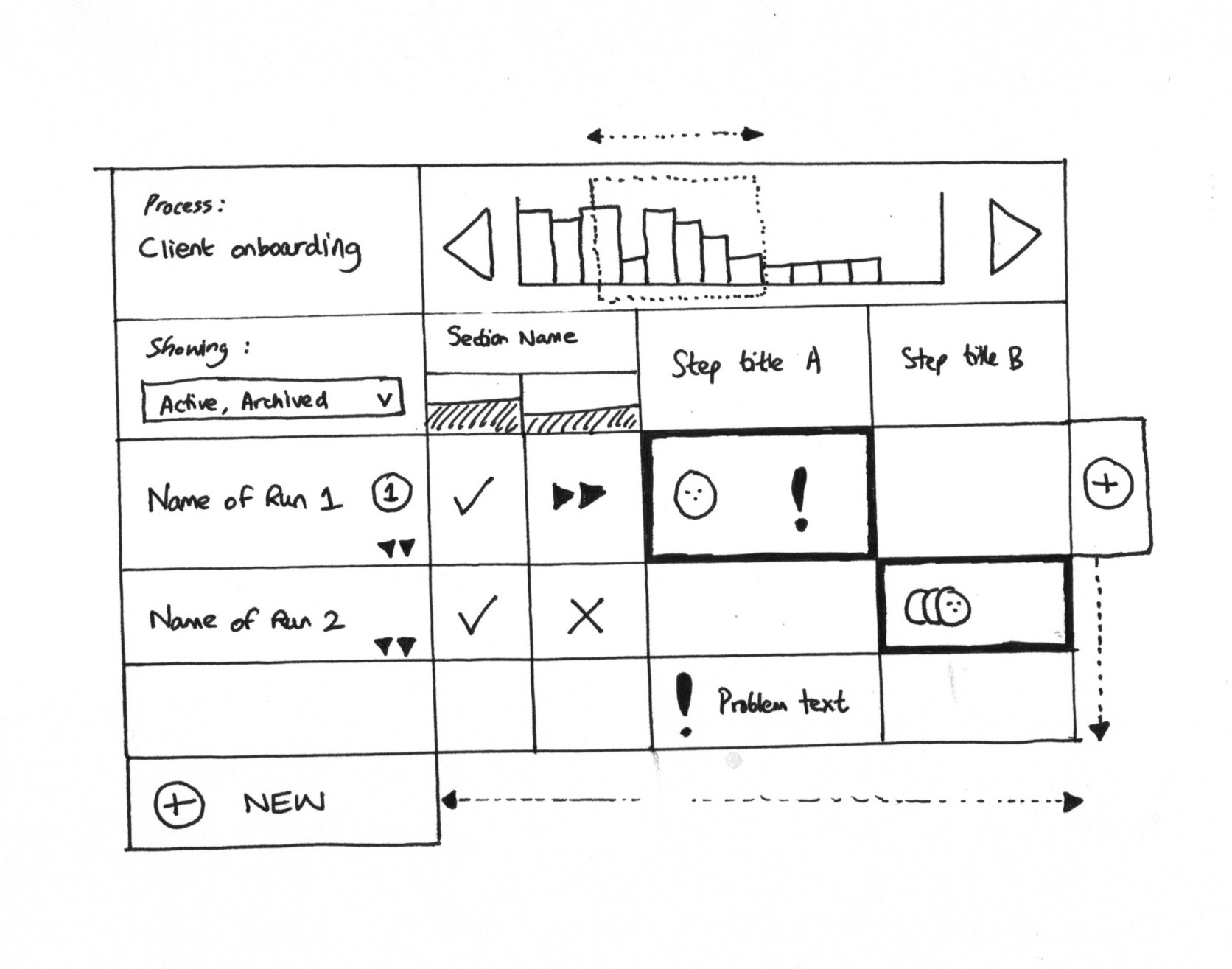
Early concept sketch: a grid view showing multiple runs with status at a glance - the visual we were trying to enable for watchers
The watching model
We redesigned around a simple concept: watching. The two states are “Watch this” or “You’re watching this.” You can watch:
- A member (everything they do)
- A blueprint (any changes)
- A process (any changes)
- A task (any changes)
The star icon stays. Users already know what it means. But what happens after you click it changes completely. There was competitive context too.
In April 2017, I’d noted:
A key selling point for DaPulse (now Monday.com) is “watching things go green” - but if you try their app - it is not responsive, and is really for tasks, not groups of tasks (runs).
That insight shaped our approach. We weren’t building task-level watching. We were building process-level watching where you could see an entire workflow progress.
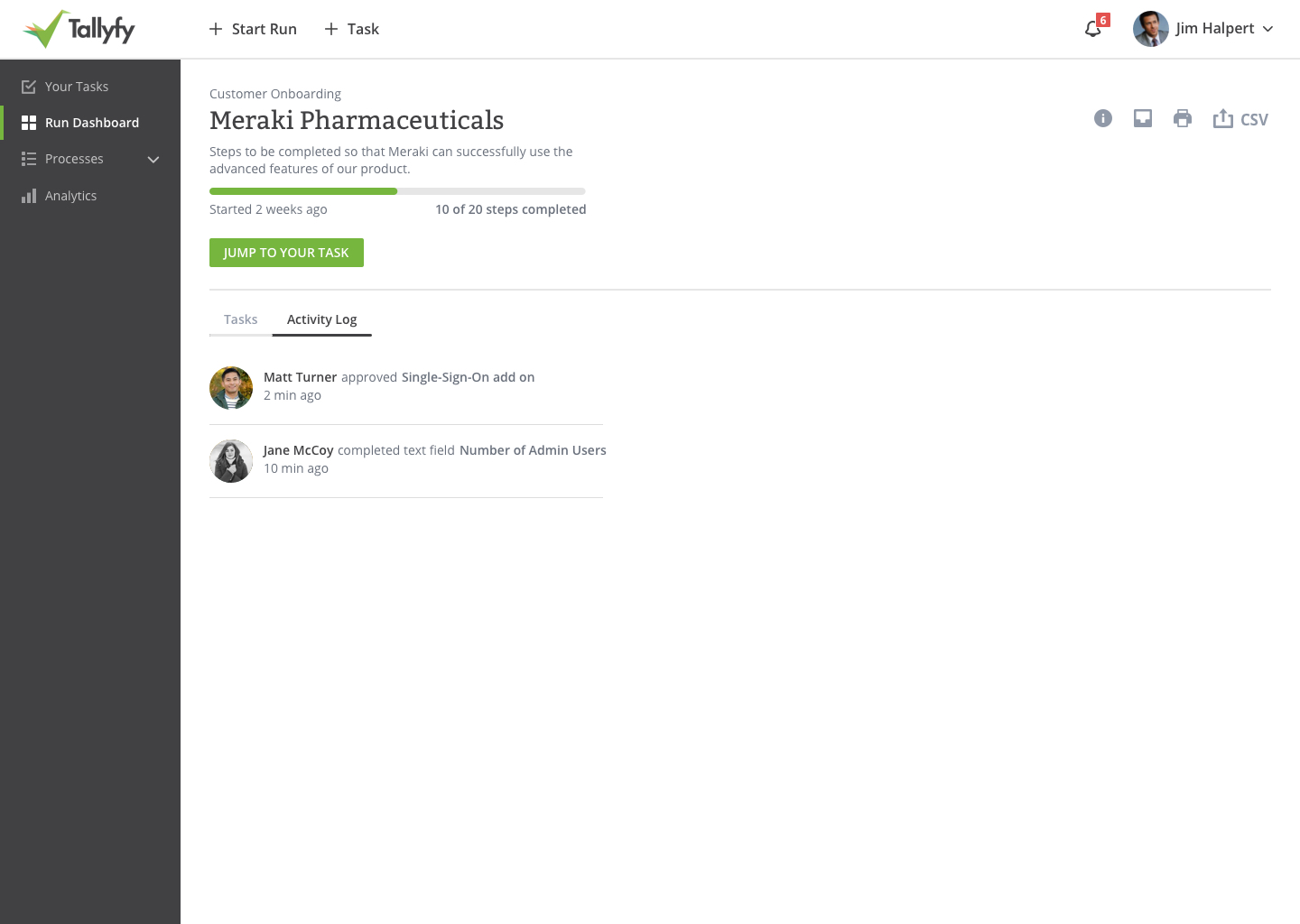
Activity log mockup: showing who did what and when within a running process - the foundation for watching notifications
Who owns a watch?
This led to an interesting design question. A watch is “owned” by someone - but there are three types:
Member-owned - a member created it - and another member can turn it on or off, or delete the watch, subject to conditions.
Guest-owned - a guest created it - and either a member or a guest can turn it on or off, or delete the watch.
System-owned - our system created it as a default and it cannot be deleted, but it can be turned on or off.
System-owned watches handle the baseline notifications that already existed - things like “email me when I’m assigned to something.” These migrate into the watching framework but can’t be deleted, only muted.
For member-owned watches, we added a rule:
Anyone with edit rights over any object can add or remove other members on the watch list. If another member set me as watching a blueprint, I can remove myself from watching it. If I set another member as watching a process, that member can remove themselves from watching it.
But there’s one exception:
The exception is member watching - you cannot remove someone from watching you. They control that watch.
You can’t stop a colleague from following your activity. That felt right for transparency.
The notification frequency problem
The biggest design nightmare was notification volume. Watch everything and get flooded. Watch nothing and miss important updates.
We designed three frequencies:
Electric - Notify for every event, immediately.
Mindful - Notify for aggregated events every 3 hours, measured from the date the watch was created.
Chilled - Notify for aggregated events once every 24 hours, measured from the date the watch was created.
The naming was intentional. “Electric” sounds urgent, high-frequency. “Chilled” sounds relaxed, batched. The words communicate behavior before you’ve read the description.
A question that keeps coming up during implementation is how aggregation works:
Let us say a team member is watching process_A and process_B and we assume that mindful time is 2 hours. In two hours, some fellows completed two tasks of process_A and three tasks of process_B. Will we notify with two separate emails - one for process_A and another for process_B - or with a single email containing all watched objects?
The answer:
Each watch generates a completely separate notification to its own target for that specific object. We are not aggregating watches or mixing them up in any way. ProcessA has a watch and ProcessB has a watch in this example, each separate, and each watch has its own frequency.
Clean separation. One watch, one digest. No mixing.
The email template design
Every watch needed a way to turn it off without logging in. We sketched a template:
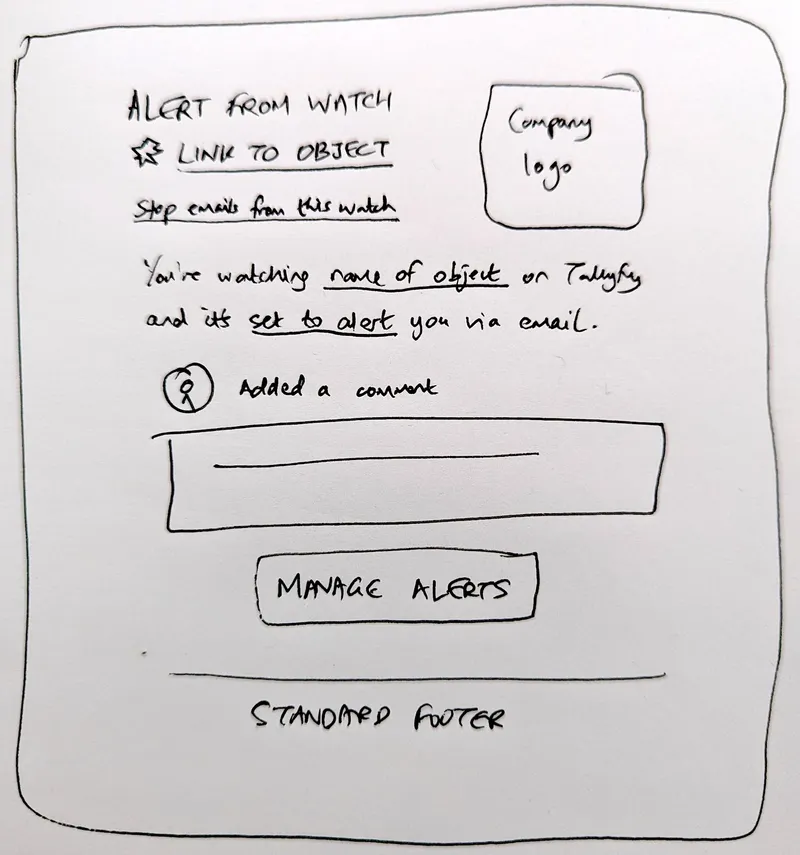
Early design sketch: the watching email template with one-click unsubscribe for specific items
The key insight in the sketch:
Instead of using the word “Unsubscribe” from an email, the email design for all watches needs to have the idea of “Stop watching this” to turn off that specific watch with one click. We do not want a global unsubscribe from all Tallyfy emails.
Grammar mattered too:
It should be “watchlist” - the name of the list of things you are watching. A watchlist holds everything you are watching and notification and target settings for each item. We should say “an item you are watching” not “a watch.”
The middle section contains what changed and who did it:
If there are multiple changes - say 6 changes in an email - just clone that middle section and add multiple items to the body in the same format. Who did it with image, what they did as verb and action, and a body payload of the change itself like words changed or comment added.
The guest question
Guests added complexity. External collaborators need visibility but with limits.
The questions started flowing during implementation:
Can a guest watch all objects - members, checklists, processes, tasks?
The answer:
Yes, a guest can watch items just like members - but if they do not have access to them, they cannot find or watch them anyway, unless a member explicitly adds them as a watcher. Fundamentally, it would make sense to treat guests and members equally for watching purposes, just like we do for assignments.
But with constraints:
A guest can not add a watch for other members and guests. They can add or remove their own watch only.
And:
A guest can not watch any member - standard or admin.
The process watching had nuance:
A guest can watch a process, but only get updates on tasks actually visible to them. The rest remains invisible, including updates for watching purposes.
So if a guest watches a 20-step process but can only see 3 tasks they’re assigned to:
If a guest is assigned task_A, task_B and task_C in process_A then watching the process gives the guest updates over all three tasks they are assigned to.
The guest sees a filtered view of the process. Their watching notifications respect that same filter.
The migration question
We had years of existing favorites. Migrate them or start fresh?
The purpose of this ticket is to map data between favorites and watching_objects tables. Let us say a team member has a favorite checklist_A then after implementation of this ticket, the user will be eventually watching this checklist_A.
Could we just start fresh? No. We decided to migrate. Every existing favorite became a watch with “chilled” frequency - the least jarring default. Users could adjust from there.
The migration hit a snag months later when QA noticed old favorites not appearing:
There are a lot of old favorited templates and processes and they do not appear in the new Favorites menu. Only newly favorited ones do.
It turned out to be a deployment issue - the migration ran but the data didn’t transfer correctly to production. We re-ran it and verified:
All the data from favorites is also added in watching table. Good to close now if there is nothing left here.
The feature flag safety
We almost shipped too early. The watching feature needed the client UI to manage watches before the emails could reference it:
Until the client UI to manage favorites and watches is in place, please ensure this entire feature has a boolean set of some kind. If emails start pushing out with links that do not exist to manage watches on our next release, it would be a disastrous experience.
And:
Can you make sure nothing is being auto-watched right now, for this feature? We need the client UI to control watches in place before going full scale with this.
The confirmation:
Until the client UI is not managed, nothing will be auto-watched.
To be fair, we almost didn’t catch this in time. Feature flags saved us from shipping half-baked functionality.
The schema design
The data model ended up polymorphic - one table for all watchable objects:
Table: watching_objects
Columns: id, organization_id, user_id, guest_id, object_id, object_type, frequency, webhook, notification_type, is_system_watch
The object_type field handles the polymorphism - checklist, process, task, or member. The is_system_watch flag distinguishes watches that the system created as defaults from user-created ones.
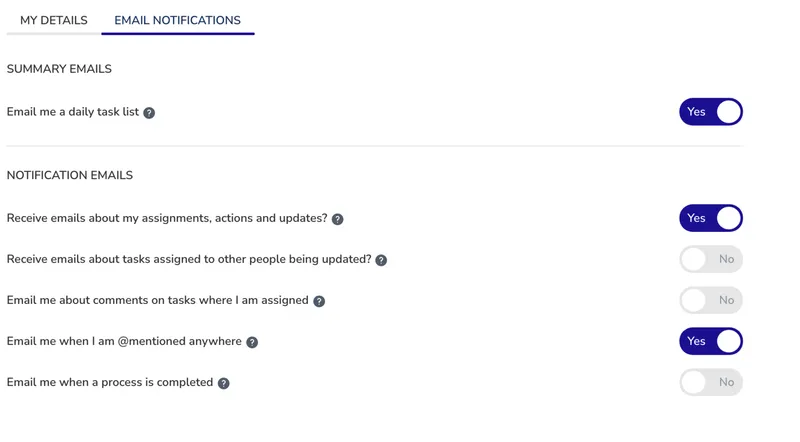
The original email notifications section - each checkbox became a system-owned watch
Those existing email notification checkboxes in settings? Each one became a system-owned watch. Same behavior, unified model.
What we left out
Several features didn’t make the cut:
A single unified activity stream got separated into three distinct concepts:
- My Notifications - personal alerts for things you care about (like Jason Fried’s Basecamp “Hey”)
- All Activity - organization-wide stream of everything happening (like Basecamp’s “Latest Activity”)
- Audit Trail - compliance-grade history for each template and process
We debated for months whether to build one stream or three. Three won because the use cases were too different. A manager watching everything isn’t the same as a team member checking their personal notifications.
Activity trails on one-off tasks were deferred. Pravina had noted in November 2016:
I want to be able to see a live stream of actions being done in real-time and mark them as read.
But one-off tasks (standalone tasks not part of a process) didn’t fit cleanly into the activity model. We punted on that.
Global activity for non-admins was debated. Should everyone see everything, or just their own stuff? We landed on role-based visibility, but the debate ran for weeks.
Webhook targets were scoped for later:
Webhook - the notification shoots to a specified webhook target.
We shipped with email only. Webhooks came later.
Chat integration was deferred:
Chat - the notification shoots out to a specific channel or person within Slack or MS Teams. You set this at the point of watching, but you must have your Slack or Teams already authenticated with us.
This required deeper integration work we weren’t ready for.
Blueprint webhooks stayed separate:
We would not migrate blueprint webhooks against steps into watches for a simple reason. Watches are owned by a person - a guest email or a member. A blueprint webhook is not owned by anyone. It is just a setting on a step in a blueprint. Therefore, we would leave all that functionality as-is without migrating things into watches.
Webhooks on steps are configuration. Watching is personal preference. Different mental models, different systems.
Assignment stayed independent:
Watching something and being assigned to something are treated entirely independently. Whatever exists for assignment right now carries on as-is. You can additionally watch something if you are assigned to it.
Assignment means you must act. Watching means you want to observe. They overlap but aren’t the same.
The long tail of events
Here’s the humbling part. Three years after we shipped this feature, we were still finding gaps. An internal ticket from work on adding a login link when registering with existing email noted:
The watching system currently provides limited coverage, only notifying watchers about completion events and some template structural changes.
We had built the infrastructure, but the event coverage was incomplete. A process could change in dozens of ways - task reassignment, deadline changes, field updates, comments - and we were only catching some of them.
Building a watching system isn’t just about the watching logic. It’s about instrumenting every possible change across your entire application. That takes years, not months. Nobody warns you about that part.
The real insight
What surprised us when we dug into the data at Tallyfy, we’ve observed that process managers rarely create tasks themselves. They watch. They monitor. They intervene when something goes wrong. Designing for active participation misses this silent majority entirely.
The deeper lesson from this EPIC is about user engagement models. Most B2B software assumes users will actively create, edit, and comment. That’s true for maybe 10% of your user base. The other 90% want to observe. They want to stay informed without taking action. They want to know what’s happening in processes that affect them, even if they aren’t assigned to any step. Understanding how members interact with your system means designing for this silent majority. Building for watchers - the lurkers, the observers, the people who care but don’t create - expands your engaged user base dramatically. A one-click star that creates real value through notifications is more powerful than a complex commenting system that 90% of users will never touch.
The star icon stayed. Everything underneath changed. And suddenly, passive users became engaged users.
What started as a simple rename took years to ship properly. And honestly? We’re still finding edge cases. That’s the nature of building systems that touch every part of your product.
Related questions
How does watching differ from assignment notifications?
Assignment notifications tell you “here’s something you need to do.” Watching notifications tell you “here’s something that changed on something you care about.” Assignment is about action required. Watching is about awareness wanted. You might be assigned to step 3 of a process and separately watch the entire process to see when steps 1, 2, 4, and 5 complete. Different purposes, different notification streams.
Can I watch something on behalf of someone else?
Members with edit rights on an object can add other members as watchers. So yes, if you have edit access to a process, you can set a colleague to watch it. That colleague can then remove themselves if they don’t want the notifications. The exception is member watching - you can’t remove someone who has chosen to watch you.
What happens to watches when a process completes?
The watch remains active for historical access, but notifications stop since there aren’t any more events. If the same template is used to launch a new process, you would need to watch that new process separately. Watches are tied to specific instances, not templates - unless you’re watching the template itself for structural changes.
How do mindful and chilled digests handle zero activity?
If nothing happens to a watched item during the digest period, no email is sent. You only get notified when there are actual changes to report. This prevents the inbox clutter of “nothing happened” summaries that some systems send.
Can guests change their notification frequency?
Yes, guests control their own watch settings including frequency. A guest can set their process watch to electric for real-time updates or chilled for a daily summary. The only thing guests can’t do is add watches for other people - they can only manage their own watching preferences.
About the Author
Amit is the CEO of Tallyfy. He is a workflow expert and specializes in process automation and the next generation of business process management in the post-flowchart age. He has decades of consulting experience in task and workflow automation, continuous improvement (all the flavors) and AI-driven workflows for small and large companies. Amit did a Computer Science degree at the University of Bath and moved from the UK to St. Louis, MO in 2014. He loves watching American robins and their nesting behaviors!
Follow Amit on his website, LinkedIn, Facebook, Reddit, X (Twitter) or YouTube.

Automate your workflows with Tallyfy
Stop chasing status updates. Track and automate your processes in one place.