
Magic links that launch processes without authentication
How Tallyfy designed magic link authentication for single-click process initiation from email. No login wall. The 6-step token validation chain behind public kickoff forms shows why anonymous form submissions required rethinking security assumptions.
Frictionless authentication enables better client-facing workflows. Here is how we approach client onboarding.
Client Onboarding Made Easy
Summary
- Magic link authentication for workflows - This is our personal, candid experience implementing it at Tallyfy. Not theory. What we actually learned about security tradeoffs, phishing risks, and the hard-won balance between convenience and protection
- Single-click process initiation removes the login wall - When someone receives an email to start or complete a workflow task, forcing them to authenticate first kills conversion rates
- Public kickoff forms enable anyone to launch a process - Anonymous visitors can submit forms that create tracked workflow instances, turning into identified participants upon email verification
- The trust boundary shifts to email ownership - If you control the email address, you control access to tasks assigned to that email. See the official magic links documentation for implementation details
This reflects our experience at a specific point in time. Some details may have evolved since, and we’ve omitted certain private aspects that made the story equally interesting.
The problem with login walls
Every workflow system faces the same friction point. Someone needs to do something in your process. Maybe they’re a client approving a proposal. Maybe a vendor submitting documents. Maybe an applicant completing an onboarding form. The traditional approach: make them create an account, verify their email, set a password, and then find their way back to the task they were trying to complete. By the time they finish that gauntlet, many have given up. In our conversations with client services teams at professional services firms, this friction was the number one complaint. One agency CEO described the problem with previous tools: “Even if they had incremental-saving forms, when clients refreshed the page or walked away, they lost everything. And we had the common problem of clients losing their usernames and passwords and granting access to others who needed to help complete the process.” Their onboarding sometimes took weeks instead of days because of authentication barriers alone. The principle we landed on was a no-brainer: if you can prove you own an email address, you should be able to complete tasks assigned to that email without any other authentication. Our internal documentation for guest emails made this explicit: “No login required - just click to get started.” That single sentence drove most of our architectural decisions.
From accounts to access keys
In February 2017, we completed a design task that fundamentally changed how guest access worked. The notes from that task capture the shift:
“Use a single view of a task with captures and comments to show that it is a scrolling page. No menus or application chrome. Only the task itself.”
And critically:
“Guest users will access the task from their email via a single URL with an access key in the link. Guest users will no longer have accounts.”
This was basically the architectural decision that enabled magic links. Instead of forcing guests to remember credentials, we embedded authentication into the link itself. Click the link, you’re authenticated. No login screen, no password reset flows, no account recovery headaches.
The security evolution we didn’t plan
Here’s the honest story of how our security model evolved. We didn’t plan this arc - we learned it.
Phase 1: Password-based auth with guest codes
Initially, internal members used standard email/password authentication. External participants received unique access codes sent to their email. Simple, but painful.
Phase 2: Social login experiments
In January 2017, I wrote in our internal specs: “Social logins would eliminate the need for passwords and assure us of genuine people (not fake emails).”
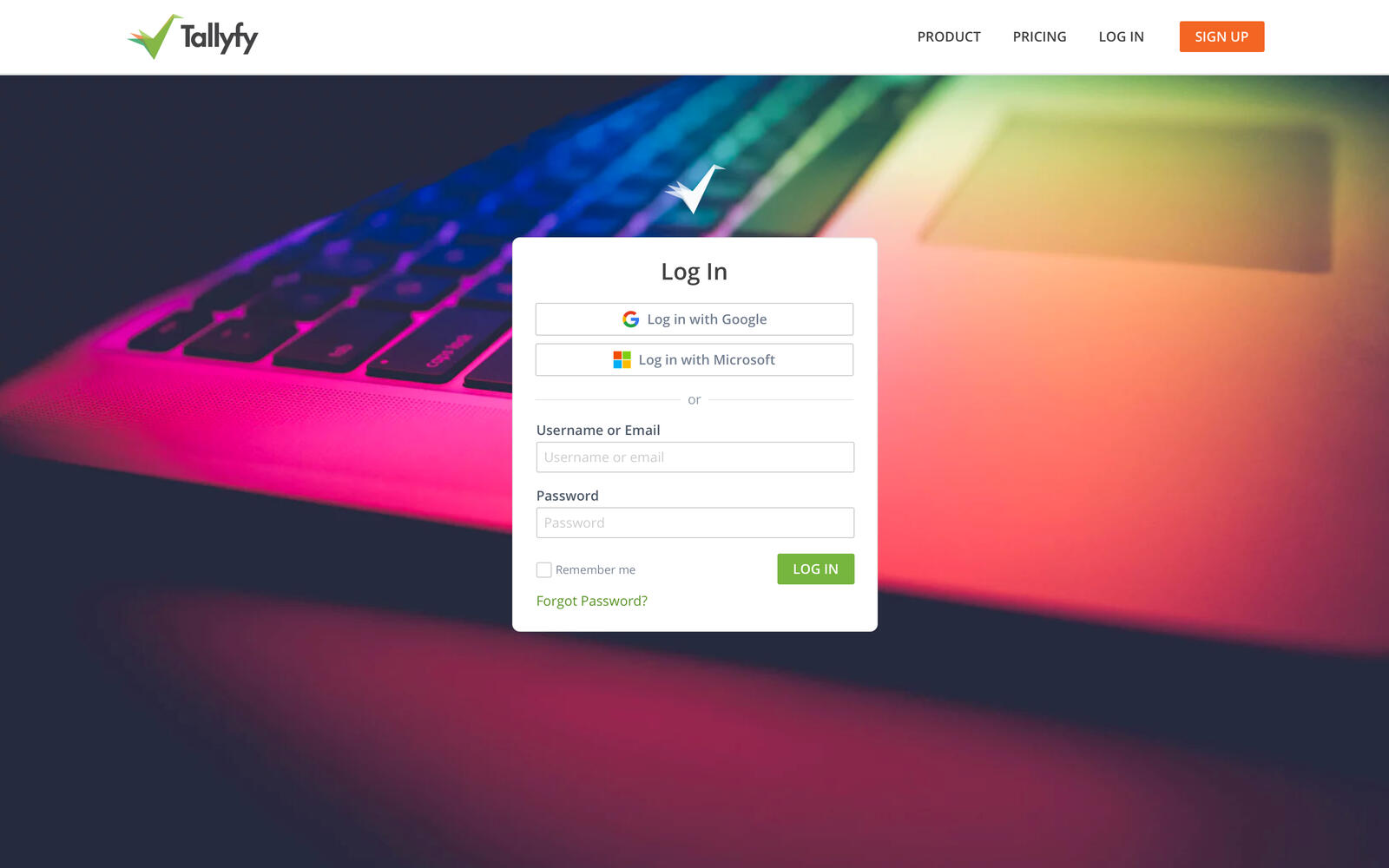
The mockup shows where we were heading - Google and Microsoft OAuth buttons above the traditional login form. This never fully shipped for guests, but it shaped our thinking about trust boundaries.
Phase 3: Magic links added
One-click actions embedded directly in email notifications. Click the link, do the thing, done. No intermediate authentication step.
Phase 4: JWT action tokens
As we built more sophisticated email actions, we moved to signed, time-limited JWT tokens. The internal specification was explicit about the validation chain:
“Store token for replay protection… Check rate limiting… Validate task assignment”
Phase 5: The phishing incident
Then we got burned. Turns out, an attacker exploited our comment API to bypass all guest creation limits and send thousands of phishing emails through Tallyfy infrastructure.
A mistake we made early on was assuming legitimate usage patterns would be the norm. This forced us to implement strict rate limiting: 100 guests per day per user, capped at 3,000 per month. The specification noted: “Rate limits are high enough for legitimate use (100 guests/day per user = 3,000/month)” - but we now verified every guest creation against these limits.
Phase 6: Session hardening
The final evolution was around session management. Our security specification was clear: “Force sign out all sessions automatically without asking users - keep the experience simple so users don’t have to think about security decisions.”
When a password changed or suspicious activity was detected, all sessions would terminate automatically. No “are you sure?” prompts. Security decisions shouldn’t require user input.
Early sketches: what guests actually need to see
When we first designed guest-facing functionality in October 2016, we started with a question: what does an external person actually need?
The first sketch showed a minimal interface:
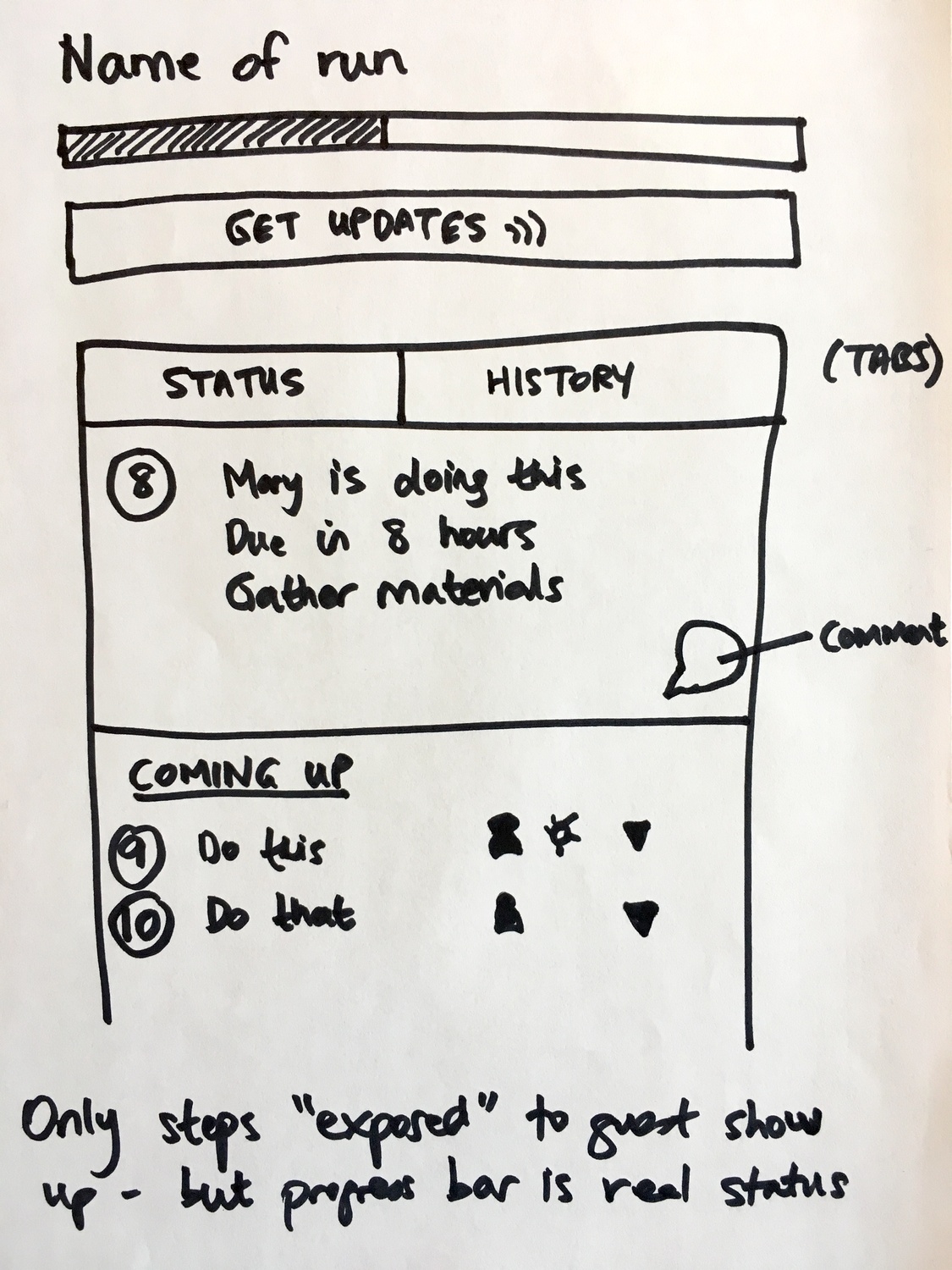
The critical annotation: “Only steps exposed to guest show up - but progress bar is real status”
A guest sees step 8 and steps 9-10 coming up, but the progress bar reflects the entire workflow including hidden internal steps. They get transparency about their progress without seeing internal complexity.
The second sketch zoomed into the interaction model:
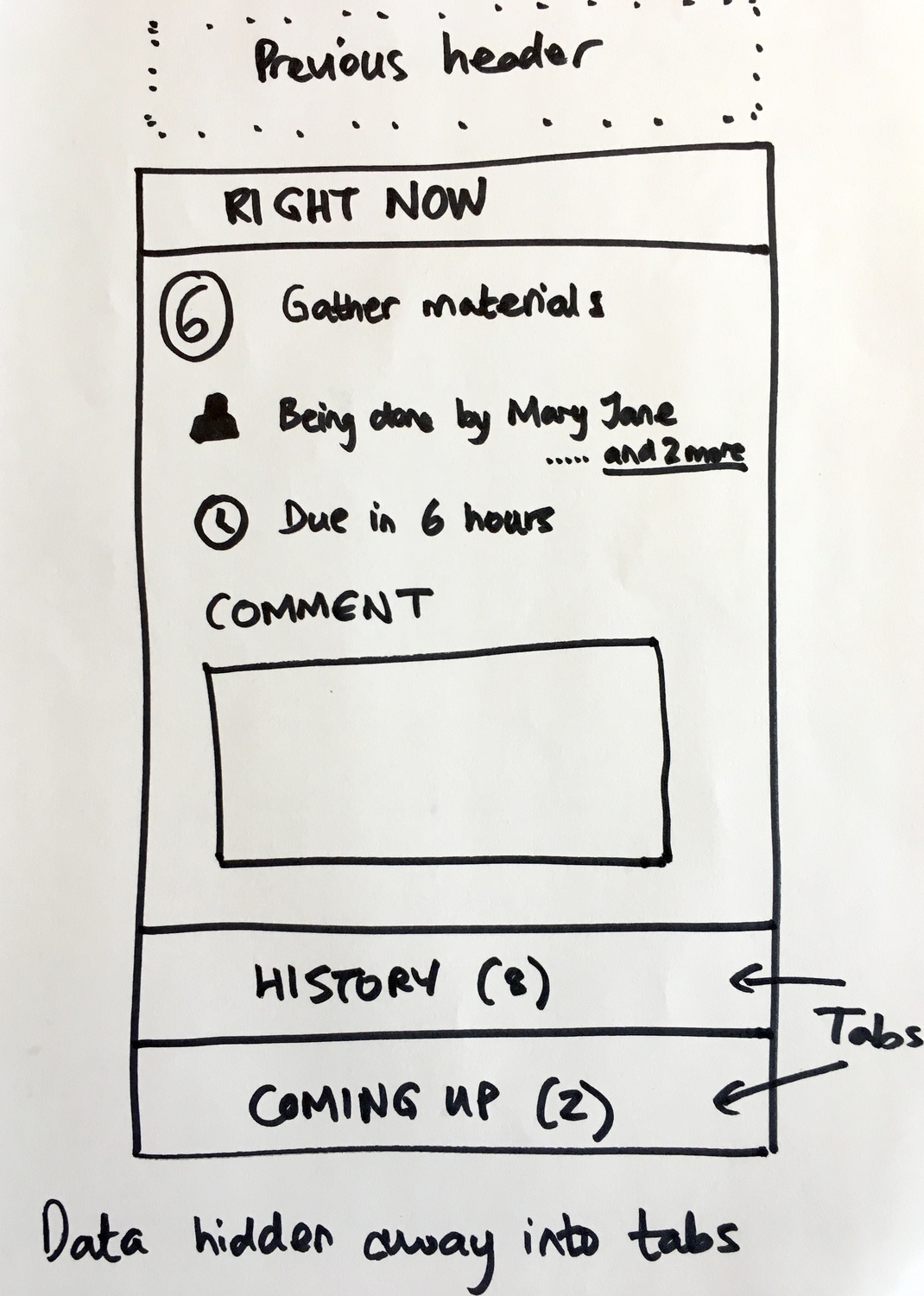
The design principle here: “Data hidden away into tabs”
Progressive disclosure. Show what matters right now, collapse the rest. A guest clicking a magic link from email should see their immediate task, not be overwhelmed with workflow complexity.
The onboarding flow that validated emails
In May 2017, I sketched out a different approach to email validation during signup:
“The next screen is ‘We sent a code to your email, please enter it here’. This validates the email is real or not with a 4 digit code, without having to click a link.”
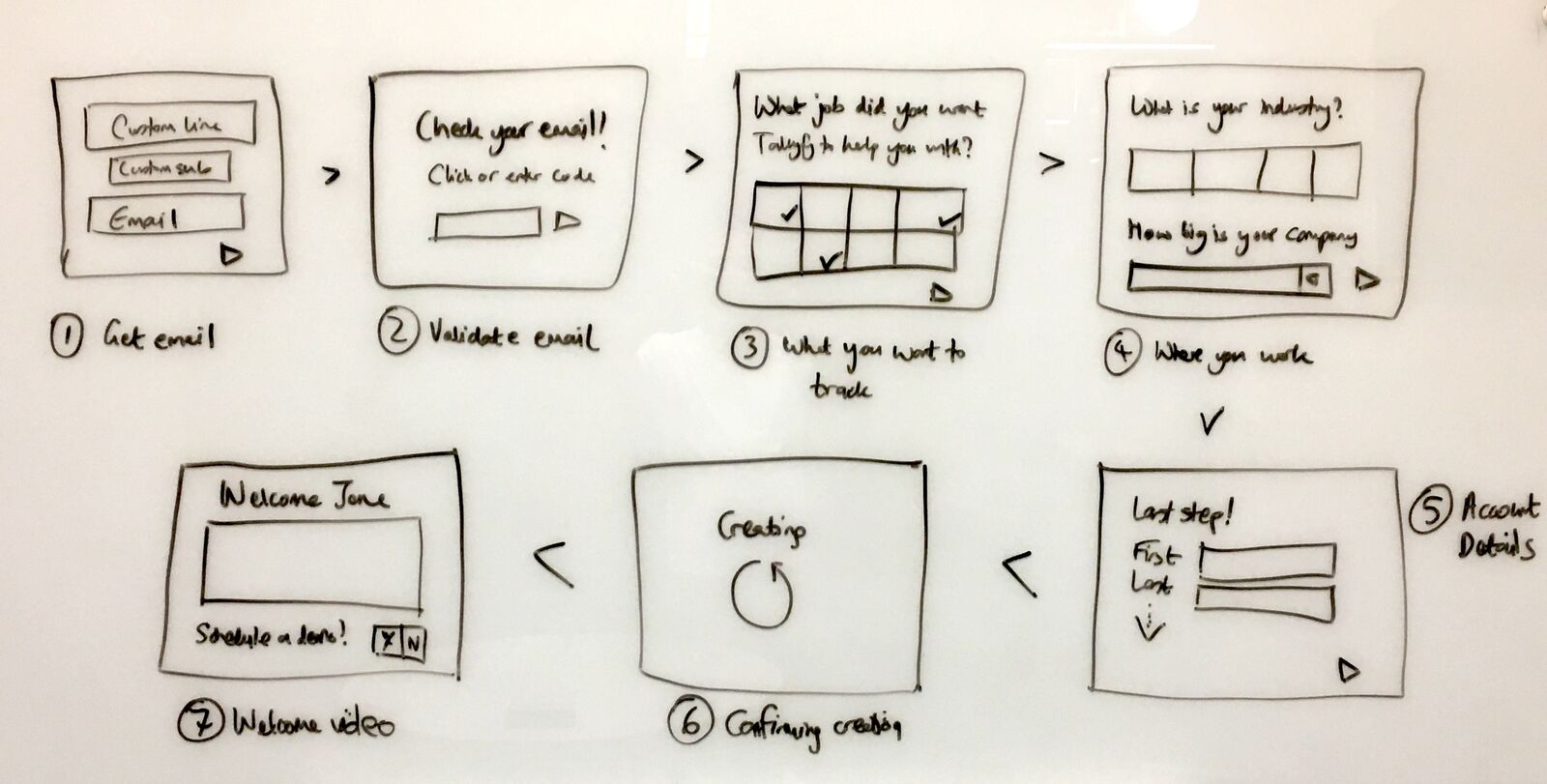
The key insight here was separating email validation from account creation. Validate email early with a code, then collect everything else. Thomas, our product designer at the time, captured the philosophy: “The simplicity is needed I think… It feels less form-y and like less work.”
We weren’t optimizing for signup volume. My note from that period: “We are looking to optimize for high quality revenue and the right customers, not for high volume of signups.”
Token validation chain
When a magic link gets clicked, what actually happens? Here’s the validation sequence from our internal specification:
Step 1: Verify cryptographic signature
The JWT token must be signed by our private key. Tampered tokens fail immediately.
Step 2: Check token not already used
Replay protection. Every token gets marked as consumed after first use. Try to reuse it? Rejected.
Step 3: Verify actor is organization member
The user ID embedded in the token must belong to an active member of the target organization.
Step 4: Verify actor is assigned to task
Being in the organization isn’t enough. You must be specifically assigned to this task.
Step 5: Verify task is in actionable state
Can’t complete a task that’s already done, blocked by dependencies, or deleted.
Step 6: Check rate limiting
Even valid tokens get rejected if the user has exceeded action limits. Protection against automated abuse.
The specification was explicit about secrets handling: “Client secrets MUST be stored securely and MUST NOT be transmitted to clients after initial creation… Show secret ONLY on creation.”
One-time display. Once you close that dialog, the secret’s gone. If you lose it, you regenerate it. No “show me my secret again” button.
Public kickoff forms: anonymous to identified
Building on the guest workflow access model, we developed the concept of public kickoff forms. These allow anyone - even anonymous visitors - to launch a workflow.
The original design document from August 2017 described it this way:
“A customer journey is a type of Tallyfy process that is designed to run on a public website. Runs of a customer journey are done by an anonymous visitor, until that visitor is identified. Upon identification of an anonymous visitor, a customer journey turns into a run.”
The key transition: anonymous visitor becomes identified participant.
This happens through email. When someone fills out a public kickoff form and provides their email address, they transform from an anonymous form submission into a tracked guest who can receive magic links for subsequent tasks.
These templates show how public kickoff forms work in practice - external participants receive magic links to complete their assigned tasks without ever needing to create an account:
The form trigger evolution
In April 2017, we had a naming debate that revealed how we were thinking about public process initiation.
I proposed renaming “pre-run captures” to “Form Trigger”:
“At present, in both builder and start a run - we employ the concept of pre-run fields. These are effectively form fields that are outside of steps. I would like to rename the builder portion of that to Form Trigger - which is effectively a form that triggers at the very beginning of a process to kick things off.”
Our CTO pushed back:
“I am not sure Form Trigger is a much better name. But I do see where you are going.”
The discussion continued:
“Ultimately, we want to embed the form on the web, in the way that Wufoo does. This would enable public forms to be filled out and start a run.”
Thomas, our product designer at the time, captured the resolution:
“So hold on the re-naming for now? I can do an audit when we land on the name we want to use and update all the mockups in Zeplin.”
We ended up calling them “kickoff forms” - the form that kicks off a process. But the underlying mechanism stayed the same: collect data, create a run, send magic links to participants.
The public website vs SaaS debate
Not everyone agreed on how far to take the magic link concept.
Pravina raised a substantive objection when we discussed embeddable customer journeys:
“The solution you have described seems to be for a public website - Public website journey. However the Box lead is the post sign up process on a SaaS - SaaS onboarding journey. IMO these two are very different - especially in terms of the problem statement and competitors.”
Her specific concerns about public website journeys:
“This is more challenging as the visitor may have started their journey on Quora, external blog-post, conference, word-of-mouth etc. How will you tailor their journey for so many channels? Will you force them to browse everything? Will you force the Tallyfy user to make hundreds of flow combinations?”
My counter-argument focused on the underlying mechanism:
“imo it is the same widget on a public website or a post-signup web app. The only difference is the identity of the person is known for post-signup and so the run has a lot more context/info.”
This debate shaped the final architecture. The magic link mechanism works identically whether someone is:
- An anonymous visitor filling out a public form
- A known contact receiving an email invitation
- A SaaS user in their post-signup flow
The only variable is how much context the system has about them.
Trust boundaries and the email assumption
The magic link model relies on a specific trust assumption: if you control an email address, we trust you are the intended recipient of tasks sent to that address.
This is the same assumption that password reset flows use. It’s the same assumption that email verification uses. We’re not inventing a new trust model - we’re extending an existing one. Nothing fancy about it.
The security implications:
- Magic links expire - Time-bounded validity prevents indefinite access
- Links are task-specific - Access to one task doesn’t grant access to others
- Email change revokes access - If an email is removed from a task, outstanding links become invalid
- Audit trail captures everything - Every magic link click is logged with IP and timestamp
Universal Email Markup: one-click from inbox
The magic link concept eventually extended to in-email actions. A recent internal specification describes:
“Enable one-click task actions directly from email notifications through Gmail schema.org and Outlook Adaptive Cards markup, with universal fallback for all email clients.”
The progression:
- Original approach: Click link, see task, complete task
- Enhanced approach: Complete task directly from email interface
The technical implementation uses JWT tokens:
“The fallback link changes from https://go.tallyfy.com/organizations/org/tasks/task to https://api.tallyfy.com/api/inbound-actions/complete?token=jwt”
Same principle, evolved execution. Remove friction between intent and action.
Tracking the guest-to-member conversion
A recent GitHub issue captured why magic links matter beyond just convenience:
“When guests sample Tallyfy, do they feel sufficiently interested to actually sign up as members?”
The answer to this question helps measure:
- Guest-to-member conversion rates
- Viral coefficient of guest experiences
- Network effects between organizations
- Quality of guest user experience as a growth driver
The issue specified webhooks that fire when:
- An email address that was previously a guest creates a new organization
- An email address that was previously a guest gets invited as a member to an existing organization
Magic links aren’t just about reducing friction. They’re a deliberate growth mechanism. Every frictionless guest experience is a potential member conversion.
What we left out
Several ideas from early magic link discussions were descoped:
OAuth-based guest login - We designed it. We mocked it up. We never completed it. The idea was that guests could authenticate via Google or Microsoft instead of magic links. Would OAuth have been better for guests? Probably not. The complexity of managing OAuth state for external participants who might only interact once didn’t justify the implementation cost.
Cloud identity services for guests - We considered using cloud identity services to manage guest identity federations. This would have given us sophisticated identity management out of the box. We decided against it because it added infrastructure dependency for a problem we could solve with signed tokens and email validation.
Referrer-based journey customization - Automatically adjusting the workflow based on whether someone arrived from Quora versus Google versus email. The conditional logic system can achieve similar results manually, but automatic referrer-based routing added complexity without proportional value.
Full website embedding - The vision included embeddable widgets that would run inside third-party websites with one-click Cloudflare and Matt Mullenweg’s WordPress plugins. We settled on link-based access which covered most use cases with much less maintenance burden.
Anonymous visitor tracking - Tracking website visitors through a journey before they identified themselves raised privacy complexity and GDPR considerations. We drew the trust boundary at email ownership instead.
Variable replacement from HTTP referrer - The original specification mentioned: “For the public website, each variable available in pre-run captures could be usable e.g. if REFERRER_SOURCE equals Quora then do this.” This conditional referrer logic was cut for simplicity.
The relationship to guest workflow access
This magic link functionality builds directly on the guest access architecture we designed. The guest access post covers:
- Why external participants should never need accounts
- How progress bars work for guests
- The rules engine applying equally to members and guests
Magic links are the transport mechanism that makes guest access practical. Without magic links, guests would need to authenticate somehow. Without guest access architecture, magic links would just be a shortcut to a login page.
The two posts together describe the complete external participant experience:
- How they get into the workflow (magic links)
- What they can do once they’re in (guest access)
Implementation insight: the public kickoff bug
A GitHub issue from our bug tracker reveals how subtle magic link edge cases can be:
“Bug: Steps with assign_run_starter equals false incorrectly get assigned when process launched via public kickoff form”
When a process launches via public kickoff, the “run starter” is the anonymous or guest submitter. Steps that shouldn’t be assigned to the run starter were still getting assigned in this context.
This bug illustrates the nuance of magic link workflows. The system needs to distinguish between:
- An internal member starting a run (they might do the first steps)
- A guest submitting a public form (they probably shouldn’t own internal steps)
The rules engine had to become context-aware about how a run was initiated.
Why this matters for workflow design
If you’re building workflows that involve external participants, the key insight is: authentication friction is conversion friction.
Every login wall you place in front of a guest is a percentage of completions you lose. Every password reset flow is someone who might not come back.
Feedback we’ve received from marketing agencies taking on 2-3 major clients per week confirmed this pattern. One operations manager described the transformation: “You just click on this forever-link and complete the task. And at the end of the day, Tallyfy sends them a gentle email reminding them what is left to do.” Their clients went through onboarding “so easily and quickly, not being cognizant of the fact that it is a long process” - a direct result of eliminating login friction.
The magic link model inverts the assumption. Instead of “prove who you are, then access your task,” it becomes “here’s your task, authenticated by the fact that you received this email.”
OK, that oversimplifies things. This isn’t removing security. It’s relocating it to where users already expect it - their email inbox.
For implementation details and current capabilities, see the process launching documentation and the specific magic links guide.
About the Author
Amit is the CEO of Tallyfy. He is a workflow expert and specializes in process automation and the next generation of business process management in the post-flowchart age. He has decades of consulting experience in task and workflow automation, continuous improvement (all the flavors) and AI-driven workflows for small and large companies. Amit did a Computer Science degree at the University of Bath and moved from the UK to St. Louis, MO in 2014. He loves watching American robins and their nesting behaviors!
Follow Amit on his website, LinkedIn, Facebook, Reddit, X (Twitter) or YouTube.

Automate your workflows with Tallyfy
Stop chasing status updates. Track and automate your processes in one place.