
Four types of rules and why they must run independently
After seven years of iteration starting in 2016, we discovered that mixing workflow rule types in Sherlock creates unpredictable conflicts. The solution was four independent types: visibility, assignment, deadline, and status rules that execute in parallel.
Rules automation is core to workflow software. Here’s how we approach it.
Workflow Automation Software Made Easy & Simple
Summary
Workflow rule types - this is our personal, candid experience building automation at Tallyfy over nearly a decade. What started as a single visibility rule engine evolved into four distinct rule types, each with its own execution context.
- The evolution was painful - We started with one rule type in 2016, debated where rules should live for two years, and finally landed on four independent types by 2023. The journey involved architecture rewrites and many heated discussions.
- Mixing rule types creates chaos - When visibility rules and deadline rules ran together, we got contradictions. A hidden step with a deadline meant notifications for tasks nobody could see.
- Step-level versus blueprint-level was the key debate - Moving rules from individual steps to the blueprint level meant one rule could affect many steps. This was a fundamental architecture shift.
- Independent execution solved the conflicts - Each rule type now runs in parallel. Deadline rules fire even when visibility rules don’t. See our automations documentation and conditionals guide for how this works today.
This is our candid experience building the four rule types at Tallyfy. This reflects our experience at a specific point in time. Some details may have evolved since, and we have omitted certain private aspects that made the story equally interesting.
In the first post about Sherlock, I described how we built an if-this-then-that framework for workflow automation. That story ended in 2018 with a working rules engine focused primarily on one thing: visibility. Show this step. Hide that step.
Turns out, what I didn’t cover was the harder problem we faced years later. One rule type wasn’t enough. We needed four.
2016: The early debates on where rules should live
The conversation about conditionals started much earlier than most people realize. Back in October 2016, our team was already wrestling with a fundamental question: where should rules be configured?
Our product designer Pravina flagged the issue directly:
“Conditionals is hard to find… Conditionals should be at step level (not whole process level)”
This sparked an immediate architectural concern. Our CTO Walker responded with the technical reality:
“It will require a rewrite on the API”
That phrase - “rewrite on the API” - would echo through years of decisions. We were building something that would need to evolve, and the foundation we chose in 2016 would constrain or enable everything that followed.
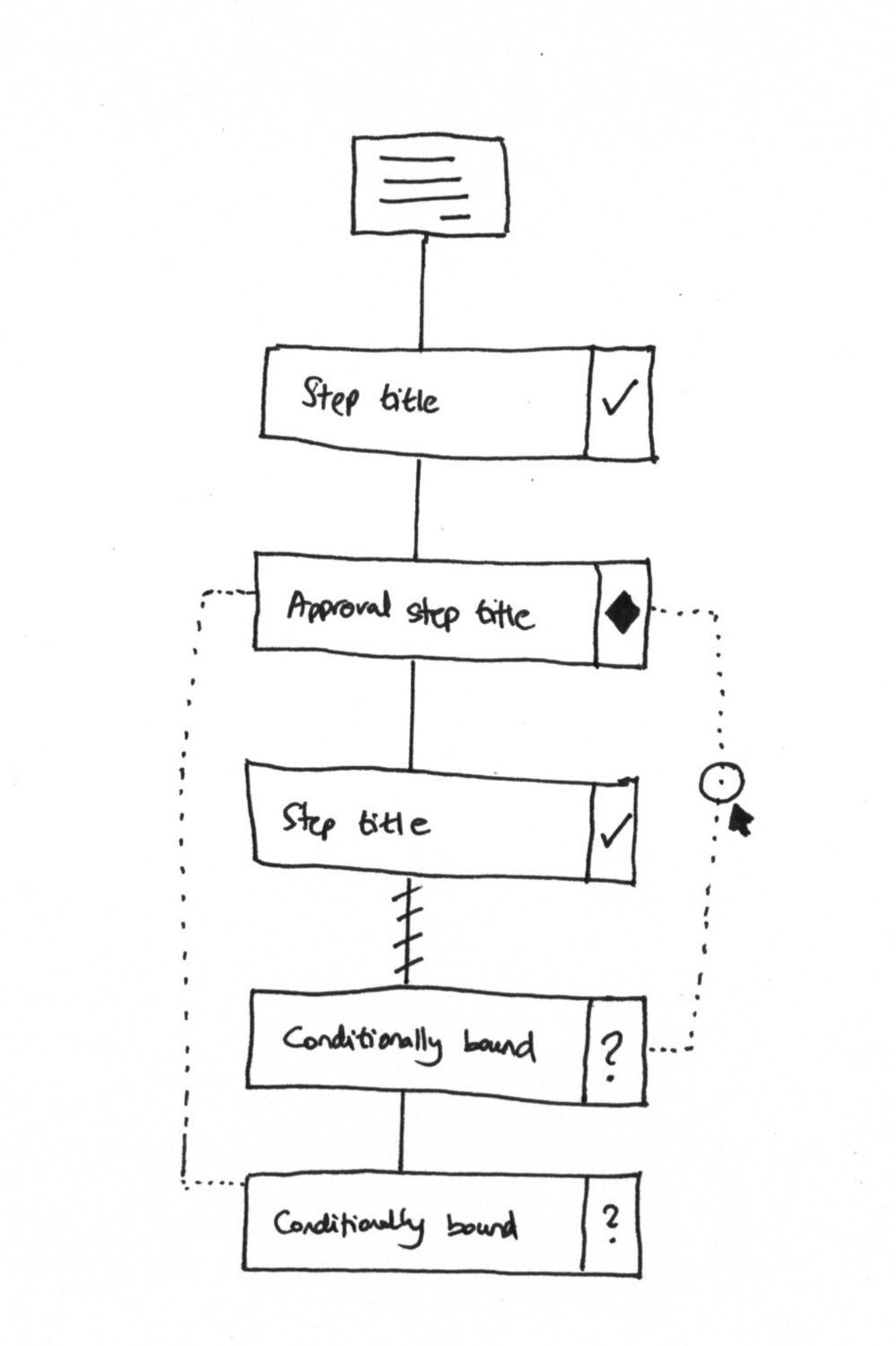 Early wireframe showing conditional visibility - some steps marked with question marks to indicate they might not appear. The dashed lines show conditional boundaries.
By September 2017, Pravina had crystallized the pattern we would use for years:
“Would you agree that this is our rules format? IF (trigger object) | Is (trigger) | THEN (action) | THAT (action object)”
That four-part structure - IF, IS, THEN, THAT - became the grammar of our rules engine. Simple enough to understand, flexible enough to handle complexity.
The swimlane insight
One early sketch changed how I thought about rules entirely. We were looking at traditional flowcharts with swimlanes - the kind that show who does what and when.
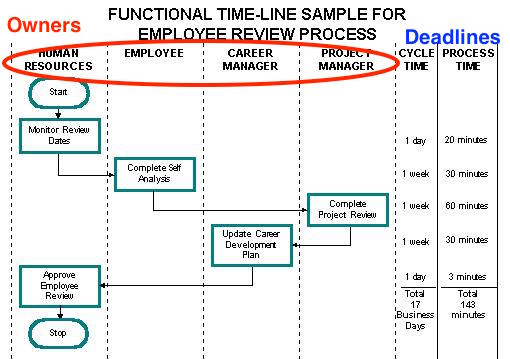 Reference diagram showing the classic swimlane approach: owners in columns, deadlines on the right. This is what inspired our thinking about separate rule types for assignment (who) and deadlines (when).
Looking at this, I realized we were sort of trying to encode three different things in a single rule:
- Who does the work (the swimlane columns)
- When it is due (the timeline on the right)
- Whether it appears at all (conditional visibility)
Each of these deserved its own rule type. Mixing them was the source of our problems.
October 2020: The rule types problem surfaces
Four years after those initial debates, I opened a GitHub issue that would reshape how we thought about rules entirely:
“Every rule type exists in its own little package and the UI should be such that adding one rule type is entirely different from adding another rule type. e.g. for deadline rules - ALL the rules will be deadline rules, they would not be mixed with visibility rules.”
That sentence - “wouldn’t be mixed with visibility rules” - was the key insight. We had been building rules that tried to do everything at once. A single rule might check a condition, hide a step, reassign it, and change its deadline. Powerful in theory. Chaotic in practice.
“In this way, you can add multiple rules with AND or OR in between but you cannot mix rules across rule types. Each rule type has an independent set of rules.”
The constraint was deliberate. Within a rule type, combine conditions freely. AND this with OR that. But across rule types? Strict separation.
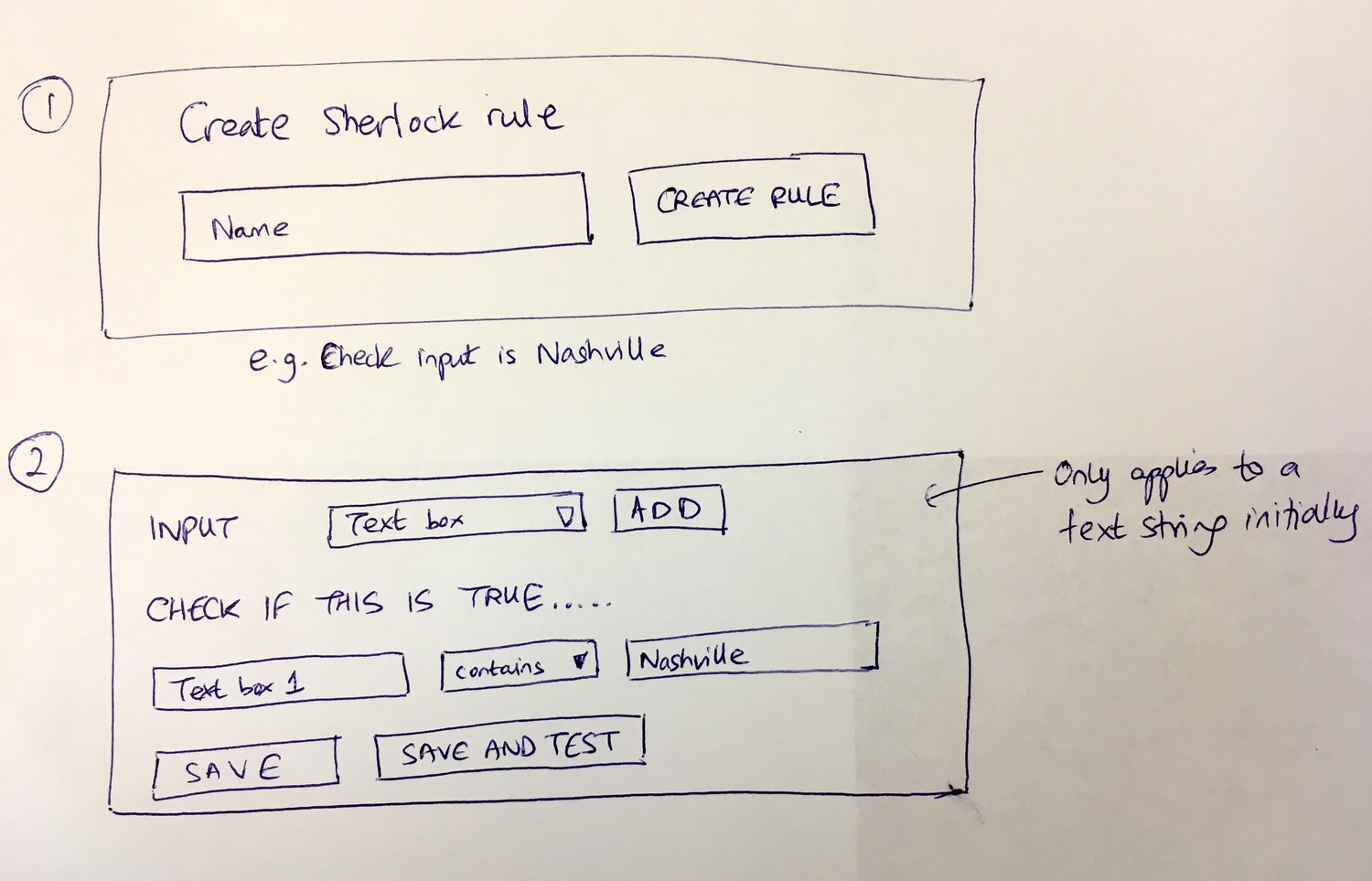 Original sketch for the Sherlock rule builder: Name your rule, select input type, define conditions. Note the “SAVE AND TEST” button - we knew from day one that rules needed testing.
Why mixing rule types creates conflicts
The problem became clear when we looked at real workflows. At Tallyfy, we’ve observed that organizations running complex processes - like a 26-step member onboarding workflow with grandparent-parent-child entity structures - need visibility rules that show different steps based on structure type, deadline rules that adjust based on effective dates, and assignment rules that route tasks to the right contacts. When these rules competed with each other, the results were unpredictable.
Consider a step that has both visibility rules and deadline rules:
Visibility rule: If department equals “International”, show this step. Deadline rule: If shipped-date field has a value, set deadline to 1 week after that date.
What happens when the visibility rule hides the step but the deadline rule still fires? Is there a deadline on a hidden step? Does time count against something invisible? Should notifications go out for a task nobody can see?
The answer we arrived at:
“This is to prevent conflicts but also to enable parallel execution i.e. the deadline rules might fire even though the visibility rules do not.”
Actually, calling them fully independent oversimplifies it. Each rule type operates in its own execution context. Visibility rules determine what appears. Deadline rules determine when things are due. Assignment rules determine who does the work. They can all run simultaneously without waiting for each other.
The step-level versus blueprint-level debate
This was the architectural decision that took years to resolve. Early implementations put rules on individual steps. Each step had its own rules affecting only itself.
Our API Lead identified the limitation:
“What if we moved the rules from being in the steps settings to becoming part of the blueprint itself”
This was the key architectural shift. Instead of rules living inside each step, rules would live at the blueprint level and target steps.
“I noticed that it has a limitation: The Step that has the automated actions is always the target of those actions. So we cannot create an automated action that controls multiple steps with the same set of conditions.”
Consider an onboarding workflow where international employees need five additional steps. Under step-level rules, you’d configure the same condition five times - once on each step.
I agreed with the proposed solution:
“The benefits of moving automated actions from step scope to blueprint scope are first - one action can operate on many steps, not just one. Second - one IF can operate many rule types, on many steps. Please proceed.”
One rule checking one condition could now:
- Show steps 5, 6, and 7
- Update deadlines on steps 5 and 7
- Assign a specific user to step 6
All from a single automated action definition.
The four rule types
Our lead developer laid out the structure in early 2022:
“We are using ‘Automated Actions’ instead of the old ‘Rules’. A single ‘Automated Action’ has many ‘Rules/Conditions’ and also, one or many ‘Then Actions’.”
The “Then Actions” are where the four types come in:
1. Visibility - Show or hide a step based on conditions.
“Visibility is a unique action while Assignee action for example can have multiple instances… unlike Visibility where any Step can only have one.”
One visibility state per step. Either it shows or it doesn’t. No-brainer.
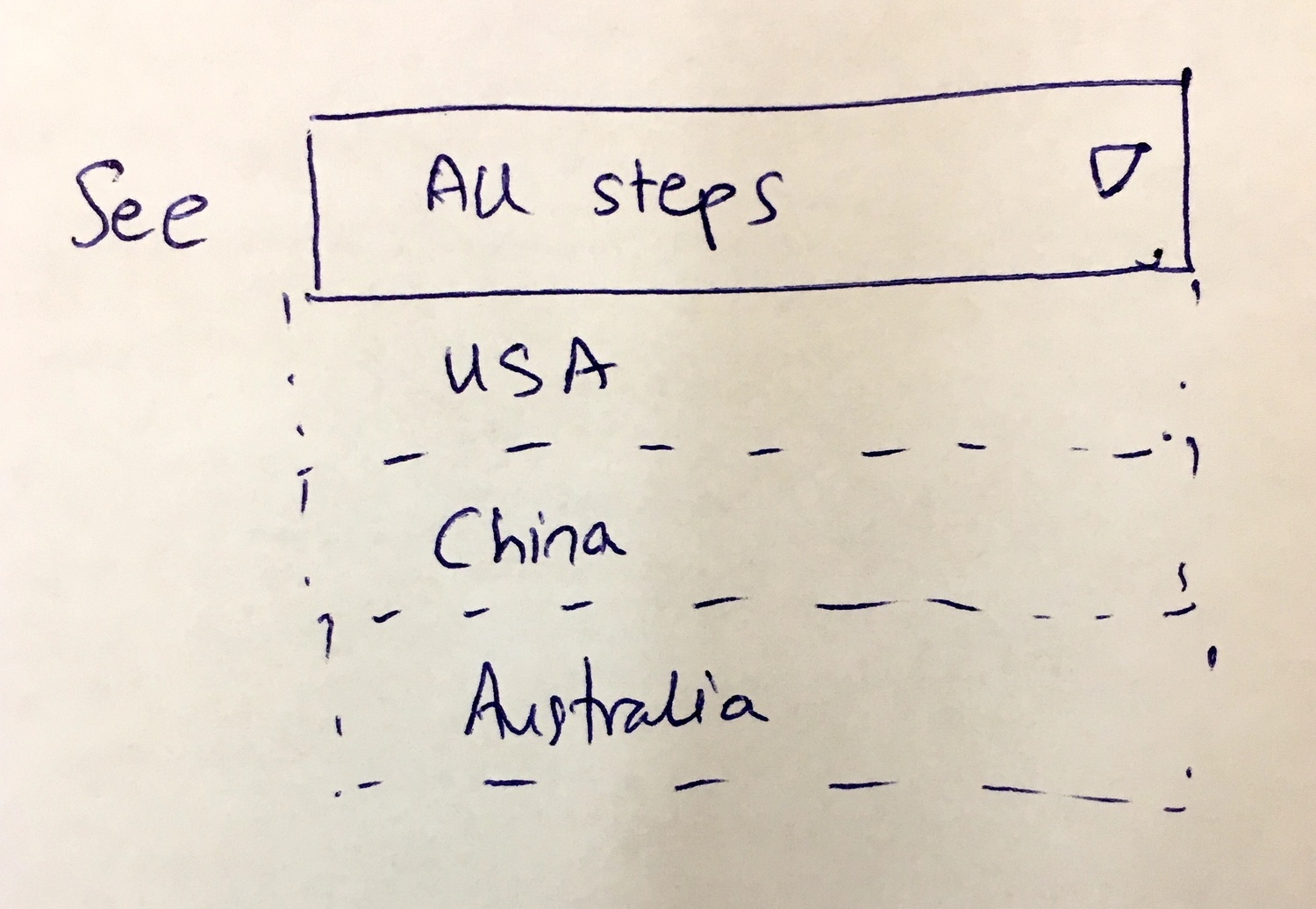 The “See All steps” dropdown concept - filter by region to see different step configurations. USA, China, Australia each see different steps in the same process.
2. Assignment - Assign or unassign people from a step.
“There is a small difference between the Visibility action and the others, that is Visibility is a unique action while Assignee action for example can have multiple instances.”
Assignment rules can stack. If Location is Nashville, assign User 1. If Priority is High, also assign the manager. Multiple assignment rules, additive results.
We built two variants:
- Assign: Add new users without removing existing assignees
- Assign Only: Replace existing assignees entirely with the rule’s specified users
3. Deadline - Change when a step is due based on conditions or form field values.
“For the Deadline Action does the new value always depend on the field selected in the Rule? or we allow users to select any form field?”
The deadline rule can reference any date field in the workflow - kick-off form dates, step completion dates, or date captures from previous steps. Then it calculates: 1 week after, 3 days before, same day.
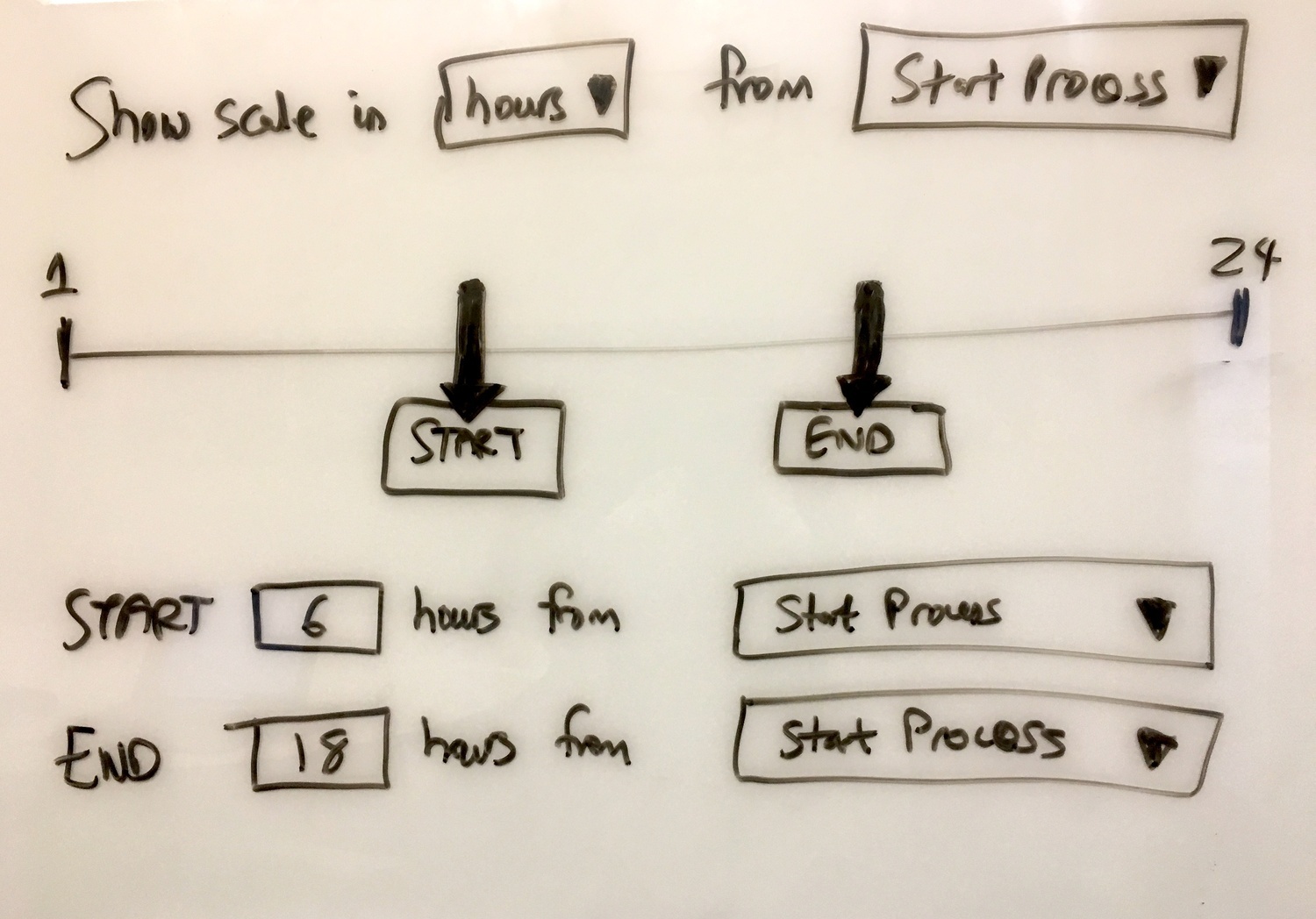 The original deadline timeline concept: START and END positions on a timeline, calculated from process start. April 2018.
4. Status - Reopen a completed step when conditions change.
This came later, specifically for approval workflows. If an approval is rejected, reopen the preparation step. If new information arrives, bring a closed step back to active status.
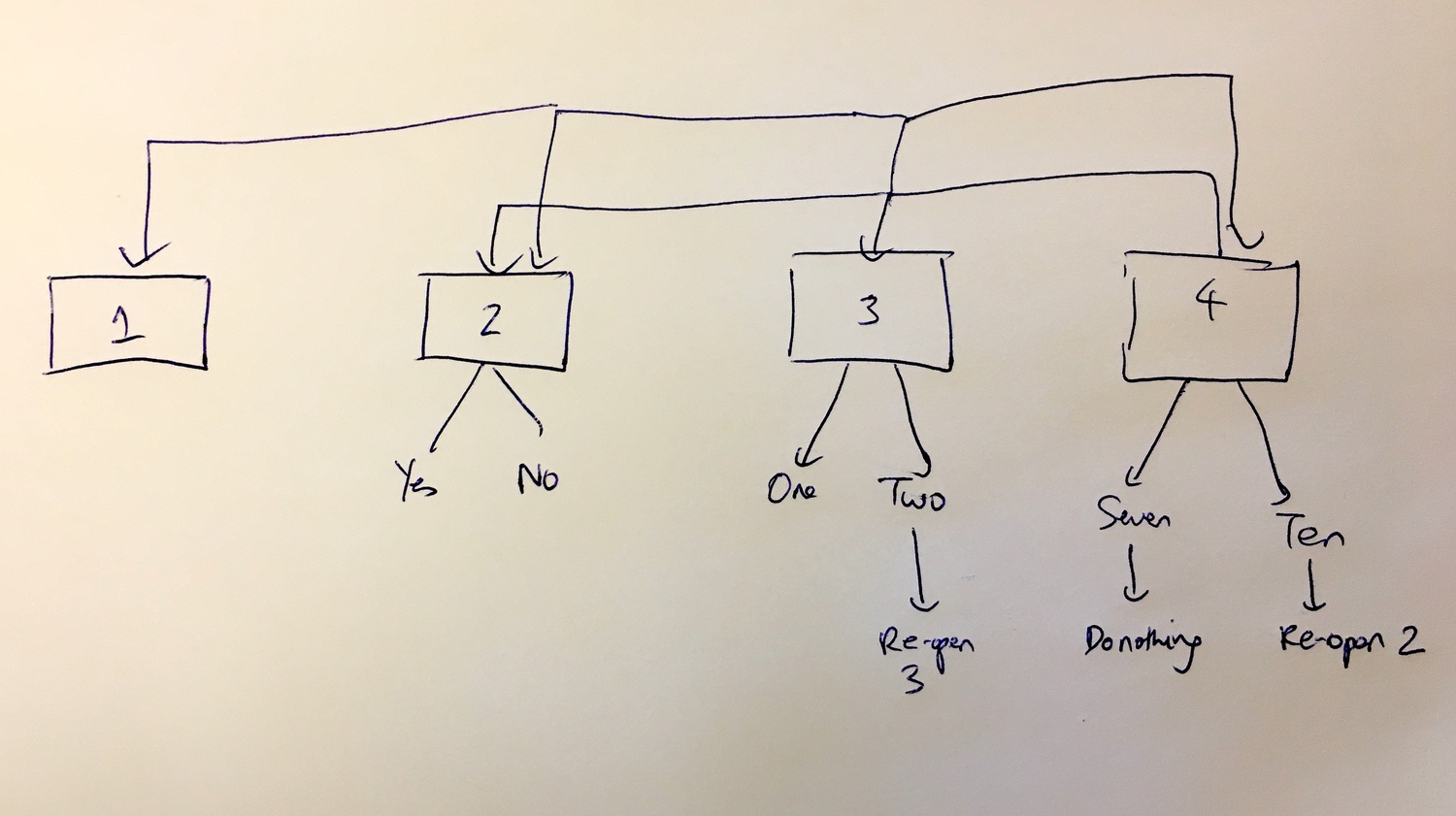 Whiteboard sketch showing re-open logic: Step 3 with outcome “Two” can re-open Step 3. Step 4 with outcome “Seven” does nothing, but “Ten” re-opens Step 2. This became the Status rule type.
The never-ending feature battle
One comment from our early discussions stuck with me. Pravina, looking at competitor products in February 2018, observed:
“This will be a never ending feature battle”
She was right. Every workflow tool adds rules. Every customer wants more conditions, more actions, more flexibility. The temptation is to build everything.
Our response was the opposite: build less, but build it correctly. Four rule types, not forty. Independent execution, not interdependent complexity.
The assignment rules customer story
One exchange captured why assignment rules mattered so urgently. A customer asked:
“Is it possible to assign next step to the one who submitted the kick-off form?”
The answer required nuance:
“If you mean literally selecting who submits a form as assignee in the action rules then unfortunately it is not supported, because we currently use the ‘values’ from a selected kickoff form which is different. However, I think we currently have the user who submits kickoff forms as the same user who launches the process, so automatically we already support assigning the process starter as Steps assignee.”
Assignment rules work with explicit values - user IDs, group IDs, email addresses in text fields. The “who launched this process” case was a special case we handled separately.
Later, we added the ability to assign based on text field values:
“Imagine a short text field called ‘Enter your email’ either in a KO form or elsewhere in a step. A user enters an email address in there - and when that value is stored/entered, we want that email to be auto-assigned as a guest on another task: IF FIELD HAS VALUE THEN ASSIGN VALUE TO THIS TASK.”
Text field becomes assignee. Dynamic assignment based on form input.
The deadline rules complexity
Deadline rules sound simple until you think through the edge cases. Feedback we have received from legal and compliance teams makes this concrete: an estate planning firm tracking 9-month probate timelines needs deadline rules that calculate from case filing dates. A government contractor managing ISO 9001 certifications needs 16 scheduled workflows with deadlines tied to audit cycles. Pre-onboarding that used to take 1-2 weeks can be reduced to 2-3 days when deadline rules automatically adjust based on form field values rather than fixed offsets.
From the original specification:
“Example 1 - Sales funnel management process: Step 1: Please pick a date for a meeting with our account executive Step 2: Send meeting reminder email Rule here: If ‘step 1>meeting-date’ is not empty THEN update deadline 1 day before ‘step 1>meeting-date’”
The meeting reminder step’s deadline adjusts based on when the meeting is scheduled. Not a fixed offset from process start. A calculated date based on form field input.
Our developer clarified the implementation:
“The format of THEN is: Update ‘Step deadline’ to ‘number’ of ‘Hours/Days/…’ ‘before/after’ the date ‘Selected Date Field’.”
The “Selected Date Field” could be:
- A kick-off form date field
- A step’s form date field
- Another step’s current deadline
This flexibility came at a painful cost. Timezone handling became a significant bug source:
“I noticed that the difference you said is caused by timezone not considered when storing the KO field date: The KO field value stored is ‘2023-10-20T04:00:00.000Z’ in GMT timezone while it shows the same value on the UI ‘20/10/2023 04:00am’.”
Dates entered in one timezone, stored in another, displayed in a third. Honestly, a total mess. We fixed it by standardizing on UTC with timezone conversion at display time.
The approval rules addition
In late 2023, we added a fourth rule type specifically for approval steps:
“Important update here with a 4th rule type that only applies to tasks of type ‘approval’.”
Status change rules - specifically, reopening steps when conditions warrant. If an approval is rejected, automatically reopen the preparation step. If a review finds issues, bring the drafting step back to active.
This completed the four-type model: Visibility, Assignment, Deadline, Status.
How independent execution works
The key architectural decision was parallel evaluation:
“Each rule type has an independent set of rules. This is to prevent conflicts but also to enable parallel execution i.e. the deadline rules might fire even though the visibility rules do not.”
When a form field changes, all four rule types evaluate simultaneously: visibility rules check if any steps should show or hide, assignment rules check if any assignees should change, deadline rules check if any due dates should shift, and status rules check if any completed steps should reopen. No rule type waits for another. No rule type can block another. The counterintuitive part is that if visibility rules fail to match, deadline rules still run. This matters for performance at scale. Workflows with dozens of rules across multiple types need fast evaluation. Sequential execution - check all visibility, then all assignment, then all deadline - would be slow. Parallel execution across types, sequential within types, balanced both correctness and speed.
The logging requirement
I added a requirement that proved essential for debugging:
“One more thing you need to factor in is that we need to log clearly and in a filterable fashion every automated action and its execution. This allows us the ability to trace what automated actions actually did, and it can also be a filter to show just automated actions within the overall activity feed.”
When a customer asks “why did this step get assigned to the wrong person?” you need to answer with evidence. The activity log shows exactly which rule fired, what conditions it evaluated, and what actions it took. Without that logging, rules become a black box. Is that acceptable? Not at all.
What we left out
There are implementation details behind this system that remain internal. How we prevent circular rule dependencies. How we handle the case where one rule’s action triggers another rule’s condition. How we optimize evaluation when hundreds of rules exist on a single blueprint.
The future ideas I sketched also remain largely unbuilt:
“One last thing - at present, automated actions are premised on the idea of IF a condition is true. I know this is a bit hard to imagine, but can you please enable the new framework to also have new and novel conditions such as WHILE to watch continuously?”
WHILE conditions - continuous monitoring rather than event-triggered evaluation - would be a different system entirely. Watching for conditions over time rather than checking at specific moments.
“If you want to build the entire computation or rules engine in something outside of Laravel, like go - open to that idea as well… please think about this in such a way that you might imagine this entire rules piece being defined and run entirely independently of our current codebase.”
A standalone rules engine that could evaluate conditions against any data source, not just our workflow objects. That vision remains on the whiteboard.
The result
Four rule types. Independent execution. Blueprint-level scope with multi-step targeting. Activity logging for every action.
The system handles conditional visibility for regional variations. Dynamic assignment based on form field values. Deadline calculations against multiple date sources. Status changes for approval workflows.
The key insight from 2020 holds: don’t mix rule types. Let each type do one thing well. Run them in parallel. Log everything.
Try an input, see what Sherlock does. But now Sherlock has four personalities, and they work together without stepping on each other.
About the Author
Amit is the CEO of Tallyfy. He is a workflow expert and specializes in process automation and the next generation of business process management in the post-flowchart age. He has decades of consulting experience in task and workflow automation, continuous improvement (all the flavors) and AI-driven workflows for small and large companies. Amit did a Computer Science degree at the University of Bath and moved from the UK to St. Louis, MO in 2014. He loves watching American robins and their nesting behaviors!
Follow Amit on his website, LinkedIn, Facebook, Reddit, X (Twitter) or YouTube.

Automate your workflows with Tallyfy
Stop chasing status updates. Track and automate your processes in one place.