
Form field validation that catches errors before submit
Building real-time validation at Tallyfy that tells users what is wrong before they hit save. The internal debates on extensibility, custom rules, and why an infinite set of validations forced us to think differently.
Summary
- An infinite set of validations - That phrase from an internal discussion about adding validation message when checklists have fewer than two options changed how we approached the problem. We couldn’t build every validator. We had to build a framework for building validators.
- Real-time beats on-submit - We watched users fill out entire forms only to get rejected at the end. The frustration was palpable. Validation needed to happen as people typed, not after they thought they were done.
- Sherlock started with validation - Before rules could trigger workflow actions, they needed to check if data was correct. Form field validation was the proving ground for the entire rules engine.
- Extensions allow the impossible - UK postcodes. 8-digit codes exactly. US phone numbers. Regional formats we had never heard of. The extension model let anyone build what they needed without waiting for us.
Form field validation - this is our personal, candid experience building it at Tallyfy. This reflects our experience at a specific point in time. Some details may have evolved since, and we’ve omitted certain private aspects that made the story equally interesting. Not a case study. The actual discussions, the customer complaints that drove our decisions, and the architectural choices that still shape the product today.
Form validation is essential to capturing clean data in workflow processes. Here’s how we approach form building.
Form Building Made Easy
If you want to see where we landed, check the form fields documentation or the building effective forms tutorial. What follows is how we got there.
The customer frustration that started it
In discussions we’ve had about onboarding workflows, the same complaint surfaced repeatedly: organizations collecting multi-state tax compliance documentation, site lists with dozens of required fields, or credit application information needed validation that happened as data was entered, not after someone hit submit. A payroll processor running client onboarding workflows told us their team spent hours chasing down incorrect information because forms accepted anything. That 64% reduction in onboarding time they eventually achieved came largely from catching data problems at the source.
An internal discussion about fixing delayed validation display in public kick-off forms captured something we kept hearing:
“The field must be a string” error, validation errors appear after moving to next field.
Users would type something perfectly reasonable, tab to the next field, and get slapped with an error message that made no sense to them. “The field must be a string” - what does that even mean if you just typed text into a text box?
Every time we onboard a new team, the same issue surfaces. The issue tracker filled with painful variations of this complaint. People entering numbers when we expected text. People entering text when we expected numbers. People pasting formatted data that included invisible characters.
Our validation was technically correct. Honestly, it was also completely useless from a user experience standpoint.
The GitHub inspiration
In July 2017, I posted this question to the team:
“What would it take to ensure that all fields throughout the app are validated in real-time for the user?”
I had been watching how GitHub handled form validation. Their signup flow validated usernames as you typed - checking availability, format requirements, length - all before you hit submit. The feedback was immediate. Red borders appeared. Error messages explained exactly what was wrong.
Thomas responded:
“We are currently implementing this on create and reset password… I can standardize this if we decide to go with it.”
We were already doing real-time validation in some places. The question was whether to make it the standard everywhere. The answer, eventually, was yes.
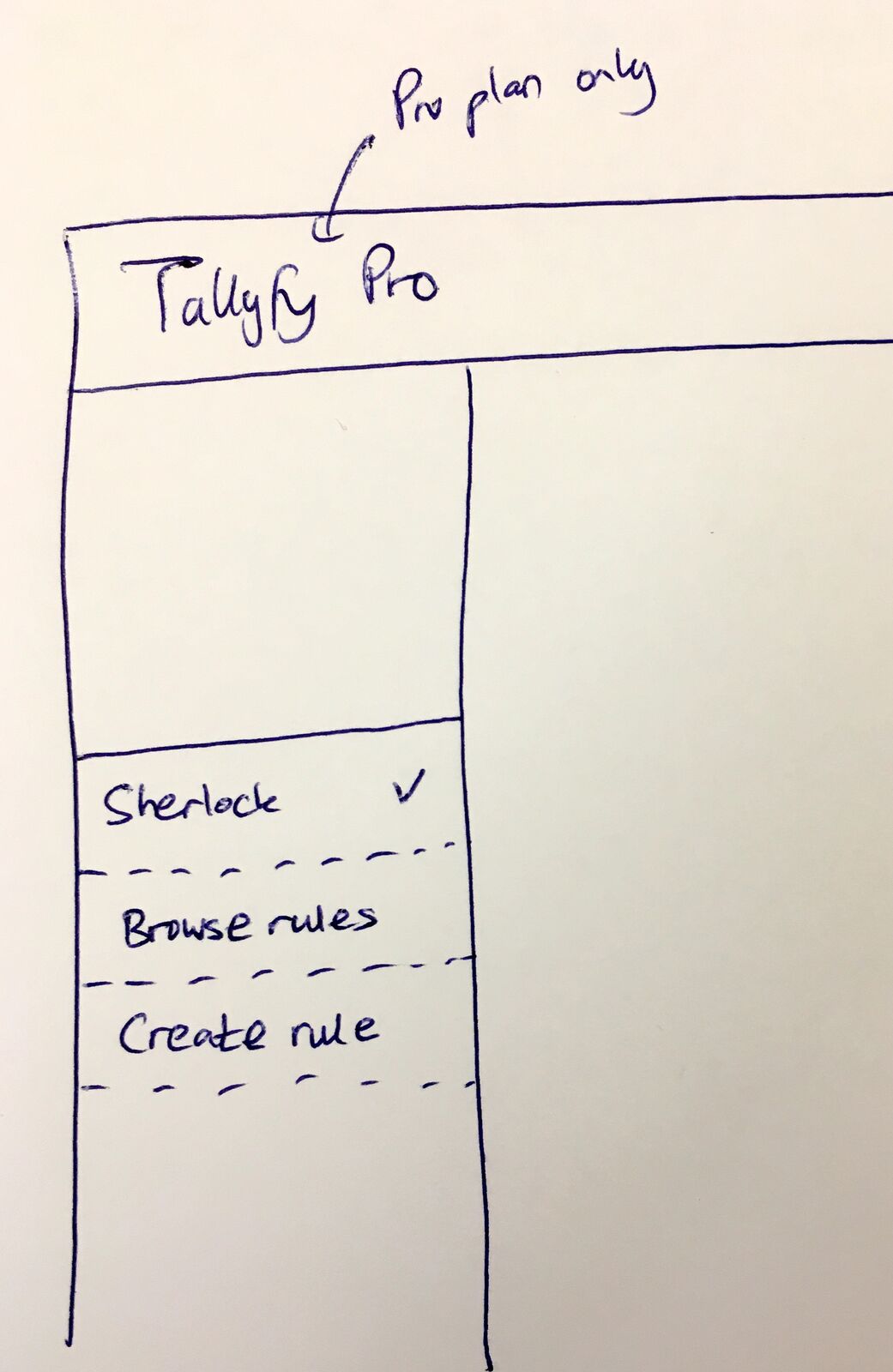 The original Sherlock sidebar concept - validation rules would live here alongside conditional rules. April 2018.
April 26, 2018 - the framework question
The validation problem connected to a bigger architectural question I had been thinking about. I posted this to our internal product design board:
“It seems like people need an extensible framework that not only validates form fields, but also lets them write custom rules.”
That word “extensible” mattered. We weren’t just building validators. We were building a system for creating validators. The distinction would shape everything that followed.
I continued:
“The two possible options for validation are: 1. Data is validated. 2. Data is not validated - and reason.”
Simple. Binary. Either the data passes or it doesn’t. But that second option - “not validated, and reason” - was the critical insight. Silent failures are useless. If validation fails, users need to understand why. Not “invalid input” but “this field requires exactly 10 digits for a US phone number.”
I wrote more specifically:
“When Sherlock rules are built - non-validation must result in a reason.”
This became a hard requirement in the rule builder. You couldn’t create a validation rule without also specifying the error message that would appear when it failed. Forcing this upfront made the difference between helpful and useless validation.
The infinity problem
An internal discussion about adding validation message when checklists have fewer than two options captured the scope of what we were dealing with:
“The bottom line is - there is an INFINITE set of validations.”
EPIC issue. Capital letters. This was big.
Every industry has its own data formats. Healthcare needs NPI numbers. Finance needs routing numbers. Shipping needs tracking codes. HR needs employee IDs. Every customer had their own internal codes, reference numbers, and formatting requirements.
We couldn’t build all of them. The thing is, we couldn’t even anticipate all of them.
The solution was to stop trying to build validators and start building a validator builder.
May 1, 2018 - the scope conversation
Five days after I posted the Sherlock framework idea, Pravina pushed back:
“As discussed yesterday, this should be focused on form field validation (not conditions/rules) to start with.”
She was spot on to narrow the scope. My vision included validation plus conditional logic plus workflow automation plus reusable rule libraries. Too much for a first version.
She proposed a specific user story:
“User wants to ensure that the value entered in a form field has 10 digits for a US phone number.”
Clear. Achievable. Something we could actually ship.
Her acceptance criteria spelled out the extension model:
“1. Developers will be able to develop this custom form field validation. 2. Developer then submits it to Tallyfy for approval. 3. Tallyfy ensures that it is QA’ed, has a sensible name, description, alert when not matched (false) etc. 4. Tallyfy publishes it. 5. It now appears as a form field type.”
A marketplace for validation rules. Developers build them. We review them. Users select them. Everyone wins.
The extension examples
Based on hundreds of implementations, we’ve observed that every industry brings its own validation nightmare. Healthcare organizations collect DEA numbers and HIN codes. Financial services firms need routing number validation. Property management companies collecting tenant information need specific formats for everything from phone numbers to lease dates. One member onboarding workflow we saw had over 40 form fields across multiple steps - entity type, tax classification, DUNS numbers, bank references - each requiring its own format.
In the original discussion, I sketched out what extensions might look like:
“Extension that does not allow anything but a UK postcode in a text box. Extension that only allows 8 digits and no more/no less.”
UK postcodes have a specific format - letters, numbers, space, numbers, letters. Not something an American developer would think to build. Not something a UK developer would consider optional.
The “8 digits exactly” example came from a customer who used internal reference codes. Their ERP system generated 8-digit codes for everything. Anything longer was invalid. Anything shorter was incomplete. No exceptions.
We could never have anticipated these requirements. But the extension model meant we didn’t have to.
Forms that benefit from real-time validation
These intake forms collect structured data where validation prevents errors at the source
Please complete this intake form to help us understand your web design project needs. This informati
Complete this form to gather all essential information from your new home buyer client. Takes about
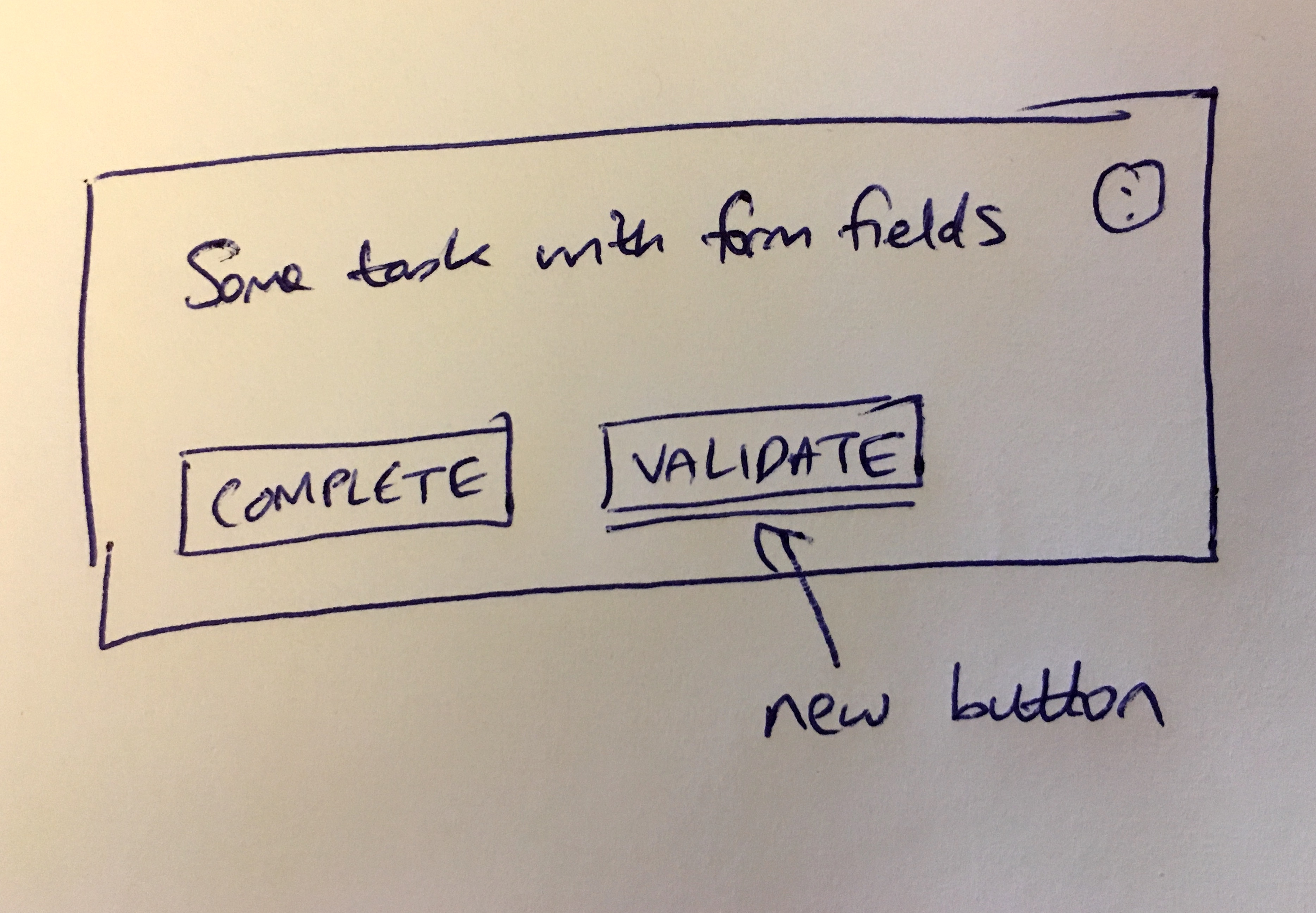 The extension model in practice - custom validators appear as field type options.
The number validation confusion
An internal discussion about fixing short text field validation for number and integer types revealed a design problem we hadn’t anticipated:
“Number validation confusion - min digits vs min value.”
Users were setting “minimum 5” on a number field. They expected it to require at least 5 digits. We interpreted it as “the number must be greater than or equal to 5.”
So “123” passed (greater than 5) but they expected it to fail (only 3 digits).
Two completely different validation concepts with the same terminology. “Minimum” meant different things depending on whether you were thinking about the value or the format.
We had to separate these:
- Value validation: greater than, less than, between
- Format validation: digit count, decimal places, thousand separators
The UI needed to make this distinction crystal clear. One dropdown for value constraints. Another for format constraints. No ambiguity.
Real-time means as you type
The shift from on-submit to real-time validation required rethinking how forms worked at a fundamental level. On-submit validation is simple: user fills form, clicks submit, server checks everything, returns errors if any. The entire form gets validated as a batch. Real-time validation is complex: every keystroke potentially triggers validation. Network latency matters. Users type faster than validation can respond. Intermediate states might be invalid even when the final state will be valid. Think about phone numbers - if someone types “(555)” they’re partway through a valid phone number, and technically it’s invalid, but interrupting them with “incomplete phone number” every time they pause is maddening. We landed on debouncing - wait until the user stops typing for a moment before validating. And contextual awareness - some fields validate on blur (when you leave the field) rather than on every keystroke.
The error message design problem
From my original Sherlock post:
“It might be that you have to build a validation-ok state and all validation-bad states separately.”
Not just “what makes this valid” but “what are all the ways this can be invalid, and what message should each show?”
A phone number field might fail for different reasons:
- Too few digits
- Too many digits
- Contains letters
- Missing area code
- Invalid area code
Each failure deserves a specific message. “Invalid phone number” tells users nothing. “Phone numbers must have exactly 10 digits (you entered 8)” tells them exactly what to fix.
This doubled the complexity of creating validation rules. Every validator needed success conditions AND failure messages for each failure mode. Worth it for the user experience.
The Sherlock connection
Form validation became the testing ground for what would become our Sherlock rules engine.
From the original Sherlock post:
“After you build a rule, you need to test it. i.e. try an input … see the result Sherlock would give you …”
Validation rules were the first rules to get this test interface. Enter a sample value. See if it passes or fails. See what error message appears. Iterate until correct.
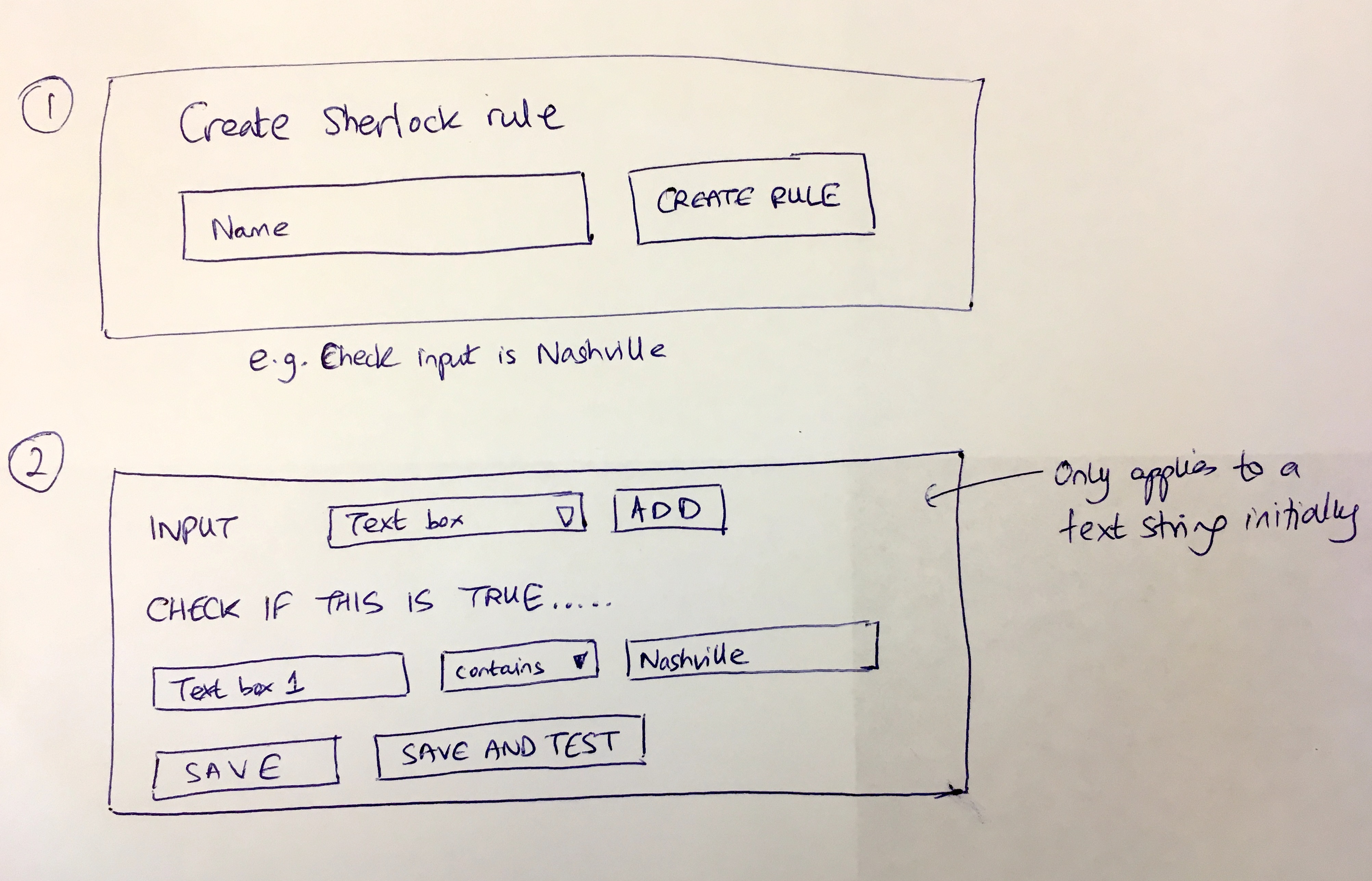 Creating a validation rule - enter the pattern, define the error message, test before deploying.
The testing interface prevented disasters. Without it, people would deploy validation rules and discover they rejected valid data. With it, they could experiment safely before touching real workflows.
Four months later
On August 18, 2018, I linked the validation discussion to our broader roadmap:
“Sherlock Apps - first starting with form field validation apps - UI needed, then proceeding to be…”
Form field validation first. Then conditions. Then assignments. Then deadlines. Each capability building on the framework we established with validation.
The progression was intentional. Validation is the simplest rule type - one input, one output, pass or fail. Hard to mess that up. Getting that right gave us confidence before tackling more complex rule types that could trigger workflow changes.
The reusability promise
From the original vision:
“Finally, in the template editor - you could just re-use the pre-built Sherlock rule in a form field or in an if this then that rule.”
Build a UK postcode validator once. Use it in every template that collects UK addresses. Update the validator, and every template automatically gets the improvement.
This reusability wasn’t just convenience. It was consistency. Every UK postcode field across your organization would validate the same way. No drift between templates. No one-off variations that nobody remembers creating.
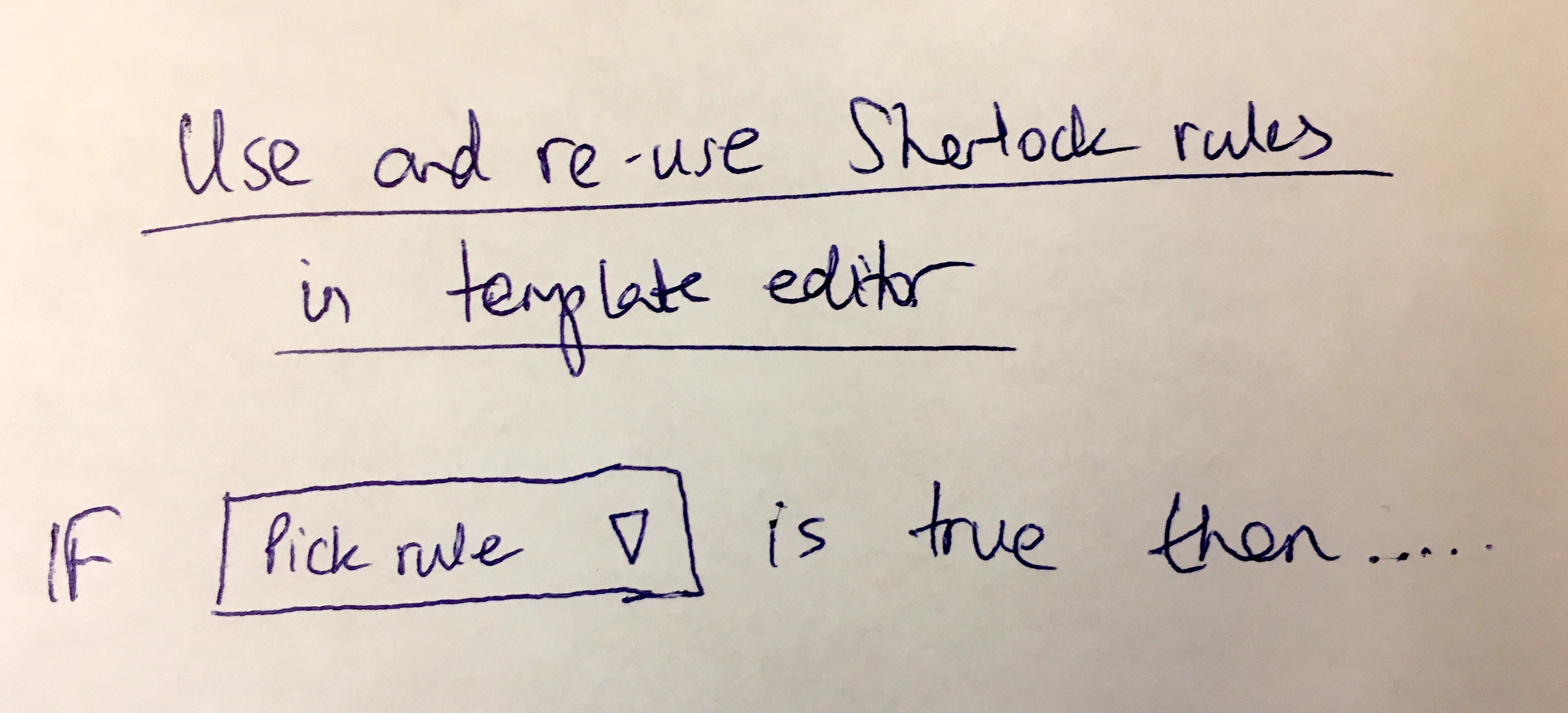 The reusability concept - “IF [Pick rule] is true then…” - build once, use everywhere.
What we learned about error timing
Real-time validation sounds straightforward until you implement it. The timing questions never end. Is there a perfect answer? No.
Validate immediately? Users see errors before they finish typing.
Validate on blur? Users might not tab out if they’re filling the last field.
Validate on submit? Back to the original problem.
We landed on a hybrid:
- Format validation (length, character types) happens in real-time with debouncing
- Cross-field validation (matching passwords, comparing dates) happens on blur
- Required field validation happens on submit attempt
Different error types at different times. More complex to build. Less frustrating to use.
The custom JavaScript question
I wondered aloud in the original discussion:
“Within rules, you can write custom Javascript code which runs whatever you like.”
Custom JavaScript in validation rules. The ultimate flexibility. Also the ultimate footgun. Could we sandbox it? Not reliably.
We debated this for months. JavaScript means unlimited power. It also means security concerns, performance risks, and debugging nightmares when someone’s validation rule crashes in production.
Eventually we decided against arbitrary JavaScript for validation. Too much could go wrong. The extension model - approved validators that we review before publishing - gave flexibility without chaos.
Some users still want custom JavaScript. We understand. The tradeoff wasn’t worth the risk.
The Pro plan constraint
From the original post:
“It could sit on the left sidebar for pro plans only.”
Validation rules were always a Pro feature. Not because we wanted to upsell, but because the complexity required support resources we couldn’t provide at every pricing tier. That’s just reality.
Someone building custom validation rules will have questions. They’ll hit edge cases. They’ll need help debugging. That support load doesn’t scale to free users.
Where it stands now
Years later, form validation handles:
- Built-in validators for common formats (email, URL, phone)
- Custom extensions for industry-specific needs
- Real-time feedback as users type
- Clear error messages for each failure mode
- Reusable validation rules across templates
The form fields documentation covers what shipped. The building effective forms tutorial walks through best practices.
The core insight remains: an infinite set of validations requires a framework, not a feature list. OK, that sounds cleaner than it actually was. We stopped trying to anticipate every format and started building tools for others to create what they needed.
The error message requirement persists. Every validation rule must explain its failures. “The field must be a string” no longer exists. Specific, actionable error messages only.
Real-time validation is now the default. Users discover problems before they think they’re done.
The infinity problem turned out to be solvable. Just not by us building everything ourselves.
About the Author
Amit is the CEO of Tallyfy. He is a workflow expert and specializes in process automation and the next generation of business process management in the post-flowchart age. He has decades of consulting experience in task and workflow automation, continuous improvement (all the flavors) and AI-driven workflows for small and large companies. Amit did a Computer Science degree at the University of Bath and moved from the UK to St. Louis, MO in 2014. He loves watching American robins and their nesting behaviors!
Follow Amit on his website, LinkedIn, Facebook, Reddit, X (Twitter) or YouTube.

Automate your workflows with Tallyfy
Stop chasing status updates. Track and automate your processes in one place.