
Mindful watchers - sending notifications without spam
Not every change deserves an immediate email. At Tallyfy, we designed three notification frequencies: Electric, Mindful, and Chilled to give watchers control over their own inbox load. The tension between real-time updates and respectful batching shaped everything about how we aggregate and deliver watching notifications.
Summary
- Workflow notification frequency settings - this is our personal, candid experience designing them at Tallyfy. Not theory. The debates about Electric vs Mindful vs Chilled, the aggregation complexity, and why we chose these specific names
- Three frequencies solve the spam problem - Electric notifies immediately, Mindful batches every 3 hours, Chilled sends daily digests. Users control their own notification load
- Each watch is isolated - Watching ProcessA and ProcessB generates separate emails, never mixed. One watch, one digest. This decision came from heated internal debates
- Timing starts from watch creation - The 3-hour or 24-hour window measures from when you started watching, not from some arbitrary clock. See how tracking works in Tallyfy
Notification management is crucial for sustainable workflow adoption. Here’s how we approach workflow management.
Workflow Made Easy
This reflects our experience at a specific point in time. Some details may have evolved since, and we’ve omitted certain private aspects that made the story equally interesting.
The Watching EPIC established that favorites should become watches - that clicking a star should generate notifications about changes. But we immediately hit a problem: how often?
In our conversations with operations managers running multiple client projects simultaneously, we kept hearing the same tension. One web development agency owner told us: “I personally really love the daily email notification we get, it helps me plan my day better!” But at a 50-person software company with 45-step onboarding processes, the same notification volume would be overwhelming. The frequency question wasn’t about technology - it was about respecting different working styles.
The engagement problem
Before we could solve notification frequency, we had to understand why notifications matter at all. Here’s the uncomfortable truth I wrote in an early Basecamp discussion:
One solution is to copy the Facebook playbook. They pushed stuff your friends were doing to you - meaning you had to login.
That sounds manipulative. But here’s the reality we faced:
The default today is that you follow everyone. It simply does not work.
Pravina nailed the problem. When everyone follows everything, nobody pays attention to anything. Jakob Nielsen’s 90-9-1 rule haunted our discussions: 90% of users in any platform are lurkers who rarely engage, 9% contribute occasionally, and 1% create most content.
The question became: how do you drag back a disengaged invitee into the app using the actions of their coworkers?
There must be an automated way to drag back a disengaged invitee into the app using the actions of their coworkers.
That was my premise. But the mechanism matters. Spam them with every update and they unsubscribe from everything. Stay silent and they forget the app exists.
The real-time trap
The obvious answer was real-time. Something changes, you get an email. Simple.
Except it’s honestly not simple. Watch a busy process with 20 steps and you could get 40 emails in a day. Watch three processes and you’re drowning. The feature designed to keep you informed becomes a nightmare you ignore.
I saw this problem at a competitor:
A key selling point for DaPulse is “watching things go green” - but if you try their app - it is not responsive.
Their promise was visual feedback on progress. But if that feedback comes as 47 emails in a day, the “green” becomes red in your inbox.
The frequency design
We settled on three options with names that communicate behavior. From our design work on page not found fix when closing details drawer with no tags:
Frequency options: Electric - Notify for every event immediately. Mindful - Notify for aggregated events every 3 hours. Chilled - Notify for aggregated events once every 24 hours.
The naming was intentional. We didn’t call them “Real-time,” “3-hour batch,” and “Daily digest.” Those are technical descriptions. Instead:
- Electric sounds urgent, high-frequency - exactly what it does. The word itself feels fast
- Mindful suggests thoughtful batching. You’re being considerate of your own attention
- Chilled implies relaxed, once-a-day summaries. No rush, no urgency
The words communicate behavior before you read the description. Someone choosing “mindful” already understands they’re making a deliberate choice to reduce interruptions. That’s the opposite of “batched every 3 hours” which sounds like a technical limitation. Why not “batched” or “3-hourly”? Because those describe the mechanism, not the benefit. Users don’t care that events get collected in a database table and processed by a cron job. They care that choosing “Mindful” means they can focus without their phone buzzing constantly. The naming convention carried a design philosophy: if the label itself teaches you what to expect, the tooltip becomes optional. We tested this with a handful of people internally - nobody needed the descriptions explained, which told us the words were spot on.
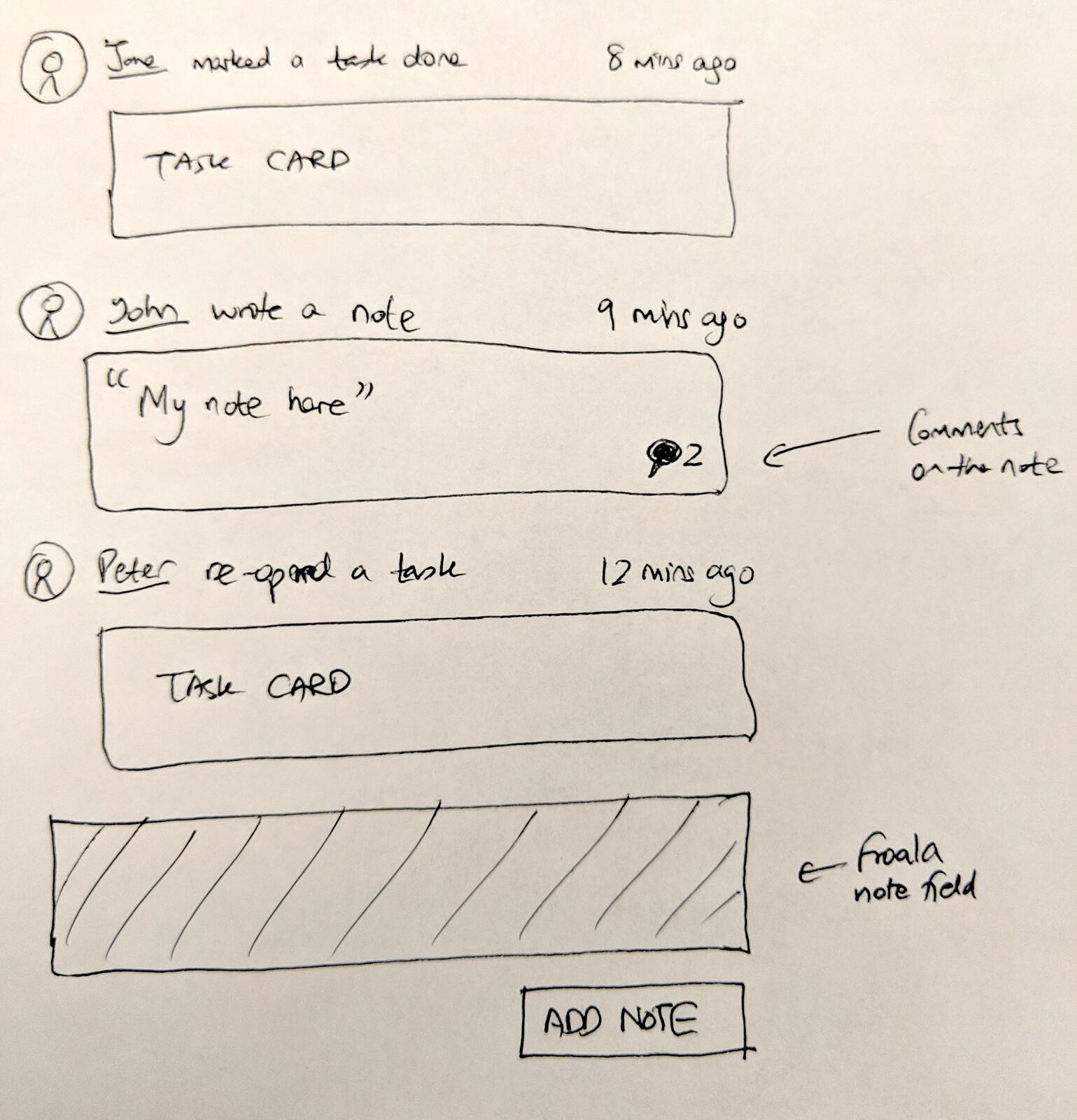
Early activity feed wireframe: “the first user marked a task done 8 mins ago” - the kind of events that would aggregate under Mindful or Chilled frequency
Why favorites became watches
This requires explaining a philosophical shift. I wrote this in an early design discussion:
Favorites in a business context doesn’t really mean anything. It’s a favorite because of a reason - you care about it in a specific way.
In consumer apps, you favorite a photo because you like it. In a business workflow tool, you favorite a process because you need to track it. The star isn’t aesthetic preference - it’s a request for updates.
Once we reframed favorites as watches, the notification question became unavoidable. A watch without notifications is just a bookmark. A watch with notifications needs frequency control.
The aggregation question
During implementation, a question surfaced that shaped the entire design:
Let us say a team member is watching process_A and process_B and we assume that mindful time is 2 hours. In two hours, some fellows completed two tasks of process_A and three tasks of process_B. Will we notify with two separate emails - one for process_A and another for process_B - or with a single email containing all watched objects?
This was the critical design decision. Do we bundle everything into one mega-email or keep watches separate?
The answer, which I documented in the issue:
Each watch generates a completely separate notification to its own target for that specific object. We are not aggregating watches or mixing them up in any way. ProcessA has a watch and ProcessB has a watch in this example, each separate, and each watch has its own frequency.
Clean separation. ProcessA gets its own digest. ProcessB gets its own digest. Even if both fire at the same time, they’re separate emails.
Why this matters: if you need to stop watching something, you stop that specific notification stream. No untangling. No “I wanted to unsubscribe from ProcessA but not ProcessB” confusion.
The complexity cost was real though. Every watch maintains its own accumulator, its own timing window, its own email template instance. More database rows, more cron job iterations, more edge cases. A bit of a headache, that. But the user experience wins over implementation simplicity.

The TASKS vs ACTIVITY tabs concept - activity feed becomes the aggregation source for Mindful and Chilled notifications
The timing anchor
Another subtle but important detail: timing anchors to watch creation, not system clock.
If you start watching something at 2:47 PM with “mindful” frequency, your digest window runs from 2:47 PM. Not from midnight. Not from the top of the hour. From exactly when you clicked the star.
This prevents the “everyone gets digests at midnight” thundering herd problem. It also means your batching period aligns with when you expressed interest, not some arbitrary system boundary.
The implementation note from that same design work:
Since every watch is unique - the settings of on/off need to be assumed as controllable via one-click within emails.
Each watch is independent. Each has its own creation timestamp as the timing anchor. Each can be turned off without affecting others.
The email template design
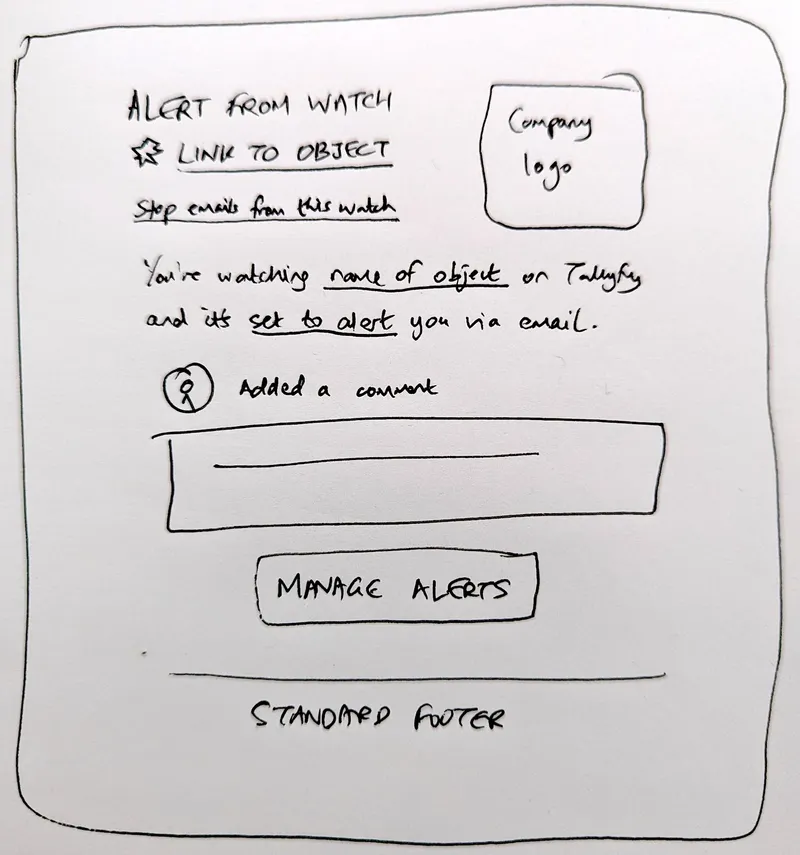
Early design sketch: one-click unsubscribe for specific items, not global unsubscribe
The email design had to support batching. For “electric” mode, one event per email. For “mindful” and “chilled” modes, multiple events in a single email.
The key insight from our sketch:
If there are multiple changes - say 6 changes in an email - just clone that middle section and add multiple items to the body in the same format. Who did it with image, what they did as verb and action, and a body payload of the change itself like words changed or comment added.
Each change gets its own row: who did it, what they did, when. Grouped by the watched object, delivered at the frequency you chose.
What actually triggers notifications
Not everything triggers a watching email. Through testing, we discovered the actual trigger points:
For a watched template:
- Step creation and deletion
- Adding and removing assignees to a step
- Step form field creation and deletion
For a watched process:
- Task completion
- Process completion
- Process archiving and unarchiving
- Process notes changes
For a watched member:
- When that member launches a process
- When that member completes a task
For a watched task:
- Task completion
- Assignee changes
- Deadline changes
- Comments added
One gap in early implementations: OOTs (one-off tasks) didn’t trigger watching alerts initially. We had to add that later. Something we learned the hard way - what seems obvious to watch isn’t always obvious to implement.
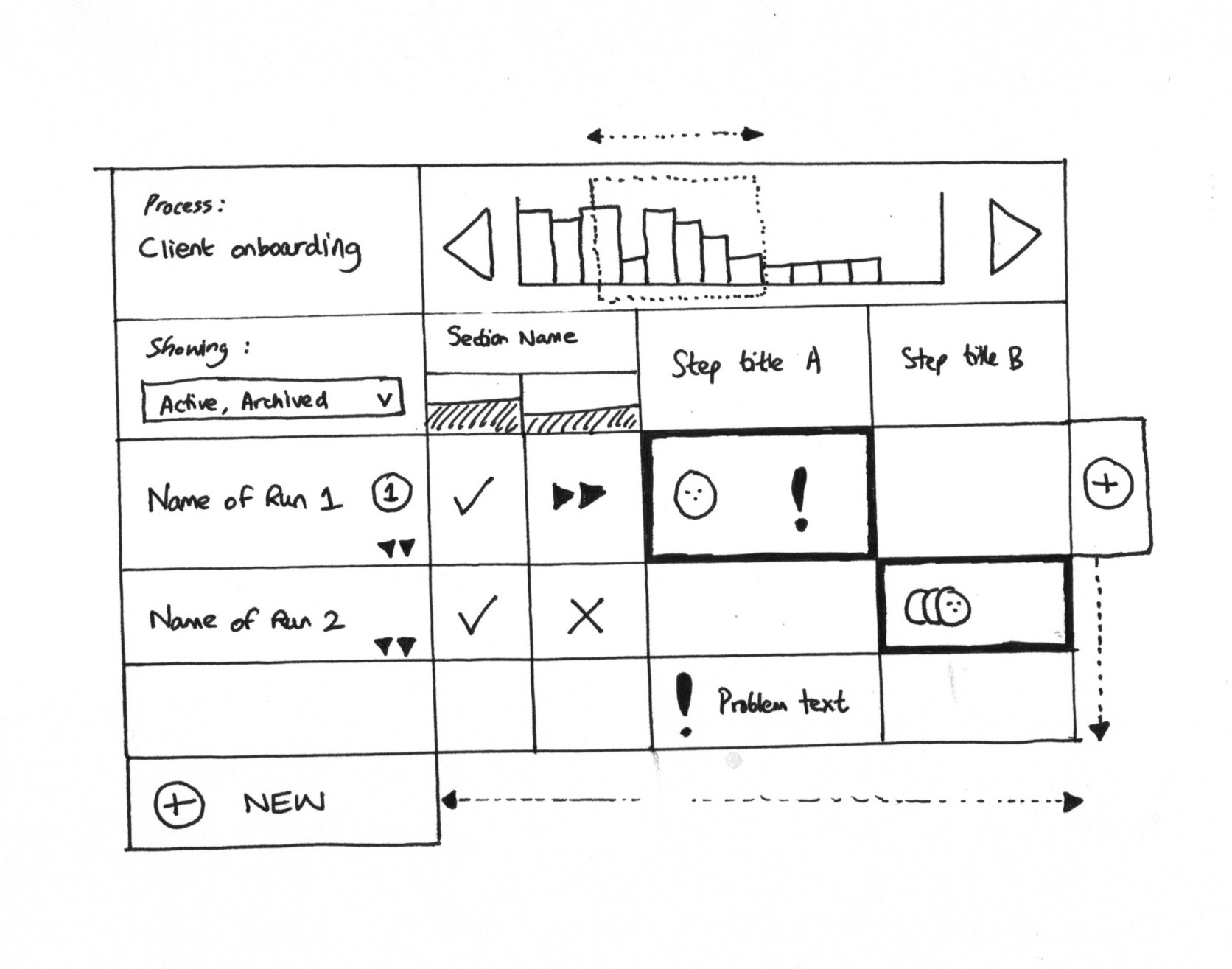
Grid view concept with status indicators - the visual feedback that Mindful watchers would receive aggregated updates about
The frequency debugging saga
Turns out, getting frequencies right took several rounds. QA found an interesting bug:
Following the above triggers, it is almost the same when using Mindful frequency but there is an issue regarding a Favorited member. When that member launches a process, the email notification is being sent in real-time as if it is still using Electric frequency. Other than that, the email notifications are being sent after 2 hours of aggregated events.
Some events were bypassing the frequency setting entirely. The member-launch-process event was hardcoded to immediate notification, ignoring the user’s frequency preference.
After the fix:
This issue while in Mindful frequency is now verified as fixed in Staging as it is now being sent as well after 2hrs+ as expected.
The “chilled” frequency had its own verification:
I am watching a checklist as a Chilled watcher. Hope to receive email in next 24 hours.
Twenty-four hours later:
This was verified. Good to close.
Sometimes the only way to test a 24-hour feature is to wait 24 hours.
The independence bug
A particularly tricky bug emerged later, documented in our work on preview field display fix:
Favorites/Watching email notifications stop working if the “Receive emails when I’m assigned” setting is turned OFF.
This violated the core principle. Watch settings and assignment settings should be completely independent. If you turn off assignment emails, that shouldn’t touch your watching emails. They’re separate notification streams for separate purposes.
The fix required untangling the notification logic - watching had accidentally inherited some conditions from the assignment notification path.
The async accumulation problem
“Mindful” and “chilled” frequencies require accumulating events over time. You can’t send what you haven’t collected.
The schema needed to hold activities until the next digest window:
The purpose of this ticket is to design a schema to hold activities on objects so we can get information from this schema for the cron job.
Events get written to a holding table. A cron job runs periodically, checks which watches have accumulated events past their frequency threshold, bundles them into emails, and clears the accumulator.
Edge case: what if zero events accumulated?
If nothing happens to a watched item during the digest period, no email is sent.
No “nothing happened” emails. If you’re watching something quiet, you simply don’t hear from us. This prevents the notification fatigue of empty status updates.
The default frequency question
When we migrated existing favorites to watches, we had to pick a default frequency. We chose “chilled” - the least intrusive option. Users could adjust to more frequent notifications if they wanted them.
For daily digest emails more generally, we changed the default for new organizations:
We want to change that default for new orgs only going forward to Monday, Wednesday and Friday. Leave existing orgs untouched. The rationale here is to prevent an overloaded experience to new signups. They can always adjust defaults later.
New users start with fewer emails. They can dial up if they want more. Starting quiet and letting users amplify is better than starting loud and making users fight to quiet things down.
The activity stream vision
Pravina had a broader vision for this work:
I want to be able to see a live stream of actions being done in real-time and mark them as read.
The notification frequency work connected to a larger ambition - an in-app activity stream that shows what’s happening across your organization. Email notifications are one channel. An activity feed is another. Both need the same underlying event accumulation system.
We built the notification frequency layer first because email was the universal case. The in-app activity stream came later, reusing the same event architecture.
The MANAGE ALERTS button journey
A recurring bug in QA: the “MANAGE ALERTS” button in emails didn’t go to the right place.
The MANAGE ALERTS button is not working properly. Instead of redirecting the user to the Favorites sidebar page, it just goes to the actual completed task view.
The fix required changes across ten different observer files. Every place that generated a watching email needed to point the management link to the correct destination.
Another issue:
For the “You are watching X user”, while it appears as a hyperlink, it is not clickable - no redirection.
Links that look clickable but aren’t actually clickable frustrate users. We had to add proper URLs for member watching. You can configure your notification preferences in your personal settings.
The comment prefix bug
A strange artifact appeared in reopened task notifications:
Task comment, when reopening a task, the comment/reasoning of reopening still has this code-like key:reopenComment, that needs to be removed.
Internal system prefixes were leaking into user-facing emails. The fix:
$commentContent = $comment->content;
if (Str::startsWith($commentContent, 'key:reopenComment, ')) {
    $commentContent = Str::replaceFirst('key:reopenComment, ', '', $commentContent);
}
Internal markers stay internal. Users see clean content.
What we left out
Some features we deliberately didn’t build in this phase:
Global aggregation across watches. We could have bundled all your watching notifications into a single “here’s everything you’re watching” email. We chose per-watch aggregation instead because stopping one watch shouldn’t affect others. The tradeoff: more emails in your inbox, but cleaner mental model for what each email represents.
Custom frequency settings. Users asked for “every 6 hours” or “twice a day.” We shipped three fixed options. Does every team need custom frequency? No. Adding a custom interval would complicate the UI and the cron job logic. Three choices is enough for most people.
Per-watch frequency control came first. We initially planned organization-wide frequency defaults with per-watch overrides. We shipped per-watch control first because that’s what users actually needed - different frequencies for different things.
Follow specific people feature. We had plans for “follow this person and get notified of everything they do.” This got deferred. Watching a member exists, but granular “follow their comments but not their task completions” doesn’t.
Webhook and chat targets were deferred. The original spec included:
Webhook - the notification shoots to a specified webhook target. Chat - the notification shoots out to a specific channel or person within Slack or MS Teams.
We shipped email only and added these targets later. Email was the universal case.
Blocker comment notifications took extra work. Normal comments triggered emails. Blocker-type comments didn’t initially. Resolution comments still don’t trigger emails in some cases:
Task comment - This is only sending email notification if the comment made is just a normal (none) or an improvement type of comment.
The comment type taxonomy interacts with notification triggers in non-obvious ways.
The tension
The fundamental tension in notification design is between completeness and respect. Users want to know everything. Users also want a manageable inbox.
“Electric” serves the everything camp - real-time, immediate, complete.
“Chilled” serves the respect camp - daily summary, minimal intrusion, batched.
“Mindful” sits in the middle - not overwhelming but not too delayed either.
Feedback we’ve received from operations teams at mid-size companies validated this design. One CEO managing rollout processes with up to 50 steps described the visibility problem: “any status that is ‘not green’ is a possible problem that management can look into.” But that same visibility, delivered as 50 individual emails per process, would make the inbox unusable. Batched notifications with clear status indicators solved both problems - full awareness without notification fatigue.
Giving users the choice is the only answer. Well, not the only answer, but the least bad one. Some people want their phone buzzing every time a task completes. Some people want a single email at the end of the day. Both are valid. Neither should be forced on everyone.
Related questions
Does changing frequency affect already-accumulated events?
If you change from “mindful” to “electric,” any events already accumulated for your next mindful digest will send immediately with the next event. If you change from “electric” to “chilled,” future events will accumulate until the next daily window.
Can different watchers have different frequencies for the same object?
Yes. If Alice watches ProcessA with “electric” and Bob watches ProcessA with “chilled,” Alice gets immediate notifications and Bob gets daily digests. Each watch is independent.
What happens if I watch something and then lose access to it?
The watch remains but notifications stop. You can’t get updates about things you can no longer see. If access is restored, notifications resume.
Do aggregated emails show events in order?
Yes. Events within a digest appear in chronological order - oldest first. You see the sequence of what happened, not a jumbled list.
Can I get watching notifications on mobile?
Email notifications go to whatever email client you use, including mobile. Native push notifications would require a mobile app - something for later consideration.
About the Author
Amit is the CEO of Tallyfy. He is a workflow expert and specializes in process automation and the next generation of business process management in the post-flowchart age. He has decades of consulting experience in task and workflow automation, continuous improvement (all the flavors) and AI-driven workflows for small and large companies. Amit did a Computer Science degree at the University of Bath and moved from the UK to St. Louis, MO in 2014. He loves watching American robins and their nesting behaviors!
Follow Amit on his website, LinkedIn, Facebook, Reddit, X (Twitter) or YouTube.

Automate your workflows with Tallyfy
Stop chasing status updates. Track and automate your processes in one place.