
What guests can watch and what they cannot
The permission model for letting external participants follow workflow updates without exposing your entire organization. When guests watch a process in Tallyfy, they only see updates for tasks they are assigned to - never the hidden steps.
Guest notifications are essential for client-facing workflow engagement. Here is how we approach client onboarding.
Client Onboarding Made Easy
Summary
Guest notification settings in workflow software - this is our personal, candid experience designing them at Tallyfy. Not theory. What actually happened - the security constraints, permission debates, and hard-won insights from years of iteration.
- Guests watch processes, but only see their tasks - If a guest watches a process containing 10 steps but is only assigned to step 3, they get updates only for step 3
- Guests can’t watch members - While members can watch each other to see activity, guests have no visibility into member activity
- Guests can only manage their own watches - A guest can add or remove themselves from watching something, but can’t modify watches for others
- Blueprint watching is off limits for guests - Even if a template is public, guests can’t watch it for changes
- See our guest documentation for implementation details and tracking features for how watching integrates with the broader system
This reflects our experience at a specific point in time. Some details may have evolved since, and we’ve omitted certain private aspects that made the story equally interesting.
From favorites to watching
The whole concept started with a rename that mattered more than it sounds. In our internal EPIC issue from January 2022, I wrote:
“We want to convert the current idea of ‘Favorites’ into the idea of things you are ‘Watching’. Favorites in a business context doesn’t really mean anything.”
Turns out, that single observation changed how we thought about the feature. A “favorite” is passive - you like something. “Watching” is active - you want to know what happens next. The psychology is completely different.
The reasoning went deeper:
“It’s well-known from social apps that watching or lurking (instead of creating content) is what 90% of people do - so create more adoption and engagement by feeding updates to watchers.”
This is Jakob Nielsen’s 90-9-1 rule that shapes most online communities. Most people consume content rather than create it. If your notification system only rewards content creators, you lose 90% of potential engagement. That’s a lot of people to just ignore.
The core design question
When we built the guest access system, we established that external participants should see only what is relevant to them. A guest assigned to step 3 of a 10-step process sees step 3. The other nine steps stay hidden.
The question we get asked most often with workflow automation, this visibility boundary is essential. A prospective member reviewing a 26-step onboarding workflow only sees the steps where they need to confirm information or approve documents - not the internal steps where staff creates Salesforce records or routes paperwork to stakeholders. A tenant in a property management workflow sees maintenance request updates relevant to their unit, not the internal coordination between field staff and accounting.
But watching introduces a new problem. If a guest watches an entire process, should they get notified when step 7 completes even though they can’t see step 7?
The answer was no. The watching system had to respect the same visibility boundaries as the rest of the guest experience.
The formal specification
In January 2022, we documented the precise rules for guest watching in our internal EPIC issue. The question came up directly:
“Can a guest watch all objects (members, checklists, processes, tasks)?”
My response established the foundation:
“Yes, a guest can watch items just like members - but if they don’t have access to them, they can’t find or watch them anyway, unless a member explicitly adds them as a watcher.”
Equal for watching purposes. That phrase mattered. A guest who watches a process gets notifications through the same system as a member watching a process. The difference is in what they’re allowed to see.
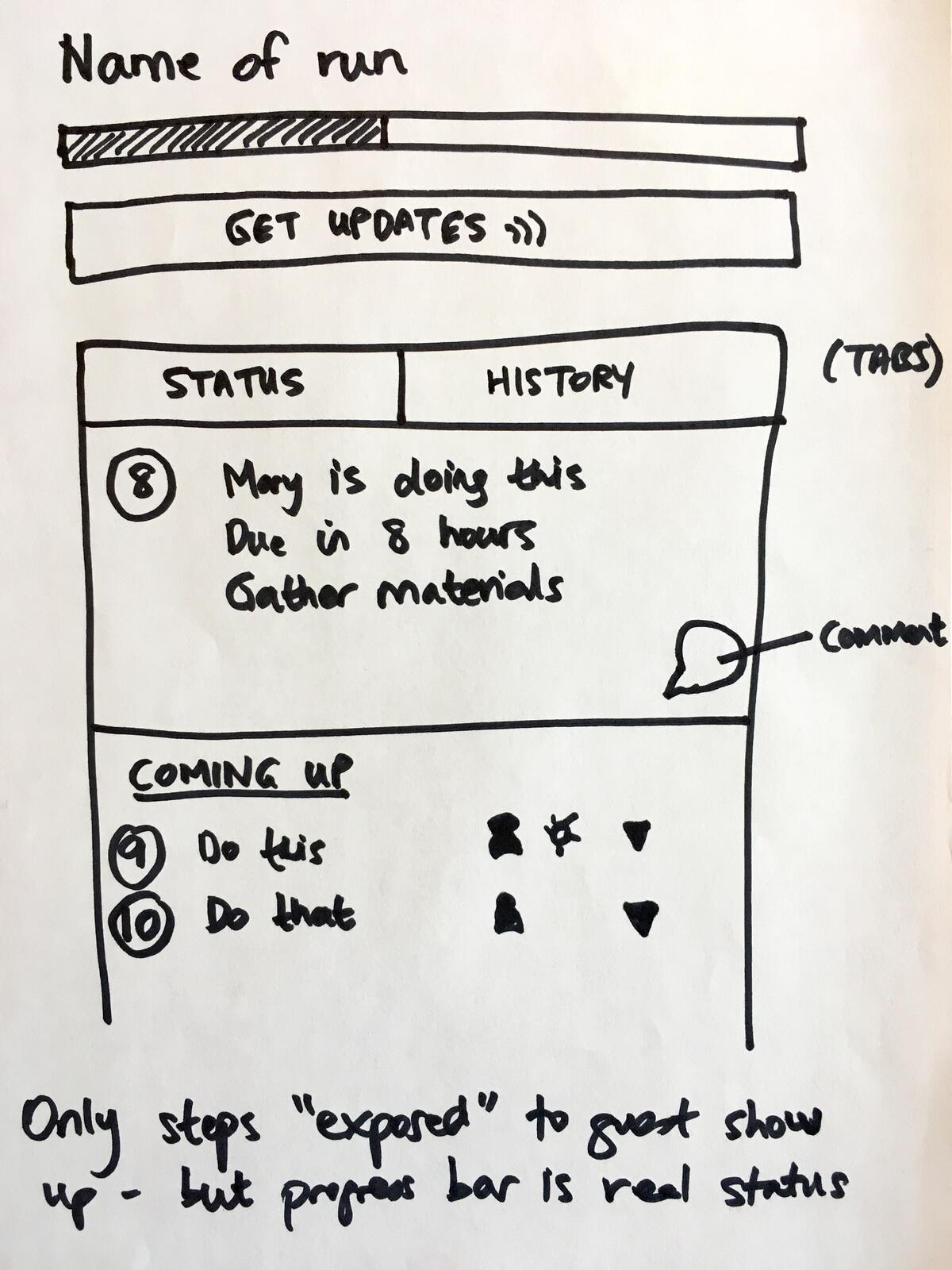
Here is the original sketch from October 2016 showing the guest widget with “Get Updates” functionality - the precursor to the watching system:
The filtered update problem
The technical clarification came next. Our developer asked for True/False answers on specific scenarios:
“If a guest has been assigned task_A then he can add only his watch on this task_A as well as on the relevant process.”
True. A guest can watch tasks they are assigned to and the process containing those tasks.
But then came the critical follow-up. I had to spell this out very precisely:
“If a guest watches process_A which contains task_A (the only task the guest is assigned to) - the guest will only get updates from tasks visible to the guest i.e. task_A.”
This is the core rule. Watching a process as a guest isn’t the same as watching a process as a member. The guest receives a filtered view of updates - only for tasks they can actually see.
What guests cannot watch
The restrictions became explicit. Here is the complete table of guest watching permissions:
| What Guests CAN Do | What Guests CANNOT Do |
|---|---|
| Watch tasks they are assigned to | Watch members (any role) |
| Watch processes (but only see updates for their visible tasks) | Watch blueprints (even public ones) |
| Add or remove their own watches | Add or remove watches for others |
| Choose notification frequency (Electric/Mindful/Chilled) | Manage watch settings for other guests or members |
The reasoning behind each restriction was deliberate:
No watching members: Members can watch other members to see their activity across the organization. Guests have no such capability. A guest can’t follow what specific employees are doing. This prevents external users from building profiles of your internal team’s work patterns.
No watching blueprints: I was explicit about this:
“A guest cannot watch any kind of blueprint.”
Even public templates. A guest might be able to view a public template, but they can’t subscribe to change notifications for it. Why? Because template watching exposes internal process improvement activity - when you update a template, you might not want external parties knowing about it.
The self-service boundary
This rule came from a security discussion that honestly got heated:
“No, a guest can only remove themselves from watching something but not other guests or other members. A member that has full access to that object however can do everything regarding adding/removing watchers from that object.”
This creates a sort of interesting asymmetry. A member can add a guest as a watcher without asking. The guest can then remove themselves. But a guest can’t add others or remove others.
There was a related restriction that came from our decision to prevent guests from directly mentioning internal staff:
“The requirement for member assignment exists because guest users cannot at-mention members directly (to avoid exposing internal staff names).”
Think about what this protects against. If a guest could add any member as a watcher, they could effectively force email notifications to any employee. Spam via watching. We closed that hole.
The feature flag lesson
One piece of hard-won wisdom from the implementation. I wrote this in the original issue:
“Until the client UI to manage favourites/watches is in place - please ensure this entire feature has a boolean set of some kind e.g. watching_enabled = no. If emails start pushing out with links that don’t exist to manage watches - it would be a disastrous experience!”
This is the kind of painful thing you learn after shipping half-baked features. An email notification that tells someone to click a link to manage their watches - but the link goes to a page that doesn’t exist yet - destroys trust. The backend often gets built before the frontend. Feature flags let you build in production without exposing incomplete experiences.
Watching frequency options
The notification system offered three frequencies:
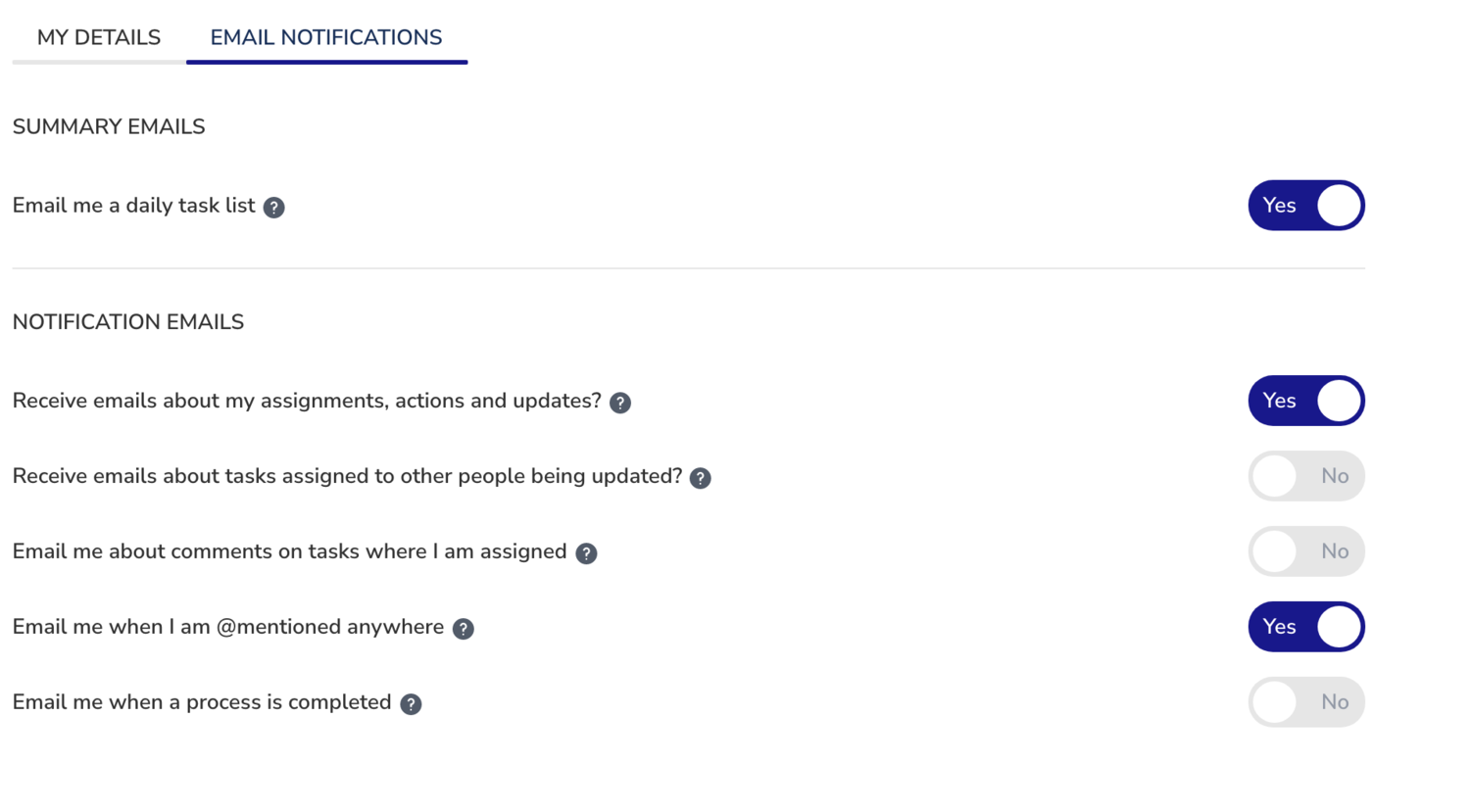
- Electric - Notify for every event, immediately
- Mindful - Notify for aggregated events every 3 hours
- Chilled - Notify for aggregated events once every 24 hours
Guests have access to all three frequencies. The filtering happens at the content level, not the timing level.
The email template debate
When designing the notification emails, I created a sketch for the watcher email format:
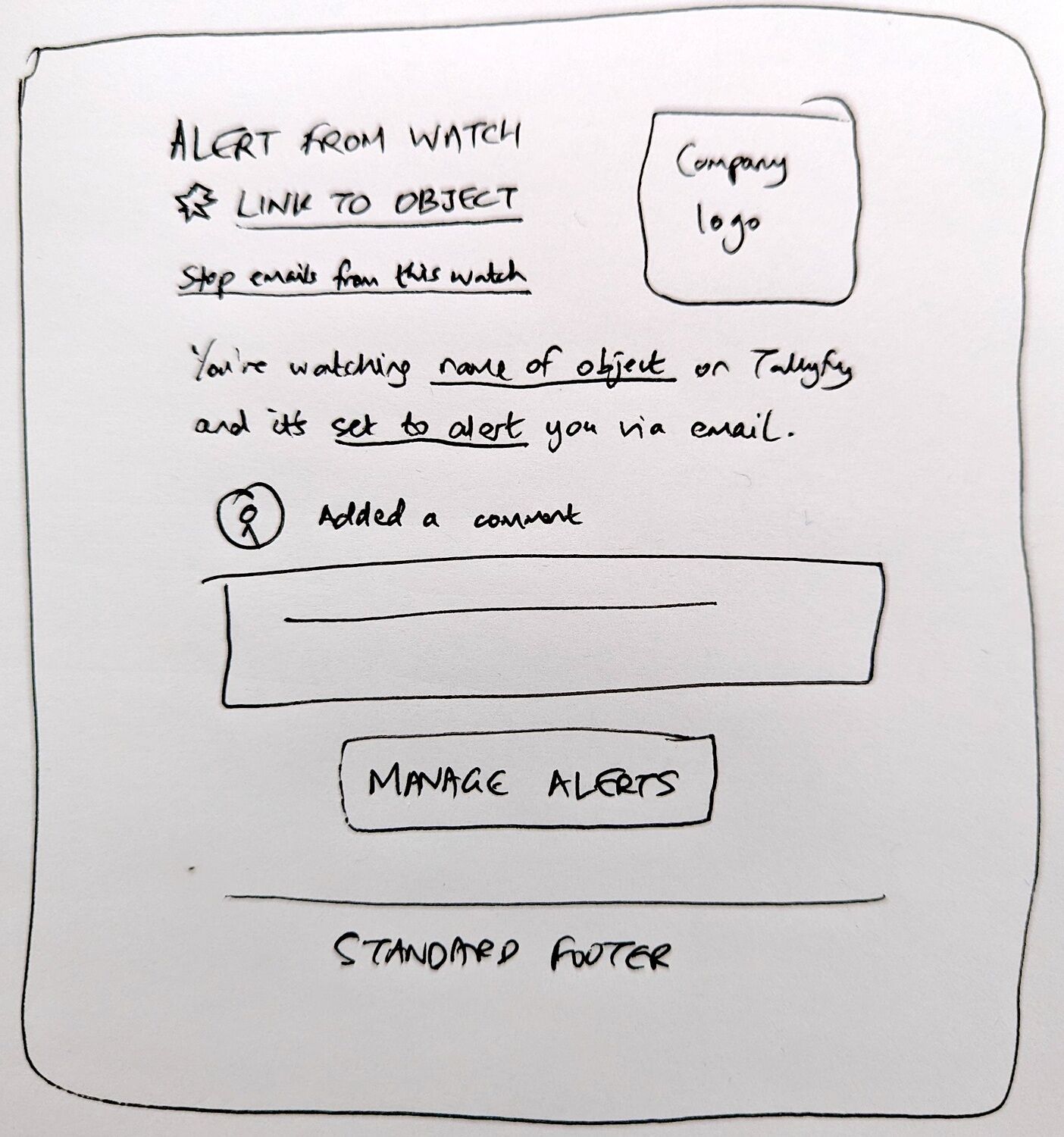
Key design decisions in this sketch:
- A watchlist is the collection of everything you’re watching
- “Stop emails about this item” provides one-click unsubscribe for that specific watch
- The middle section shows who did what - cloned for multiple changes in digest mode
- The word “unsubscribe” was deliberately avoided - instead using “Stop watching this”
For guests, this same template applies, but the content is filtered. A guest watching a process sees changes only to tasks they’re assigned to.
The granularity debate
One internal discussion challenged whether watching should notify on every form field change:
“Let say this task contains 10 form fields and some of the assignees fill these fields. When a single form field will be filled then it means that the task has been updated. If an assignee fills all 10 form fields then eventually 10 emails will be sent to the watchers who want Electric Notifications.”
I pushed back on this approach:
“I think the answer might be to send updates only on task completion and not on any field being updated i.e. you only watch at macro task level (state of completion), not within micro-updates to the task (like every field being filled).”
The reasoning:
“The audit trail of every change in a task or form field is something for activity feeds, not for watching - due to the obvious problem of too many emails being sent if ‘electric’ is set for a watch.”
This distinction between watching and activity became clearer when Pravina raised what she wanted from activity tracking:
“I want to be able to see a live stream of actions being done in real-time and mark them as read.”
Our CTO had a more nuanced take on how notifications and activity should relate:
“Notifications should be a subset of ‘activity’. It should be a few items pulled out of activity, which is more akin to an audit trail.”
That framing stuck with me. Activity is the complete audit trail. Notifications pull out the items worth interrupting you for. Watching lets you choose what gets pulled into your notifications.

Watching operates at the task and process level. Individual field changes go into activity feeds where you can review them if you care. The notification system stays quiet until something meaningful happens - a task completes, a process launches, a deadline passes.
The conservative approach
“We want watching to be a little conservative and not send too many watch alerts (especially via email) initially, but later - we will tune that with a new watching state like ‘Extremely Electric’ or similar if people want finer-grained notifications about things they are watching.”
This is the product philosophy. Start conservative. Let users ask for more. The opposite approach - flooding inboxes and requiring users to turn things off - destroys trust. The biggest lesson from our own journey building this for organizations running 98+ active workflows simultaneously is that external participants - tenant applicants, prospective members, partner contacts - complete tasks efficiently when notifications are relevant and sparse. Email fatigue from over-notification would undermine the 60% reduction in onboarding time these organizations achieve.
For guests especially, this matters. They didn’t sign up for your workflow tool. They’re participating because someone at your organization invited them. Overwhelming them with notifications would be hostile. Would they stick around? Probably not.
Three types of watches
The system distinguishes ownership of watches:
-
Member-owned - A member created it. Another member can turn it on/off or delete it, subject to edit permissions on the watched object.
-
Guest-owned - A guest created it. Either a member or the guest can turn it on/off or delete it.
-
System-owned - The system created it as a default. It can’t be deleted, but can be turned on/off.
System-owned watches came from migrating existing email notification preferences. Each toggle in the original settings became a watch that you can disable but not remove entirely.
The exception for member watching
There’s one case where the normal permission model doesn’t apply:
“The exception to this is member watching - you cannot remove someone from watching you - they control that watch.”
If I’m a member and another member watches me, I can’t stop them. They control their own watch preferences. This makes sense - watching a person is about staying informed on their work, not about the watched person’s preferences.
Guests don’t have this concern because they can’t watch members at all. Should they? No.
What we left out
Some things got explicitly excluded from the guest watching system. These were conscious decisions, not oversight:
Guests watching members - A guest can’t watch what any member is doing, and this was security first because if external parties could track internal employee activity, it would expose work patterns, availability, and organizational structure that organizations want to keep private. Guests watching blueprints - Even if a template is marked public, guests can’t subscribe to changes, since template updates often reflect internal process improvement discussions and that visibility belongs to members only.
Guests adding or removing watches for others - A guest can manage only their own subscription, meaning no guest can add another guest or member as a watcher, and no guest can remove someone else’s watch, which prevents any kind of notification spam or manipulation via the watching system. Extremely Electric mode - The fine-grained notification option that would notify on every field change, every comment, every edit was discussed but never built because the conservative approach proved sufficient. Webhook targets for guest watches - While the watching system supports email, webhook, and chat targets, we restricted guest watches to email only in the initial implementation because guests shouldn’t need to configure webhook endpoints or chat integrations.
How this connects to the visibility model
In the guest access post, I wrote about the core principle: guests see only their assigned steps, but the progress bar reflects real status.
Watching extends this principle. Guests can watch processes, but they receive updates only for tasks they can see. The watching system respects the same visibility boundaries.
This isn’t a limitation. It’s a feature. A guest doesn’t want to know about internal handoffs between your departments. They want to know when it’s their turn to act and when the outcome affects them.
The watching system gives them exactly that - relevant updates, filtered to what matters to them, without exposing the complexity they never needed to see.
Three years later
Looking back at these design discussions from 2022, most decisions aged well. Actually, that’s generous. The conservative notification approach prevented email fatigue. The strict boundaries around guest permissions avoided security complaints. The feature flag requirement became standard practice.
What we’re still iterating on: missing notification events that slip through the cracks. Every few months we discover another scenario where a watcher should have been notified but wasn’t - a specific combination of conditional logic and task completion that the original implementation didn’t anticipate.
The design philosophy remains constant. The implementation details evolve. That’s probably how it should be.
For more technical details on how the guest and member systems work together, see the guest documentation and tracking documentation.
About the Author
Amit is the CEO of Tallyfy. He is a workflow expert and specializes in process automation and the next generation of business process management in the post-flowchart age. He has decades of consulting experience in task and workflow automation, continuous improvement (all the flavors) and AI-driven workflows for small and large companies. Amit did a Computer Science degree at the University of Bath and moved from the UK to St. Louis, MO in 2014. He loves watching American robins and their nesting behaviors!
Follow Amit on his website, LinkedIn, Facebook, Reddit, X (Twitter) or YouTube.

Automate your workflows with Tallyfy
Stop chasing status updates. Track and automate your processes in one place.