
When disabled members need force reassignment
What happens to Tallyfy task assignments when someone leaves? Force reassignment transfers all active tasks to the admin who disabled the member. Completed tasks keep the original owner for audit trail purposes.
Summary
- Workflow task reassignment when users leave - this is our personal, candid experience building it at Tallyfy. Not theory. The edge cases, the compliance requirements, and the multi-organization complexity we discovered.
- Active tasks get reassigned, completed tasks do not - When disabling a member, active assignments transfer to the person doing the disabling. Completed tasks keep the original owner for audit trail purposes.
- The problem started with process launch failures - Customers could not launch processes because disabled members were blocking the launch validation. Nobody understood why.
- Multi-organization complexity drove the design - A user disabled in Org A must stay active in Org B. This ruled out simpler solutions like converting disabled users to bot accounts.
- Two options per assignment - Either just remove the assignment or reassign to another active member. Bulk reassignment exists but granular per-item control was needed.
This post focuses on what happens to task assignments when a team member is disabled. Related topics include assignment rules and process manager permissions.
This is our candid experience building force reassignment at Tallyfy. This reflects our experience at a specific point in time. Some details may have evolved since, and we have omitted certain private aspects that made the story equally interesting.
Honestly, task reassignment is critical for workflow continuity. Here’s how we approach it.
Work Management Made Easy
The customer problem that revealed the gap
A user reported being unable to launch a process. The error message didn’t explain why. Investigation revealed the root cause: a disabled member was assigned to a step in the template, and the system wouldn’t launch processes with disabled assignees.
From our work on improving task completion error messages for open issues:
“A customer reported being unable to launch a process with this error… The root cause was a disabled member blocking the launch.”
The disabled user’s name and icon remained visible across various views - in the Template Editor, in Active Process tasks, and in the Out-Of-Track view. The remnant name was only removed if you manually assigned at least one new member. The pattern we keep running into is this exact nightmare - someone leaves, nobody notices the downstream assignment breakage until a process mysteriously refuses to launch.
I wrote in the issue:
“I think a message about why they cannot launch would be the first step - in this case, because a user was disabled - which is what prevented launch.”
Turns out, clear error messages mattered. But the deeper problem was architectural: what should happen to assignments when someone leaves?
August 2022: The revamp discussion
Our API Lead did a review of the existing remove and reassign feature. From our work on fixing task avatars not displaying in Internet Explorer 11:
“The existing remove and reassign feature: Disables the user in the organization (does not delete or archive). Replaces all old user occurrences including: Blueprint creator and owner, Step assignments, Task assignments.”
Then the key insight:
“Btw, we do not replace the user id for completed tasks.”
This was intentional. Completed tasks needed to preserve who actually did the work. Audit trails break if you retroactively change who completed a task. I added a clarification about the options:
“When a user is disabled, provide two options: Just remove - Remove assignments without reassigning. Re-assign to another active member.”
Two modes, not one. Sometimes you want the assignment cleared. Sometimes you want it transferred. The choice depends on what makes sense for that specific workflow.
The bot user idea that got rejected
I’d proposed an optimization:
“I had an idea - could we reset the type of the user when it is removed to ‘bot’ - ensuring that all the minimal features of a bot user are inherited by a removed user? This should minimize testing and weird issues - since we already know bot users are quite limited. We would keep all user properties, name (e.g. a user (Removed), etc.) - this is purely about the type being changed to ‘bot’.”
Our API Lead explained why this wouldn’t work:
“I think it is better to keep the user type as is, there are some reasons, for example: If a user is part of many organizations and we change his type, he will become bot in all of them. We have layers to prevent user input that assign or edit bots, but not if the data is already stored.”
Multi-organization users killed the simple solution. Someone disabled in one organization might be active in another. Converting their user type globally would break their access everywhere. This constraint reflected real patterns we observed. In discussions with global commercial real estate firms running standardized onboarding across thousands of employees, the same person often appeared in multiple organizational contexts - different regional offices, different client accounts, different service lines. When someone leaves one division, they might still be active in another. A mortgage company we spoke with had over a dozen full-time employees plus 20 commissioned salespeople, each potentially involved in multiple process contexts simultaneously.
Multi-organization complexity
This constraint from the IE11 avatar fix shaped everything:
“Changes must only apply to the user in the context of that specific organization, not across all organizations they are linked to.”
I agreed:
“Ah yes, great point - this should only apply to the user in context of that org, not for all the orgs they are linked to.”
Organization-scoped disabling. A user can be disabled in Org A but fully active in Org B. The data model needed to handle this granularity - there’s basically no shortcut around it. The same person might be:
- Disabled in Company Alpha (they left that job)
- Active in Company Beta (their new employer also uses Tallyfy)
- Active in Company Gamma (a volunteer organization they help)
Global user type changes would have broken the cross-organization model entirely. Each organization had to track disabled status independently. Which is a bigger deal than it sounds.
What data to preserve versus replace
The team converged on a data preservation strategy. From the IE11 avatar fix work, our API Lead outlined the approach:
“Keep the current user disabled state (user remains retrievable but not billable). Preserve disabled user ID in immutable/historical data.”
The specific breakdown:
Preserve (historical, immutable):
- Blueprint creator (
checklists.user_id) - Task starter/completer
- Completed/archived task assignee
- Process starter (
runs.user_id)
Replace or remove (active, mutable):
- Active task/step assignments (
steps_assignees,tasks_owners) - Blueprint ownership (
checklists.owner_id) - Active process ownership (
runs.owner_id)
History stays. Active assignments transfer. Running Tallyfy taught us this distinction matters for compliance - many organizations need to prove who actually completed specific tasks months or years later.
The compliance requirement
A pattern emerged from feedback. From discussions we’d had:
“Customers want to keep completed tasks as assigned to the original (disabled) user with something like ‘First Last (Removed)’ for compliance and analytics purposes.”
The “(Removed)” suffix idea kept surfacing. Organizations needed to:
- See exactly who did the work originally
- Know that person isn’t active anymore
- Not have old data pointing to a ghost user with no context
This informed the UI treatment. Disabled users remain visible with their original names, but with a visual indicator that they’re no longer active members in the organization.
Related workflow templates
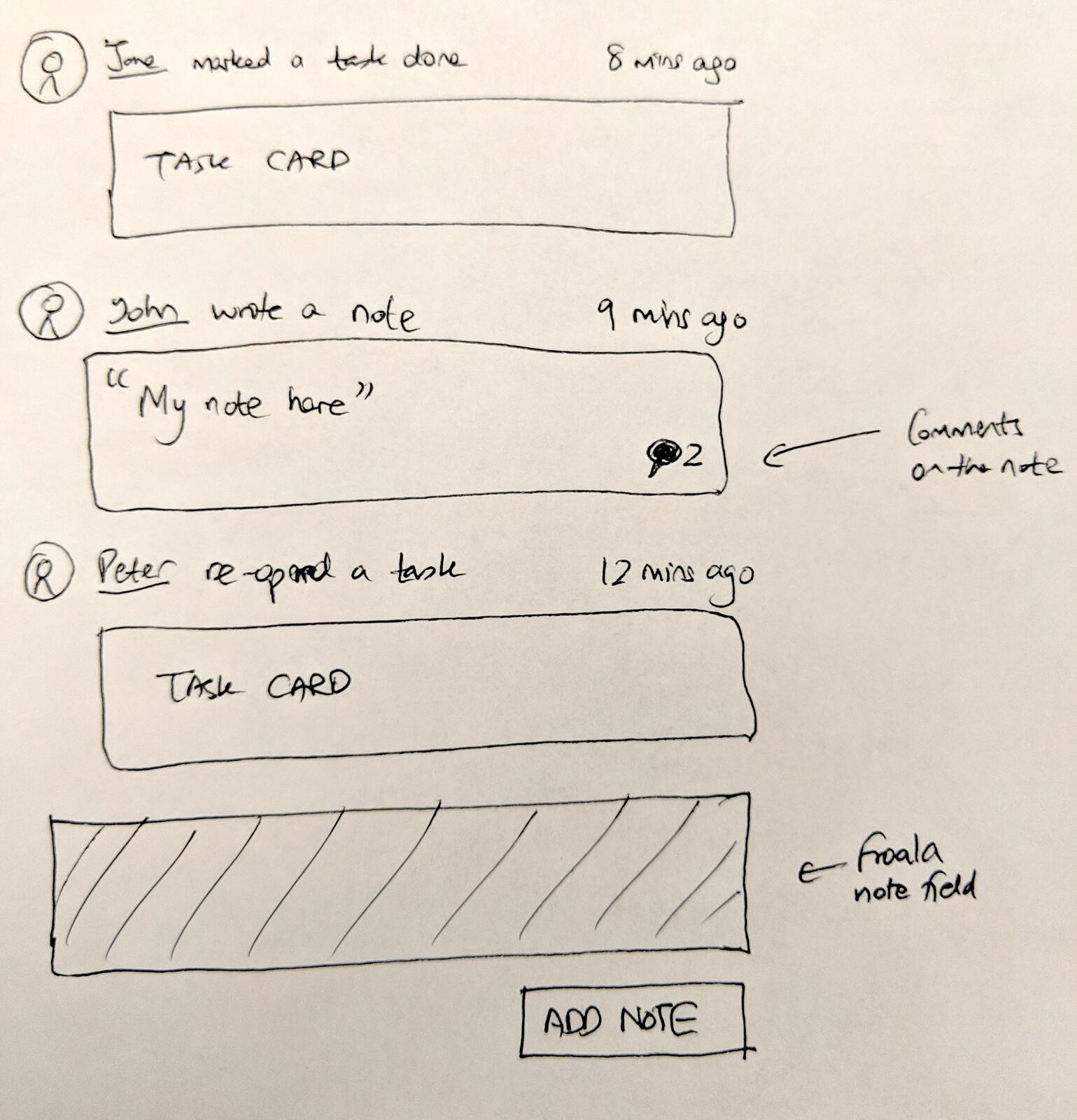
The activity feed sketches from early design work show how we thought about attributing actions to specific users. “Jane marked a task done” and “Peter reopened a task” - this attribution needed to persist even after users left.
Edge cases that needed testing
From the IE11 avatar fix, our API Lead flagged the testing requirements:
“Thoroughly test edge cases including: Reopening tasks previously assigned to disabled users.”
Reopening tasks created an interesting scenario. If a completed task (assigned to a disabled user) gets reopened, it becomes an active task. But the disabled user can’t work on it. What happens?
The answer: the task stays assigned to the disabled user record (for audit continuity) but is flagged as unworkable. An admin must reassign it to proceed. The system doesn’t silently drop the assignment or auto-reassign on reopen.
Notification handling was another concern. If a disabled user’s email is still on record, should they receive notifications about tasks they were historically involved with? The answer depends on whether notifications serve current work (no) or audit purposes (maybe). We haven’t fully settled this one yet.
The actor receives the work
The final design decision: when an admin disables a user, their active tasks automatically reassign to the admin performing the disable action.
From our work on improving task completion error messages for open issues:
“Implement automatic reassignment in the API when a user is disabled: Active tasks/steps: Automatically reassign to the admin who initiated the disable action.”
The completed task handling was explicit:
“Completed tasks: Keep the disabled owner as-is (no reassignment).”
The “actor” concept simplified a complex question. Instead of requiring admins to manually specify where each task should go, the default is that if you disable someone, you temporarily own their work. You can then redistribute it. Actually, that makes it sound smoother than it really is.
This pattern appears in other systems. When a manager terminates an employee, they become responsible for work handoffs. Tallyfy encoded that real-world pattern - the person with the authority to disable someone is the logical person to receive their pending work. We’ve observed this pattern intensely in organizations with high staff turnover. One government contractor told us their pre-onboarding used to take 1-2 weeks and new hire onboarding required 5-7 business days, with HR manually coordinating across multiple departments for 10-20 simultaneous hires. When someone left mid-process, the handoff chaos multiplied. Their pre-onboarding dropped to 2-3 days and onboarding to 2-3 days after implementing proper reassignment - a 71-86% reduction - because the system handled departures automatically instead of requiring manual task-by-task cleanup.
The validation fix
While building the full solution, a quick fix addressed the immediate problem. Our API Lead implemented:
“Initial validation fix… to allow requests with disabled user IDs.”
The system had been rejecting operations that involved disabled user IDs anywhere in the request. This prevented process launches, task updates, and other operations that historically referenced disabled users. Relaxing this validation unblocked users while the fuller reassignment feature was built.
What we left out
The current implementation defaults to reassigning everything to the actor. Here’s what we considered but didn’t ship:
Automatic successor nomination: Organizations asked for designated backup assignees. “If Person A is disabled, their work goes to Person B automatically.” This requires pre-configuration that most organizations don’t maintain. We decided the actor-receives-work pattern was simpler and didn’t require advance planning.
Team-level inheritance: When someone leaves, distribute their work across their team rather than to one person. This requires team hierarchy data we don’t always have, plus algorithms for fair distribution. Complex for marginal benefit.
Granular per-item reassignment UI: The full vision from that work:
“Per-item choice between ‘remove’ vs ‘reassign to specific user’”
Rather than all-or-nothing bulk reassignment, some workflows need item-level decisions. Task A goes to Person X, Task B just gets unassigned, Task C goes to Person Y. This granular mode isn’t fully shipped. We also considered but didn’t implement proactive reassignment warnings. Before disabling a user, showing what active assignments exist and requiring explicit decisions about each one. The current flow handles this reactively - assignments transfer, then admins redistribute. The group membership cleanup - removing disabled users from all groups they belong to - runs automatically. But the reverse (restoring group memberships when re-enabling a user) still requires manual setup. There are a few more rough edges we know about but haven’t prioritized yet.
How this connects to process managers
The process manager concept intersects with disabled user handling. A process manager has authority over all tasks in a process, regardless of specific assignment.
When a regular assignee is disabled, their tasks need reassignment. When a process manager is disabled, the scope is larger - they had oversight of everything in that process. The reassignment logic handles both cases similarly (transfer to actor), but the operational impact differs.
Similarly, assignment rules that reference disabled users by ID continue to fire. The rule says “assign Task B to User X when Condition Y is true.” If User X is now disabled, the rule fails silently rather than causing an error. Should the rule auto-update? No. The rule remains configured but ineffective until either the user is re-enabled or the rule’s updated.
The result
Disabled member handling now:
- Preserves historical data for audit trails
- Reassigns active work to the disabling admin by default
- Operates at organization scope (multi-org users unaffected elsewhere)
- Provides clear error messages when disabled users block operations
- Maintains user records (disabled, not deleted) for data integrity
The user who couldn’t launch their process can now launch it. The disabled member’s assignments were cleaned up. The audit trail shows who originally did completed work. The system no longer silently blocks operations with confusing errors.
Process managers who design workflows don’t need to think about member lifecycle. The infrastructure handles the edge case of someone leaving. Active work transfers. Historical records persist. The process continues.
About the Author
Amit is the CEO of Tallyfy. He is a workflow expert and specializes in process automation and the next generation of business process management in the post-flowchart age. He has decades of consulting experience in task and workflow automation, continuous improvement (all the flavors) and AI-driven workflows for small and large companies. Amit did a Computer Science degree at the University of Bath and moved from the UK to St. Louis, MO in 2014. He loves watching American robins and their nesting behaviors!
Follow Amit on his website, LinkedIn, Facebook, Reddit, X (Twitter) or YouTube.

Automate your workflows with Tallyfy
Stop chasing status updates. Track and automate your processes in one place.