
Audit trails that actually get used for compliance
Every workflow tool claims audit trails. Tallyfy built compliance-grade audit logging after real SOC 2 and ISO 27001 security assessments revealed what auditors actually check. One law firm doubled case capacity per attorney with proper audit trails. The gap between activity history and compliance-grade audit trails is wider than most teams expect.
Summary
- This is our candid experience building audit trails at Tallyfy - not marketing speak. We started with activity logs in 2017 and evolved toward compliance-grade system logging based on real enterprise feedback
- Activity history and audit trails are different things - Users want to see who did what. Compliance officers need tamper-proof records with timestamps, user attribution, and retention policies
- What you don’t log matters as much as what you log - Every database row you store has performance and storage cost. We learned to separate high-volume events from compliance-critical events
- Automation attribution caused surprising debate - When a rule auto-assigns a task, who gets credited in the audit trail? We settled on “Tallyfy Bot” as the actor for all automation-triggered events
- Filter by actor is the killer feature compliance teams actually use - Not chronological scrolling. They want to see everywhere a specific user did something across an entire organization. Learn more about compliance
The question landed in our support queue in August 2017:
On live chat a user on V1 asked this today: Where am I able to view a history of completed runs?
Simple enough. Show people what happened after a process finished. But as we dug in, we realized we were facing two very different problems that wore the same clothes. This reflects our experience at a specific point in time. Some details may have evolved since, and we’ve omitted certain private aspects that made the story equally interesting.
Audit trails are essential for compliance. Here’s how we approach process tracking and auditability.
Tallyfy is Process Audits Made Easy
Activity history versus audit trails
The request seemed straightforward at first. Someone on our team summarized the real need:
The main issue is the ability to see the full activity history of a completed run or completed task, i.e. step by step actions+changes+states or audit trail with time stamps and user
Turns out, that phrase “or audit trail” hid a world of complexity. Activity history is a user experience feature. Audit trails are a compliance requirement. They sound similar but serve completely different masters.
Activity history answers “what happened?” for users who want to understand a process. Did Maria approve this before or after the deadline? When did the customer upload their documents? These questions help teams work better.
Audit trails answer “can you prove it?” for regulators, auditors, and legal teams. They need tamper-proof records, retention guarantees, and the ability to reconstruct exactly what happened during any timeframe.
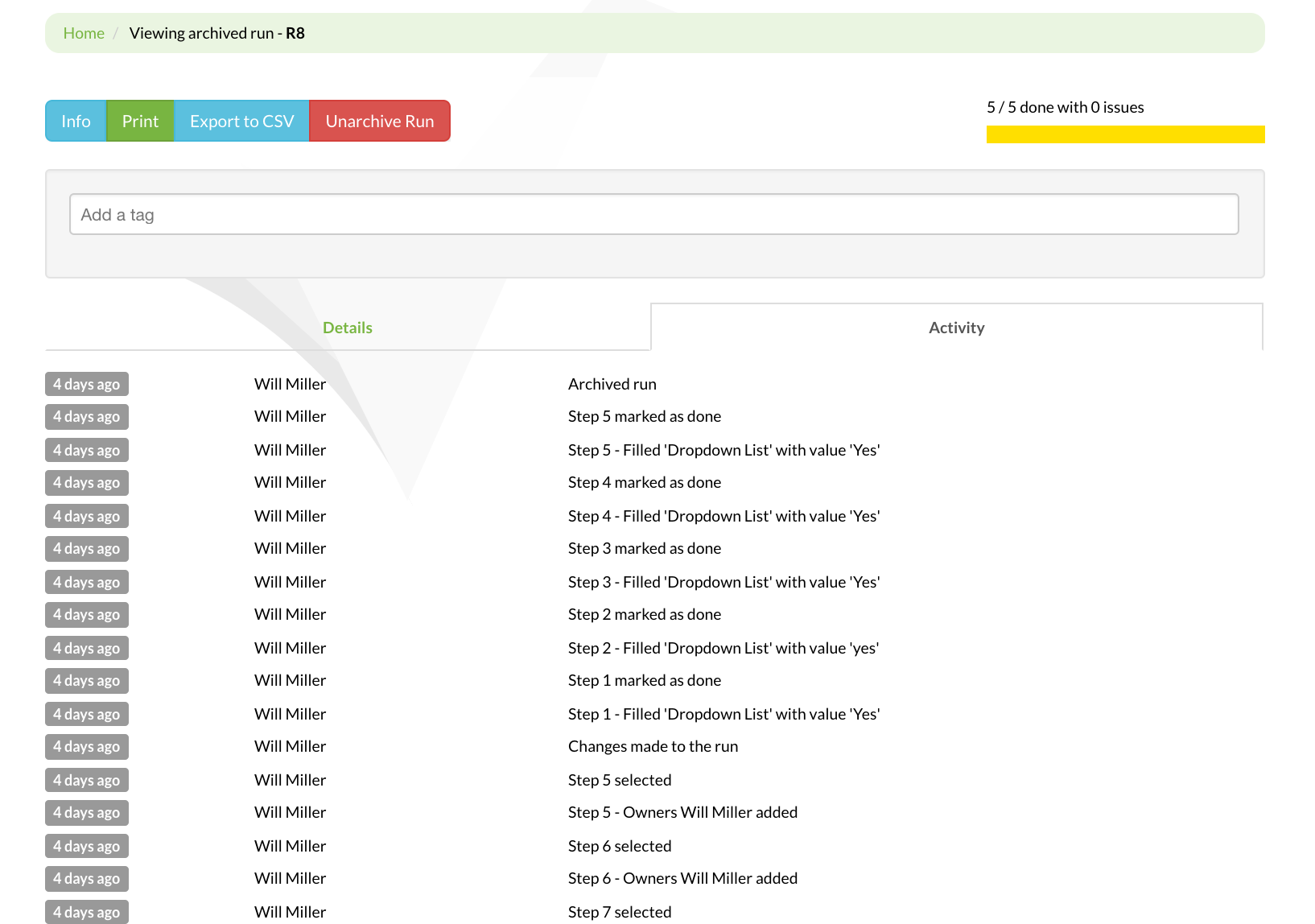
V1 activity tab: our first attempt at showing process history - functional but not compliance-grade
We already had pieces in place. When the question came up, one of our team members pointed out:
In V1, there are 2 options: 1. In Run View > Activity and 2. In Analytics > Runs > State Analysis > Run name > Run Audit
Two different views, two different purposes. But neither was designed with enterprise compliance in mind. They showed events. They didn’t prove events.
The priority debate
Here’s where it got interesting. We had limited engineering bandwidth, and audit trails competed with other features for attention:
I think notifications is definitely more important than having 1-3 views when it comes to encouraging daily active usage of Tallyfy.
Fair point. Notifications drive engagement. Activity logs sit idle until someone needs them. But three years later, enterprise customers would make audit requirements their top concern during security reviews.
In discussions we had with law firms managing estate proceedings - where each case involves 100+ steps and 9-month timelines with critical legal filing deadlines - the audit trail requirement was non-negotiable. They needed immutable records that showed exactly who did what, when. One firm told us they doubled their case capacity per attorney after implementing proper process tracking with audit trails. SOC 2 certification became a hard requirement, not a nice-to-have.
The tension between building for daily users versus building for quarterly audits never fully resolved. We kept doing both, incrementally.
Our CTO made a commitment that shaped our approach:
We will be adding this in. It is not a priority for launch, but yes, we will be adding this in.
“Not a priority for launch, but yes” became our pattern. Actually, “pattern” is generous. Ship the core feature, then iterate toward compliance-grade. Honestly, not ideal, but realistic for a startup.
What enterprise customers actually asked for
The requests evolved as we landed larger customers. By September 2017, the requirements had matured:
As a user or manager, it would be great to see a stream of who did what on any given view. Ideally, a universal toggle to move between activities and normal views
That was the user experience request. The compliance request came wrapped differently:
I would like to filter or search activity for a given actor (e.g. anywhere a specific user did something).
Filter by actor. Not browse chronologically. Not search by keyword. Find everywhere a specific person touched anything. That’s what auditors actually do. They investigate people, not events.

Filter dropdown mockup: the ability to slice activity by actor became the most requested compliance feature
This insight changed our data model.
Instead of storing events as a simple chronological log, we needed indexed actor relationships. Every event needed efficient lookup by who did it, not just when it happened.
The system logging specification
Years later, we formalized requirements in a detailed specification. The scope expanded dramatically from simple activity logs:
Implement a thorough system logging solution that captures technical and security events at the organization level, providing customers with visibility into failed operations
Notice the shift. Not just successful operations. Failed operations. The audit trail needed to capture what went wrong, not just what went right. That’s where compliance investigations usually start.
The specific events we committed to logging tell the story of what enterprises actually audit:
Log password reset initiated by any given member, Log password reset successfully completed, Log every time a member switches to Admin role
Security events. Access control changes. Privilege escalation. These aren’t workflow events - they’re security events that happen to occur within a workflow platform.
And the failure modes matter even more:
Failed webhooks, Failed email sends from native Tallyfy sending via Mailgun, Failed email SMTP attempts via external server
When an integration fails, was it logged? Can you prove the system tried to send that critical notification? Can you show the retry attempts? These questions come up in incident reviews.
The storage architecture debate
Here’s where engineering reality collided with compliance idealism. Every logged event takes space. Activity tables can grow painfully massive.
Logs stored in separate DigitalOcean droplet via Manufactory. When an organization is deleted, system log entries are deleted as well.
We made a deliberate architectural decision: separate storage for system logs. Not in the main application database. No competition with production queries. A dedicated logging infrastructure.
The deletion policy raised eyebrows internally. Delete logs when an organization is deleted? That seems counter to compliance. But here’s the nuance - these are system logs, not audit records. The distinction matters.
System logs capture technical events: failed API calls, infrastructure issues, integration problems. These have limited compliance relevance and significant storage cost. They get cleaned up. Audit records - the actual who-did-what-when for business events - live longer and have different retention requirements. We separated the concerns because the lifecycle requirements differed.
This architecture decision was validated when we saw organizations in OSHA-regulated industries achieve dramatic results through proper audit trails. One operations team reduced headcount 75% while increasing revenue 4x - but only because they had clear, immutable audit trails that proved compliance at every step. Without that paper trail, no regulator would’ve believed their streamlined process was actually compliant.
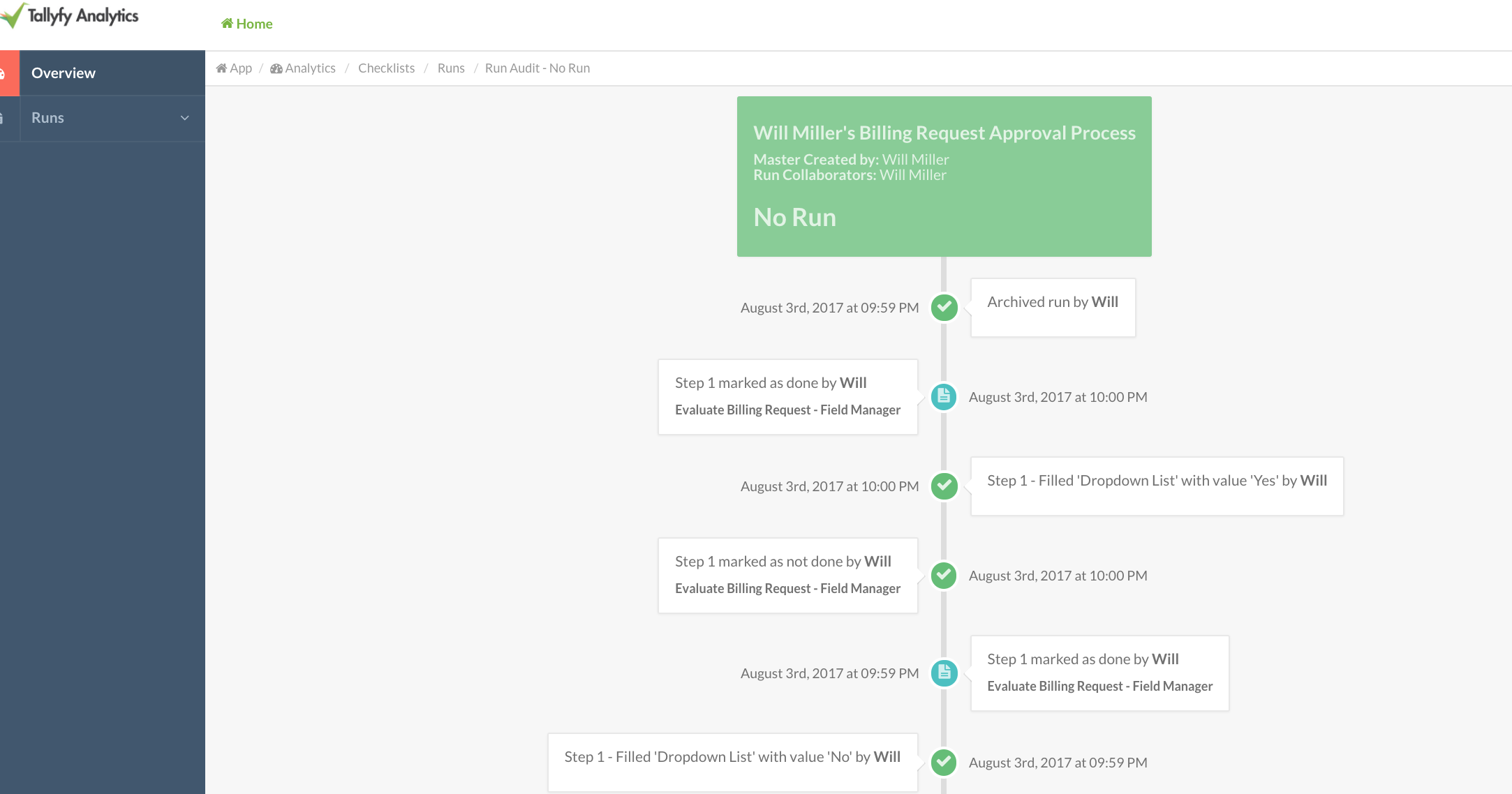
V1 run audit: the compliance-oriented view that went deeper than the activity tab
The versioning problem
One issue blindsided us. Blueprints (templates) have draft and published versions. Users edit drafts, then publish. Reasonable version control. But what happens to the activity feed when you merge versions?
Activity feeds lose detailed change history when draft and published blueprint versions are merged.
If you make 47 edits in draft mode, then publish, what shows in the audit trail? Every edit? Just the final state? The merge event only?
We struggled with this. The granular history exists in the draft. The published version is what matters for compliance. But auditors sometimes want to see the evolution, not just the outcome. Our compromise: preserve granular activity for drafts, create a merge event for publishing, maintain the ability to reconstruct what changed. Not perfect, but defensible.
Enterprise security assessments
The real pressure came from security reviews. A major bank ran us through their security assessment, and the findings were specific:
CRA 9.3.3 - Lack of configured password parameters: maximum failed login attempts before lockout
Password lockout policies. Not exactly workflow automation, but part of the platform. And if the platform doesn’t log failed login attempts, you can’t prove the lockout works.
ISO 27001 audits dug even deeper:
ISO 27001 - A.12.4.1 Event Logging - Missing audit trails
A.12.4.1 is explicit about what event logging means. User activities, exceptions, faults, and security events must be recorded and retained. The keyword “retained” has teeth - you need documented retention periods and evidence of enforcement. Running Tallyfy taught us that most teams underestimate how much effort goes into proving retention policy enforcement during an actual audit.
SOC 2 added another dimension. Type II audits examine whether controls operated effectively over a period, not just whether they exist. Your audit trails become evidence that your controls work. They don’t just verify the controls exist - they prove the controls actually work.
GDPR brought the right to erasure into the picture. Users can request deletion of their personal data. But audit records that show who accessed what? Those have legitimate business purpose that may override erasure requests. The legal nuance here consumed multiple meetings with our compliance advisors.
The automation attribution question
This one caused more internal debate than anything else:
Add activity feed entries when automations are executed, attributed to Tallyfy Bot. The activity feed should track and display when automations are executed
When a rule automatically assigns a task, who did it? The person who created the rule? The system? Nobody?
We settled on “Tallyfy Bot” as the actor for all automation-triggered events. A fake user that represents the system. The reasoning:
- Humans didn’t take the action, so attributing to humans would be misleading
- “System” is too vague - which system? What triggered it?
- “Tallyfy Bot” is searchable, filterable, and clearly represents automated behavior
The filter-by-actor feature now works for automation too. Want to see everything the automation system did in the last month? Filter by Tallyfy Bot. That’s it.
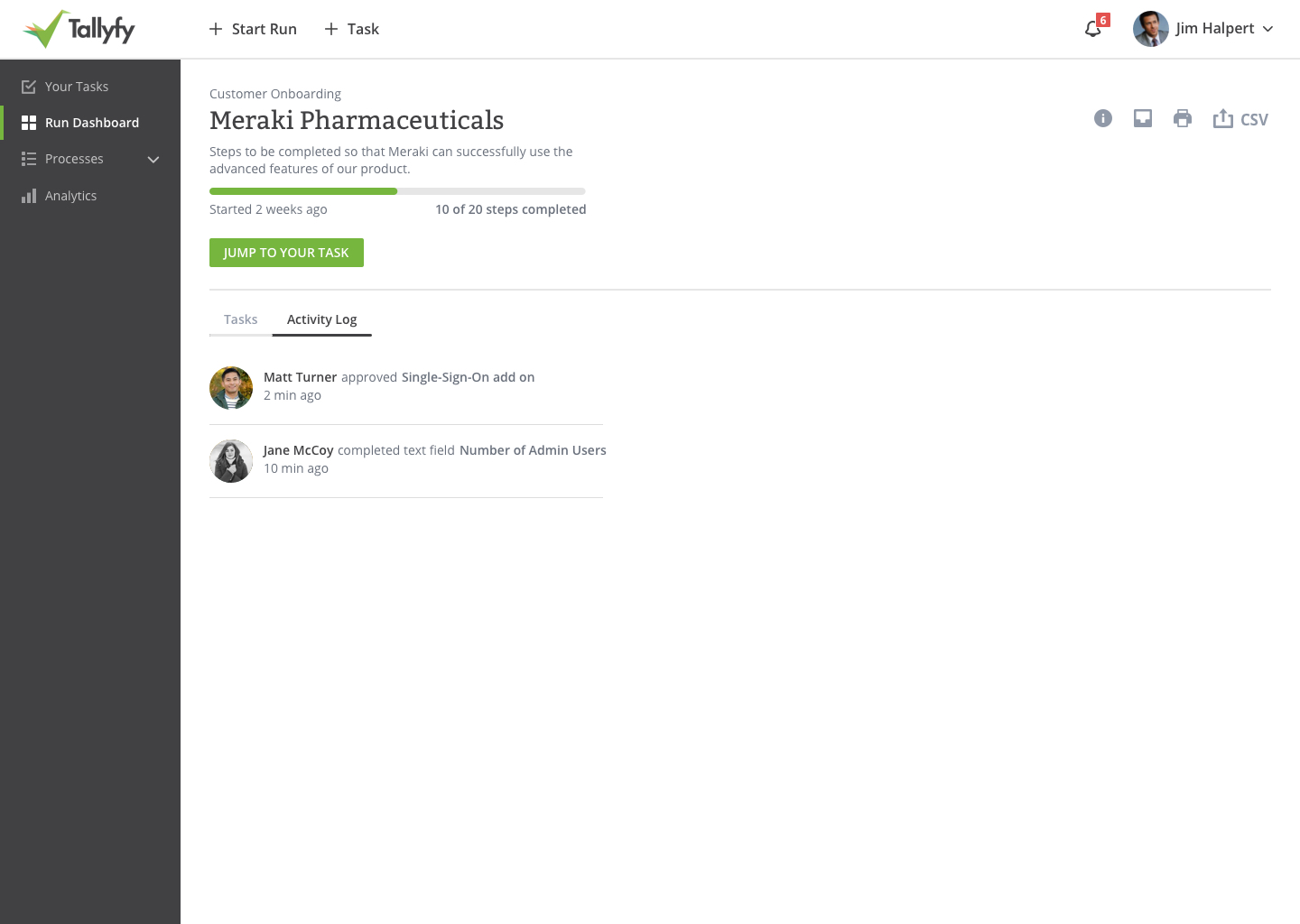
The evolved activity log: integrating automation attribution alongside human actions
What to log versus what to skip
Every event you log costs something. Storage, indexing overhead, query complexity, retention management. We developed heuristics:
Always log:
- Authentication events (login, logout, failed attempts)
- Authorization changes (role changes, permission grants)
- Data modification (creates, updates, deletes on business objects)
- Access events (who viewed what, when)
- Security configuration changes
Log with summarization:
- High-frequency read operations (batch into access patterns)
- Transient state changes (status pending to in-progress)
- System health checks (aggregate, don’t enumerate)
Skip entirely:
- UI interactions without business meaning (clicked a tab, scrolled)
- Temporary calculation states
- Cache operations
- Internal system coordination
The principle: log business-meaningful events, not technical operations. A task completion is business-meaningful. A database connection pool adjustment isn’t.
Security incident report template
The retention policy question
How long do you keep audit records? The compliance answer: it depends.
SOC 2 typically wants one year of logs available. Healthcare regulations can require seven years. Financial services sometimes need longer. GDPR requires you to not keep data longer than necessary. Good luck squaring all of that. The pattern we keep running into is that teams set retention periods once and forget about them until an auditor asks pointed questions years later.
We landed on configurable retention with sensible defaults. Organizations can set their own retention periods based on their compliance requirements. We provide the infrastructure; they provide the policy.
The implementation detail that matters: deletion must be verifiable. When retention expires, you need to prove records were deleted, not just claim they were. That means logging the deletion. Yes, logging that you deleted logs. Compliance is recursive like that, and it’s one of those things that sounds absurd until an auditor asks for the proof.
What we left out
Several features didn’t make the cut:
Real-time streaming of audit events was requested by customers who wanted to pipe everything to their SIEM (Security Information and Event Management) systems. We built webhook support for this instead of native streaming. Let their systems pull rather than us push.
Tamper-proof blockchain logging came up in multiple enterprise discussions. The appeal is obvious - immutable, verifiable records. Is it the future of audit logging? No. The reality is complex. Blockchain adds latency, complexity, and cost for benefits most teams can’t actually use. We focused on strong access controls and cryptographic hashing instead.
Full-text search across audit records sounds useful until you consider the storage and indexing requirements. We implemented structured search (by actor, date range, event type, object) rather than arbitrary text search. More useful for proper investigations.
Audit record exports in every conceivable format - PDF, CSV, JSON, XML - are a constant request. We support JSON and CSV. The others are formatting exercises that customers can do themselves.
Audit dashboards with visualizations were on the roadmap but never prioritized. The compliance use case is investigation, not monitoring. People query audit trails when something goes wrong, not to admire charts. Analytics tooling serves that need better than we could’ve.
The honest truth about usage
Here’s the uncomfortable reality: most teams never look at their audit trails. They need them to exist. They need them to pass security reviews. They need them for the theoretical investigation that might happen someday.
But day-to-day? Activity logs get more eyeballs. People check what happened in their process. Managers review who completed what. The user experience view dominates actual usage when tracking tasks and processes.
The audit trail sits there, quiet. Like insurance. You hope you never need it. When you do need it, you’re very glad it exists.
The filter-by-actor feature? The one compliance teams actually requested? Used heavily during incident investigations. Barely touched otherwise. Built for the 1% of time when it matters intensely.
The real insight
Building audit trails taught us something about enterprise software: the features that sell contracts aren’t always the features that get used daily. At Tallyfy, we’ve learned to build for two audiences simultaneously - the procurement team evaluating security questionnaires and the end users who actually run processes.
Audit logging appears in every enterprise security questionnaire. It’s a checkbox that must be checked. Deals stall without it. But after the contract signs, nobody thinks about audit trails until something goes wrong.
That shapes how you build the feature. Build for investigations, not browsing. Index by actor, not just time. Make exports reliable, not pretty. Support the quarterly audit review, not the daily dashboard check. Understanding compliance requirements deeply means building for the auditor, not just the user.
The activity history that started this journey - showing users what happened in their processes - that feature gets used constantly. The compliance-grade audit trail built on top? It’s insurance. Essential insurance. But insurance nonetheless.
Every workflow tool claims audit trails. The question is whether yours will hold up when an auditor actually looks at it. We’ve been through enough enterprise security reviews to know what they actually check. The answer isn’t “do you have logging?” The answer is “can you prove what happened, to whom, by whom, when, and show me retention policy enforcement?”
That’s the difference between activity history and audit trails. Both matter. They just matter to different people at different times.
Related questions
What is the difference between activity logs and audit trails?
Activity logs show users what happened in their workflows for operational awareness. They answer questions like “when did this task complete?” or “who approved this request?” Audit trails are compliance artifacts that prove events occurred with tamper-resistant timestamps, user attribution, and retention guarantees. Activity logs prioritize usability. Audit trails prioritize legal defensibility. Most systems need both, built on the same underlying data but presented differently.
How long should you retain audit records for compliance?
Retention requirements vary by regulation and industry. SOC 2 typically requires one year of available logs. HIPAA requires six years. Financial regulations can require seven years or longer. GDPR adds complexity by requiring you to not retain data longer than necessary while also maintaining records of processing activities. The safest approach is configurable retention that matches your most stringent compliance requirement, with documented policies and verifiable deletion when retention expires.
Why does automation attribution matter in audit trails?
When automated rules execute actions - assigning tasks, sending notifications, changing statuses - the audit trail must record who did it. Attributing automated actions to the person who created the rule is misleading; they didn’t take the action. Attributing to “system” is too vague for investigations.
A named automation actor like “Tallyfy Bot” provides clear attribution that’s searchable, filterable, and distinguishable from human actions. This matters when auditors ask “was this done by a person or by automation?”
What events should always be logged for compliance?
Authentication events (successful and failed logins, logouts, password changes), authorization changes (role assignments, permission grants and revocations), data modifications (creates, updates, deletes on business-critical records), access events (who viewed sensitive information), and security configuration changes. The principle is: log events that could matter in a security investigation or compliance audit. Skip purely technical operations like cache refreshes or internal system coordination.
How do you handle audit trails when users request data deletion under GDPR?
GDPR gives users the right to erasure, but audit records often have legitimate business purposes that override this right. Records showing who accessed what data, when, and why may need to be retained for legal compliance, security investigations, or contractual obligations. The resolution typically involves anonymizing personal identifiers in audit records rather than deleting them entirely. This preserves the audit trail but removes personally identifiable information. Document your legal basis for retention clearly.
About the Author
Amit is the CEO of Tallyfy. He is a workflow expert and specializes in process automation and the next generation of business process management in the post-flowchart age. He has decades of consulting experience in task and workflow automation, continuous improvement (all the flavors) and AI-driven workflows for small and large companies. Amit did a Computer Science degree at the University of Bath and moved from the UK to St. Louis, MO in 2014. He loves watching American robins and their nesting behaviors!
Follow Amit on his website, LinkedIn, Facebook, Reddit, X (Twitter) or YouTube.

Automate your workflows with Tallyfy
Stop chasing status updates. Track and automate your processes in one place.