
Launching a process with no template - when structure gets in the way
Sometimes you need to bundle tasks together without the overhead of creating a template first. We built ad-hoc processes for exactly this scenario - here is why and how.
Summary
- Workflow without template is a real need - When you need to ask 6 people to submit timesheets by Friday, creating a template first is absurd
- Ad-hoc processes bundle one-off tasks - Group related tasks together for tracking without defining a reusable blueprint
- The shell template trick - We discovered existing functionality could solve this without building a new endpoint
- Task linkage determines context - A task can link to nothing, a process, or a template - each choice changes behavior
- Structure should serve work, not constrain it - Process types exist on a spectrum from read-only to fully launched
Workflow without template. That phrase kept coming up in our GitHub issues and internal discussions. People wanted to track work together without the ceremony of defining steps first. This reflects our experience at a specific point in time. Some details may have evolved since, and we have omitted certain private aspects that made the story equally interesting.
In our conversations, we have heard this request consistently from operations teams who need to bundle one-time tasks - like coordinating a vendor review with 13 different stakeholders across IT, legal, and cybersecurity - without creating a permanent template they’ll never use again.
Most workflow tools assume you know exactly what you’re doing before you do it. Create the template. Define the steps. Set up the automations. Then launch.
But real work doesn’t always happen that way. Sometimes you just need to bundle a group of tasks together. No predefined sequence. No reusable blueprint. Just related work that belongs together.
The problem we kept hearing
One of our prospects put it bluntly in a conversation:
“I wish there was a ‘preview’ option where you can see what the process looks like to the end user without having to launch an entire procedure. Good for quick tests.”
Another company wanted something similar - a self-guided walkthrough without cluttering up their tracker with test processes.
These requests kept coming in different forms. People wanted to test their automation rules without launching real processes. They wanted to bundle related tasks without the ceremony of template creation. They wanted flexibility.
The balance between structure and flexibility is at the heart of workflow automation. Here’s how we approach it at Tallyfy.
Workflow Automation Software Made Easy & Simple
Then in August 2024, this GitHub issue landed that crystallized everything:
“Can we launch a process with no template in order to bundle a group of tasks together?”
That question kicked off a debate that shaped how we think about the relationship between templates, processes, and tasks.
When templates become overhead
Here’s a real scenario we faced while building the Tallyfy AI Assistant. The assistant needed to handle requests like this:
“Ask 6 people to submit their timesheets for this week, deadline Friday at 5pm”
Think about what that requires. You need to create 6 individual tasks. Each goes to a different person. They all share the same deadline. And you want to track them together - who’s submitted, who hasn’t.
Creating a template for this would be ridiculous. By the time you’ve defined the steps, added the assignees, and configured the deadlines, the actual work could already be done. The template would never be used again. Pure overhead.
The engineering team articulated the core need clearly:
“We invented a chat-driven AI assistant called Tallyfy Assistant… the reason we need an empty process not linked to any template is just to ‘bundle’ a group of tasks together.”
That’s the key insight. Sometimes the value is in bundling, not in the blueprint. Based on hundreds of implementations, we’ve observed that healthcare organizations and professional services firms often have complex multi-step onboarding processes - 26 steps or more with conditional logic for different entity structures - but they also need the flexibility to handle one-off coordination tasks that don’t fit any existing template.
The internal debate
When this came up in our engineering discussions, the first response was predictable. Someone pointed out that we already had a mechanism:
“Yes it is possible, we have an existing Shell Template that can be used to create empty processes. We currently use it to create an empty process then attach one-off tasks to it.”
That was our engineer explaining what already existed. But the question remained - should we build a dedicated endpoint for this?
The back and forth went like this. Someone asked for an example API call. The response:
“Currently we do not have a specific endpoint which just creates an empty process. But I can go ahead and create one for the UI to incorporate if you would like?”
This is where engineering decisions get interesting. Do you build something new, or find a way to use what already exists?
The proposed approach was straightforward:
“API creates an empty process, then create a OOT for each of the assignees, then attach them to that empty process.”
OOT means one-off task. The pattern is: create a container, then put tasks in it. Simple.
Comments that spawn tasks
Here’s where it gets weird. Back in April 2018, we had a different discussion about tasks appearing in unexpected places. I wrote this in a Basecamp thread:
“Sometimes, you are doing a process step and you just randomly realize - wait… I have this large one-off task that needs doing as part of this step”
The idea was simple: you’re working through a process, you post a comment, and that comment should be able to become a task. Not a step in the template - a one-off task attached to the context you’re already in.
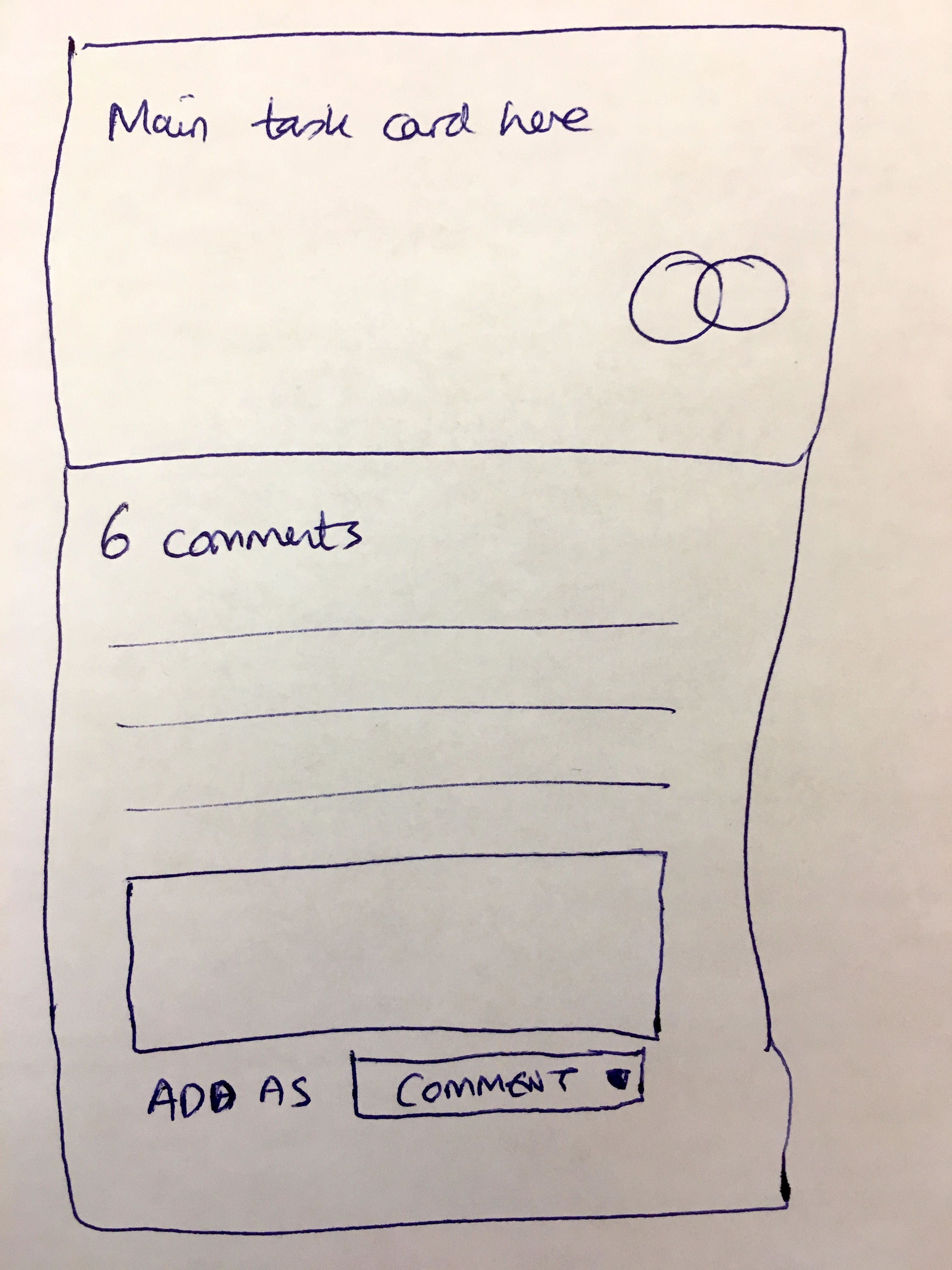
This sketch shows the basic concept - a main task card with its comment stream, and at the bottom, a dropdown asking whether to add content as a comment or something else. The “something else” is where tasks come in.
Task linkage - the crucial question
Our Product Manager raised the reverse question in that same thread:
“Turn a set of one-off tasks into a template”
Now we had two directions. Tasks becoming templates. Templates spawning tasks. But the crucial design question was: what should a task be linked to?
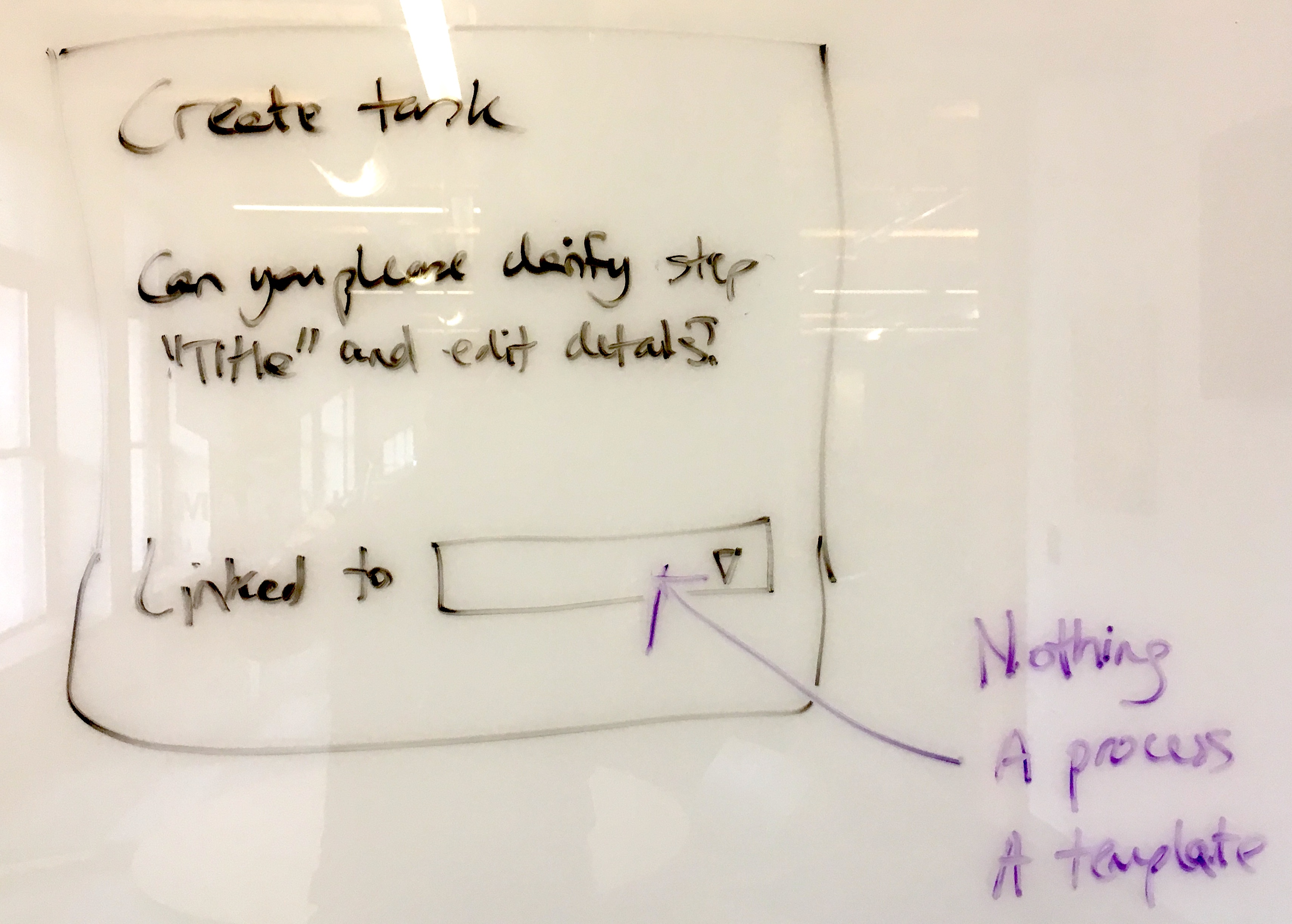
This whiteboard capture shows the three options we settled on:
- Nothing - A standalone task with no context
- A process - A task attached to a running instance of work
- A template - A task attached to a blueprint for future runs
Each option creates different behavior. Link to nothing and the task is orphaned - useful but hard to find later. Link to a process and you get bundled tracking. Link to a template and you’re saying “every time this runs, include this task.”
The “Linked to” dropdown became a core part of our task creation flow.
The solution hiding in plain sight
It turned out the existing Create One-off Task endpoint could do exactly what we needed. The trick was a specific combination of parameters:
{
    "title": "Please submit your timesheet",
    "owners": {
        "users": [21306]
    },
    "separate_task_for_each_assignee": true,
    "status": "not-started",
    "task_type": "task",
    "deadline": "2024-09-10 20:48:14"
}
The magic is separate_task_for_each_assignee: true. When you set this flag:
- API creates an empty process
- Creates one task per assignee
- Attaches them all to that empty process
- Each task can be tracked independently
If you assign to a single user, you get one task attached to a new empty process. Assign to multiple users, and you get multiple tasks all bundled together.
The engineering team confirmed it worked:
“I tried this and it works great. Admin user created the task and assigned two members. Do you think we should change anything in the existing behavior?”
No new endpoint needed. No new UI. Just a parameter flag that did exactly what people kept asking for.
Different task types for different needs
The task creation form evolved to handle multiple scenarios. Not every task is a simple checkbox.
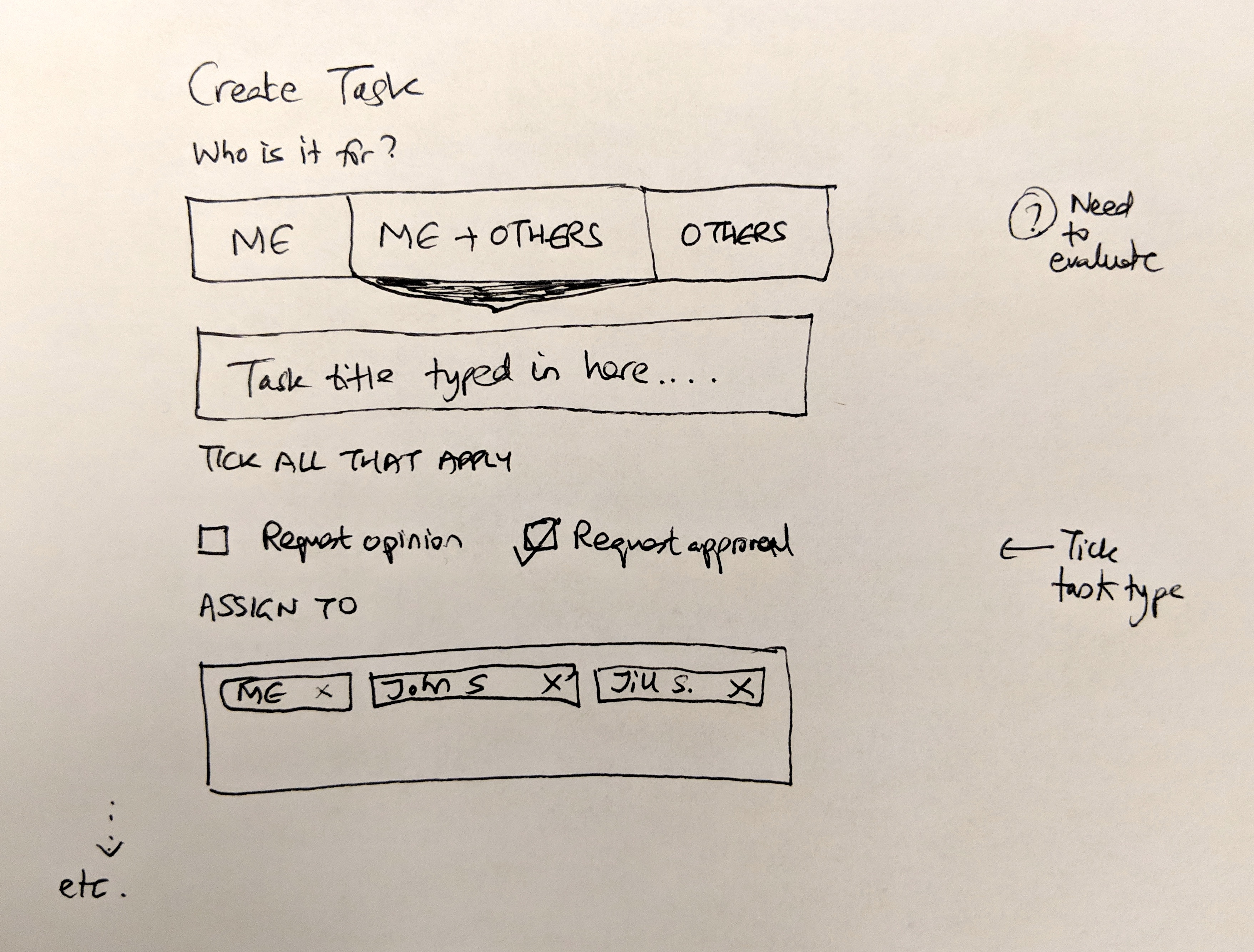
This sketch shows how we thought about task creation:
- Who is it for? - Three clear options: just me, me and others, or only others
- Task types - Request opinion (soft ask) vs Request approval (decision needed)
- Assignees - Chips for each person, removable with an X
The “tick task type” annotation on the right shows we were thinking about how these different types would display differently. An approval task isn’t the same as a regular task. The UI should reflect that.
The two-stage approach
For more complex scenarios - say you want different task titles for each person - you use a two-stage approach:
- Create the first task with its process using the method above
- Create additional tasks separately, attaching them to the same process
This enables tracking progress using the existing Tracker view.
One detail that came up: the task creator was being assigned to every task automatically. We decided to remove that since the admin is already set as the process owner. Cleaner separation between who created it and who needs to do it.
Dynamic steps and grid tracking
The question of how ad-hoc tasks display in the tracker led to another design challenge. If steps can be added dynamically, how do you show them in a grid?
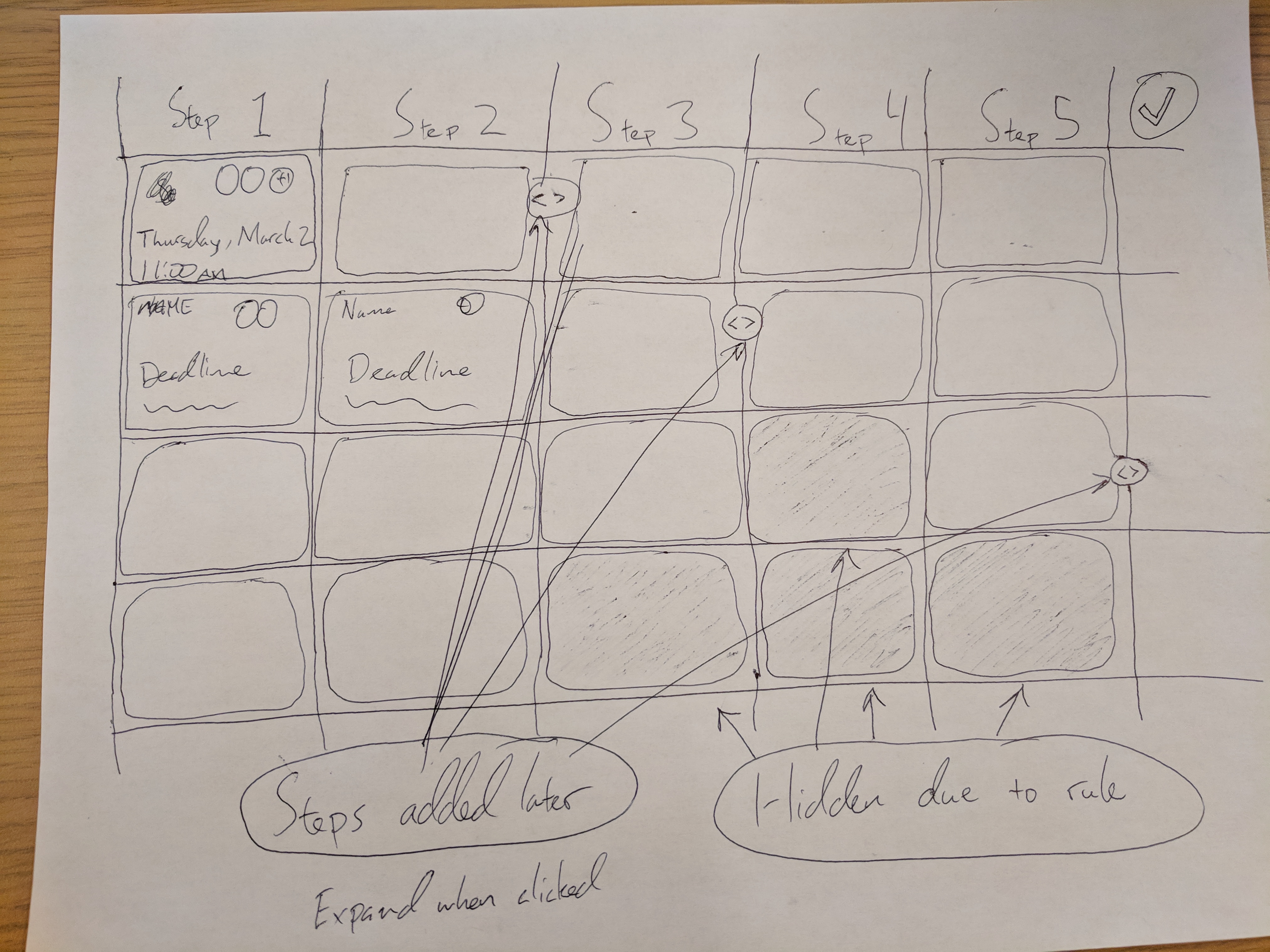
This sketch from our design sessions shows the complexity. Steps 1 through 5 across the top, with rows for different process instances. But some steps get added later - they need to insert into the grid. Other steps might be hidden due to conditional rules - they need to collapse visually.
The annotations tell the story:
- “Steps added later” - These arrows show where dynamically added steps would appear
- “Hidden due to rule” - Shaded cells indicating steps skipped by automation
- “Expand when clicked” - The idea that you could drill into the detail
This is why ad-hoc processes and template-based processes share the same tracking infrastructure. The display logic had to handle dynamic content regardless of origin.
Process types - a spectrum of structure
This work led us to think more carefully about process types in general. We ended up defining three distinct modes:
Read - Perfect when you just want to read a procedure. No tracking, no assignments, no clutter.
Drive Thru - Perfect to run through a procedure interactively. Test your automations. Walk through the flow. No real process gets created.
Launch - Perfect for full accountability with assignees, deadlines, and comments. The traditional template-to-process flow.
The ad-hoc process capability sits alongside these. It’s for when you need tracking without predefinition.
For more on how launching works, see our launching documentation.
Mock processes and drive-thrus
We also explored the concept of mock processes - what we eventually called “drive-thru” mode. The pain point was clear:
“I want to test if my rules work - but do not want to launch lots of processes all the time, cluttering up my tracker.”
The technical approach we settled on:
- Use existing database tables with a flag column to identify drive-thru processes
- Create dedicated APIs to reduce code branching in validations
- Add a global scope to automatically filter out drive-thru processes from existing queries
- Enable easy conversion from drive-thru to normal process by removing the flag
The key insight was that drive-thru processes should auto-archive or clean up after a month of inactivity. Test data shouldn’t accumulate forever.
When to use what
After building all this, here’s how I think about the spectrum:
Use a template when:
- The process will run more than once
- Multiple people need to understand the steps
- You want automation rules
- Compliance or audit trails matter
Use an ad-hoc process when:
- You need to bundle one-time tasks
- The tasks are related but not sequential
- Creating a template would take longer than doing the work
- You want tracking without ceremony
Use drive-thru mode when:
- Testing automation rules
- Training someone on a process
- Validating that conditionals work correctly
- Demoing to prospects
What we left out
We deliberately didn’t build a full “create ad-hoc process” endpoint. The existing one-off task creation with the separate_task_for_each_assignee flag handles the core use case.
We also discussed but didn’t implement a visual way to convert drive-thru processes to real processes. The database flag makes it trivial at the API level, but the UI work is still pending.
Template inheritance and variations - where you might want slight modifications of a base template - remains a separate problem. Ad-hoc processes aren’t templates at all. They’re the absence of templates.
There was also discussion about whether the client should handle the logic or whether we needed a dedicated server-side API. The engineering debate went back and forth. Client-side meant more flexibility but also more complexity in the Angular code. Server-side meant cleaner client code but a new API to maintain. We ended up with a hybrid - simple cases handled by client orchestration, complex cases potentially getting their own endpoint later.
The task-to-template conversion that Wesley suggested? Still on the backlog. The idea of taking a set of one-off tasks that worked well and saving them as a template for future use is compelling. But the edge cases are tricky. What about assignees? Deadlines? Custom fields? Each of those decisions needs thought.
The philosophy underneath
There’s a tension in workflow software between structure and flexibility. Too much structure and people work around your system. Too little and you can’t track anything.
At Tallyfy, we believe the answer isn’t to pick one. It’s to provide a spectrum.
Templates exist for repeatable work. Ad-hoc processes exist for coordinated one-time work. Drive-thrus exist for testing and learning. Read mode exists for reference.
Each serves a different moment in how work actually happens.
The lesson from building this: sometimes the feature you need is already there, hidden behind a parameter flag nobody documented. And sometimes the best engineering decision is recognizing that you don’t need to build anything new at all.
The other lesson? Those whiteboard sketches and GitHub issues from years ago - they keep coming back. The problems we half-solved in 2017 and 2018 became the foundation for what we fully solved in 2024. Engineering is layers, not leaps.
About the Author
Amit is the CEO of Tallyfy. He is a workflow expert and specializes in process automation and the next generation of business process management in the post-flowchart age. He has decades of consulting experience in task and workflow automation, continuous improvement (all the flavors) and AI-driven workflows for small and large companies. Amit did a Computer Science degree at the University of Bath and moved from the UK to St. Louis, MO in 2014. He loves watching American robins and their nesting behaviors!
Follow Amit on his website, LinkedIn, Facebook, Reddit, X (Twitter) or YouTube.

Automate your workflows with Tallyfy
Stop chasing status updates. Track and automate your processes in one place.