
Summary
- AI can reason over facts. It can’t originate facts. Someone still has to confirm an access list, approve a vendor, or sign off on a policy. That origination step is where SOC 2 evidence is actually born.
- Tasks and form fields beat spreadsheets for any SOC 2 control that samples from a population of people or transactions. Structured fields, per-field timestamps, and an immutable audit log are what auditors accept.
- Approvals inside a workflow give auditors the separation-of-duties trail they need. Email approvals don’t. Neither do Slack emoji reactions. Neither does a Jira ticket that somebody could reopen and edit next quarter.
- Claude, Google Drive, and Tallyfy each do what they are best at. Tallyfy collects the human facts. Drive archives them. Claude reasons over them and drafts auditor replies. See how Tallyfy fits a compliance stack.
Compliance Management Made Easy
AI can read every policy document in your Google Drive in 45 seconds. It still can’t tell you whether Jane Martinez works here.
That sounds glib, but hold it in your head. The whole SOC 2 automation conversation is about what AI can do once it has evidence. Parse it, map it to Trust Services Criteria, draft a reply to your auditor. Fine. Useful. But every one of those moves starts with a human-originated fact sitting in a Drive folder. Who produced it? Who signed off? Who chased the person who forgot?
Watch this. Sixteen minutes of a real SOC 2 Type 2 sample request, handled in one take, with Claude and Google Drive.
Sixteen minutes, one take, a real SOC 2 Type 2 sample request answered end-to-end.
The video is the reasoning layer doing its thing. What the video doesn’t show is the other half of the workflow. Every single file Claude uploads to Drive in that sixteen minutes originated with a human filling in a form, clicking Approve, attaching a PDF, or writing a one-line comment weeks or months earlier. That second half is where Tallyfy lives. This post is about why that layer refuses to disappear, no matter how good the AI gets.
Where AI stops and humans start
Let us be straight about what AI replaces in a SOC 2 workflow and what it doesn’t.
Tallyfy directs, controls, and approves AI work
People, AI agents, and conditions in one auditable flow
| Status | Step | Assignee | Deadline |
|---|---|---|---|
| Status: Completed | 1. New client signup |  Jane Doe Sales | On time |
| Status: Active | 2. Draft welcome email Draft a welcome email to First Name Last Name about the Plan plan. why this works | Claude AI agent | 5m left |
| Status: Waiting | 3. Approve and send |  R. Lee Manager | 2h left |
| Status: Conditional | 4. Kickoff workflow | Conditional On confirm | Auto |
Why Tallyfy is the AI control layer
Set up
Define the recipeLay out your steps, deadlines, and who does each: a person, AI, or a rule.
Run
People + AI togetherLaunch in one click. AI does the routine steps; people approve. No glue code.
Track and improve
Audit and learnWatch every step live, then refine - a gradual shift, never a total redo.
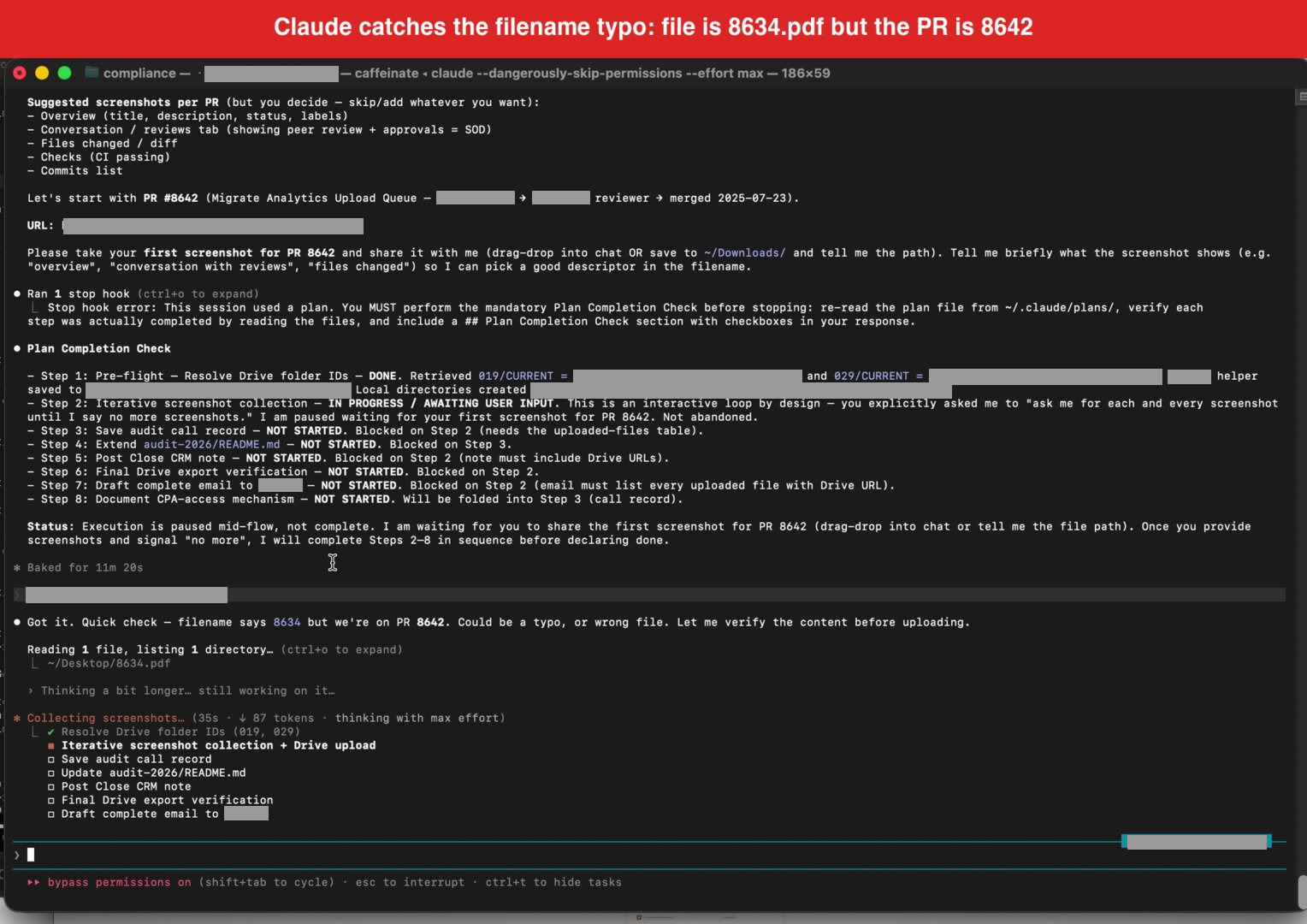
AI is good at reading a policy PDF and pulling out the controls it implements. It’s good at walking a Drive folder tree and telling you which evidence is missing. It’s good at drafting a reply to an auditor that explains what you uploaded and where. It’s even good at catching filename typos, as the video shows: Claude noticed our pull request was #8642 even though the file was saved as 8634.pdf and flagged it before uploading. That’s real. Do not underestimate it.
Here’s what AI can’t do.
It can’t tell you whether Jane Martinez still works here. Her status exists as a fact somewhere - in your HRIS, on somebody’s payroll sheet, in her manager’s head - but somebody has to originate the claim “yes, still an employee” and attach a timestamp and a signature to it. AI has no standing to assert that.
It can’t originate a manager sign-off on quarterly access reviews, chase 60 employees for policy acknowledgments in January, or make a vendor fill in your security questionnaire. Sure, AI can send the reminder emails. But the sign-off itself, the acknowledgment, and the vendor answers have to come from the named human. What we’ve seen across compliance rollouts is that AI does the drafting and the chase-up beautifully, while the origination step stays stubbornly human.
Why does this matter for SOC 2 specifically? Because SOC 2 Type 2 is an evidence-over-time audit. Your auditor doesn’t just check that a control exists. They sample a population - say, 40 of the 167 pull requests merged this year - and verify that your change-management control produced acceptable evidence for each one. That sampling only works if the evidence has a human origin point the auditor can trust. Audit advisory guidance on AI-generated evidence makes this explicit: engagement teams remain responsible for the sufficiency and appropriateness of audit evidence, regardless of how that evidence is generated.
And if your underlying human process is broken? AI just automates the broken process faster. IBM’s 2025 AI-breach report found that 97% of organizations with AI-related breaches lacked proper access controls. The access controls were missing because nobody had actually reviewed who had access to what. No human review, no audit trail, no defense when it mattered.
So the question stops being can AI replace SOC 2 workflows and becomes where does the human-origination step go? That’s the question Tallyfy exists to answer.
Tasks and form fields ask specific people for specific facts
The default human-fact origination mechanism in most mid-size companies is a spreadsheet. Somebody in IT or compliance maintains it, circulates it by email once a quarter, chases people down via Slack, and cleans up the replies at the end. Nobody loves it. It’s the classic busywork tax on operations teams.
The truth is, spreadsheets fail the auditor test at three specific moments.
- Who filled in row 47, and when did they do it? Your spreadsheet doesn’t know.
- Did somebody edit row 23 after the quarter closed? Your spreadsheet doesn’t know.
- When the auditor wants a random sample of 10 rows from this population, which version of the spreadsheet do they sample from? Your spreadsheet doesn’t know.
Email is worse. Slack is worse still. A Jira ticket is built for software bugs, not compliance evidence - nobody on your auditor’s team wants to reason over a Jira epic. And every compliance consultant I’ve worked with has a graveyard of abandoned “compliance tracker” spreadsheets somewhere on a shared drive, one per company they have ever audited.
What auditors actually want is laughably specific:
- A named task
- Assigned to a named person
- With a named deadline
- Capturing a structured answer with per-field timestamps
- With an immutable audit log of who said what, when
- And a sign-off from somebody downstream
That’s what a Tallyfy process gives you, and the reason we built it the way we did.
A Tallyfy process is a template for a recurring job. Employee onboarding. Quarterly access review. New-vendor intake. Annual policy acknowledgment. You define it once.
A Tallyfy task is one instance of that template, assigned to one person, with a deadline and a clear set of instructions. When a process runs, it kicks off a bundle of these tasks across the right people at the right time - sometimes in parallel, sometimes in strict sequence, depending on how you wire it.
A Tallyfy form field is a structured capture inside a task. Dropdowns. Text fields. Dates. Signatures. File attachments. Multi-select. Conditional logic that shows or hides follow-up questions based on earlier answers.
For a typical SOC 2 quarterly access review, the form fields on one manager’s task might be: User still employed? [dropdown Y/N], Access still appropriate? [dropdown Y/N], If N, what should be removed? [text], Manager sign-off [e-signature]. Multiply by 25 direct reports, multiply by 12 people-managers, and you’re running 300 structured atomic evidence events through one process.
Now imagine your auditor asking, six months later, “show me the access review you did for Jane Martinez in Q3.” With a spreadsheet: good luck. With Tallyfy: here’s the task, here’s the manager who approved it, here’s the timestamp, here’s the comment. Done in forty seconds.
The subtler win is what happens on the AI side. Every Tallyfy form field export is structured JSON or CSV. Claude, or any other reasoning layer, can parse it cleanly without having to infer meaning from freeform prose. A form field labelled access_still_appropriate with values yes or no is a workflow-native data contract between humans and AI agents. Without that contract, your AI agent is pattern-matching against blobs of email text, which is exactly the kludge everyone is trying to avoid.
The form field is the reason AI gets to do anything useful in your SOC 2 workflow in the first place.
Approvals as the signed, timestamped sign-off auditors actually accept
The second thing Tallyfy does that no middleware glue layer matches is approvals. And SOC 2 cares about approvals more than almost any other control category.
The separation-of-duties controls (CC1.3, CC6.3) literally require that somebody other than the person doing the work reviewed and approved it. The managerial-review controls (CC4.1, CC5.2) require a named approver sign-off. The change-management controls (CC8.1) require a code reviewer approval before deployment. None of these are satisfied by “somebody eyeballed it and said yes.” Evidence is specifically who approved, when, what they saw, and what they wrote in the comment.
Here’s what I mean. An email “Approved” reply isn’t evidence. It isn’t searchable across teams, has no structured schema, carries no context about what was being approved, and can be deleted or forged. Slack /approve emoji reactions are cute. They aren’t evidence either. A Jira comment is closer to evidence but still editable, and your auditor can’t easily sample across all approvals from all projects in a given quarter.
A Tallyfy approval step produces something different. One named person clicks Approve or Reject. An optional comment gets captured inline. The platform records the approver’s identity, the exact moment of the click, what content was displayed to them at that moment, and the trigger that routed the approval to them in the first place. That record is immutable - the approver can’t retroactively edit it, nor can anybody else.
The edge cases matter. Approver on leave? The reassignment itself is logged, so the auditor can trace why a secondary approver stepped in and when. No response from the approver within the SLA? The escalation event is logged. Approval rejected? The rejection comment is captured and the process routes back to the requester to fix and resubmit, with all of it on the record.
Contrast this with the email-approvals mess that most mid-size companies live with. The email thread is in somebody’s inbox. When that person leaves, you lose it. When IT archives their mailbox, you lose it. When the auditor asks for the approval, somebody has to forward an email from four months ago, hope it’s still there, and then screenshot it into the evidence folder. It’s fossilised process dressed up as compliance.
Could you wire this together in Zapier (point-to-point middleware, a model AI is making obsolete), Make, or n8n (predates the AI era; modern alternatives skip the connector layer) with enough webhooks and Airtable columns? Probably. We wrote about why teams replace manual approvals with AI-driven workflows in a separate post, but the short version is: what you can’t get out of that glue layer is the audit trail that survives scrutiny. The approval has to live inside the process that triggered it, not in a brittle middleware lash-up between the trigger system and the approval system. Otherwise, the moment Zapier changes a pricing tier or deprecates a connector, half your audit evidence becomes unreachable.
We often hear from compliance leads that approval management is the single feature they wish they had before their first audit. It’s usually the moment they stop fighting their tooling. If you want the deeper read on this pattern, see our write-up on approval management software as a category - Tallyfy is one take on it, but the category itself is worth understanding before picking a vendor.
Claude reads the Tallyfy exports, Drive archives them, auditors see what they asked for
Now the fun part: how the three layers actually connect in practice.
The pipeline looks like this. A Tallyfy process runs to completion. The form fields all get filled in. Approvals clear. Then a webhook fires - either on every process completion, or on a schedule - and pushes the structured output to a Google Drive folder. The folder structure mirrors your SOC 2 evidence-item numbering. 001 - Policy Acknowledgments, 006 - Access Review, 012 - Vendor Security, and so on, right through to whatever your highest-numbered evidence item is.
Your auditor emails you a sample request. You paste the email into Claude. Claude reads your compliance repo, finds the matching evidence item numbers, walks to the relevant Drive folders, picks out the specific files, verifies them visually (which is what the filename-verification moment in the video is about), and drafts a reply to your auditor summarising what was uploaded and where to find it. End of workflow.
Each layer does what it’s best at. Tallyfy handles structured human-fact capture, workflow enforcement, reminders, escalations, approvals, and the immutable audit log. Google Drive handles cheap, auditor-friendly archival - every external auditor on the planet has used Drive, so they can walk the folder tree without training. Claude handles pattern-matching between the auditor’s ask and the correct evidence, reasoning about content when filenames are ambiguous, and drafting the reply.
Try to collapse these layers and something breaks. Replace Tallyfy with “a smart AI” and you’re back to pattern-matching guesswork over unstructured text. Replace Drive with Tallyfy’s own storage and auditors have to learn a new tool three weeks before the report deadline. Replace Claude with static Tallyfy reports and you lose the reasoning layer - the thing that reads an English-language sample request and figures out which of 30 evidence folders actually matters.
The integration isn’t magic. A Tallyfy webhook fires on process completion, a small uploader receives the payload, names the file, drops it in the right Drive folder. Fifty lines of code. Claude can write it in about a minute - you saw that happen in the video.
This used to be a middleware problem. Zapier, Make, or an iPaaS license, plus a year of babysitting brittle zaps. The modern way is different. Describe the uploader in plain language, let the AI write it, run it on your own infrastructure, skip the middleware subscription.
Three real SOC 2 workflows built this way
Abstract is useful. Concrete is better. Here are the three workflows that, between them, cover most of what a small-to-mid-size company actually does in a SOC 2 Type 2 year.
Example 1: Quarterly access review
Maps to SOC 2 CC6.1 (logical access controls) and CC6.3 (periodic access review). This is the single most sampled control category in most SOC 2 audits.
The process fires on the first business day of each quarter, driven by a calendar trigger. For every people-manager in the organisation, a task spawns with a pre-populated list of their direct reports and each employee’s current access scopes (pulled from your identity provider via a Tallyfy integration or a scheduled export).
Form fields per employee on each manager’s task: Still reports to you? [Y/N], Access still appropriate? [Y/N], If N, what specifically should be removed? [text field], Justification if access retained [text field]. Four fields, cleanly structured. A manager with 6 direct reports does the review in maybe 8 minutes.
When the manager submits, the task routes to the CISO or a designated security lead for a sign-off step. The sign-off is an approval step - named person, timestamp, optional comment.
On process completion, the webhook dumps the whole thing as a CSV into Drive folder 006 - Access Review with a filename like 2026-Q1-access-review.csv. At audit time, the auditor samples 10 employees from the 167-employee population. For each one, they see: the manager who reviewed access, the timestamp of the review, the sign-off from the security lead, and any changes made. The before-Tallyfy version was a spreadsheet emailed around that nobody actually did until a month before the audit. The current version is a tracked process with 40-plus atomic tasks, all independently timestamped, with zero chase-up from the compliance team. That’s the boilerplate control the auditor just waves through.
Example 2: Vendor security review
Maps to SOC 2 CC9.1 (risk mitigation) and CC9.2 (vendor management). This is the control where AI has the weakest claim to end-to-end automation, and where Tallyfy’s structured workflow earns its place most clearly.
Trigger: procurement flags a new vendor. A Tallyfy process kicks off with four tasks. Task 1 - procurement fills the vendor intake form (name, domain, data types, contract band, geographic scope). Task 2 - a guest-task link goes to the vendor themselves, who fill a security questionnaire and upload their own SOC 2 report as an attachment. Task 3 - your security team reviews the vendor’s report, assigns a risk tier (Low / Medium / High / Critical), writes a justification. Task 4 - CISO approval with a written risk-acceptance comment. Export is a PDF snapshot of the entire process to Drive folder 012 - Vendor Security.
The reason this can’t be AI-only is simple. Real vendor security officers push back on AI-drafted questionnaires. They want a human with a real reason behind the ask. And the risk-tier call is a judgment that auditors expect a named human to make. The structural shell around that judgment - the intake, the guest-task routing, the reminders, the approval chain, the export - is pure workflow, and it’s the boilerplate that eats compliance teams alive if they do it in email threads.
Example 3: Annual policy acknowledgment
Maps to SOC 2 CC1.4 (commitment to competence) and CC2.3 (communication with internal users). This is the bulk-volume compliance event that eats HR’s January every single year.
Trigger: first business day of January, automated. One task spawns per employee, dynamically generated from the current HR roster. For every employee, for every policy - Acceptable Use, Information Security, Code of Conduct, Whistleblower, Data Retention, and whatever else your policy library contains - a form field appears: I’ve read the [linked policy name] dated [policy version date]. [Acknowledge]. E-signature field attached.
Manager sign-off step confirms their direct reports all completed.
Stragglers get chased automatically. At day 10, an escalation email goes to the employee and their manager. At day 15, a second escalation goes to HR. At day 20, the employee’s access gets flagged for review (this is configurable - some companies gate access renewal on policy acknowledgment, others just notify).
Export: a single CSV of all acknowledgments lands in Drive folder 001 - Policy Acknowledgments. For a 60-employee company with 8 policies, that’s 480 individual acknowledgment events in one CSV, each with employee ID, policy ID, version date, acknowledgment timestamp, and e-signature hash.
At audit time, the auditor asks for proof that every employee acknowledged the updated AUP. HR drops the CSV into Claude and asks “who has not yet acknowledged version 3.2?” Claude returns the gap list in seconds. Those gaps then get chased via the same Tallyfy process (re-triggering the specific task for the laggards).
Setup time for HR on this process is maybe 15 minutes. Ongoing effort during the acknowledgment window is zero. Compared to the previous world of PDF attachments in email, a chase-up tally in a spreadsheet, and missed acknowledgments discovered three days before the audit, this is the category of win that makes operations people visibly relax.
Nothing in this post means Tallyfy replaces compliance judgment. You still need somebody with the knowledge of which controls apply, which evidence feeds which control, and which policies need updating when a new regulation lands. The software’s working for that human, not the other way round.
What Tallyfy does is remove the drudge work between “I know what evidence I need” and “the evidence is in Drive, audit-ready, with a clean trail.” That middle layer is what eats compliance teams alive. Claude is unreasonably good at the reasoning on top. Drive has been around long enough that every auditor knows how to use it. The gap between them is where human-fact origination happens, and that gap needs a workflow tool, not a chatbot and not a shared spreadsheet. The deeper read on the audit-trail plumbing is over in our engineering audit trails post.
Common questions
Can AI replace the entire SOC 2 evidence workflow?
No, and the rest of this post spells out why. The parts AI replaces sit on the reasoning side of the workflow: reading evidence, matching it to controls, drafting auditor replies, catching filename inconsistencies. The parts AI can’t replace sit on the origination side: the named human who confirms an access list, the manager who signs off, the vendor who fills in a security questionnaire. Without a structured origination layer, AI is reasoning over blobs of email and guesswork. With one, it’s reasoning over clean, timestamped, signed facts. The question isn’t whether AI helps but where the human-origination step lives in your stack.
Where does Tallyfy sit when we already use Drata, Vanta, or Sprinto?
GRC platforms like Drata, Vanta, and Sprinto handle control mapping, continuous monitoring, and evidence-to-control linkage. They are good at the framework-management layer. What they do less well is workflow-driven evidence collection from humans - the quarterly access review, the vendor intake, the policy acknowledgment. Tallyfy plugs into that gap. You run the collection workflow in Tallyfy, export the structured output to your GRC platform via webhook or direct integration, and the GRC platform handles the control-level view. The two sit alongside each other; they don’t overlap.
What about SOC 2 Type 1? Do I still need all of this?
Type 1 is point-in-time attestation, not evidence-over-time. It’s easier. For a first-time Type 1 report, the pressure on structured workflow is lower - you can probably get through it with spreadsheets and email if you’re small enough. The moment you commit to Type 2, which samples evidence across 6 to 12 months, the spreadsheet approach starts breaking. Most of our compliance-focused users come in during Type 2 prep rather than Type 1. If you’re planning to move from Type 1 to Type 2 in the next year, setting up the workflow layer now saves you a frantic scramble later.
Can Claude write the Tallyfy process for me?
Roughly, yes. Claude can draft a process template from a policy document or a control narrative - we’ve seen this work reasonably well for first-draft templates. You still need a human to refine the form fields, assign approvers by name, decide on deadlines and escalation paths, and kick the first run. The AI-to-workflow generation is getting tighter over time. Our roadmap includes deeper AI-generation features, where the template is produced from a policy document with much less human refinement required. Today it’s a useful accelerant; tomorrow it’s closer to hands-off.
