
Summary
- Kissflow is a platform, Tallyfy is a workflow tool, and that gap is the whole migration - Kissflow gives you Processes, Boards, Apps, and Datasets under one roof. Tallyfy runs sequential workflows. Moving means folding those module types into blueprints and accepting that the low-code app layer does not transfer.
- There is no one-button export, it goes module by module - a Board exports to CSV, the API reads each module with an access key, and Datasets come out separately. You export each module type on its own, which is part of why this takes planning.
- Processes are easy, Apps are the hard part - a Kissflow Process maps almost directly to a blueprint. A multi-form App has to be rebuilt as a merged kick-off form plus conditional steps, and that is the work that drives the timeline.
- Plan for weeks, and inventory your modules first - simple Processes move quickly, App-heavy and Dataset-heavy tenants take much longer. Book a 30-minute migration walkthrough and we’ll scope your modules honestly.
Moving from Kissflow to Tallyfy comes down to one honest framing: you’re trading a broad platform for a focused tool, and most of the effort goes into deciding what doesn’t come with you. Kissflow is a low-code work platform. It gives you Processes for BPM-style flows, Boards for Kanban, Apps for custom multi-form applications, and Datasets for reference data, all stitched together. Tallyfy does one thing: it runs your work as a sequence that moves itself.
So the migration is less a data transfer and more a translation, folding several different Kissflow module types into Tallyfy blueprints. That translation is the job, and it’s the part that decides how long this takes. It sits at the heart of most workflow software moves where you’re leaving a platform for something more focused.
Why teams move off Kissflow
Let me be fair to Kissflow first. As a unified low-code platform, one of those broad intelligent BPM platforms that aims to cover every base at once, it’s genuinely capable, and teams have built real internal applications on it. If you need one place to spin up custom apps, boards, and process flows without code, it genuinely delivers.
The reason teams start looking is usually the breadth itself.
A pattern we see with teams on all-in-one platforms is that the platform was quietly doing five jobs, and only one of them was the workflow they actually cared about. They came to Kissflow to run a few approval processes, and somewhere along the way they were also maintaining Datasets, Apps, custom scripts, and a handful of Boards, most of which exist to prop up the workflows rather than to do the work. That messy sprawl is the cost.
So what pulls them toward Tallyfy?
Focus, mostly. They want a tool that does workflow well rather than a platform that does ten things adequately, an AI-native foundation instead of low-code scaffolding, and a simpler pricing and ownership story. If the goal is to run and keep improving a set of repeatable processes rather than to maintain a software platform, a narrower tool is the point. That’s the lens process improvement is built around, and it’s a different goal than the one Kissflow optimizes for.
Tallyfy is Process Improvement Made Easy
What Kissflow export actually gives you
Here’s where Kissflow’s breadth shows up as friction, because there isn’t one export button, there are several. You export module by module, and each type behaves differently.
A Board exports to a CSV file that’s emailed to you, but only the fields visible in that layout. Hidden fields don’t come out, and Kissflow’s own docs are specific that a list-layout export leaves out Lookup, Remote lookup, Image, Signature, Attachment, and Checklist fields, along with notes, activity, item transitions, and anything inside a table. Apply a filter and only the filtered items export. So the CSV is real, but it’s a partial view, and you’ll want to know what’s missing before you treat it as a backup.
For a complete pull you use the API, which authenticates with an access key made of an ID and a secret that you generate under your account settings. The API reads your modules programmatically, which is the route when the CSV’s exclusions matter. Datasets export on their own, separately again, to a CSV or text file.
Turns out the thing to take from all this isn’t any single format. It’s that “exporting from Kissflow” isn’t one task, it’s one task per module type, and a tenant with Processes, Boards, Apps, and Datasets has four different export jobs before any rebuilding starts. That’s the first sign this migration rewards planning over speed.
How Kissflow concepts map to Tallyfy
This is where the multi-module shape gets translated, and Tallyfy publishes a clear object mapping to lean on. Some module types map almost directly. One of them is genuinely hard.
| In Kissflow | In Tallyfy | What actually changes |
|---|---|---|
| Process | Blueprint | Near-direct, both are BPM flows |
| Board | Blueprint | Each column becomes Entry, Work, Exit |
| App | Blueprint | Multi-form app merged into one flow |
| Dataset | Reference data | No live equivalent, stored as reference |
| Form | Kick-off form | What you collect to start a process |
| Case / Card | Process (run) | One running instance |
| Decision point | Conditional step | Branch logic rebuilt as a rule |
| Formula / Lookup | Static value | Calculation documented, not run |
A Kissflow Process is the easy case, because it’s already a BPM flow with steps and approvals, so it lands as a blueprint with very little rethinking. A Board is the familiar Kanban-to-sequential move: each column becomes a short run of three steps, an entry, the work, and an exit that’s usually a required approval before the next stage. The App is the painful one, and it’s worth slowing down on.
Take a travel-and-expense App, the kind of thing Kissflow’s app builder is made for. It might hold a request form, an approval view, a reimbursement form, and a Dataset of cost centers it looks up, all wired together as one application. There’s no single Tallyfy object that equals an App, so you rebuild it as a flow: the request form becomes the kick-off, the approval becomes a sign-off step that holds the claim until a manager grants it, the reimbursement becomes a later step, and the cost-center Dataset becomes reference data the process points at. It works, and the result is cleaner, but it’s a rebuild, not an import, and a complex App can take real effort to untangle into a single sequence.
The field types mostly behave. Text, number, date, and dropdown map straight across, a multi-dropdown becomes a checklist, and a user field becomes an assignee. The ones to watch: Rich Text loses its formatting, a formula or lookup field becomes a static value because the calculation isn’t carried over, a child table maps to a Tallyfy table but caps around a thousand rows, and a sequence number becomes plain text because the auto-increment doesn’t follow.
A realistic migration timeline
How long this takes is mostly a function of how many Apps and Datasets you run. A team with a few straightforward Processes can move in a couple of weeks. An App-heavy tenant with several Datasets and custom logic should plan for considerably longer, because the Apps are rebuilds, not imports.
Week one is the module inventory, and it’s the step that makes or breaks the schedule. Go through your account and sort what you have by type: which are simple Processes, which are Boards, which are Apps, and which are Datasets. The Processes are quick wins. The Apps are where the time goes, so count them honestly and look at how many forms and how much branching each one carries.
Week two is the easy rebuilds. Recreate your Processes as blueprints, since they barely change shape, and convert your Boards by splitting each column into an entry, the work, and an exit. Decision points get rebuilt with the rules engine, which uses the same branching idea expressed as Tallyfy rules.
Week three onward is the Apps and the Datasets, the genuine work. Each App gets untangled into a merged kick-off form plus conditional steps, and each Dataset needs a home, either as Tallyfy reference data or, for the big relational ones, an external store the process references. Then put one team on a parallel run before you switch, so any gaps surface while the old platform is still there to fall back on.
Why so much care on the Apps?
Because an App was never one workflow. It was several forms and views bundled into an application, and pulling the actual process out of that bundle is the part you can’t rush. Rushing it just rebuilds the sprawl you were trying to leave.
What breaks, and what Tallyfy won’t replace
Let me be plain about what doesn’t come across. Custom scripts in JavaScript or Python don’t transfer; Tallyfy isn’t a place you write code. Dynamic and remote lookups become static values. Advanced views like calendars, timelines, and charts have no equivalent. Card-movement rules that automatically shuffle Kanban cards don’t carry, because the board model they belong to is gone.
And then the bigger, more honest point.
Tallyfy doesn’t replace Kissflow’s low-code app platform, and it never set out to. Kissflow’s whole value proposition is building custom applications without code, with Datasets, dynamic lookups, and scripting behind them. Tallyfy is a focused workflow tool, deliberately. If your team is genuinely running custom low-code applications on Kissflow, an App-heavy tenant is not a one-to-one move, and parts of it may not have a Tallyfy home at all. That’s worth knowing before you start, because the right answer for some teams is to move the workflows and keep the genuine applications where they are. The clearer your processes are versus your apps, the cleaner this migration gets, which is why it helps to read up on BPM tools and where a focused workflow engine fits against a broad platform.
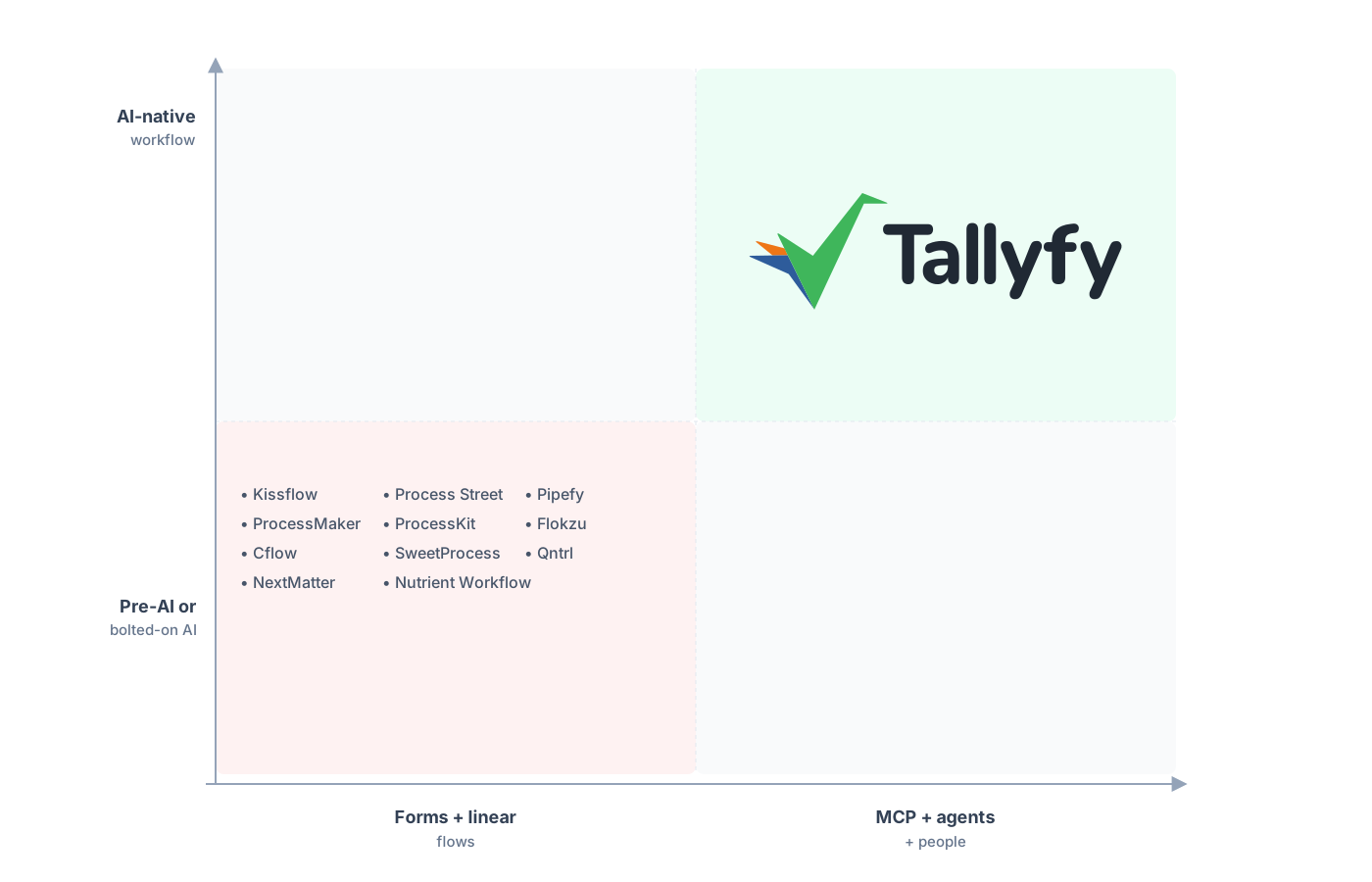
A focused workflow tool built AI-native, not a low-code platform with AI bolted on.
What teams tend to feel within a week of switching is relief at running one tool instead of maintaining a platform. The processes get easier to see, every run shows up in real-time tracking on a named step, and the time that used to go into keeping Datasets and Apps wired together goes back into the work itself.
Common questions about migrating from Kissflow
How long does a real migration from Kissflow take?
What happens to my Apps and Datasets?
Can I export everything in one step?
Does my conditional logic carry over?
How does the pricing compare?
Still in evaluation mode rather than committed? The Kissflow alternative comparison walks the switch in detail; here you get the practical how-to instead.
Book a short call when the move feels real. We’ll go through your module inventory, confirm how cleanly your Processes and Boards map, and flag which Apps and Datasets need real design work.
Book a 30-minute migration walkthrough and bring the modules your team relies on most. An honest look at your real modules beats any amount of guessing about fit.
