
Summary
- The export is the easy part, the sorting is the work - Camunda models are BPMN 2.0 XML, and you can download a diagram’s XML definition straight from the Modeler. The hard question is which of those diagrams are human workflows versus pure system orchestration.
- Human-driven BPMN maps cleanly, engine-grade BPMN does not - user tasks become steps, exclusive gateways become rules, lanes become groups. Service tasks, message correlation, and compensation logic do not, because they describe machines talking to machines.
- Tallyfy is not a BPMN execution engine, and that is on purpose - it runs a sequential, human-first model with conditional rules. If you need Zeebe-style orchestration, service-task execution, or transaction semantics, Tallyfy is the wrong tool, and this guide will say so plainly.
- Budget several weeks, and start by tagging each diagram human or system - the human ones move quickly, the system ones stay in an engine. Book a 30-minute migration walkthrough and we’ll triage your diagrams with you.
Migrating from Camunda to Tallyfy is an unusual one, because the export that breaks most migrations is the easy part here. Camunda models are BPMN 2.0 XML, and you can download a diagram’s BPMN 2.0 XML definition straight from the Modeler. The data comes out cleanly. Turns out the real work isn’t getting your processes out of Camunda, it’s deciding which of them belong in Tallyfy at all.
That’s the question this guide is built around: which of your BPMN diagrams are human workflows, and which are system orchestration? The first kind maps to Tallyfy well. The second kind is exactly what Tallyfy is deliberately not built to run, and being honest about that line is the difference between a smooth move and a painful one. It’s a sharper version of the call you face in most choosing workflow software decisions.
Why teams move off Camunda
Camunda deserves a fair hearing first, because it’s excellent at what it’s for. As a developer-grade BPMN and DMN engine, it executes complex, high-throughput orchestration with a rigor that few tools match. If your processes are services calling services, with message correlation and transactional guarantees, Camunda is a serious, well-built choice and you may not want to leave it.
The teams who do start looking usually aren’t its target user. They’re the business side: operations, finance, HR, the people who own approvals and onboarding and request handling. For them Camunda often feels like a tool that needs a developer in the room for every change, with BPMN notation that business users can’t safely touch.
What surprised us most about Camunda migrations is how few of the diagrams turn out to be human work. A team will have dozens of BPMN models, and when you walk through them, most are straight-through automation: a service task here, a script task there, no human ever in the loop. Only a slice involve a person reviewing, approving, or filling something in. That slice is what belongs in Tallyfy, and it’s usually smaller than the diagram count suggests.
So what’s the goal in moving?
Usually it’s to get the human workflows away from the engineering team’s backlog, so the people who run them can change them without filing a ticket.
Tallyfy is Service Management Software For Any Size Of Business
What Camunda export actually gives you
Here’s the part most migration guides would pad out, and for Camunda it’s refreshingly short. The export works. Camunda’s Web Modeler lets you download the diagram’s BPMN 2.0 or DMN 1.3-compliant XML definition from the action menu, plus PNG or SVG images for a BPMN diagram, and forms come out as their own JSON definition. Camunda 7 and Camunda 8 differ under the hood, but both speak BPMN 2.0 XML, and that XML is portable by design.
Tallyfy’s own migrator reads BPMN XML directly, so the import side has a real starting point rather than a blank page. That’s a genuine advantage over the vendors where you’re re-typing everything from a PDF.
The catch isn’t the format, it’s the content. A BPMN file faithfully captures service tasks, script tasks, message events, and gateways, and a good chunk of that describes machine behavior, not human steps. So the export gives you everything, and then the migration basically becomes an editing job: keep the user tasks and the decision points a person owns, set aside the parts that were only ever the engine’s job. The clean export is what makes that triage possible, but the triage is still the work.
How Camunda concepts map to Tallyfy
The Tallyfy team keeps an explicit BPMN-to-Tallyfy object mapping, and it’s open that the result is a deliberate simplification. BPMN can express far more than a human-workflow tool needs, so the mapping keeps what people drive and folds away what only a runtime cares about.
| BPMN element | Tallyfy concept | Notes |
|---|---|---|
| Process | Blueprint | The main container becomes one template |
| Pool | Separate blueprint | Each pool becomes its own template |
| Lane | Group or role assignment | Lanes become Tallyfy groups |
| User Task | Task step | The clean, direct mapping for human work |
| Receive Task | Approval step | Waits on an external sign-off |
| Service or Script Task | Webhook step, often out of scope | Machine work, usually left in the engine |
| Business Rule Task | Conditional step | Logic recreated as rules |
| Exclusive (XOR) gateway | IF-THEN rules | Branch on a field value |
| Parallel (AND) gateway | Parallel steps (same position) | Steps run side by side |
| Timer event | Deadline or external scheduler | Tallyfy has no native timers |
| Start / End event | Trigger / completion | How the run begins and finishes |
Take a concrete one. Picture a customer refund request modeled in Camunda: a user task where an agent reviews the claim, an exclusive gateway that routes small refunds to auto-approval and larger ones to a manager, and a service task that issues the refund through a payment API. Inside Tallyfy that human spine turns into a blueprint: a review step, then a rule that branches on the refund amount, then a step that waits for a manager’s decision when the amount crosses the threshold. The payment-API call stays where it belongs, as a webhook out at the edge or back in the engine. A refund flow that was half human judgment and half system call splits cleanly into the part Tallyfy runs and the part it doesn’t.
Now flip it. A BPMN diagram with no user tasks at all, just services and scripts firing in sequence, isn’t a migration candidate. There’s no human in it for Tallyfy to coordinate, so it should stay in the engine.
A realistic migration timeline
Plan in weeks, and make week one a triage rather than a build.
The first job is tagging. Go through your BPMN diagrams and mark each one human-driven or system orchestration. Anything dominated by service tasks, message correlation, or transaction boundaries gets set aside, it’s staying in Camunda or another engine. What’s left, the diagrams where people review, approve, and submit, is your real migration scope, and it’s usually a fraction of the total.
Week two, rebuild your two or three busiest human workflows as blueprints, using the exported BPMN as the reference. User tasks become steps, gateways become rules, lanes become group assignments. Week three, parallel-run on one team so the business owners can confirm the rebuilt version behaves. From there, switch the rebuilt workflows and work down the tagged list. Because the export is clean and the human subset is small, this phase tends to move faster than a typical platform migration once the triage is done.
The decision logic is the piece to handle with care. A messy pile of nested gateways in BPMN often hides a simpler intent, so rebuilding it as Tallyfy rules is a chance to express the branching in plain terms instead of carrying the notation across unchanged.
What Tallyfy won’t replace
Let me put the key line plainly, because nothing else in this guide matters as much: Tallyfy is not a BPMN execution engine, and it has no ambition to become one.
Tallyfy runs a sequential, human-first model with conditional rules. It does not execute the full BPMN 2.0 specification, it does not run Zeebe-style orchestration, and it has no compensation or transaction semantics. Service tasks, script tasks, message correlation across processes, and the timer-driven, machine-to-machine choreography that Camunda is genuinely good at, none of that is Tallyfy’s job. If your processes need a developer-grade engine to run reliably at scale, keep that engine. The honest recommendation is to move the human workflows to Tallyfy and leave the orchestration in Camunda, not to force one tool to be both.
That’s not a weakness to apologize for, it’s a design choice. The reason business users can build and change workflows in Tallyfy without writing Java is precisely that it doesn’t carry the full weight of an execution engine. You’re trading raw orchestration power for something the operations team can own outright.
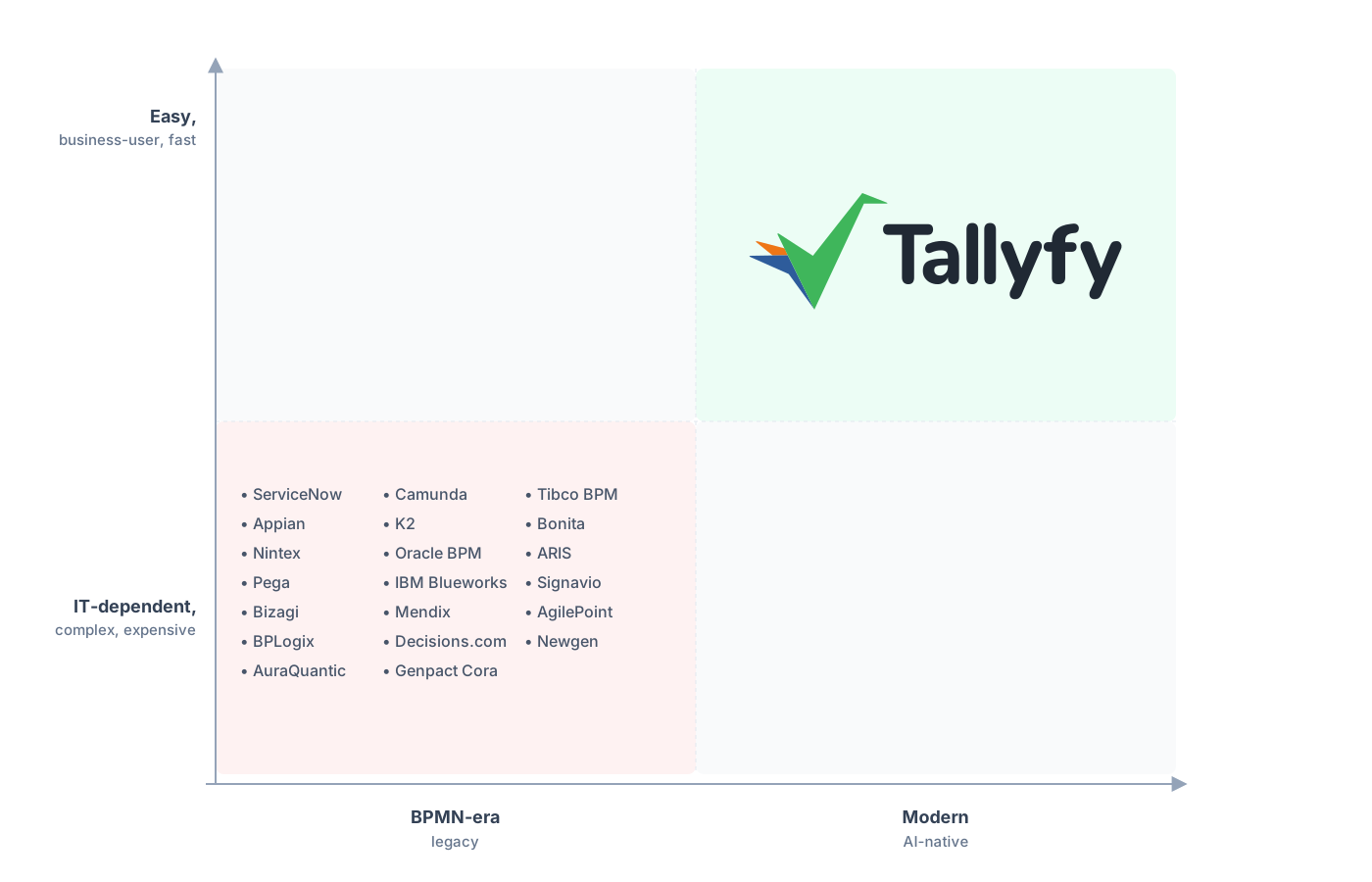
Legacy BPM treats process as a developer artifact. Tallyfy puts it in the hands of the team that runs it.
If the notation itself is what your business users keep tripping over, it’s worth reading why a checklist-and-rules model often beats a BPMN diagram for work that people, not servers, actually carry out.
Common questions about migrating from Camunda
How long does a real migration from Camunda take?
Can I export my Camunda models?
What about service tasks, timers, and DMN decision tables?
Is Tallyfy a BPMN engine?
How does the pricing compare?
Not fully decided yet? Our Camunda alternative comparison makes the full case for switching, while this guide just shows you how to run the move.
Ready to plan it? The easiest place to start is a short call. We’ll walk your diagrams together, split the human workflows from the system orchestration, and confirm which ones map cleanly onto Tallyfy.
Book a 30-minute migration walkthrough and bring the diagrams your team touches by hand. Thirty minutes with your real diagrams tells you more than any feature list.
