
Summary
- A project management tool is built for the project shape - work that is temporary, unique, and finishes once. The discipline itself defines a project as a temporary endeavor, and that definition is the root of the mismatch.
- Recurring work is the opposite shape - client onboarding, approvals, and the monthly close come back every time, same steps and a different person. A board built for one-off tasks can’t hold a process that repeats.
- The test is whether the work comes back - if it shows up once and disappears, a project tool like Asana or Trello is fine. If it recurs, you want a process engine that runs the same way every time.
- Stop shopping for features, start matching the shape - pick the tool that fits how your work actually arrives. See how workflow management works in Tallyfy
Every few months someone posts the same thing in r/projectmanagement. They sat down, actually tried a stack of project management apps, and they want to know which one won. The thread that prompted this ran through ClickUp, Freedcamp, and ActiveCollab, and the comments piled on Asana, Notion, Monday, and Trello. Hundreds of careful words. Sidebar widths, keyboard shortcuts, the price per seat.
And reading it, I get the same flat feeling every time. They’re all the same tool wearing a different coat.
Here’s the part nobody in the thread says out loud. The reason none of them ever quite fits isn’t the feature list, and it isn’t that you picked wrong. It’s that every one of these tools is built for one shape of work, and most of what actually runs a business is the other shape. Get the shape wrong and no quantity of features rescues you. This is the same idea sitting underneath a lot of workflow automation advice, just stated more bluntly.
What every PM tool is actually built for
Project management as a discipline defines a project as “a temporary and unique endeavor” with a defined beginning and an end. The whole category of tooling grew up around that definition. A launch. A website redesign. Moving the office across town. You scope it, you plan it, you assign the tasks, you ship it, and then it’s done and somebody archives the board. That arc is baked into the product: a project is a container you fill, finish, and close.
So the features all serve the same job. Gantt charts to sequence a one-time plan. Milestones to mark progress toward an end date that exists. A timeline that runs out.
That’s genuinely useful for the work it was built for.
Watch a real project move through one of these tools and the fit is obvious. Marketing decides to launch a new pricing page. Someone opens Asana, creates a project, breaks it into tasks: write the copy, design the layout, get legal to sign off, build the page, QA it, flip it live. Owners get assigned, a due date goes on the calendar, the team works the list down, and the day the page ships the project is effectively over. A month later that board is a tombstone nobody opens. The tool did its job perfectly, because the job had an end and the tool is built around ends.
The same Wikipedia entry draws the line precisely: “The temporary nature of projects stands in contrast with business as usual (or operations), which are repetitive, permanent or semi-permanent functional activities to produce products or services.” Read that twice. The people who define project management for a living tell you, in plain words, that operations are a different category of work. The tools are honest about what they are. We’re the ones who keep trying to run the other half of the business inside them.
Workflow Made Easy
One misconception we run into constantly is that a more powerful project tool will eventually absorb the recurring stuff too. More automations, more views, more integrations, and surely it’ll cover everything. It never does, because the gap isn’t capability. It’s category.
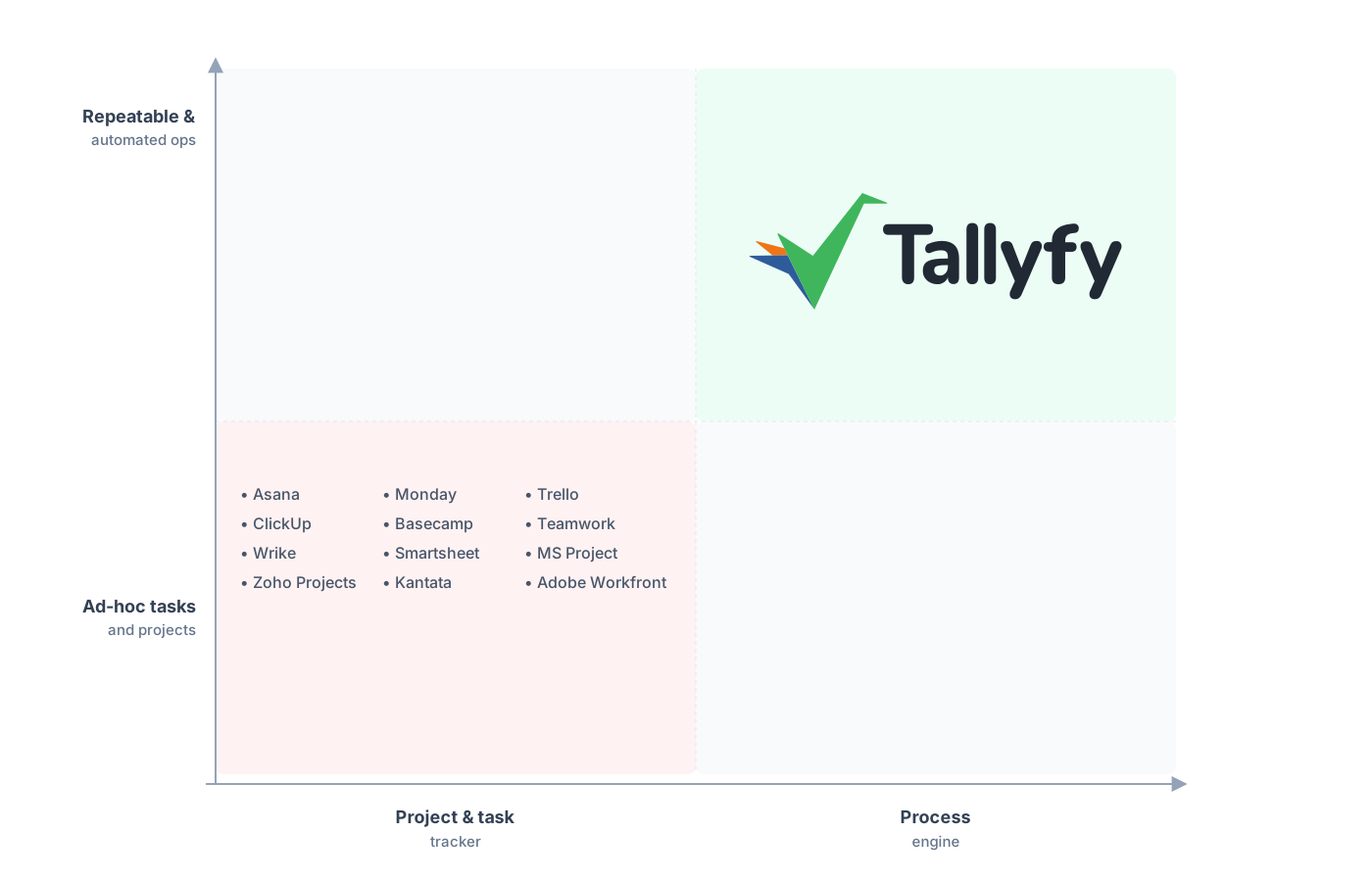
Repeatable and automated operations, not ad-hoc tasks.
Why does recurring work break them?
Because recurring work isn’t a project. It’s a process, and a process has a shape the tools can’t hold. A business process is “a collection of related, structured activities or tasks” where “a specific sequence produces a service or product” for a customer. The key word is sequence. Onboarding a client, approving an invoice, closing the books at month end: each is the same ordered set of steps, run again and again, with a different instance every time.
A project tool models that as: copy the template, spin up a new project, reassign the tasks. Which works for about three runs.
Then the cracks show. The tool treats run number forty like run number one, a blank board with no memory. It doesn’t enforce the order, so someone skips step three and nobody notices until step seven breaks. It doesn’t carry forward what you fixed last month. There’s no single place to see all forty in-flight instances at once, because each lives in its own little project island. The connective tissue that makes a process a process, the part that says this always happens this way, simply has nowhere to live.
Picture client onboarding run this way. Every new client gets a duplicated Trello board: collect documents, set up the account, schedule the kickoff, send the welcome pack. By the fortieth client you’ve got forty near-identical boards, each one slightly drifted from the last because someone tweaked a card here and renamed a column there. Which one is the current version? Nobody knows. A new hire copies whichever board they stumble onto, inherits last quarter’s mistakes, and the drift compounds. The process exists, but it lives in forty places at once, which is the same as living nowhere.
The deeper problem is what the tool optimizes for. A project board is built to drive one plan to completion and then disappear. A process is meant to never disappear. You’re asking a thing designed to end to model a thing designed to repeat forever, and the friction you feel scrolling through your hundredth duplicated project is that contradiction leaking through the interface.
The tell is whether the work comes back
So here’s the test, and it’s almost embarrassingly simple. Does the work come back? If it shows up once and then it’s gone, you want a project tool, and you should buy a good one. If it shows up every week, every new hire, every approval, you want something built to repeat. That single question sorts most of the confusion in those PM-tool threads, because the threads compare features when they should be comparing shapes.
There’s a clean second test hiding in there too. You can improve a process. You can’t really improve a one-off.
Think about why the entire field of process improvement exists. Six Sigma chases a target of fewer than “3.4 defects per million opportunities,” which is “99.99966%” of outputs coming out clean. That math only means anything when the work runs enough times that a defect rate is even a coherent idea.
Nobody runs Six Sigma on a one-time office move. There’s only one move, it happens, you learn nothing reusable, and you go home.
Recurrence is what makes work measurable, and measurability is what makes it improvable. A project gives you neither. It just ends.
Make it concrete. If your invoice approval runs two hundred times a month, you can see that step four (the manager sign-off) is where things stall, measure the average delay, change the rule, and watch the next two hundred runs get faster. That’s a real feedback loop. Try the same thing with a launch and there’s nothing to measure against, because there’s one launch and then it’s history. The recurring work is the only work where getting a little better each time actually adds up, and a project board has no slot for “a little better each time.” It only has done.
Something we figured out slowly, watching teams outgrow their tools, is that the frustration almost always traces to this exact swap. They bought a project tool, then quietly asked it to run their operations, and blamed the tool when it couldn’t. The tool wasn’t broken. It was being used to do the one thing it was never shaped for.
What recurring work actually needs
A process engine is a different animal, and once you see the difference you can’t unsee it. The steps are fixed, not redrawn each time. Every step has an owner, so a stall pings a person instead of vanishing. The whole thing recurs on its own, on a schedule or a trigger, instead of a human remembering to clone last month’s board. There’s a live status view across every running instance, so you can see all forty onboardings at a glance and spot the two that are stuck. And when you improve the template, every future run inherits the fix automatically.
That last part is the quiet superpower. In a project tool, a lesson learned on one project dies with that project. In a process, you change the master once and every future run gets smarter.
Take content approval as the before-and-after. In the project version, every article is a fresh board someone builds from memory, the review order depends on who set it up, and when a draft skips the legal check it’s discovered after publication. In the process version, the steps are locked, legal is step three for every single article, the draft literally cannot reach publish until that step closes, and if you decide next month that compliance should also see medical claims, you add one step to the master and every future article inherits it. Same work, completely different reliability. One is a pile of look-alike boards. The other is a single source of truth that runs itself.
This is also where the lines between tasks, projects, and processes finally separate cleanly. A task is a single thing to do. A project is a bundle of tasks with an end. A process is a bundle of steps with no end, run over and over. Most PM tools blur the second and third together and call it flexibility, but the blur is exactly what hurts you the moment your work starts repeating. You can also wire rules and automations into a process so the routine decisions handle themselves, which a project board has no real place to put.
So which one do you actually have?
Pull up whatever tool your team lives in right now and do a quick audit. Walk through the active boards and sort them with the one test: does this come back, or is it a one-off? The launch is a one-off. The redesign is a one-off. But the client onboarding, the content approval, the weekly report, the vendor setup, the monthly close: those all come back, and they’re probably being faked as repeating projects in a tool that wishes they’d just end.
A question we hear constantly from operations leads is some version of “we have a project tool, so why does our recurring work still feel chaotic?” The answer is that the chaos is structural. You’re storing processes in a project container, and the container can’t enforce, remember, or improve them. So every week feels like reinventing the same wheel, because in a sense you are: each run starts from a duplicated board instead of a living process.
The payoff for getting this right is bigger than tidier boards. When recurring work runs as a defined process, a new hire can execute it correctly on day one without shadowing anyone, because the steps and the order are the work itself. The drift stops. The “which version is current” question disappears. And the senior person who used to babysit every run gets their week back.
You don’t have to rip anything out to fix this. Keep the project tool for the projects, where it shines. But take your five most-repeated workflows, the ones that show up every single week, and stop pretending they’re projects. Define them once as a real process, with owners and order and a status you can watch. That’s the move. Once you split work by shape instead of by feature list, the question of which PM tool is best stops mattering, because you finally stopped asking one tool to be two things.
