
Ask how to get your MCP server listed in Google Gemini and you want one clean answer. There isn’t one. Google runs three separate surfaces for connecting outside tools, and they don’t share a submission form, a review, or even a meaning for the word “official.” One takes a self-serve custom MCP link from any user, but only on personal accounts. One is self-serve but unvetted, and it already shut down for most individual users on June 18 2026. One is real, self-serve, and quietly the most useful for business customers, but it lives inside each customer’s account instead of a public directory.
Summary
- Google has three separate doors - There’s no single official MCP listing for third-party software. Google splits it across three surfaces: the consumer Gemini app (Spark), the Gemini CLI extensions gallery, and Gemini Enterprise. None of them issues a “verified” badge for an outside connector.
- One server clears most of the bar - The reusable build is a remote HTTPS server on Streamable HTTP, OAuth 2.0 with user consent, annotated tools, and a public privacy policy. Gemini Enterprise is strict about one thing in particular: it supports Streamable HTTP and rejects the deprecated SSE transport.
- The CLI gallery already lost its consumer users - The easiest self-serve route, the CLI extensions gallery, is unvetted, and Google replaced Gemini CLI with Antigravity CLI for free, Pro, and Ultra users on June 18 2026. Gemini Code Assist Standard and Enterprise license holders kept their access, so weigh a CLI-only extension against that shrunk audience.
- Where to put your effort - Make sure your server works as a Gemini Enterprise custom MCP data store, because that’s the route a customer can switch on without a Google deal. Book a Tallyfy demo
One thing worth saying before any of the steps. Wiring Gemini to reach into your product is the easy half of the job. The half that decides whether it helps or quietly wrecks something is the process those tools sit inside, which is exactly why the workflow layer matters the moment an agent can act. That thread runs through the AI and the future of work hub if you want the longer version.
Google has no single front door for MCP
Anthropic and OpenAI each run one public pipeline: you submit, a human reviews, and accepted servers show up in a directory real people browse. Google runs nothing like that for third-party software. Instead there are three surfaces, and the gaps between them matter more than any single checklist.
Workflow Automation Software Made Easy & Simple
The first is the consumer Gemini app. At Google I/O 2026 it gained Spark, an agent that takes actions for you, and it reaches outside tools over MCP. TechCrunch’s coverage of the launch put the third-party story plainly: “Spark can be integrated into a wide range of services over MCP, and Google expects to roll out more connections in the months to come.” What it doesn’t have is a public directory for developers to submit to. The named connectors, like Canva, OpenTable, and Instacart, are negotiated deals, but since mid-2026 any user can paste a custom MCP server URL into Spark’s Connected Apps settings on a personal account. If Spark’s named-partner tier is your target, you need a Google partnerships contact, not a submit button.
That surface is a relationship for the named partners, though Spark’s Connected Apps custom MCP option needs no relationship at all.
The second is the Gemini CLI extensions gallery, a public list where anyone can publish an extension that bundles an MCP server. Self-serve, free, ranked by GitHub stars. The catch is in Google’s own words on the gallery: the extensions are “sourced from public repositories and created by third-party developers,” and “Google does not vet, endorse, or guarantee the functionality or security of these extensions.” There’s no verified tier. There’s a list.
The third is Gemini Enterprise, where an admin inside a customer’s own Google Cloud tenant can register your server as a custom MCP data store. It’s self-serve, but per customer, and it never produces a public directory entry. Three doors, three different deals.
The part that carries across every door
None of those doors opens for a server that isn’t built right, and the build is mostly identical no matter which one you walk through. So build to the strict version once.
A remote, cloud-hosted server on a public HTTPS endpoint. Streamable HTTP as the transport, because the old standalone SSE transport is deprecated and gets refused. OAuth 2.0 with a real user-consent flow. Every tool annotated with a clear title and the right read-only or destructive hint. A public privacy policy that’s actually live. A demo account a reviewer or an admin can log into and use.
There’s one positioning point that quietly helps you everywhere. Most of these programs draw a hard line against pass-through middleware, a thin relay to someone else’s API. A server that connects to your own product is a first-party connector, so you clear that gate by default. Say so in the listing.
If you want the protocol background before the build, our explainer on what MCP servers are covers the architecture. The payoff for doing it once is real: Tallyfy’s own server runs Streamable HTTP with OAuth, so the same build that satisfies Anthropic’s review also satisfies Gemini Enterprise’s transport rule with nothing rewritten.
The route that works without asking Google
If you want a self-serve path that doesn’t depend on a partnership or a gallery’s mood, Gemini Enterprise is the one. Google’s custom MCP setup docs are specific about what it takes. The connector “exclusively supports the new StreamableHTTP transport,” so SSE is out. The admin needs the Discovery Engine Editor role to create the data store. And you “register Gemini Enterprise as an OAuth client application with your identity provider,” whether that’s Okta, Azure AD, or Google.
This is the one Google route you can finish without anybody’s permission.
That OAuth registration is why a clean discovery document earns its keep. When a client points at a Streamable HTTP server, the first thing it reads is the server’s protected-resource metadata, which tells it where the authorization server lives and exactly which scopes exist. Here’s that document on a production server:
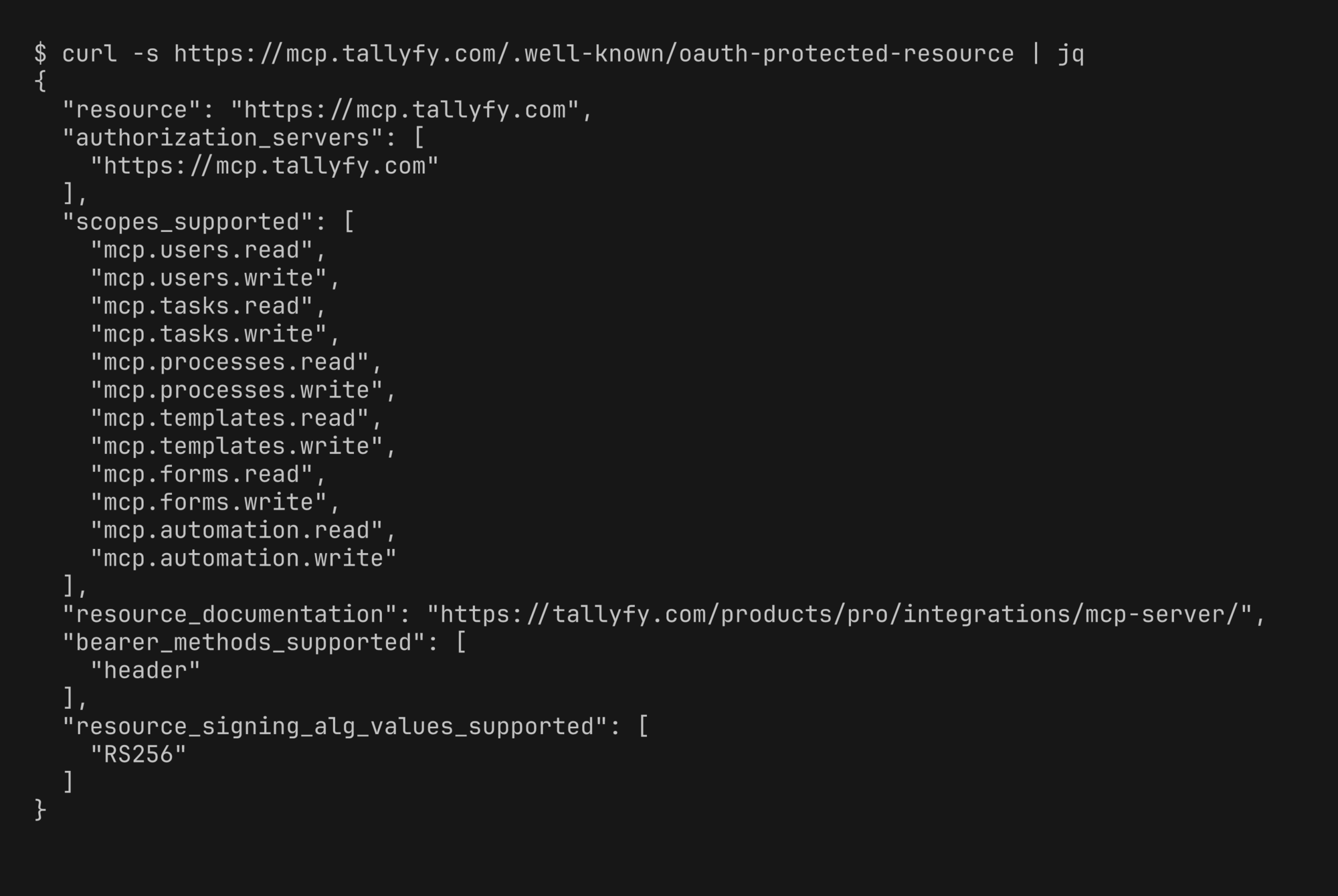
The granular read and write scopes, split per resource type, are what let an admin grant Gemini exactly what it needs and nothing more. That’s the data-minimization most programs care about, handled at the protocol level instead of in a policy doc.
The other self-serve option is the CLI extensions gallery, and here’s where I’d pump the brakes. You publish by putting your extension in a public Git repo with a gemini-extension.json manifest that declares your MCP server, then listing it in the gallery. Simple enough. But Google announced that the Gemini CLI “will stop serving requests for Google AI Pro and Ultra, as well as those using it free of charge” on June 18 2026, and that cutoff has already passed, with the tool now replaced by Antigravity CLI for those users. Organizations on a Gemini Code Assist Standard or Enterprise license keep their access. So a gallery extension aimed at free users is now built on a surface that’s already closed for them.
An unvetted listing on a tool that already lost most of its individual audience is the weakest “official” in this whole set.
So which Google door should you actually use?
Match the door to who you’re trying to reach, and ignore the rest. For enterprise customers, make your server work as a Gemini Enterprise custom MCP data store and write the setup steps down, because that’s the one a customer can switch on themselves with no Google deal in the room. For the consumer Gemini app and Spark, the named partner connectors still need a business-development conversation with Google, though Spark’s Connected Apps setting now lets any personal account paste a custom MCP server URL with no partnership needed. For the CLI gallery, weigh it against its smaller post-Antigravity audience before you spend real hours on it.
The frustrating truth about Google is that “official” buys you the least here of anywhere. There’s no badge to earn and no review to pass, which sounds easy until you realize it also means no public credential to point at. What you can actually control is being ready the moment a customer or a Google partner team comes asking. If you want to see how tools get scoped to a defined process before any of that, the walkthrough of Tallyfy’s MCP server shows the shape, and Tallyfy’s AI guardrails cover how an agent stays inside the process once it’s connected. If Claude, ChatGPT, or Copilot are also on your map, getting into Claude’s Connectors Directory, submitting an app to ChatGPT, and wrapping it for Microsoft Copilot reuse the same server against clearer, stricter reviews.
Common questions about listing an MCP server in Gemini
Can I list my MCP server in the consumer Gemini app today?
Is the Gemini CLI extensions gallery vetted?
Does Gemini Enterprise support the SSE transport?
What happens to Gemini CLI extensions after June 18 2026?
So the real first move for Google isn’t chasing a listing. It’s making your server a clean Gemini Enterprise custom data store and documenting the setup, so any customer can connect it the day they ask. Do that, keep the consumer and gallery routes in their right boxes, and you’ve spent your effort on the one Google door that opens on its own.
