
To put your MCP server in front of ChatGPT users, you build an app on OpenAI’s Apps SDK, submit it from the Platform Dashboard, and once it passes review it shows up in the in-ChatGPT app directory. The Apps SDK runs on MCP, so the server you already have is most of the build. The part people trip on isn’t the code. It’s a verification step and a short list of review rules that bounce apps before a human even tries them.
Summary
- What getting into ChatGPT means - You build an app on the Apps SDK (which runs on MCP), submit it from the OpenAI Platform Dashboard, and once it passes review it’s published in the in-ChatGPT app directory where users find it. Self-serve, review-gated.
- The gate before the gate - Organization verification is mandatory before you can submit at all. You confirm identity for the name you’ll publish under, and only one app version per org can be in review at a time.
- What the reviewers check - Verb-style unique tool names, correct annotations with a written justification for each, a fully-featured demo login with sample data, and an app that’s first-party rather than a pass-through relay. You also can’t sell subscriptions inside the app.
- Where to start - Verify your org in the dashboard now, because that alone can block a launch date. Book a Tallyfy walkthrough
ChatGPT can call your tools, sure. But tools without a process behind them are just a faster way to do the wrong thing, which is exactly why the workflow layer matters once an agent is loose in your account. More on that thread runs through the AI and the future of work hub.
Workflow Automation Software Made Easy & Simple
Here’s the path, in order, with the traps marked.
What an app in ChatGPT really is
An “app” in ChatGPT is an MCP server, dressed up for a consumer surface. OpenAI’s own docs are blunt about the foundation: “With Apps SDK, MCP is the backbone that keeps server, model, and UI in sync,” and “an MCP server exposes tools that a model can call during a conversation.” If you’ve read how MCP works under the hood, none of that is new. The Apps SDK adds a submission and review layer on top, plus an optional iframe UI rendered inside the chat.
The payoff is reach. A published app sits in the in-ChatGPT directory, discoverable by a very large audience, and approval auto-generates a Codex plugin too. That’s the largest consumer distribution any MCP surface offers right now.
Reach like that is the whole reason to bother with the review.
It’s also a real review, not a rubber stamp. OpenAI runs an actual submit-and-review pipeline: submit, get reviewed, get published or sent back with notes. So the question isn’t whether your server works. It’s whether it clears their rules.
Verify your org before anything else
This is the step most people forget until it stops them cold. Before you can submit anything, OpenAI requires identity verification. In their words: “Before submitting an app, complete identity verification in the OpenAI Platform Dashboard for the name you plan to publish under in the directory.” Individual or business, depending on who’s publishing.
It gets stricter. You submit from the Platform Dashboard, and you need the api.apps.write permission to create and submit a draft. Organization owners have it automatically and can grant it to others. And there’s a throughput limit worth planning around: “only one version of each app may be published at a time and only one version of each app may be in review at a time.” So you can’t queue five variants and see which sticks. One shot in the pipe.

We run a production MCP server, and org verification is the step teams underestimate every time. It’s paperwork, not engineering, so it slides to the bottom of the list and then it’s the thing standing between you and a launch. Do it first. Treat it as the actual start of the project.
Where OpenAI reviewers actually look
The detail lives in OpenAI’s app submission guidelines, and it’s specific enough to be useful. Tool names should be verb-style and plain: “use plain language that directly reflects the action, ideally as a verb.” Tool descriptions cannot sell themselves. OpenAI says to “avoid misleading, overly promotional, or comparative language,” and names the exact words it doesn’t want, like best, official, and pick_me. Your descriptions describe behavior. They don’t lobby the model.
Annotations carry an extra requirement here that Anthropic doesn’t ask for. OpenAI notes that “incorrect or missing action labels are a common cause of rejection,” and tells you to set readOnlyHint, openWorldHint, and destructiveHint correctly and “provide a detailed justification for each at submission time.” So it’s not enough to label a tool destructive. You write a sentence explaining why.
Then there’s the demo account, which is non-negotiable: “you must provide a login and password for a fully-featured demo account that includes sample data.” Apps that force a reviewer to create a new account, or that hide behind 2FA a reviewer can’t pass, get rejected on the spot. The auth itself runs on standard OAuth discovery. Here’s the metadata document a client reads off a production server, showing PKCE and dynamic client registration:
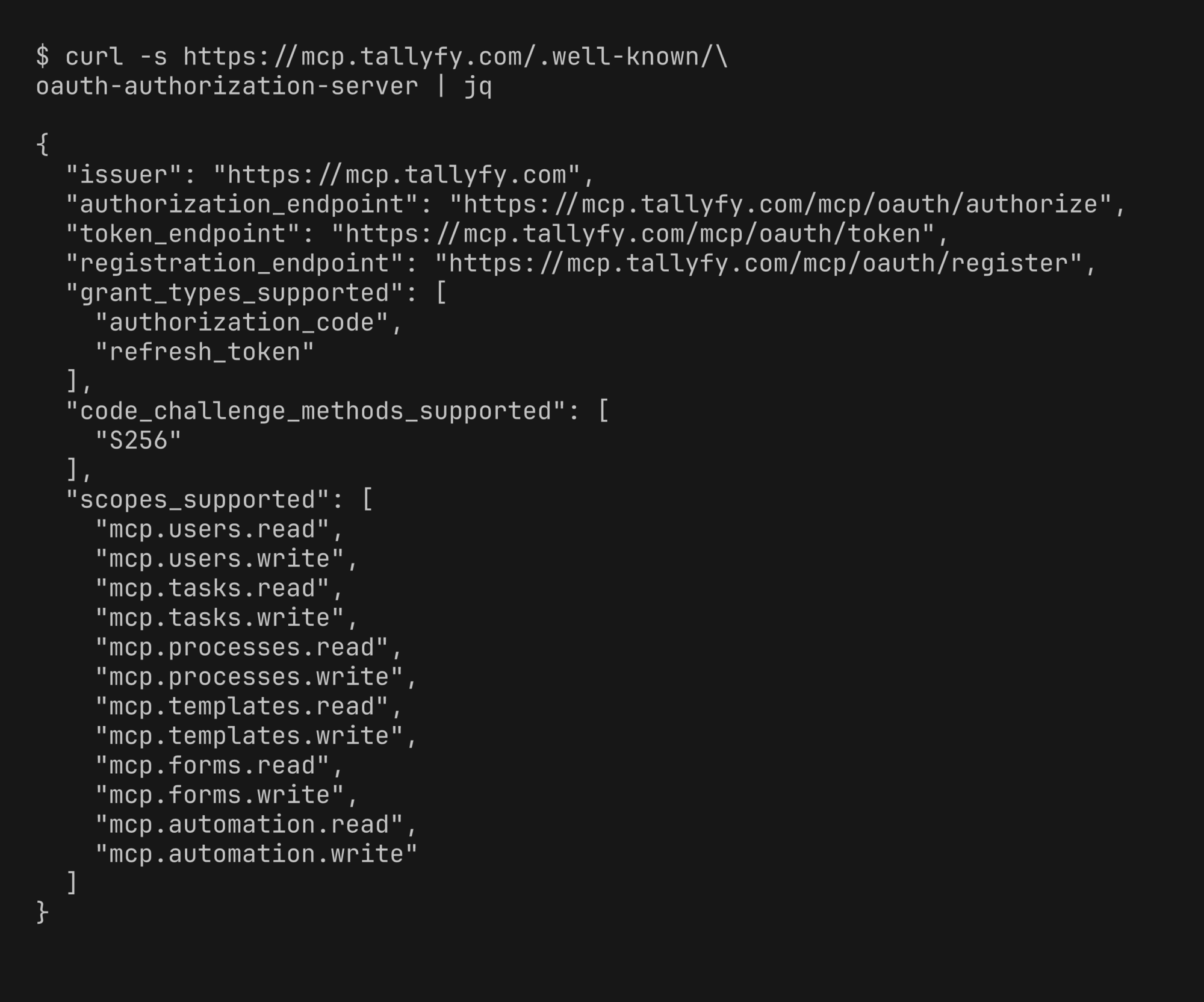
That registration_endpoint and the S256 challenge method are what let a reviewer’s client register itself and complete consent without anyone hand-wiring credentials. Get the discovery document right and the auth review takes care of itself.
What gets your app rejected?
One rule rejects more SaaS connectors than any other, so internalize it. OpenAI states: “we cannot approve apps that primarily function as unofficial connectors to third-party services, including pass-through middleware layers.” If your app is just a thin relay to someone else’s API, it’s out. The safe position is first-party: your app connects to your own product and delivers native value, and you say so plainly in the listing.
First-party is the safe lane here.
Commerce is the other quiet killer. You can’t sell digital goods inside the app. OpenAI says selling digital products or services “is not allowed, whether offered directly or indirectly (for example, through freemium upsells).” Route every upgrade to checkout on your own domain. No in-app subscription sale, no embedded third-party checkout.
After that, it’s the basics done right: a complete app rather than a demo, accurate names and screenshots, minimal data collection, and a real support contact. You’re notified by email, with a Case ID for follow-ups. Want the deeper version of how an agent actually calls your tools once it’s connected? Our piece on how agents talk to your tools over MCP covers it, and Tallyfy AI shows how those calls stay inside a defined process. If Anthropic is also on your list, the same package gets you into Claude’s Connectors Directory with a few different checks.
Common questions about submitting an app to ChatGPT
Is submitting an app to ChatGPT free?
Do I need to verify my organization first?
Can I have several app versions in review at once?
Why do pass-through connectors get rejected?
So the real first move isn’t writing tools. It’s verifying your org and standing up a demo login a stranger can use, today. Clear those two, keep your tool descriptions plain and your app first-party, and you’ve handled the parts that sink most submissions.
