
Summary
- This isn’t a data migration, it’s a re-think - a Zap is app-to-app plumbing, and Zapier is good at that. The move is narrow: the multi-step Zaps that quietly turned into human workflows, with approvals and hand-offs Zapier was never built to track.
- There’s no portable Zap to export - you can duplicate a Zap or share a setup link, but both stay inside Zapier. There’s no export-to-file, so you rebuild the human workflows by reading them, not by converting them.
- Tallyfy replaces the people layer, not the connector layer - keep your real app-to-app Zaps, or hand them to AI talking to apps directly. Move the approvals, reviews, and hand-offs into a tool that actually tracks who’s doing what.
- Audit first, rebuild the human Zaps, leave the plumbing - find the Zaps with a person waiting inside them and rebuild those. Book a 30-minute migration walkthrough and we’ll help you tell them apart.
Moving off Zapier as your workflow tool isn’t a normal migration, because there’s almost nothing structural to migrate. A Zap is a chain of app-to-app actions, plumbing that fires in the background. Zapier, the connector-era middleware that AI and MCP increasingly handle directly, is genuinely good at that plumbing, and this guide isn’t an argument to rip it out. The reframe is narrower than that. Somewhere along the way, some of your Zaps stopped being plumbing and turned into workflows. They grew a manual step, then an approval, then a “wait until someone does X.” Those are the ones to move, because a Zap was never built to track a person.
That distinction is the whole job, and it’s worth being honest about up front: Zapier didn’t fail you here, it just got used for something it isn’t. A connector fires and forgets. A workflow waits on people, shows who’s stuck, and remembers what’s been done. When you ask a tool built for the first to do the second, you end up bolting spreadsheets and Slack threads onto it to see what’s happening. Sorting the real automations from the disguised workflows is the same clear-eyed call you make in any weighing workflow software decision.
Workflow Automation Software Made Easy & Simple
Why Zapier quietly became your workflow tool
Nobody sets out to run their approvals through an integration platform. It happens by drift. You build a Zap to move a form submission into a spreadsheet, and it works. Then you add a step to notify a manager. Next comes a delay, so it waits a day. After that, a path, so urgent ones go somewhere else. Six months later that “Zap” is a messy multi-person process held together by a tool that can’t show you a single one of those people.
Something that surprised us watching teams move off middleware is how few of their Zaps are really integrations. A lot of them are workflows in disguise: a person has to look at something, decide, and hand it on, and the Zap is just the wiring between the apps around that person. A fair amount of what gets automated this way, like invoice handling, is a human workflow wearing an automation costume.
The pain shows up in predictable places. A Zap breaks silently and nobody notices until a lead goes cold. The per-task pricing climbs as the chains get longer. And when someone asks “where’s that approval?”, the only answer is to dig through run logs, because the people aren’t tracked anywhere.
So what’s the actual goal here?
To pull the human workflows out of the plumbing, so the people in them are visible, accountable, and able to see their own work, while the genuine data moves keep running untouched.
What you can actually export from Zapier
This is where moving off Zapier differs from every other migration: there’s almost nothing to export, and that’s not the obstacle it sounds like.
Zapier doesn’t hand you a portable copy of a Zap. You can duplicate a Zap or share it as a setup link, but both stay inside the platform, a copy for you or a template someone else rebuilds with their own apps. There’s no export-to-file. Teams have asked Zapier for years to export a Zap as an editable file they could move or version externally, and the answer has held steady: it’s a standing feature request, not a feature. A Zap lives in Zapier, full stop.
That sounds like a wall, but it actually makes the move a bit simpler. Since there’s no file to convert, you’re not wrestling with a half-broken import or a mapping that almost works. You open the Zap, read what it does, and pick out the human parts.
Which steps are a person deciding something? Where does it wait on someone? That reading takes minutes per Zap, and it’s the same reading you’d need to do anyway to rebuild the workflow well. The absence of an export turns out to be permission to start clean.
Which Zaps actually belong in Tallyfy
Not all of them, and being clear about which is the difference between a smart move and an overreach.

| Zapier element | Where it belongs | Why |
|---|---|---|
| Single trigger to action | Stays in Zapier | Pure data move, no person |
| Multi-step Zap with a person | Tallyfy Blueprint | The workflow is the people part |
| ”Wait for approval” / path | Approval step | A decision that needs tracking |
| Manual / hand-off step | Tallyfy Step | Someone has to do something |
| Zap trigger fields | Kick-off form | How the process starts |
| Webhook to another app | Stays in Zapier | Connector work, keep it |
Picture a content-publishing Zap: a new draft fires a Zap that posts to a Slack channel, adds a card to a board, and emails the editor. It looks automated, but the real work, the editor reading the draft, asking for changes, approving it, and scheduling the release, happens nowhere the Zap can see. People chase it in Slack threads and follow-up pings. Move it into Tallyfy and it becomes a blueprint: a draft kicks off a process, a review step lands with the editor, an approval step gates publishing, and a live view shows who’s holding it up. The Slack-notification Zap can stay exactly as it is. It’s the human review that belongs in a workflow tool.
The opposite case is just as clear. A Zap that copies new Stripe customers into your accounting tool and does nothing else has no person in it. There’s nothing to track, no decision, no hand-off. That one stays in Zapier, or moves to whatever connector layer you settle on. Leave the plumbing alone and move the parts where people live.
A realistic way to make the move
Think in weeks, and spend the first one auditing rather than building.
Week one is the audit, and it’s the part that pays off most. Go through your Zaps and tag each one: pure data move, or human workflow in disguise. The tell is simple. Does a person have to look at something, decide, or wait? If yes, it’s a workflow. If it just shovels data from app A to app B, it’s plumbing.
The clearest giveaways are a Delay step that holds the chain for a day, a Filter that only moves on after someone replies, or a manual webhook a person fires by clicking a button. Each of those is a spot where the process is really waiting on a human, not on data. The workflows are your scope; the plumbing stays.
Weeks two and three, rebuild the workflows. Take the disguised Zaps one at a time and build each as a Tallyfy process: the kick-off form, the human steps, the approvals, the routing. You’re not importing anything, you’re recreating the people-part from what you read in the Zap, which is faster than it sounds because the logic was always simple, just trapped in the wrong tool.
Then leave the plumbing be. The genuine app-to-app Zaps keep running, and over time you can move those to AI-native integration as it matures. There’s no flag-day cutover, because the two halves never overlapped. You’re not switching off Zapier. You’re taking the people out of it.
What Tallyfy won’t replace
Here’s the honest boundary, because it’s easy to read this the wrong way: Tallyfy is not an integration platform, and it won’t replace your connector layer.
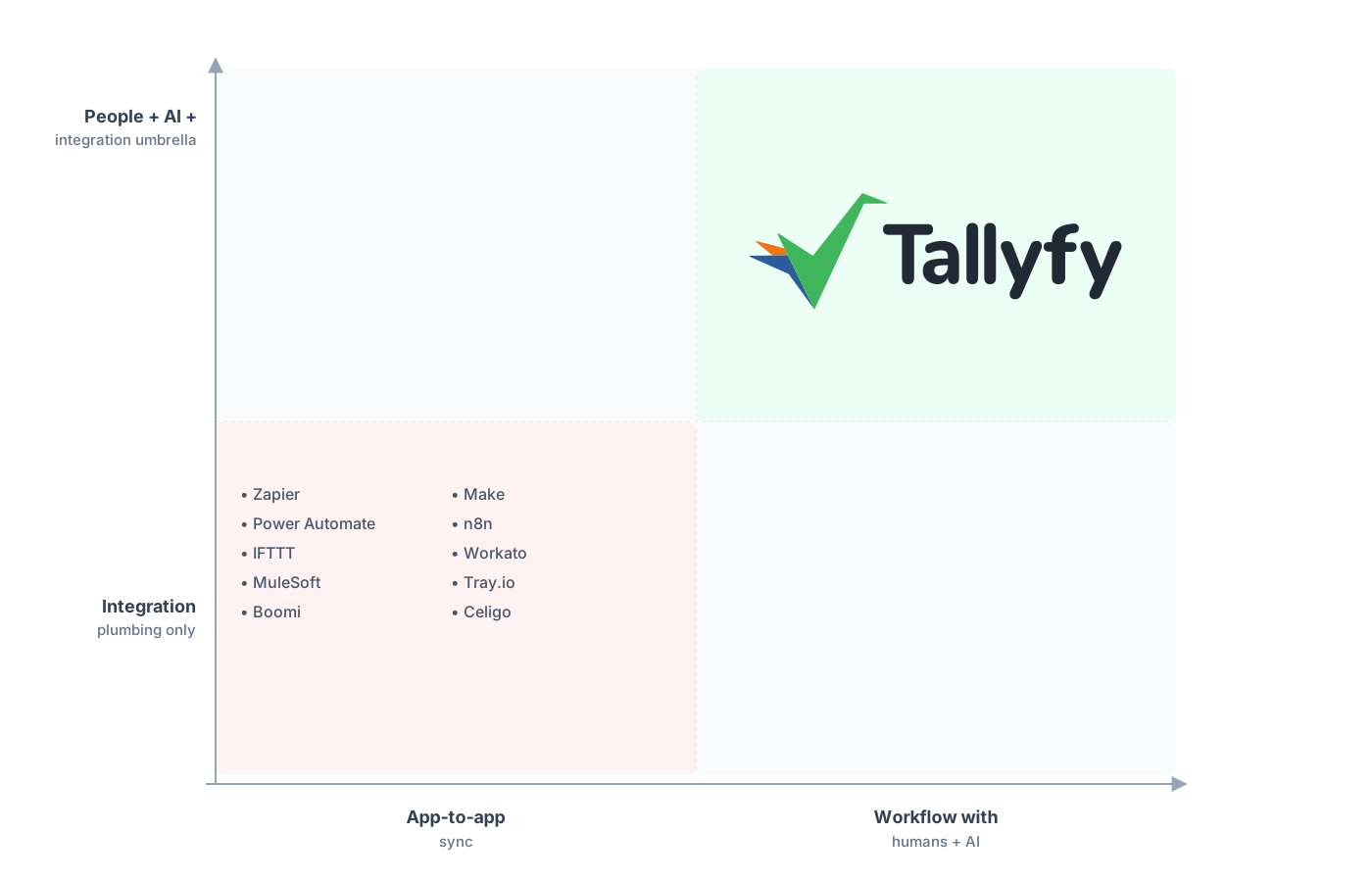
Middleware moves data between apps. Tallyfy runs the human work that data is supposed to serve.
Tallyfy doesn’t move data between thousands of apps in the background. It has no connector marketplace, no per-trigger wiring between your CRM and your email tool, none of the substrate Zapier is built around. You still need a connector layer for genuine app-to-app moves, and increasingly that layer is AI writing the integration on demand instead of a per-task middleware bill, the shift we got into in vibe coding your integrations. If that’s what you need, keep Zapier or move to something AI-native, but don’t expect Tallyfy to be it.
What Tallyfy replaces is the other thing, the human-workflow layer that crept into your Zaps and never belonged there. Forms, approvals, sequential steps, and a status view a business user can read, all the parts a connector can fire toward but never run. So the picture is two layers, not one tool beating another. Connectors move the data; Tallyfy runs the people. Trying to make middleware do the people part is how you ended up with workflows you can’t see, which is the reason you’re reading this.
Common questions about moving off Zapier
Should I cancel Zapier and move everything to Tallyfy?
Can I export my Zaps into Tallyfy?
Which Zaps should actually move to Tallyfy?
Won't AI make this whole question moot?
How does the pricing compare?
Not sure yet whether to make the switch? The alternatives overview lays out where Tallyfy fits against the tools teams put it next to. Where that page weighs the decision, this one is the how: lifting the human work off the middleware once you’ve made the call.
When you’re ready to start, the fastest way in is a short audit call where we go through your Zaps together, separate the real integrations from the disguised workflows, and confirm which ones rebuild cleanly in Tallyfy.
Book a 30-minute migration walkthrough and bring the Zaps that have a person stuck inside them. Those are the ones worth moving.
