
Summary
- Leaving Wrike is an inventory job before it’s an export job - the hard part is walking your custom item types, request forms, and deep folder trees and deciding which projects are actually repeatable processes. That sorting decision drives the whole move.
- Wrike’s export is built in, and it’s lossy in predictable ways - you can export any folder, project, or space to Excel, but Wrike states plainly that attachments and comments aren’t included. The full structured path is Wrike’s REST API.
- The mapping holds up once you accept the flatten - a Project turns into a Tallyfy blueprint, a Request Form becomes a kick-off form, each Custom Item Type becomes its own tagged blueprint, and Milestones become real approval steps.
- Count on weeks, not a weekend - export, inventory your item types and forms, rebuild your top three processes, parallel-run, then switch. Book a 30-minute migration walkthrough and we’ll give you the unvarnished take on whether it fits.
If you’re looking at the door on Wrike, you’ve probably reached the point where the tool does more than your team needs, and the configuration it takes to keep it useful has started to cost more than it returns. The export itself is trivial. The work is deciding what’s worth bringing.
The honest summary belongs at the top. Migrating from Wrike to Tallyfy is basically an inventory problem. Wrike lets you build deep structures, Spaces holding folders holding projects holding tasks, plus business-specific custom item types and request forms layered on top. You have to walk that structure and separate the projects that are genuine repeatable processes, the work that comes back the same way every cycle, from the one-off projects that were never templates. That single decision is the migration. It’s the same sorting question underneath most workflow platforms you might pick, and it’s closely related to why the speed of first real use predicts whether a new tool ever sticks.
Why teams move off Wrike
Wrike is a capable enterprise tool, and there’s no point pretending otherwise, because a guide that frames the tool you’re leaving as broken does nobody any favors. Wrike does serious project management: resource planning, Gantt scheduling, request intake, custom workflows by department. For a large org coordinating many projects at once, that depth pays off.
The friction lands in one place. It’s when the depth outgrows the need.
The two reasons teams start looking both trace back to weight. The first is the painful configuration tax. Custom item types, custom statuses per workflow, request forms, and folder hierarchies all need setting up and maintaining, and a small team running five recurring processes ends up administering a platform built for fifty.
The second is that flexibility drifts. When every department shapes its own Spaces and item types, the same process exists in three slightly different forms, and nobody can point to the current one. Turns out that for work that’s supposed to be identical every time, that drift is the actual problem, and another configuration option won’t fix it.
What Wrike’s export actually gives you
Start with what the export actually contains, because that frames everything else. Wrike lets you export a folder, project, or space to Excel from the three-dot menu, choosing projects and folders with filtered tasks or all tasks. The file carries task statuses, dependencies, assignees, start and due dates, duration, and time-log entries. So a project comes out as a usable spreadsheet of its tasks.
Now read the limits, because they shape what you can realistically move. Wrike’s own help is direct: attachments and comments aren’t exported to Excel, and the export caps at 65,000 rows and 256 columns. You keep the field values and the task list. You don’t keep the conversation or the files in that one spreadsheet.
If you’d rather a complete, structured pull instead of a per-folder spreadsheet, the path is Wrike’s REST API, which is organized the RESTful way with GET, POST, PUT, and DELETE on tasks, folders, projects, and more. Most migrations never script against it at all. You export the projects you care about, keep the old Wrike account read-only as your archive, and rebuild the processes fresh.
Enterprise Workflow Made Easy
How Wrike concepts map to Tallyfy
Here’s the step people expect to be the hard one, and it’s more orderly than Wrike’s nesting makes it look, because the Tallyfy team maintains an explicit object mapping. Every Wrike concept has a home.
| In Wrike | In Tallyfy | What actually changes |
|---|---|---|
| Account | Organization | Direct match |
| Space | Blueprint category | Becomes organizing metadata |
| Folder | Blueprint category | Deep folders fold into categories |
| Project | Blueprint | Your reusable process definition |
| Task | Step | The unit of work |
| Subtask | Sub-step / checklist | Nested item under a step |
| Milestone | Approval step | Becomes an explicit sign-off |
| Request Form | Kick-off form | Intake fields move to the start |
| Custom Item Type (Bug, Campaign) | Tagged blueprint | Each type becomes its own template |
| Custom Status | Step status | Original kept as metadata |
| Formula field | Read-only value | The calculation is documented, not run |
| Automation | Rule (IF-THEN) | Rebuilt by hand, not imported |
The biggest mental shift is the hierarchy. Wrike’s strength is structure: Space into folder into project into task into subtask, plus custom item types branching off. Tallyfy is flatter: Organization, category, blueprint, step. So the deep nesting flattens. Those Spaces and folders collapse into categories and tags, and the project you cared about becomes a single blueprint. You shed some of the filing-cabinet shape, but for a repeatable process that shape was mostly a place for versions to drift apart.

The Wrike-specific pieces are the request forms and the custom item types, and both land well. A request form becomes a kick-off form at the front of the process, so intake stops being a separate object and becomes step one of the run. Each custom item type, the Bug, the Campaign, the Candidate, becomes its own tagged blueprint instead of a configured variant inside one tool.
Run a marketing campaign through it as the example. In Wrike, a new campaign probably starts as a “Campaign” custom item type sitting in a Marketing Space, kicked off by a request form, with custom statuses running from Brief to In Design to In Review to Live, and tasks hanging under it for each deliverable.
Migrate it and that whole arrangement becomes one campaign blueprint. That request form turns into the kick-off form that captures the brief. Custom statuses stop being labels and become the step a run is sitting on. The sign-off before launch becomes a real sign-off step that blocks until someone approves, instead of a status someone forgets to change. Same campaign, none of the configuration overhead.
A realistic migration timeline
Treat any one-weekend migration promise as a sales line. A genuine move for a team with a handful of active processes runs five to six weeks, and most of that time is judgment, not typing.
Week one means export and audit, and for Wrike that audit carries two extra questions: how many custom item types do we actually run, and which request forms feed real recurring work? Pull your projects out and sort them with one test: does this work come back, or did it happen once? Inventory your item types at the same time, because each one you keep becomes its own blueprint, so this is the moment to drop the types nobody really uses.
In week two, rebuild your top three processes as blueprints. Just three to start. Not thirty. Choose the ones that sting most when they break, and define them properly, with owners, order, and the sign-offs that matter. The third week is a parallel run: have one or two teams run the new Tallyfy process alongside the old Wrike project, so you catch the gaps while the safety net is still up.
Week four hands the power users over fully and sets the Wrike version read-only. Across weeks five and six, the rest of the teams move and Wrike winds down to an archive.
Why stretch it out?
Because the point isn’t to recreate Wrike in a new tool. It’s to turn the configured, drifted versions of your processes into clean, flat ones on the way through, and that’s worth doing slowly.
What breaks, and what Tallyfy won’t replace
Be specific about the failure points, because every migration meets a few. The deep folder and Space hierarchy doesn’t survive intact; you flatten it with categories and tags and accept that some filing structure goes away. Each custom item type needs its own blueprint, which is more setup than a single import. Formula fields go static, with the calculation written into the step instructions rather than computed. And Gantt positions and detailed time logs don’t migrate, because they live in views Tallyfy doesn’t have.
And now the bit most guides gloss over, the trade-offs. There are things Wrike does that Tallyfy does not.
Wrike is a project-management platform, and Tallyfy is a workflow engine. Wrike’s resource management, workload and capacity views, billable-hours and budget tracking, and full Gantt scheduling have no equivalent in a tool built to run one process well, and the object mapping lists those under what cannot migrate. One thing that surprises teams moving off Wrike is how little of that they were really using: the resource dashboards looked reassuring and got opened once a quarter. But if your team genuinely plans capacity and tracks billable hours inside Wrike every day, keep a tool for that and move only the repeatable processes across. Plenty of teams run both, a planning tool for the project financials and Tallyfy for the processes that have to run the same way every time.
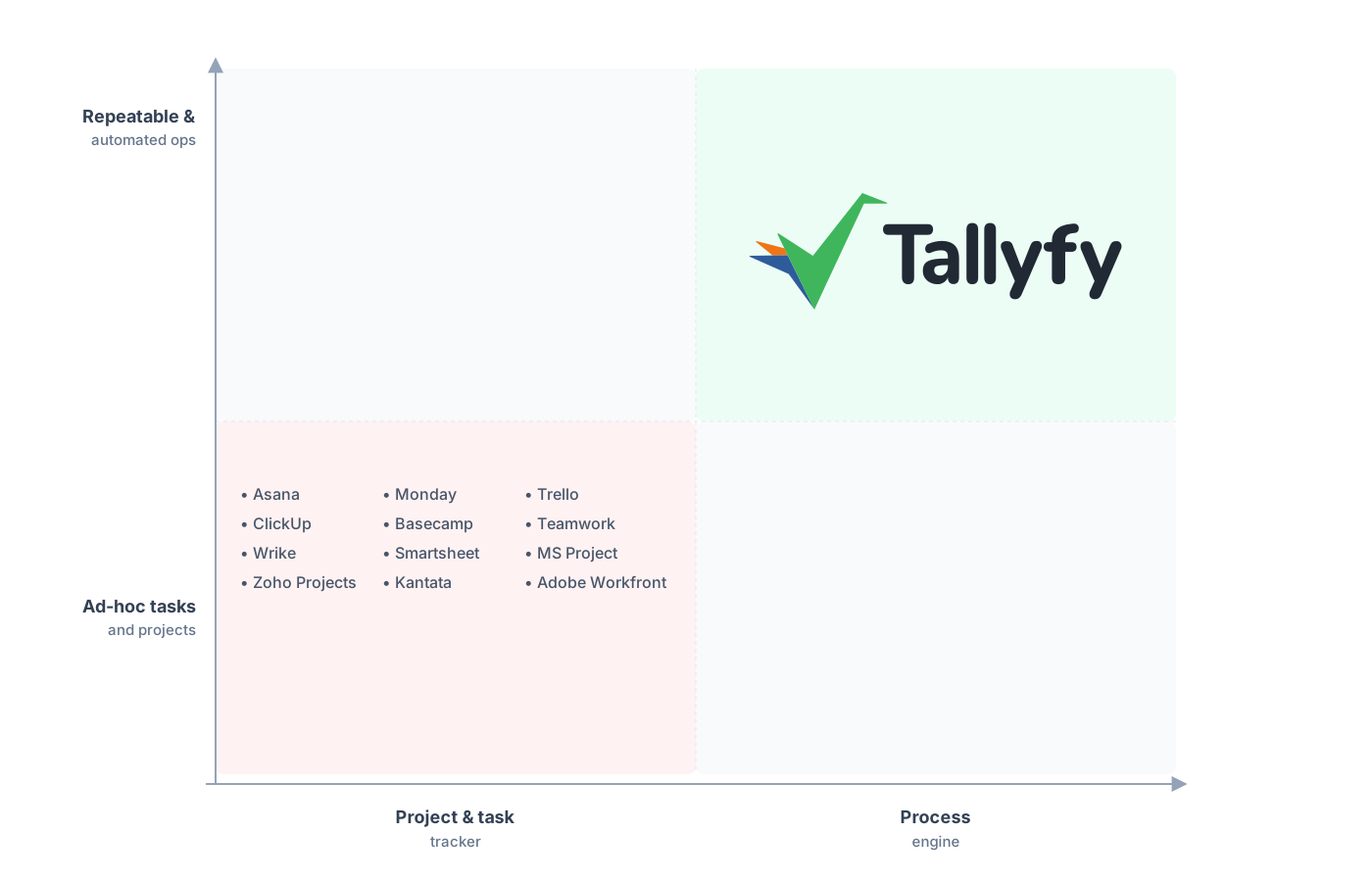
Repeatable and automated operations, not an enterprise project platform.
Visibility is the thing teams assume they’ll sacrifice, and it’s the opposite. In Wrike, a process spread across projects with custom statuses takes interpreting before you can say where anything stands. In Tallyfy, those same runs land in one live process view, each on a named step, so a glance tells you which two are stuck and where. That flattening you dreaded is exactly what makes the work easier to see, and rebuilding automations as Tallyfy’s conditional logic is usually quick once the process itself is clear.
Common questions about migrating from Wrike
How long does a real migration from Wrike take?
Can I export my Wrike comments and attachments?
What happens to my custom item types and request forms?
Do my Wrike automations and formulas come across?
How does the pricing compare?
If you’re still deciding rather than ready to move, our Wrike alternative comparison is the one that sizes up the heavy platform against the lean one. This guide handles the mechanics of actually moving.
When you’re ready to map out the move, grab a short call. We go through your Wrike setup and say plainly which projects and item types are worth bringing and which should stay where they are.
Book a 30-minute migration walkthrough and bring your two or three busiest Wrike Spaces. That conversation is the quickest read on fit you’ll get.
