
Summary
- This is a rebuild, not a data move - a Make scenario is app-to-app plumbing, and Make runs that plumbing well. The move is narrow: the scenarios that quietly became human workflows, with approvals and hand-offs Make was never built to track.
- Make exports a Blueprint, but it lands nowhere useful - you can export a scenario as a JSON Blueprint, yet that file is a Make-internal definition. It pastes back into Make, not into Tallyfy, so you rebuild the human parts by reading them.
- Tallyfy runs the people layer, not the connector layer - keep your real app-to-app scenarios, or hand them to AI talking to apps directly. Move the approvals, reviews, and waiting into a tool that tracks who owes what.
- Audit your scenarios, rebuild the human ones, leave the plumbing - find the scenarios with a person stuck inside and rebuild only those. Book a 30-minute migration walkthrough and we’ll help you split them.
Leaving Make as your workflow tool barely counts as a migration, because most of what you’d move isn’t a workflow at all. A Make scenario is a chain of modules that shuttle data between apps in the background. Make, the kind of point-to-point integration plumbing that AI agents increasingly handle on their own, is genuinely good at that shuttling, and none of this is an argument to switch it off. The reframe is smaller than that. A handful of your scenarios stopped being plumbing somewhere along the way and turned into workflows. They sprouted a manual step, then an approval, then a router that waits until a person decides. Those are the ones to move, because a scenario can’t track a person.
That sorting is the entire task. Make didn’t let you down, it just got handed work it isn’t shaped for. A module fires and moves on. A workflow, by contrast, waits on people, surfaces who’s stuck, and remembers what’s already done. Telling the two apart is the same clear-eyed call you make in any vetting workflow software decision, and it’s most of the value here.
Why Make quietly became your workflow tool
Nobody decides to run approvals through an integration platform on purpose. It creeps in. You build a scenario to push a form submission into a spreadsheet, and it works. Then you bolt on a module to ping a manager. Next a filter, so only the big ones go through. After that a router, so urgent cases branch off. A few months later that “scenario” is a messy multi-person process held together by a tool that can’t show you one of those people.
Workflow Automation Software Made Easy & Simple
A pattern we keep seeing with teams on Make is how little of their scenario library is really integration. Plenty of it is workflow wearing a costume: someone has to look, judge, and pass it on, and the scenario is just the wiring around that person. Much of what gets automated this way, with invoice handling the obvious example, is human work dressed up as a data pipe.
The pain lands in predictable spots. A scenario errors quietly and nobody notices until a customer does. The operations-based bill climbs as the modules multiply, because Make counts every operation, including the ones that only check whether anything changed. And when someone asks where an approval is, the honest answer is to open the run history, because the people aren’t tracked anywhere.
So what’s the goal here?
To lift the human workflows out of the plumbing, so the people in them are visible and accountable, while the real data moves keep humming along untouched.
What you can actually export from Make
Here’s where Make differs from the spreadsheets-and-databases crowd: there’s a real export, and it still doesn’t get you where you want to go.
Make lets you export a scenario as a Blueprint. Open the scenario, click the three dots in the top corner, and export the blueprint as a JSON file to your device. That Blueprint holds the scenario’s modules, their settings, and the values mapped between them, a reusable copy of how the whole thing is wired. You can share it with another Make user or paste it into a fresh scenario, and it rebuilds exactly.
So why doesn’t that solve the migration?
Because a Blueprint is a Make definition, not a portable workflow. It pastes back into Make, into an LLM, or into another tool that speaks Make’s format. It doesn’t import into Tallyfy, and no converter would make it. You can read your scenario’s structure from the JSON, which is genuinely handy, but you can’t load it anywhere that runs human work.
That sounds like a dead end. It isn’t. Since the Blueprint won’t import, you skip the half-broken conversion and start from what the scenario actually does. Which modules are a person deciding something? Where does it pause for a human?
Reading that takes a few minutes per scenario, and it’s the same reading you’d do anyway to rebuild the workflow properly. The export turns out to be a map you read, not a thing you carry across.
Which scenarios actually belong in Tallyfy
Not all of them, and knowing which is the line between a smart move and an overreach.
| Make element | Where it belongs | Why |
|---|---|---|
| Trigger module to action | Stays in Make | Pure data move, no person |
| Scenario with an approval | Tallyfy Blueprint | The work is the people part |
| Router that waits on a person | Approval step | A decision worth tracking |
| Manual or “wait” module | Tallyfy step | Someone has to act |
| Webhook trigger fields | Kick-off form | How the process starts |
| HTTP module to another app | Stays in Make | Connector work, keep it |
Walk through one. Picture an order-exception scenario: an order that fails a validation check fires a Make scenario that flags it, posts to a channel, and writes a row to a data store. It looks automated. But the real work, a person deciding whether to refund, reship, or escalate to a manager, happens off to one side in email and chat.
Rebuilt in Tallyfy, that turns into a blueprint. A failed order kicks off a process, a review step lands with the right person, an approval step gates the refund, and you see where every item is sitting without chasing anyone. The channel-notification module can stay precisely where it is. It’s the human judgement that belongs in a workflow.
Flip that around. A scenario that copies new Stripe charges into your accounting tool and does nothing else has no person in it. No decision, no wait, no hand-off. That one stays in Make, or moves to whatever connector layer you land on later. Leave the plumbing be, and move the parts where people live.
A realistic way to make the move
Expect a few weeks, and spend the first one sorting rather than building.
Week one is all audit, and it’s the week that pays you back. Walk your scenario list and tag each one: pure data move, or human workflow in disguise. The test is blunt. Is a human in there to look, judge, or wait on something? If so, it’s a workflow. If it only carries data from app A to app B, it’s plumbing.
The giveaways are specific in Make. A sleep or “wait” module that holds the scenario until later. Then a router whose branch depends on someone’s reply. Or a manual trigger a person fires by hand, or a data store that exists only so a human can come back and flip a flag. Each is a spot where the scenario is really waiting on a human, not on data. Those are your scope. The rest stays put.
Across weeks two and three, you rebuild the human ones. Take the disguised scenarios one at a time and build each as a Tallyfy process: the kick-off form, the steps a person works, the approvals, the routing. You’re not importing a Blueprint, you’re recreating the people-part from what you read, which goes quicker than it sounds because the logic was always simple, just buried in modules.
Then leave the plumbing alone. The genuine app-to-app scenarios keep running, and over time you can move those to AI-native integration as it matures. Nothing forces a flag-day cutover, since the two halves never touched in the first place. You’re not turning Make off. You’re just pulling the people out of it.
What Tallyfy won’t replace
Let me draw the honest boundary, since this part is easy to misread: Tallyfy is not an integration platform, and it won’t replace your connector layer.
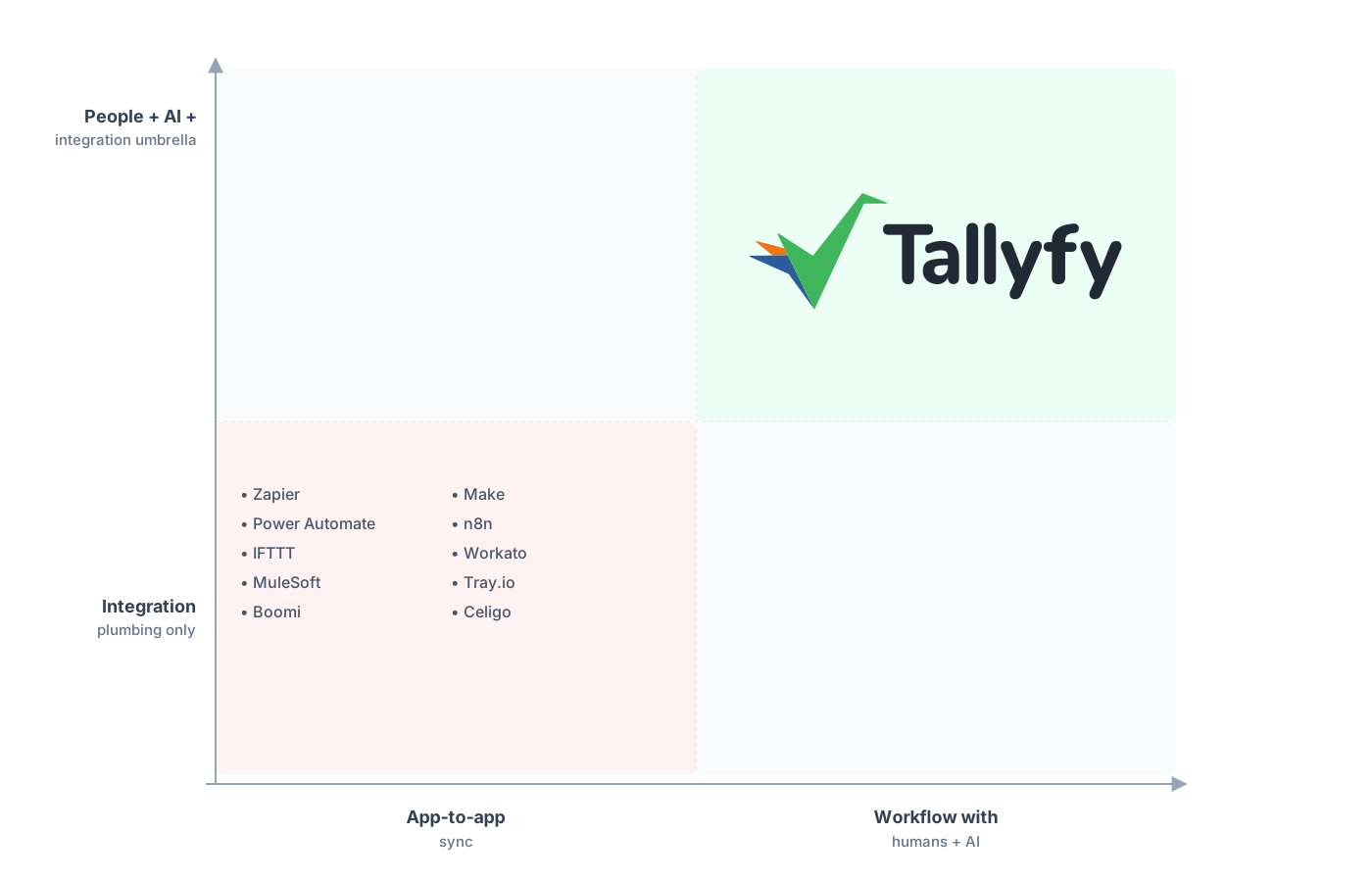
Middleware shuttles data between apps. Tallyfy handles the human work that data is meant to serve.
Tallyfy isn’t moving data between hundreds of apps in the background. There’s no module library, no per-trigger wiring between your CRM and your mailer, none of the substrate Make is built on. For real app-to-app moves you still need a connector layer, and more and more that layer is AI letting AI write the integration when you ask for it rather than a per-operation bill. If that’s the job, keep Make or move to something AI-native, and don’t ask Tallyfy to be it.
What Tallyfy takes over is the other thing, the human-workflow layer that crept into your scenarios and never belonged there. Forms, approvals, ordered steps, and a status view a business user can actually read, all the parts a module can fire toward but never run. So you end up with two layers, not one tool beating another. Modules move the data. Tallyfy runs the people.
Forcing middleware to do the people part is how you got workflows nobody can see, which is the reason you’re reading this. It’s also what teams shopping for AI automation tend to work out a step late, because the agent still needs a defined process to act inside.
Common questions about moving off Make
Should I cancel Make and move everything to Tallyfy?
Can I import my Make scenarios into Tallyfy?
Which scenarios should actually move to Tallyfy?
Won't AI make this whole question moot?
How does the pricing compare?
Still comparing rather than ready to commit? Our alternatives overview shows where Tallyfy sits against the tools teams put it beside. This guide is the doing half of that call: how to lift the human work off the middleware once you’ve decided.
When you’re ready, the best first move is a short audit call: we walk your scenarios together, split the real integrations from the disguised workflows, and confirm which ones rebuild cleanly.
Book a 30-minute migration walkthrough and bring the scenarios with a person stuck inside. Those are the ones that actually need moving.
