
Summary
- A full Appian migration isn’t realistic, and that’s fine - Appian builds enterprise applications on a low-code platform with Records and a data fabric. Tallyfy is none of those things. The move is one slice: the human approval workflows that don’t need an app platform under them.
- The export is built for Appian, not for leaving Appian - an application package exports as a ZIP of design objects and configuration, but it’s made to move between your own dev, test, and production environments, matched by UUID. There’s no clean export out to another vendor.
- That makes it a re-author, which is lighter than it sounds - you’re not converting a file, you’re rebuilding a handful of human approvals from scratch. For simple sign-offs that’s quick, because there wasn’t much under them to begin with.
- Keep Appian for the app platform, move the approvals - scope to one workflow, rebuild it, parallel-run it. Book a 30-minute migration walkthrough and we’ll sort what moves from what stays.
Migrating from Appian to Tallyfy is, before anything else, an exercise in scoping. Appian is a low-code platform for building enterprise applications, with its own Records, a data fabric, and SAIL interfaces wired to custom logic. Tallyfy doesn’t replace any of that, and pretending otherwise would set the move up to fail. So the honest version is small: you’re moving the human approval workflows that got built in Appian but never needed the platform underneath them.
Why so narrow? Because Appian’s strength, and the reason to keep it, is the custom app layer, and that layer is exactly what doesn’t travel. A purchase approval, a capex sign-off, a simple review-and-route, those are people-driven workflows that happen to live in Appian. Lift them to a tool a business user can change, and leave the enterprise apps where they belong. That sorting is the work, and it’s a sharper version of the call you face in any evaluating workflow software decision.
Why teams move off Appian
Appian has real strengths, and it’s worth naming them before talking about moving anything. As a low-code platform it builds genuinely complex enterprise applications, with a data fabric that unifies records across systems and interfaces that handle serious business logic. For organizations building custom apps that need to scale, that’s real power, and it’s not power Tallyfy offers.
The pull toward moving comes from a familiar place. Appian needs Appian skills. Changing a process model, tweaking an interface, adjusting a rule, all of it tends to route through a developer or a trained builder. So when the operations team wants to edit a three-step approval, they file a request and wait, the same clunky friction that sends people looking past any enterprise application that’s heavier than the job in front of them.
What tends to surprise teams leaving Appian is how few of their process models are really app work. Turns out a lot of them are plain human approvals in platform clothing: a form, a couple of sign-offs, a notification. Those don’t need a data fabric. They need to live somewhere the people who run them can change them without a deployment.
So what are you actually trying to move?
Just the human approvals, the workflows where the value is the sequence of people, not the application built around them.
Enterprise Workflow Made Easy
What an Appian export really gives you
Here’s the part that shapes the whole move: Appian’s export is real, but it’s built to keep things inside Appian.
When you export an application, you click EXPORT PACKAGE, then DOWNLOAD PACKAGE to get a ZIP file of design objects and application configuration. That sounds like a clean export, until you notice what it’s for. The package is made to move an application from one Appian environment to another, development to test to production, and Appian matches objects across environments by UUID, deploying only from an earlier version to a later one. It’s a deployment mechanism, not a portability one.
So there’s no clean export out of Appian to a different vendor. The ZIP is Appian-shaped XML that only Appian reads, the way a saved file from one app rarely opens in another. That makes this a re-author migration: you read the process model to understand it, then rebuild the human parts in Tallyfy by hand. For a developer-grade app that’s a lot of work, which is exactly why you keep those in Appian. For a three-step approval it’s quick, because there was basically nothing under it once you set the platform aside.
There’s an upside hiding in that. The process model you open to understand the workflow is, in effect, your specification. It lays out every human step, every approval, and the order they run in, which is exactly what you need to build the same thing again. You aren’t reverse-engineering a black box. You’re reading a clear diagram and recreating the people-part of it in a tool the people can own.
How Appian concepts map to Tallyfy
For the human-approval subset, the mapping is direct, because those workflows were always just people and steps. The discipline is leaving the platform parts in orange where they belong.
| Appian element | Tallyfy concept | Notes |
|---|---|---|
| Process model (human subset) | Blueprint | Only the human-approval models |
| Interface / form | Kick-off form | How a request starts |
| Approval task | Approval step | A sign-off in the chain |
| Task | Step | A single unit of work |
| Group | Group | Who the work is assigned to |
| Records / data fabric | Out of scope | Stays in Appian |
| SAIL interface logic | Out of scope | App-platform work |
| RPA / integrations | Out of scope | Platform-bound |
Take a concrete one. Picture a capital expenditure approval in Appian: an interface captures the request, the process model routes it to the cost-center manager, then to finance, then to a director once the amount crosses a threshold. In Tallyfy that becomes a blueprint where the kick-off form captures the request and each sign-off is an approval step a manager has to clear before it moves on, with a rule that adds the director when the amount is large. The human spine maps one to one. What stays in Appian is the Record that tracks the spend against a budget and the data-fabric link to your finance system, because that’s app work, not workflow.
Now flip it. A process model that reads from the data fabric, writes to a Record, and drives a SAIL interface with real logic isn’t a candidate. The human steps are a thin wrapper around an application, and the application is the point. That one belongs in Appian.
A realistic migration timeline
Budget a few weeks, and treat week one as a sorting exercise rather than a build.
Week one, separate your Appian process models into two piles: the ones that are genuinely human approvals, and the ones that are really applications with a human step or two attached. The first pile is your scope. The second isn’t moving, and saying that clearly up front is what keeps the project honest and small.
Week two, rebuild one approval. Read the process model and the interface, then build the same flow as a Tallyfy blueprint by hand, since there’s no file to import. Start with one high-volume sign-off, get the form fields, the approval chain, and the routing rule right, and resist doing five at once.
Then parallel-run. Keep the Appian version live while the rebuilt one handles real requests on one team, so the owners can confirm it behaves before you switch anything off. Because you’re only moving simple approvals and leaving the app platform intact, this stays a contained project rather than a migration of everything Appian does.
After that it’s a gradual roll-out, not a switch you throw. Once a team trusts the rebuilt approval, new requests start in Tallyfy, the open Appian runs finish on their own, and you move to the next approval on the list. Appian keeps running its applications the whole time, so nothing about the platform is at risk while you lift the workflows off it one at a time.
What Tallyfy won’t replace
Here’s the line, because it’s the most important thing in this guide: Tallyfy is not a low-code application platform, and it isn’t trying to be.
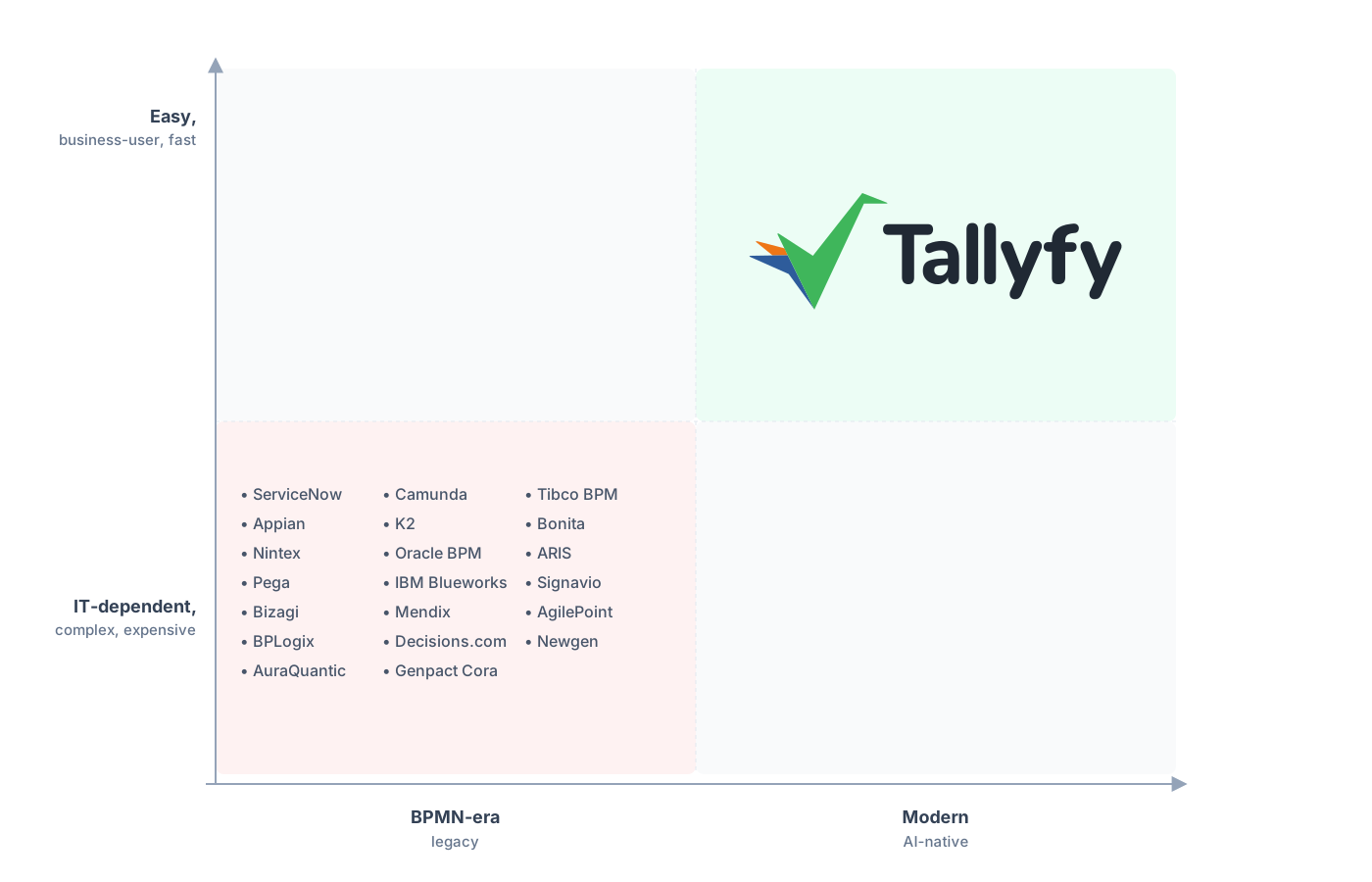
Low-code platforms treat process as something developers build. Tallyfy treats it as something a business team runs.
Tallyfy doesn’t build custom applications. It has no data fabric, no Records as a system of record, no SAIL interface designer, no RPA, none of the app-platform machinery Appian is built around. It won’t run the enterprise apps your team built, and it won’t hold the data those apps manage. If you need to build software, you need a platform like Appian, and keeping it for that is a no-brainer.
What Tallyfy does is the human-workflow layer: forms, approvals, sequential steps, and rules a business user can change on their own. That’s why it complements Appian rather than competing with it. Keep building applications on Appian. Move the approvals that were only ever people-and-steps to Tallyfy. One of the cleanest wins is to replace the manual approvals that drifted onto a platform far heavier than a sign-off ever needed.
Common questions about migrating from Appian
Can I move my whole Appian setup to Tallyfy?
Can I export my Appian workflows to another tool?
Which Appian workflows are worth moving?
How long does a scoped Appian migration take?
How does the pricing compare?
Still on the fence about the move itself? For the fuller case on lifting approvals off a low-code platform, read our Appian alternative comparison. Treat this guide as the practical companion for actually doing it.
Scoping it for real starts with a short call. We read your process models side by side, mark which ones are genuine app work and which are just approvals, and pin down which ones port over cleanly.
Book a 30-minute migration walkthrough and bring the approvals your team runs by hand. Seeing them together is what makes the keep-or-move line obvious.
