
Summary
- The dangerous failure is over-action, not inaction - a vibe-coded tool that sits there doing nothing is annoying; one that does far too much, fast, with no brake is the one that costs you. One harmless request can fan out into dozens of calls, and one confirm can turn into a pile of deletes, all because nothing capped the run.
- These are missing-boundary failures, not bad models - the model did what it was told. Nobody drew the edges, so there were none. The fix is four hard limits: a cap on parallelism, a human confirm before anything destructive or costly, a rate limit, and something outside the run that can stop it.
- A defined task draws those edges by default - vibe coding made the doing cheap and left the stopping exactly as hard as it always was. Stopping is what a workflow platform owns; an autonomous agent loose in a loop owns none of it.
- Throwaway scripts can run loose - the brake matters when a tool acts at scale on real data. Try Tallyfy free
The failure that should worry you is not the vibe-coded tool that sits there doing nothing. It’s the one that does far too much, far too fast, with nothing in the way to stop it.
Here’s what the demos never show you. A tool you generated from one sentence will, sooner or later, take a small instruction and run with it at a scale you never sanctioned. It won’t crash. It’ll succeed, loudly, at the wrong thing, because the part of a real system that says “stop here, check first, don’t do that a thousand times” was never in the prompt and the model can’t invent it on its own. The brake was never code the generator skipped writing. A boundary is something nobody asked for, so the generated tool never came with one.
This is a different slice of the story than the one about the connector marketplace going away. That argument is about the logic between your apps. This one is about what happens after you’ve got the logic and the tool starts acting, when there’s no edge between “do the thing” and “do the thing to everything.” It’s part of the same bigger question of AI and how work gets done, looked at from the spot where a build actually goes wrong.
What does “too much” actually look like?
Three shapes, and a vibe-coder hits all three eventually.
The first is fan-out. One user query goes in, and instead of one lookup it spawns a swarm: a search per item, a call per row, a request per record, all firing at once because nothing said “do these a few at a time.” A harmless-looking ask becomes dozens of parallel calls, and the thing you built to save five minutes is now hammering an API and your own patience.
The second is the irreversible action with no gate. A tool wired to clean up, archive, or delete gets one confirmation and treats it as permission for the whole set. One “yes” turns into a long list of deletions, none of which you got to look at, because there was no step that said “show me what you’re about to remove and wait.”
The third is cost. A loop with no rate limit calls a paid service over and over, and a job that should have cost pennies runs up a bill you find out about from the invoice.
Picture a tool you’d actually vibe-code: something that reads a folder of customer messages and drafts a reply to each. The demo runs on five test files and it’s lovely. Then you point it at the real folder, which has four thousand messages, and it tries to draft all four thousand at once against a paid model. No cap on how many it drafts in parallel, no limit on spend, no human glancing at the batch before it sends. The tool didn’t misunderstand the job. It understood it perfectly and did the whole thing in one breath, because nobody told it the job had a size or a speed limit.
None of these are the model being dumb. The model did exactly what it was handed, which was a task with no edges. As the developer pron put it in a Hacker News thread on vibe coding, agent code can reach a point where “fixing one bug causes another, and then the codebase is in such a state that no human or agent can salvage.” A run with no brake is that idea in motion: it doesn’t converge, it just keeps going.
Four edges that keep an AI run bounded
An off-switch isn’t one button. Think of it as four limits you decide on before the tool runs, each one closing a specific way a build runs away.
A cap on parallelism handles fan-out: this step may do five things at a time, not five hundred, no matter what the input looks like. A confirm gate handles the irreversible: before anything deletes, sends, pays, or publishes, a human sees the exact list and clicks. A rate limit handles cost: this run may make so many paid calls per minute and then it waits, so a tight loop can’t become a tab. And the catch-all is something outside the run that can stop it: a watcher, a budget ceiling, a kill command that doesn’t depend on the tool noticing its own problem.
That last edge matters most, and it’s the one people skip. It has to live on the outside because a runaway tool is a terrible judge of its own behavior. From the inside, every extra loop reads as progress, so it keeps going right up until the machine buckles. An off-switch wired into the tool’s own code is a smoke alarm you handed to the arsonist. The version that saves you is the one the tool can’t reason its way past: a hard ceiling it doesn’t control, a watcher with its own eyes, a person who can pull the plug without asking the tool whether that’s a good idea.
Notice none of these are smarter prompts. They’re constraints on what the tool is allowed to do, set from the outside, that hold whether the model has a good day or a bad one. Vibe coding made the doing cheap. It left the stopping exactly as hard as it always was, and the stopping is the half a workflow platform has to own.
Some vendors hand you the fourth edge at the org level, which is worth knowing before you go and build your own. These are Claude Enterprise’s org-wide switches for Claude Code.
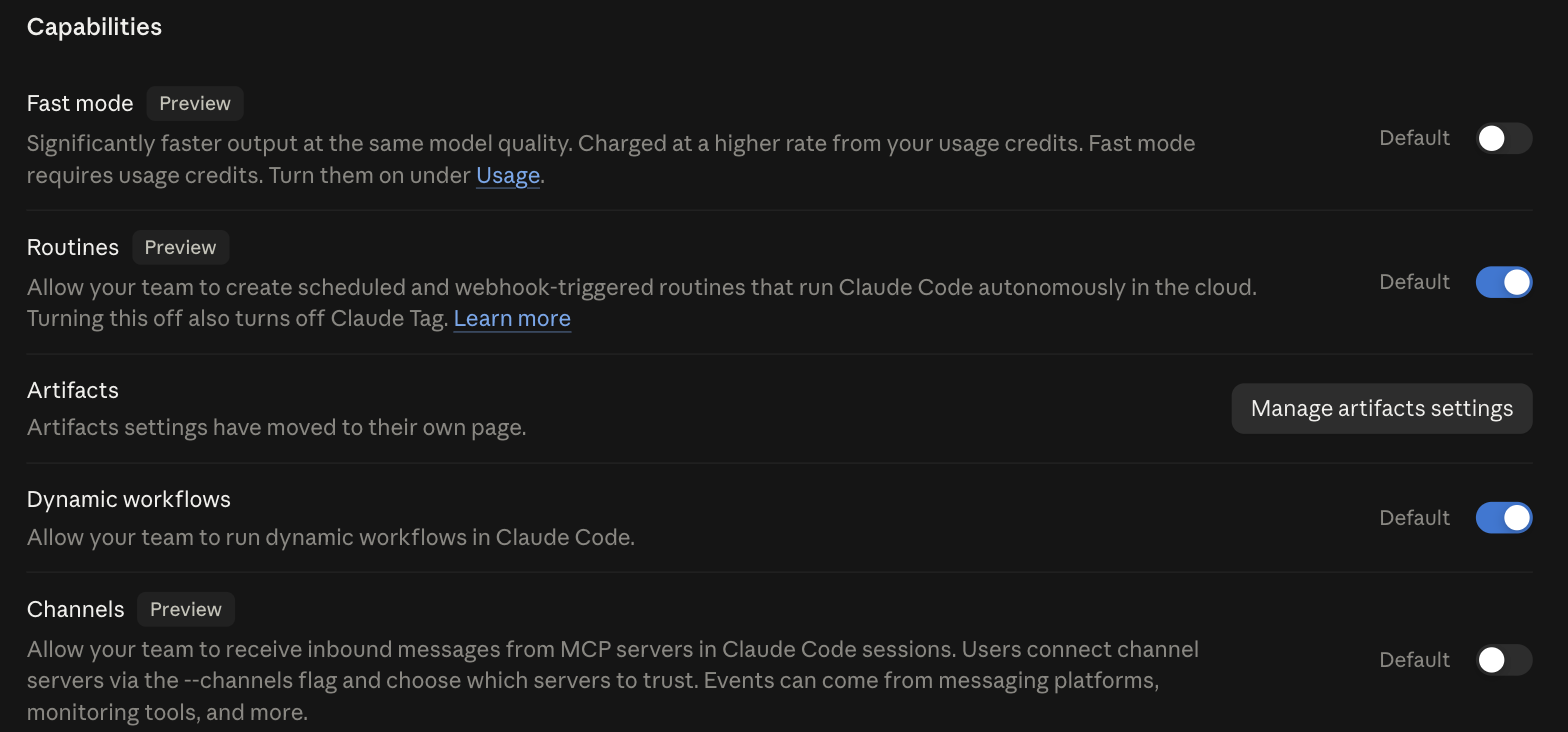
Routines is the row that matters here. Scheduled and webhook-triggered runs mean the agent works when nobody’s watching the screen, which is the exact condition the four edges exist for, and the off-switch for it is one toggle an admin owns.
That’s the good version of this.
The catch is that it’s all or nothing. You can stop autonomous runs for everybody, and you can’t say “off for finance, on for engineering, and never after midnight”. Vendor switches are blunt on purpose, because a vendor can’t know your org chart. The edges you draw inside your own workflow are the ones that get to be specific, and that isn’t redundancy. It’s the division of labour.
A defined task draws the edges for you
Here’s the quiet advantage of running AI inside a task instead of letting it loose as an agent: the task already has the edges. A defined step has one input, one job, one owner, and a check before the next step starts. Put an AI in that slot and the cap, the gate, and the handoff come from the shape of the step, not from you remembering to add them at 11pm. An autonomous agent pointed at a whole job has none of that scaffolding, which is why it’s the thing that fans out and over-deletes.
There’s a reliability angle here too, and I want to be careful not to re-tell it, because why a long chain of AI steps falls apart already owns that math in full. The short version: a job is a chain of tasks, and success multiplies down the chain, so a step that’s 90 percent reliable on its own leaves a ten-step run finishing only about a third of the time. The deeper point for bounded edges is what a retry and a gate do to that curve. A step that can stop, ask, and try again holds near the top; a step that just barrels ahead compounds every miss. The widget below lets you add retries and watch the difference, but the full proof and the Monte Carlo are in that other post.
Add retries and watch a bounded chain hold
A job is just a bunch of tasks in a row. Drag the sliders and watch what happens when AI tries the whole job by itself.
One slip-up anywhere and the whole job fails.
Each task is checked, and tried again if it slips.
90% per task, 10 tasks in a row, is about 35%. A 10-step job done blind is worse than a coin flip.
Model your own chainPut the customer-reply tool from earlier into a defined task and it looks like a different animal. The AI drafts each reply as its step, but the step doesn’t send anything. It hands the batch to an approval step, where a person scans the drafts and waves them through or kicks them back. Only an approved draft reaches the send step, and the whole run is capped at a batch size you picked. Same model, same logic, but now the fan-out has a ceiling, the irreversible part has a gate, and there’s a name attached to the approval if a bad reply ever slips out. The edges came from the shape of the task, not from a prompt you had to get exactly right.
I spend my days on software that runs other people’s work, so I’ve watched the runaway version up close more than once. The teams that come out fine aren’t the ones with the cleverest agents. They’re the ones who decided, before the tool ran, what it was allowed to touch and when it had to stop and ask. That decision lives in the process, not the prompt, which is why the durable place to put an AI step is inside a workflow that gates and tracks it rather than in a loose script. The workflow holds the live status, the approval, and the record; the AI does its one bounded piece.
Workflow Automation Software Made Easy & Simple
Some builds really don’t need a brake
I’m not going to pretend every script needs four edges, because that would be its own kind of nonsense.
If a tool you cobble together touches nothing real and nobody else depends on it, let it run loose. A tool that can’t delete anything has no destructive action worth a gate. A job that pings one free endpoint a handful of times has no cost worth a rate limit. Work that stays on your own machine, on your own data, has no fan-out worth a cap. There’s nothing to bound, so bounding it is wasted motion, and adding a confirm gate to a script only you will ever touch is just slowing yourself down for no reason.
The calculation flips the moment a tool acts at scale, on real data, on behalf of other people, where a wrong move is expensive or hard to undo. That’s the line. Below it, it’s a no-brainer: vibe-code it and move on. Above it, the bare tool is a quiet incident waiting for a busy Tuesday.
So the off-switch isn’t a feature you bolt on after the tool’s already loose. You build it into the shape of the task before you let it run: this much, this fast, then stop and check. Get the shape right and writing the code is the part you barely think about. Get it wrong and the sharpest model still runs off an edge nobody drew. That’s a design gap, not a prompting one, and you close it before the tool ever runs. If you want a place to run AI steps that come with the edges already drawn, start free and gate the first one inside a real process.
